B2B and D2C on One Shopify Store: Adapt Checkout for Each Buyer
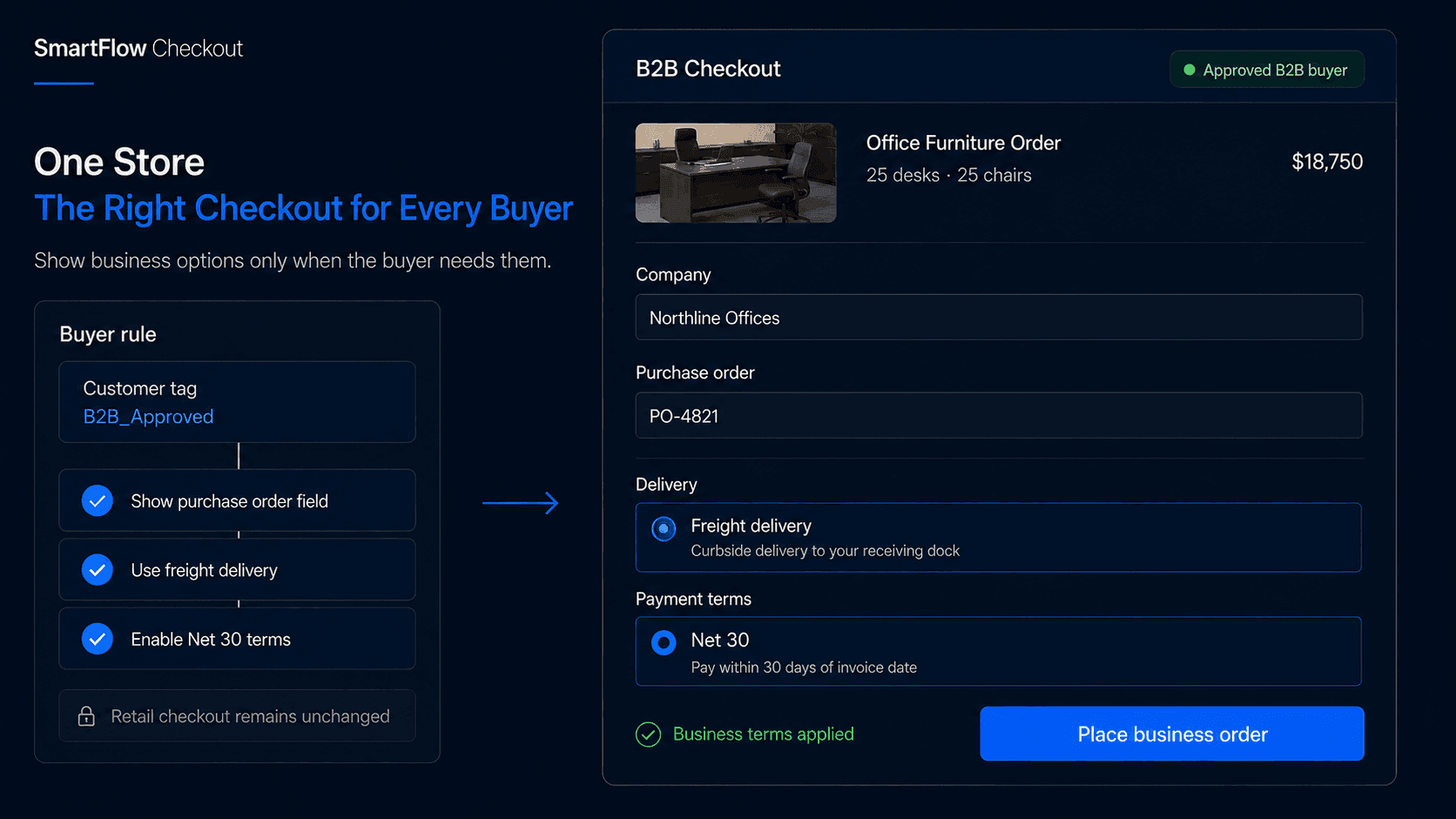
One Store, Different Buyers
Imagine two customers reaching checkout at the same time.
The first is buying one T-shirt for $38 and wants to pay by credit card.
The second is purchasing 400 units for their retail business and expects business information, agreed payment terms, and delivery options suitable for a much larger order.
They are buying from the same company.
But they do not need the same checkout.
That is the challenge for merchants running B2B and D2C sales from one Shopify business.
The goal is not to make checkout more complicated.
It is to show each buyer the options that actually make sense for their order.
Why Checkout Needs to Adapt
A normal retail customer usually expects a straightforward purchase:
Choose products → Enter shipping details → Select delivery → Pay → Place order
A business buyer may need something different.
That could include:
- Purchase order references
- Company or tax information
- Different delivery methods
- Approved payment terms
- Additional review for larger orders
If all of those options appear to every retail customer, checkout becomes unnecessarily complicated.
If none of them appear to wholesale buyers, the operations team may end up fixing orders manually afterward.
The better approach is to adapt the checkout according to who is buying and what the order actually requires.
The best hybrid checkout does not add more options. It removes the options that do not belong.
Identify the Buyer First
Before checkout can change, the store needs a dependable way to determine which experience should apply.
That might come from Shopify B2B context, company association, customer information, tags, products in the cart, order value, or other configured business conditions.
For example:
Approved B2B buyer → Use business checkout rules
Retail buyer → Use standard consumer checkout
The important part is reliability.
Someone buying a large quantity is not automatically an approved wholesale customer.
Likewise, a business customer may still have account-specific purchasing limits or payment conditions.
The checkout logic should be based on real buyer context rather than assumptions about cart size alone.
Match Payments to Buyers
Payment expectations can differ significantly between D2C and B2B customers.
A retail shopper may expect credit card, Shop Pay, wallets, or other normal consumer payment options.
An approved business buyer may have agreed payment terms, deposit requirements, or another commercial payment arrangement.
Suppose a wholesale customer has Net-30 terms.
That is not simply another payment button.
The business needs to know whether the buyer is approved for those terms, whether there is a spending limit, whether a deposit applies, and whether the current order requires additional review.
That makes payment configuration part of the company's actual credit policy.
SmartFlow Checkout can help merchants apply supported payment rules based on the relevant buyer and order context.
The important principle is:
Show the payment options the buyer is actually allowed to use.
Adapt Shipping and Fields
Shipping can vary just as much as payment.
A retail customer buying one box may need standard shipping, express delivery, or local pickup.
A wholesale customer ordering several pallets may need freight-related options, warehouse pickup, or additional receiving instructions.
The same logic applies to checkout fields.
A consumer usually does not need to enter a purchase order number or buyer department.
A business order may require those details before fulfillment or accounting can proceed.
Useful B2B-specific information can include:
- Purchase order number
- Company reference
- Tax or business identifier
- Delivery contact
- Receiving instructions
There is little value in asking every retail customer for those fields.
A cleaner experience is:
Retail buyer → Hide business-only requirements
Eligible B2B buyer → Show the additional information the order needs
This keeps consumer checkout simple while collecting the information the wholesale team actually uses.
Treat Tax Separately
Tax deserves special care because it is not simply another checkout display rule.
A field asking for a reseller number or tax ID can collect information.
That does not automatically establish tax-exempt status.
Whether tax should be charged depends on the buyer, merchant configuration, jurisdiction, registrations, exemptions, and applicable tax rules.
So the logic should not be:
B2B buyer → Hide tax
A better way to think about it is:
B2B buyer → Apply the correct tax treatment for that buyer and transaction
SmartFlow Checkout can help collect or display relevant information, but tax treatment should still come from the store's actual tax setup and applicable business requirements.
A checkout customization should never create the appearance of compliance when the underlying tax configuration says something different.
Review High-Value Orders
Not every approved B2B order should move through checkout exactly like a routine purchase.
Imagine a customer normally places orders around $5,000.
Today they submit one worth $90,000.
They may still be a legitimate approved buyer, but the business may want another person to review the order before it proceeds through the normal commercial process.
That is different from simply saying:
B2B = different payment method
The business can think in terms of actual commercial risk.
A hybrid checkout might behave like this:
Retail order → Normal checkout
Routine approved B2B order → Business terms and fields
Unusually large B2B order → Additional review
The exact thresholds depend on the merchant.
The important part is deciding them deliberately rather than treating every business order as identical.
Keep the Rules Understandable
Conditional checkout logic can become difficult to maintain if every edge case becomes another rule.
Before adding one, ask whether it solves a real business problem.
For example:
Why does this option need to disappear?
Which buyers should see this field?
What happens if the buyer is classified incorrectly?
Can support explain the rule to a customer?
Does it affect payment, tax, shipping, or fulfillment?
How will the team test it?
A rule that nobody understands six months later becomes operational debt.
The cleanest checkout usually comes from a smaller number of meaningful rules tied directly to how the business sells.
Test Both Buyer Journeys
A hybrid store needs more testing than a simple D2C checkout.
Do not test only the B2B path.
Verify that retail customers still see a clean consumer checkout, without business-only payment terms or unnecessary wholesale fields.
Then test approved B2B buyers.
Make sure the expected payment configuration appears, required business information is available, and the delivery experience matches what the merchant intends.
Also test edge cases.
What happens with an unusually large order? What happens if company information is missing? What if a buyer loses B2B eligibility? What happens on mobile or through an accelerated checkout path?
The goal is not simply to confirm that a condition fires.
It is to confirm that the entire purchase still makes sense for that buyer.
Measure the Checkout Outcome
A more complex checkout is not automatically a better one.
Useful metrics can include:
- B2B checkout completion
- D2C checkout completion
- Orders requiring manual correction
- Missing business information
- Payment or delivery issues
- Support tickets related to checkout confusion
If conditional logic reduces manual cleanup while keeping both journeys easy to understand, it is doing useful work.
If customers constantly ask why an option disappeared or why they cannot use their expected payment method, the rules may need clearer logic or messaging.
The result to optimize is not:
Number of checkout customizations
It is:
Fewer unnecessary choices for the buyer and fewer corrections for the team afterward.
Frequently Asked Questions
Can Shopify support B2B and D2C customers in the same business?
Yes. Shopify supports businesses that sell to both consumer and business buyers, with available B2B and checkout capabilities depending on the merchant's Shopify setup and plan.
Can payment options differ for B2B customers?
Yes. Supported payment customization capabilities can be used to adjust which payment options appear under applicable conditions, while business payment terms depend on the merchant's Shopify configuration and buyer eligibility.
Can B2B buyers use Net-30 terms?
Applicable Shopify B2B configurations can support net payment terms. Merchants still need to decide which buyers qualify and what commercial rules apply.
Can I show additional fields only to business buyers?
Conditional checkout components can be designed around relevant buyer and checkout context where the supported Shopify surface and merchant setup allow it.
Can tax be removed just because someone is B2B?
No. B2B status alone does not determine tax treatment. Tax should follow the merchant's configured exemptions, registrations, buyer status, jurisdiction, and applicable requirements.
Can SmartFlow Checkout hide irrelevant options?
SmartFlow Checkout can help merchants build conditional checkout experiences across supported payment, delivery, validation, messaging, and checkout component features.
One Store Needs Flexible Checkout
A retail customer buying one item and a wholesale buyer placing a large business order may share the same company, catalog, and inventory.
They do not need to share every checkout decision.
For the retail shopper, the goal is simplicity.
For the business buyer, the goal is showing the information, payment structure, and purchasing requirements their order actually needs.
That means the strongest hybrid checkout is not the one with the most rules.
It is the one where each buyer sees less irrelevant information.
Identify buyer → Apply relevant rules → Collect what is needed → Keep the rest out
SmartFlow Checkout helps merchants build those conditional experiences around the way their business actually sells.