In-Cart Upsells That Help Customers Buy More Without Adding Friction
Make the Cart More Useful
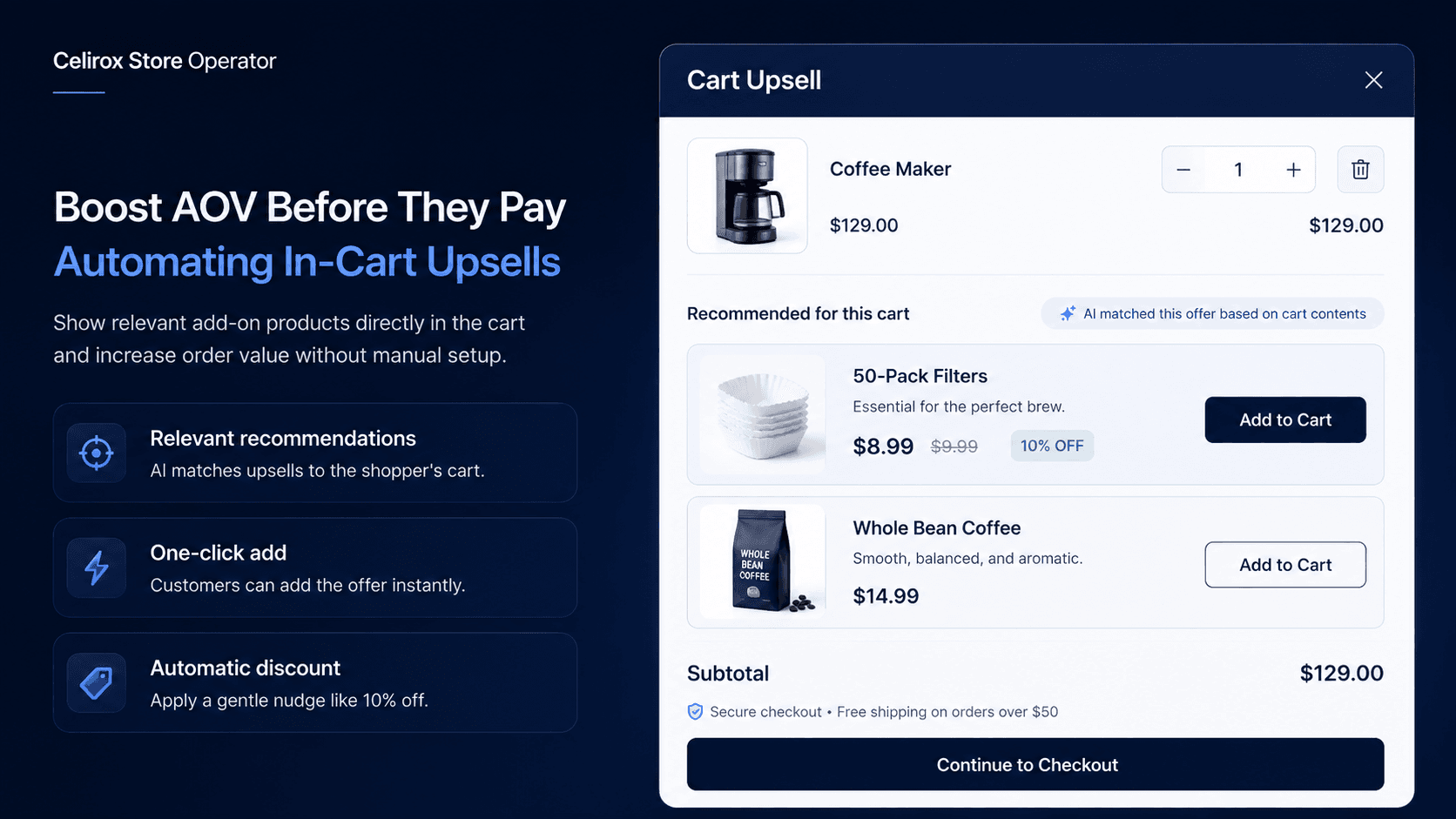
Imagine a customer adds a coffee machine to their cart.
They are almost ready to checkout.
Then the cart suggests:
50-pack of compatible coffee filters
That recommendation makes sense.
Now imagine the same shopper sees:
Recommended for you: Ceramic Travel Mug
There is nothing wrong with the mug, but the relationship is much weaker.
That is the difference between a useful in-cart upsell and a recommendation that simply takes up space.
The cart is valuable because the customer has already made one buying decision. The next recommendation should make that purchase more complete, not force them to start another shopping journey.
What Is an In-Cart Upsell?
An in-cart upsell is an additional product or offer shown after a customer has added something to their Shopify cart but before the purchase is completed.
It might appear inside a cart drawer, mini-cart, main cart page, or another cart-related storefront component.
The recommendation should normally be connected to what the customer is already buying.
For example:
- Coffee machine → Coffee filters
- Running shoes → Performance socks
- Camera → Memory card
- Laptop → Protective sleeve
- Cleanser → Daily moisturizer
The best recommendation feels like a natural continuation of the original purchase.
The goal is not to show more products. It is to show the most useful next product for the cart that already exists.
Relevance Beats More Offers
It is tempting to think that showing more products creates more opportunities to sell.
Usually, the customer experience gets worse when the cart becomes another product catalog.
Imagine someone buys running shoes and then sees performance socks, sunglasses, a water bottle, backpack, hoodie, and protein bar.
Some of those products may be related to running.
But now the customer has six more decisions to make.
Compare that with:
Complete your run
Performance Socks - $12
Add
The second experience is easier to understand because the relationship is immediate.
A useful recommendation should also know what is already in the cart. If the customer has already added the socks, showing the same recommendation makes the store look unaware of what the shopper is doing.
The same principle applies to availability.
If the recommended product is out of stock, it should not appear simply because the rule was originally configured.
The cart should respond to the current purchase, not a static merchandising plan.
Build Rules Through Chat
With Celirox Store Operator, a merchant can begin with the merchandising idea instead of manually configuring every part of the experience.
For example:
"When someone adds the Professional Coffee Maker, recommend the 50-pack of filters. If they already have the filters in their cart, don't show the offer."
Or:
"When a customer adds the Trail Runner shoes, recommend performance socks. Hide the recommendation if the socks are unavailable."
The workflow becomes:
Check cart → Match related product → Check conditions → Show recommendation → Customer accepts or ignores
The merchant defines the product relationship and the rules around it.
Store Operator helps turn that intent into the store setup.
The quality of the result still depends on choosing a recommendation that genuinely makes sense for the customer.
Make Adding It Easy
Fewer clicks can help, but only when the product can genuinely be added without another important decision.
Imagine a customer adds a coffee machine and the cart recommends one compatible pack of filters.
That is a strong candidate for a direct Add action.
Now imagine someone adds a navy blazer and you recommend matching trousers.
The trousers require waist size, length, and perhaps color selection.
A one-click add may not make sense because the shopper still needs to make important product choices.
In that case, the experience should allow the customer to select the required option or take them to the appropriate product configuration.
The rule is simple:
Reduce unnecessary steps, not necessary decisions.
An upsell should make the purchase easier without sacrificing product accuracy.
Use Discounts Only When Needed
An in-cart upsell does not automatically need a discount.
Suppose someone buys a camera but forgot the memory card.
The recommendation itself may already provide enough value:
You may also need a 128 GB memory card
That feels very different from:
BUY THIS NOW - 20% OFF
The first feels like a useful reminder.
The second turns the interaction into a promotion.
Discounts can make sense when the combined purchase still has healthy margin, when the incentive creates a meaningful bundle, or when the merchant intentionally wants to encourage a larger quantity.
For example:
Professional Coffee Maker: $249
Coffee Filters: $15
Offer: Add filters and save 10% on the filters
That can be reasonable if the economics work.
But the product relationship should still make sense without the discount.
Do not reduce margin simply because an upsell exists.
Know When to Hide It
A good upsell rule is partly about deciding when not to show anything.
Hide the recommendation when:
- The product is already in the cart
- The recommended product is unavailable
- The qualifying product is no longer in the cart
- The combination no longer makes sense
- Another promotion makes the message confusing
- The offer would add unnecessary clutter
This is especially important because the cart can change several times during one session.
A shopper may add the main product, add the recommended item, remove the original product, change quantity, apply a discount, or switch variants.
The recommendation should continue to make sense as those actions happen.
The cart should never become a permanent advertising panel that ignores its current contents.
Choose the Right Moment
The cart is not the only place where an additional offer can appear.
Different recommendations belong at different points in the buying journey.
A product-page recommendation can work well when the customer needs to understand the relationship before choosing the main item.
The cart is useful for simple complementary products after the first purchase decision has already been made.
Checkout can work for focused add-ons that fit naturally into the purchase flow.
Post-purchase can be better for larger or more optional recommendations because the original transaction is already complete.
For example:
Cart: Add shoe-care spray for $12
Post-purchase: Consider another pair of shoes
The more thought the second purchase requires, the less likely it belongs inside the cart.
Placement should follow the customer's decision-making process, not simply where the merchant has available screen space.
Keep the Cart Focused
A cart can become overloaded very quickly.
A merchant might add an upsell, free-shipping bar, countdown, discount message, gift offer, trust badges, recommendation carousel, and announcement.
Individually, each component may seem reasonable.
Together, they compete with the most important action:
Checkout
The cart should still feel like a review of what the customer is about to purchase.
Every additional element should earn its place.
If a recommendation makes the order more complete, helps the shopper remember an obvious accessory, or saves them from needing to return later, it may deserve the space.
If it simply advertises another product, it probably does not.
That distinction matters more than how visually impressive the upsell component looks.
Test and Measure the Offer
A merchant could begin with a Store Operator request such as:
"When the Professional Coffee Maker is in the cart, recommend the 50-pack of filters. Hide the offer if the filters are already in the cart or unavailable. Give customers 10% off the filters when they add them through the recommendation."
Before publishing, test the full cart experience.
Check what happens when the qualifying product is added or removed, when the recommendation is already in the cart, when inventory disappears, when quantity changes, when a discount applies, and when the customer continues to checkout.
Mobile deserves particular attention because cart drawers have limited space.
Measurement should also go beyond Average Order Value.
Useful metrics include:
- Upsell acceptance rate
- Revenue from recommended products
- Average Order Value
- Cart-to-checkout rate
- Checkout completion rate
- Product margin
Imagine AOV increases while fewer customers move from cart to checkout.
That may not be a successful outcome.
The goal is not simply to make every cart larger.
It is to improve the economics of the complete purchase without making the buying experience worse.
Frequently Asked Questions
What is an in-cart upsell?
An in-cart upsell is an additional product or offer shown after a customer has added something to their cart and before the purchase is completed.
What products work best for cart upsells?
Products that clearly complement what is already in the cart and require little additional consideration are usually the strongest candidates.
Should every customer see the same upsell?
Usually not. Recommendations are more useful when they reflect the shopper's current cart, product availability, and other relevant conditions.
Should I discount the upsell product?
Not necessarily. A strong product relationship may be enough. Discounts should be used when they support the merchandising strategy and still make financial sense.
Can products with variants be upsold?
Yes, but the experience should allow customers to make any required variant selections. One-click adding is appropriate only when no important product choice is being skipped.
Where should I place the upsell?
Simple complementary products can work well in the cart. Offers that require more consideration may fit better on the product page or after purchase.
Can Celirox Store Operator create cart upsell rules?
Yes. Merchants can describe the products, conditions, exclusions, and offer behavior they want in plain English, and Store Operator can help create and manage the corresponding store setup.
Make the Recommendation Feel Helpful
Imagine buying a new coffee machine and someone reminds you:
"You'll need filters for this model."
That feels helpful.
Now imagine they place ten unrelated products in front of you before allowing you to continue.
That feels like selling.
The difference is relevance.
A useful in-cart upsell understands what is already in the basket, recommends something that genuinely improves the purchase, and then gets out of the customer's way.
Relevant product → Correct conditions → Easy decision → Clean cart
Celirox Store Operator helps merchants turn those product relationships into cart rules without making every recommendation another manual configuration project.
The merchant decides what actually belongs together.
Store Operator helps make that logic work inside the shopping experience.