AI Invoice Processing: From Vendor Email to Accounting Review
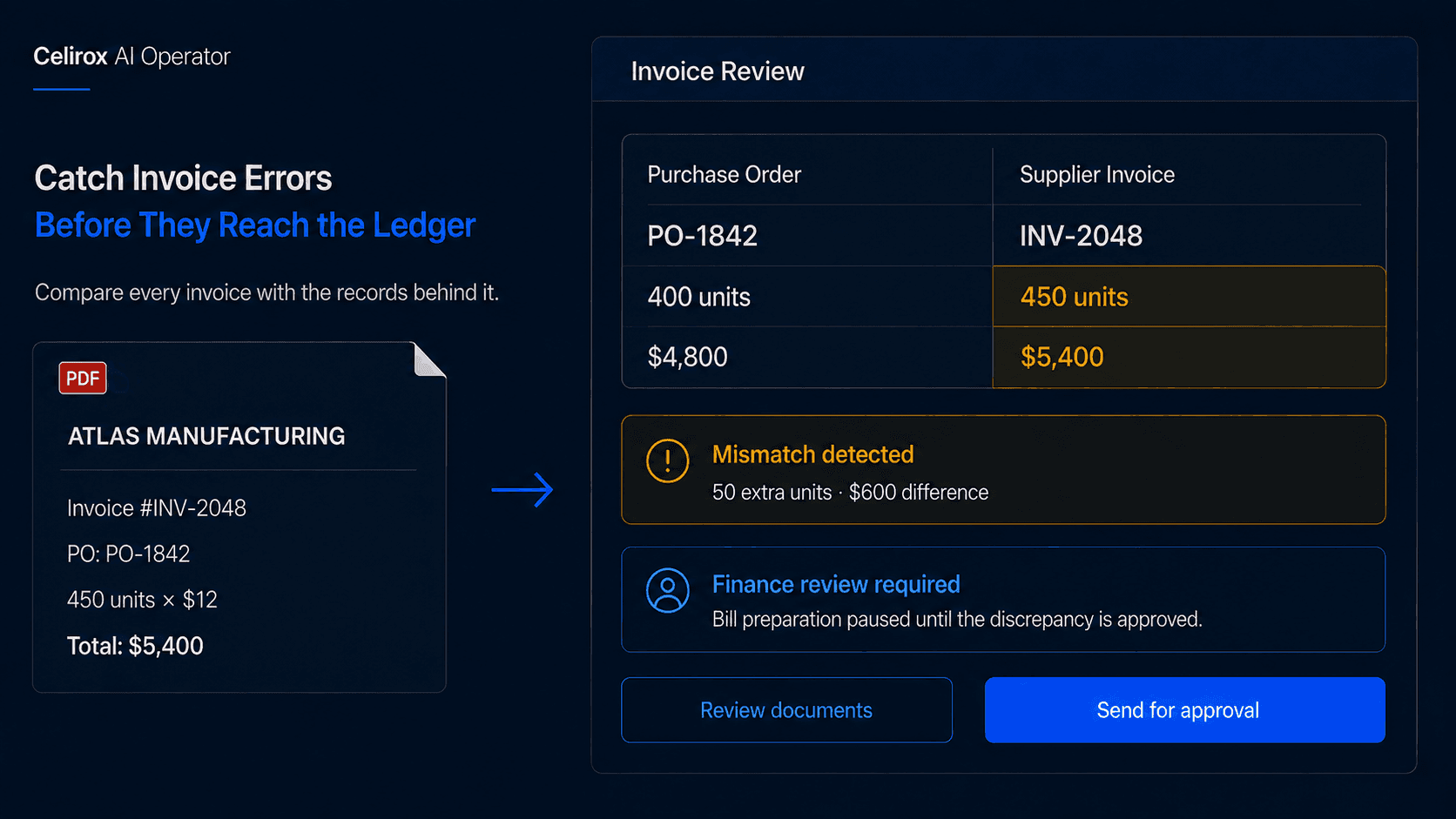
The Invoice Needs Context
Imagine Monday morning in a finance inbox.
One supplier sends a clean PDF invoice. Another sends a scanned document. A third writes the amount in the email and attaches a statement. Another invoice contains twelve line items, two tax rates, a purchase order reference, and a shipping charge buried near the bottom.
None of these documents are unusual.
But somebody still has to turn them into structured accounting information.
That usually means finding the vendor, invoice number, dates, currency, line items, quantities, tax, total amount, and any purchase order reference.
Then comes the more important question:
Does this invoice actually match what the business expected to pay?
That is where invoice processing becomes more than data entry.
What AI Invoice Processing Means
AI invoice processing uses document understanding and connected business systems to help turn incoming invoices into structured information that can be reviewed, checked, and prepared for accounting.
A typical process might look like:
Invoice received → Document read → Data extracted → Vendor matched → Records checked → Exceptions flagged → Bill prepared → Human reviews
The goal is not simply to read text from a PDF.
The useful part is understanding what the extracted information means in the context of the business.
A $5,400 total may be perfectly valid on the invoice itself, but if the related purchase order was approved for $4,800, someone needs to notice that difference before the bill moves forward.
Manual Processing Creates Hidden Risk
Invoice work becomes difficult because the same small decisions repeat across hundreds of documents.
A finance employee may open the email, inspect the attachment, find the vendor, locate the invoice number and dates, check tax, search the accounting system, find the purchase order, enter the bill, and route anything unusual for approval.
None of those steps are particularly difficult on their own.
The problem is repetition.
Small mistakes become easy to make when the same process is repeated throughout the day.
Common problems include:
- Duplicate invoices
- Wrong vendor matches
- Incorrect totals or tax
- Quantity or price mismatches
- Expense categories applied incorrectly
The objective should not simply be to process invoices faster.
It should be to reduce repetitive handling while making the unusual cases easier to notice.
Every Invoice Looks Different
Invoices are not standardized enough to assume one layout.
One supplier might place:
Invoice Total: $4,820
at the top.
Another uses:
Amount Due: $4,820
near the bottom.
Another separates the same information into:
Subtotal: $4,500
Tax: $320
Balance Due: $4,820
The business meaning is similar even though the labels and positions are different.
That is why invoice processing should not depend entirely on one vendor-specific layout or fixed coordinates.
Modern document understanding systems can interpret the content and structure of the document, but extraction is still only the first step.
The extracted values still need to be connected to the vendor, purchase order, accounting records, and business rules around the invoice.
Where AI Operator Fits
With Celirox AI Operator, a finance team can describe the outcome it wants instead of manually defining the same processing path for every invoice.
For example:
"Review invoices arriving in our accounts payable inbox. Extract the vendor, invoice number, dates, line items, tax, currency, and total. Find the related vendor and purchase order. If everything matches, prepare the bill for review. If quantities, totals, or vendor details do not match, flag the discrepancy instead."
The workflow becomes:
Read invoice → Extract information → Match vendor → Find supporting records → Compare values → Prepare bill or flag issue → Human reviews
Different invoices can take different paths depending on what the Operator discovers.
That matters because the difficult part is often not reading the invoice.
It is understanding whether the invoice is consistent with the rest of the business.
Matching and Validation Matter
Suppose your company ordered:
400 units × $12 = $4,800
The supplier invoice arrives with the same quantity, unit price, and subtotal.
Everything matches.
The workflow can extract the information, confirm the vendor and purchase order, and prepare the accounting action for review.
Now change one number.
The purchase order still says:
400 units × $12 = $4,800
but the invoice says:
450 units × $12 = $5,400
The invoice itself may look perfectly legitimate.
The problem only becomes visible when it is compared with the supporting record.
The same applies to vendor matching.
An invoice may arrive from Acme Digital Services Ltd. while the accounting system contains Acme Digital. A useful process can consider stronger identifiers such as tax information, email domain, purchase order, address, previous invoices, or stored vendor IDs instead of relying only on an exact name match.
If the evidence is still unclear, the correct action is not to guess.
It is to ask for review.
Catch Exceptions Before Entry
Invoice processing should include verification, not only extraction.
Duplicate invoices are a simple example.
A supplier may send the same invoice twice. Before preparing another payable, the workflow can compare the vendor, invoice number, amount, date, and existing accounting records.
If the invoice already exists, it can be flagged instead of being entered again.
Mathematical validation is another useful check.
Suppose an invoice shows:
Subtotal: $9,800
Tax: $980
Total: $10,780
The workflow can confirm that the numbers reconcile before the information is prepared for accounting.
Expense categorization also benefits from context.
A line item such as:
Meta Ads - July Campaign: $2,500
does not automatically tell the system which general ledger account the business uses. Previous accounting patterns may help prepare a suggestion, but unfamiliar or unusual transactions should still be reviewed rather than forcing a confident classification.
The same principle applies across the whole process:
Extract first, validate second, act only when the evidence supports it.
Keep Finance Controls Intact
Finance is not a good place for unlimited autonomous action.
A company may define rules such as:
- New vendors always require review
- High-value bills require additional approval
- PO mismatches stop the workflow
- Duplicate invoice numbers are flagged
- Bank-detail changes always require human verification
The thresholds will differ by business.
The important part is defining them clearly.
The goal is not to remove finance controls. It is to remove repetitive work before those controls are needed.
AI Operator can gather the information, compare the records, prepare the action, and explain why something needs attention.
The person responsible for the financial decision still remains in control where the consequence matters.
Connect to Accounting Systems
Invoice processing becomes more useful when it connects to the systems where the finance team already works.
Accounting platforms such as QuickBooks and Xero can be part of the workflow where the appropriate integration and permissions are available.
A practical flow could look like:
Invoice arrives → Information extracted → Vendor and PO checked → Exceptions handled → Draft accounting record prepared → Finance reviews
The accounting platform remains the system of record.
The Operator helps coordinate the work required before the record is ready.
That distinction is important.
The objective is not to replace the accounting system.
It is to reduce the manual work required to get accurate information into it.
Focus Humans on Exceptions
The best invoice workflows make routine documents easy and unusual documents obvious.
Some cases deserve extra attention:
- New or unfamiliar vendors
- Changed payment details
- Missing purchase orders
- Duplicate invoice numbers
- Unexpected currencies
- Quantity or price mismatches
- Unusual tax treatment
- Amounts far outside normal patterns
The system does not need to treat every invoice as equally risky.
A routine invoice that cleanly matches an existing vendor and approved purchase order can move through a normal review path.
An invoice with changed bank details and an unexpected amount should receive much more scrutiny.
That allows the finance team to spend its attention where judgment is actually needed.
Measure Accuracy, Not Just Speed
Faster invoice processing sounds good, but speed alone is not enough.
Useful metrics can include:
- Time spent per invoice
- Percentage requiring manual correction
- Duplicate invoices detected
- PO mismatches found
- Drafts approved without changes
- Incorrect vendor matches
- Time spent waiting for approval
If invoices move faster but the finance team spends more time correcting mistakes later, the workflow has not improved much.
Accuracy, control, and exception visibility matter just as much as processing speed.
The useful question is:
Did the workflow reduce repetitive work without making the financial records less reliable?
Frequently Asked Questions
What is AI invoice processing?
AI invoice processing uses document understanding to extract invoice information and combine it with business rules and connected systems for validation, accounting preparation, and review.
Can AI handle different invoice layouts?
Modern document-understanding systems can work with a range of layouts instead of requiring every vendor to use one fixed template. Poor scans, unusual formats, or unclear documents may still need human review.
Can invoice data go into accounting software?
Yes, where the relevant accounting platform, integration, permissions, and business rules support it. A common approach is to prepare draft records for finance review rather than treating every extracted value as automatically approved.
Should AI approve vendor bills automatically?
Not by default. Approval rules should reflect invoice value, vendor risk, mismatches, payment details, and existing finance controls.
Can AI Operator detect invoice mismatches?
Yes. AI Operator can be used to compare extracted invoice data with connected records such as purchase orders, vendors, and existing accounting information, then surface differences for review.
Put Attention on Exceptions
A finance professional's most valuable contribution is rarely copying an invoice number from one screen into another.
It is noticing that the quantity is wrong.
Recognizing that a supplier charged more than expected.
Catching a duplicate.
Questioning unfamiliar payment details.
Deciding whether an unusual expense is legitimate.
That is where human attention matters.
Celirox AI Operator helps with the repetitive work around those decisions by reading documents, gathering connected records, comparing information, preparing the next action, and bringing unusual cases to the people responsible for reviewing them.
Read → Match → Validate → Prepare → Review → Verify
The goal is not to remove the finance team from invoice processing.
It is to make sure their attention is spent on the parts of invoice processing that actually require finance judgment.