The Guitar Is in the Cart. But COD Shouldn't Be.
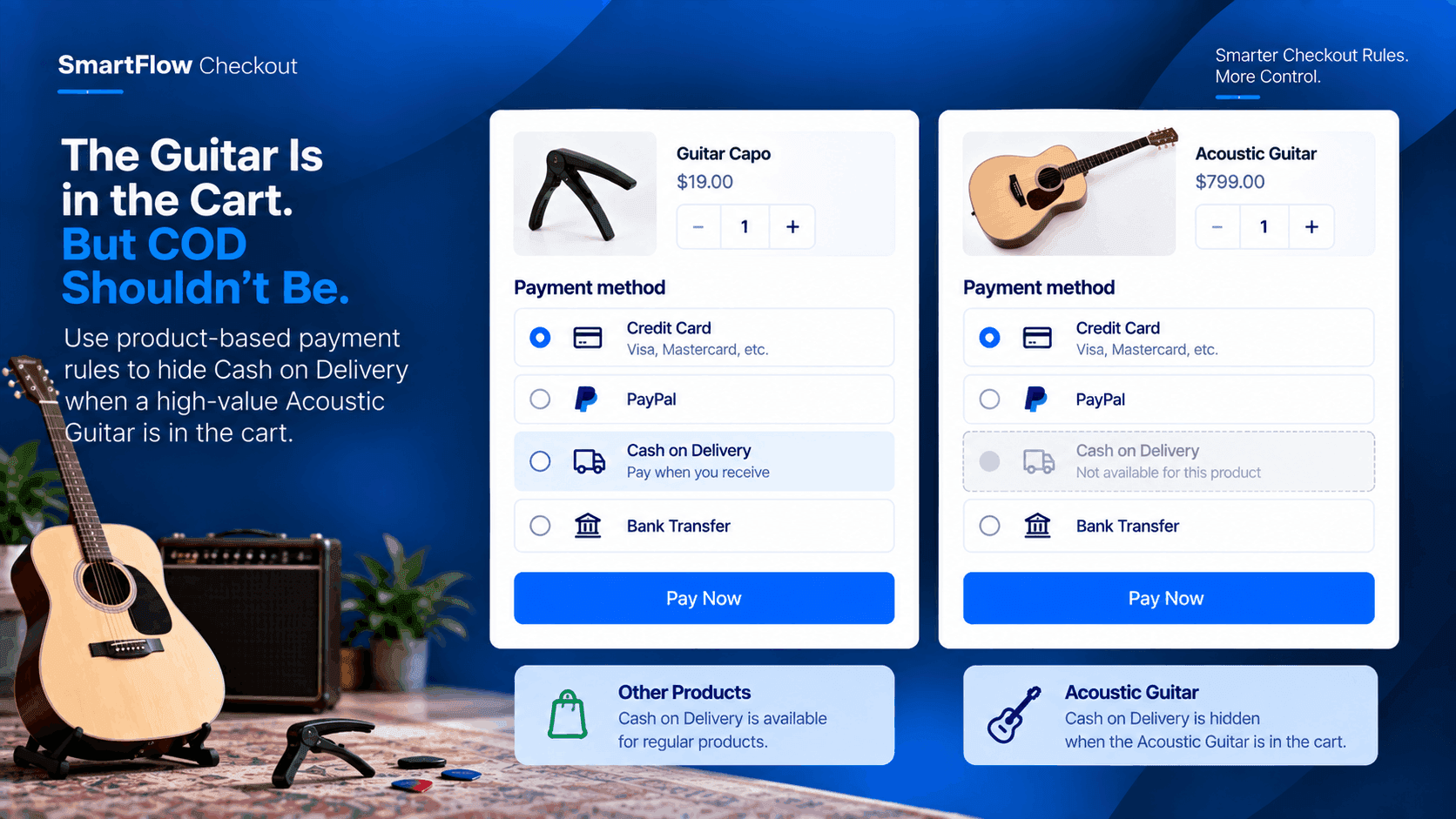
A customer has found the guitar they wanted.
They open the product page, compare the details, and finally add a premium Acoustic Guitar to their cart.
Everything looks normal.
Then they reach checkout.
The store offers several payment methods, including Cash on Delivery.
For smaller products, that option may work perfectly well.
But this guitar is different.
It is a high-value product, and the merchant doesn't want to offer Cash on Delivery for it.
The problem is that the store doesn't want to remove COD for every customer or every product.
It only needs to disappear when this particular product is being purchased.
Not Every Product Needs COD
A musical instrument store can sell many different products.
Guitar picks.
Strings.
Tuners.
Capos.
Cleaning accessories.
And high-value instruments.
A single payment policy doesn't necessarily make sense for all of them.
COD might be convenient for a low-cost accessory.
The merchant may have a different payment policy for an expensive Acoustic Guitar.
That means the payment options need to respond to what the customer is actually buying.
The Cart Already Knows The Answer
The important information is already available at checkout.
The Acoustic Guitar is in the cart.
That is enough to determine which payment rule should apply.
The merchant doesn't need to ask the customer an additional question.
They don't need to manually review the order.
They simply need checkout to recognize the product and apply the configured payment rule.
Hide COD For The Guitar
SmartFlow Checkout supports payment-method customization, including rules that can hide, rename, or reorder payment methods based on conditions such as cart products and other checkout information. :contentReference[oaicite:0]{index=0}
For this store, the logic is straightforward:
If the cart contains the Acoustic Guitar → hide Cash on Delivery.
Other available payment methods can remain visible.
The rule is tied to the product rather than applied across the entire store.
A Customer Adds A Different Product
Now consider a customer buying a guitar accessory.
They add a capo to the cart.
The Acoustic Guitar isn't present.
The product condition isn't satisfied.
The COD rule for the guitar therefore doesn't need to apply.
The customer can continue seeing the payment methods configured for that type of purchase.
This keeps the restriction specific.
Then The Guitar Gets Added
Now the customer adds the Acoustic Guitar.
The cart changes.
SmartFlow can evaluate the configured condition against the cart.
The guitar is present.
The payment rule applies.
Cash on Delivery can be hidden from the available payment options.
The checkout experience now reflects the product being purchased.
The Merchant Doesn't Need A Store-Wide Rule
This distinction is important.
The merchant isn't saying:
“We don't accept Cash on Delivery.”
The merchant is saying:
“We don't accept Cash on Delivery for this product.”
Those are completely different business rules.
A store-wide COD restriction would affect every customer and every product.
A product-based payment rule can keep the restriction limited to the situation where it is actually needed.
The Checkout Does The Checking
Without a conditional payment rule, the merchant may have to rely on manual processes.
A customer places the order with COD.
The store notices the product.
Someone contacts the customer.
The payment method has to be changed or the order may need additional handling.
That creates unnecessary work.
With a checkout rule, the decision happens while the customer is completing the purchase.
The payment option can be controlled before the order is submitted.
Keep The Customer Experience Clear
Removing a payment option should not make checkout confusing.
The customer can still see the payment methods that remain available.
The store is simply not presenting a method that doesn't fit the product's payment policy.
That creates a cleaner connection between the product and the checkout experience.
The customer sees the available options.
The merchant keeps the payment rule they intended.
One Product, One Payment Rule
This workflow doesn't require a complicated checkout setup.
The store has one specific product.
It has one specific payment restriction.
And the condition is easy to understand.
Product: Acoustic Guitar
Payment method: Cash on Delivery
Rule: Hide COD when the Acoustic Guitar is in the cart.
That is the entire business logic.
What Happens When Products Mix?
Imagine the customer adds the Acoustic Guitar and a guitar tuner to the same cart.
The guitar is still present.
The product condition is therefore still satisfied.
The configured COD rule can continue to hide Cash on Delivery.
This is useful because the merchant's policy is based on the presence of the high-value product, not simply on which item happens to be most expensive or which product was added last.
The rule remains predictable.
A Simple Rule Can Remove Manual Work
The store owner doesn't need to remember which orders require special payment handling.
The checkout rule carries that logic.
When the relevant product appears in the cart, the payment method is handled accordingly.
When it doesn't, the rule doesn't need to interfere.
That makes the checkout experience more consistent across orders.
SmartFlow Turns Policy Into Checkout Logic
The merchant's policy is simple:
High-value Acoustic Guitar orders should not use Cash on Delivery.
The challenge is making that policy happen automatically.
SmartFlow Checkout provides payment-method customization with conditions that can use cart information, including products in the cart. :contentReference[oaicite:1]{index=1}
The store can therefore connect its product policy directly to the checkout experience.
No customer service message.
No manual payment-method change after the order.
No store-wide COD restriction.
Just a product-specific rule.
Frequently Asked Questions
Can SmartFlow hide a payment method for one product?
Yes. SmartFlow supports payment-method rules that can use cart-product conditions, allowing a payment method such as Cash on Delivery to be hidden when a specified product is in the cart. :contentReference[oaicite:2]{index=2}
Does this remove COD for the entire store?
Not necessarily. The rule can be configured around the relevant product condition, so the restriction can remain specific to the checkout situation defined by the merchant.
What happens if the customer buys only a different product?
If the Acoustic Guitar condition is not met, the product-specific payment rule does not need to apply.
What if the Acoustic Guitar is combined with other products?
If the rule is based on the presence of the Acoustic Guitar in the cart, the condition can still be satisfied when other products are included.
Can SmartFlow change other payment methods too?
Yes. SmartFlow supports payment-method customization including hiding, renaming, and reordering payment methods based on configured conditions. :contentReference[oaicite:3]{index=3}
Does this require custom code?
SmartFlow Checkout is designed to provide checkout customization without requiring merchants to build custom code for supported rules. :contentReference[oaicite:4]{index=4}
Let The Cart Control The Payment Rule
The customer shouldn't have to understand the merchant's internal payment policy.
They simply add the Acoustic Guitar to the cart and continue to checkout.
The store already knows the rule.
High-value Acoustic Guitar? No COD.
The checkout can apply that rule based on the product in the cart.
For other products, the store can continue using its normal payment options.
That gives the merchant a more controlled checkout without turning the entire store into a restricted-payment environment.
When payment rules depend on the product being purchased, the checkout should be able to recognize the difference.