The Glasses Are Ready. But Where Is the Prescription?
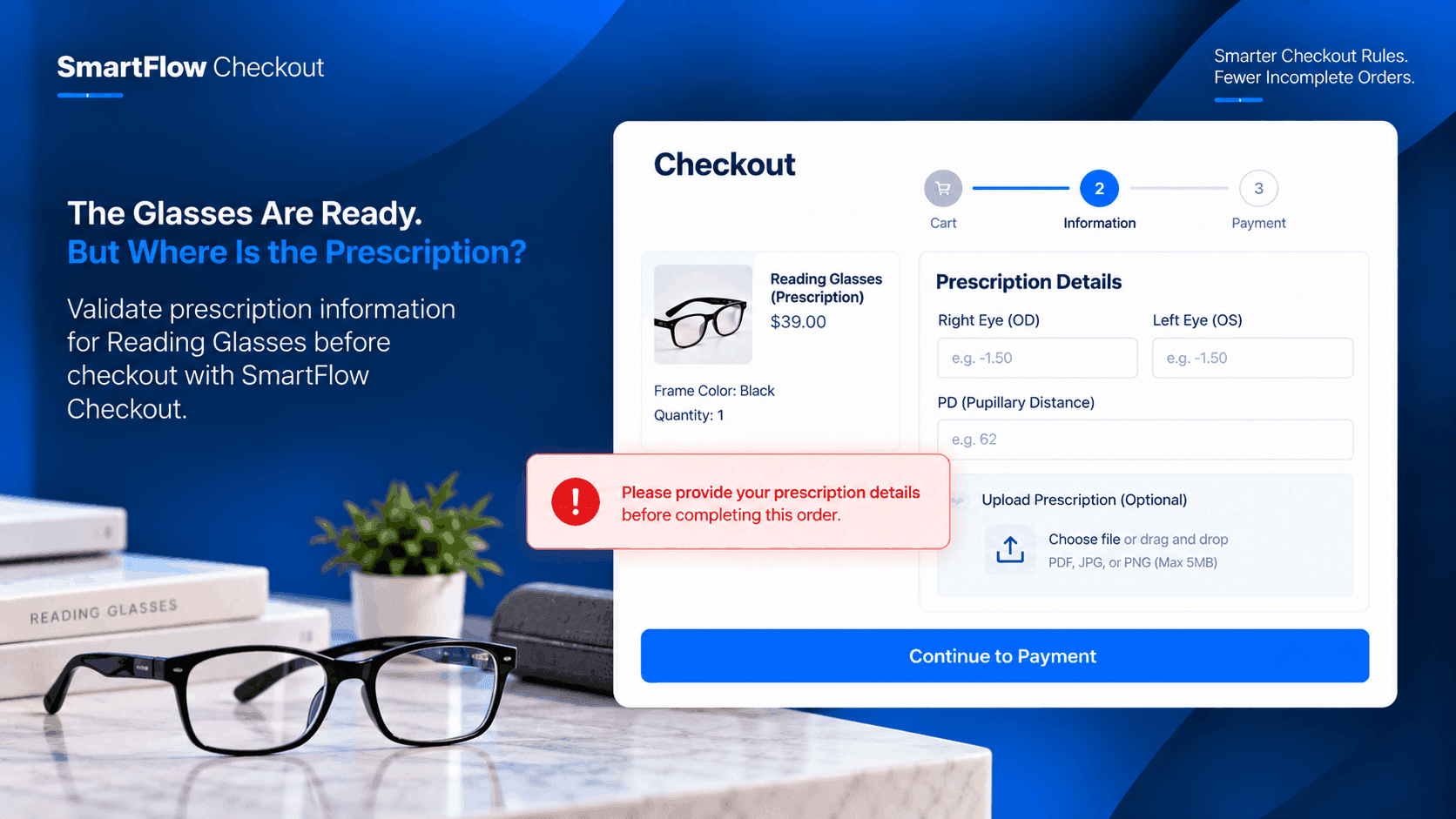
The customer has found the right pair of Prescription Reading Glasses.
They choose the frame.
They select the quantity.
They add the glasses to their cart.
Everything looks ready.
Then the order arrives.
There is just one problem.
The prescription information the store needs isn't there.
Now someone from the team has to contact the customer, wait for a response, and make sure the order doesn't move into fulfillment before the missing information arrives.
The checkout was completed.
But the order wasn't actually ready.
The Missing Information Appears Later
For a prescription eyewear store, the information attached to an order matters.
A customer may complete the normal shopping process without realizing that something important is still missing.
From the customer's perspective, checkout looks complete.
From the merchant's perspective, the order needs another step.
That creates unnecessary back-and-forth.
The store has to identify the incomplete order.
Someone has to contact the customer.
The customer has to respond.
Then the team can continue processing the order.
A simple validation step before checkout could prevent that situation.
The Store Knows What It Needs
The merchant already knows what information is required to process the product.
The problem isn't deciding what is needed.
The problem is making sure the required information is present before the order is submitted.
For Prescription Reading Glasses, the store can define the information it needs as part of its checkout process.
The customer should be stopped when that requirement isn't satisfied.
That is where checkout validation becomes useful.
Stop The Order Before It Gets Stuck
SmartFlow Checkout supports checkout validation rules that can block an order when configured requirements are not met and display a custom error message to the customer. :chatgpt-content-reference{index="0"}
For this eyewear store, the logic can be straightforward:
Prescription Reading Glasses are being purchased → required prescription information is missing → prevent checkout from completing.
The customer receives a clear message explaining what needs to be provided.
The order doesn't enter the merchant's workflow in an incomplete state.
The Customer Gets An Explanation
Stopping checkout without telling the customer why would create another problem.
The customer needs to understand what is missing.
A custom validation message can make that clear.
For example:
“Please provide your prescription details before completing this order.”
Now the customer knows why they cannot continue.
They don't have to wait for an email from the store.
They don't have to wonder whether the website is broken.
The requirement is communicated while they are still completing the purchase.
The Merchant Avoids The Follow-Up Email
Without validation, the process might look like this:
Customer places order.
The team notices the prescription information is missing.
Someone emails the customer.
The team waits for a response.
The customer sends the information.
The order can finally continue.
That may only take a few minutes in one case.
But across many orders, those small interruptions add up.
Validation moves the check earlier.
The customer is asked to complete the requirement before the order becomes an operational problem.
Not Every Product Needs The Same Rule
The store may sell more than prescription reading glasses.
It might also sell accessories such as cases or cleaning cloths.
Those products don't necessarily require prescription information.
The validation logic can therefore be designed around the relevant checkout situation instead of treating every product in the store identically.
That keeps the customer experience more appropriate.
Someone buying an accessory doesn't need to complete an unnecessary prescription step.
The Checkout Becomes More Intelligent
The important part isn't simply blocking an order.
The checkout is now responding to the situation.
A customer buying Prescription Reading Glasses has a specific requirement.
The checkout can check whether that requirement has been satisfied.
If it has, the customer can continue.
If it hasn't, the checkout explains what is missing.
This creates a more useful connection between the product and the information required to fulfill it.
Fewer Incomplete Orders Reach The Team
Imagine the store receiving fifty eyewear orders in a day.
If several arrive without the required prescription details, the team has to stop normal processing to chase those customers.
Now imagine the checkout prevents those incomplete orders from being submitted in the first place.
The customer resolves the missing information during checkout.
The team receives a more complete order.
That is a small operational improvement with a direct effect on fulfillment.
The Rule Protects The Fulfillment Process
An order isn't truly ready just because the payment has been completed.
For some products, the merchant needs additional information before fulfillment can begin.
Prescription eyewear is a good example.
The store can use checkout validation to make the information requirement part of the purchasing process instead of relying entirely on post-order follow-up.
That makes the transition from checkout to fulfillment cleaner.
One Product, One Important Requirement
This workflow doesn't need dozens of conditions.
The business case is simple.
Product: Prescription Reading Glasses
Requirement: Prescription information
Problem: Information is missing
Action: Block checkout and show a custom message
The merchant can keep the validation focused on the information that actually matters for this product.
The Customer Gets A Clearer Checkout
Good checkout experiences aren't only about making checkout faster.
They are also about preventing avoidable mistakes.
If a customer cannot complete an order because something important is missing, telling them at the right moment is more helpful than allowing the order to go through and asking them about it later.
The customer gets immediate feedback.
The store gets fewer incomplete orders.
Both sides benefit from the earlier check.
SmartFlow Turns The Requirement Into A Rule
The merchant already has the business requirement:
“Don't let an order for Prescription Reading Glasses proceed without the required prescription information.”
SmartFlow Checkout can turn that requirement into a checkout validation rule.
The validation can stop the checkout and display a custom error message when the configured requirement isn't satisfied. :chatgpt-content-reference{index="1"}
That means the store doesn't need to rely solely on someone checking every new order manually.
The checkout can enforce the rule at the point where the missing information matters most.
The Workflow In Practice
The customer adds Prescription Reading Glasses.
They proceed toward checkout.
SmartFlow evaluates the configured validation rule.
If the required prescription information is available:
The customer continues checkout.
If the required information is missing:
Checkout is blocked and the customer sees the configured message.
The customer can correct the issue before submitting the order.
That keeps the workflow simple for both the shopper and the merchant.
Why Earlier Validation Matters
Every incomplete order creates another task.
Someone needs to identify it.
Someone needs to contact the customer.
Someone needs to wait.
Someone needs to update the order.
Validation moves that work to the customer journey where the missing information can be corrected immediately.
The store still provides support when needed.
But it doesn't have to depend on manual follow-up for every incomplete order.
Frequently Asked Questions
Can SmartFlow block checkout when information is missing?
Yes. SmartFlow Checkout supports checkout validation rules that can prevent an order from being completed when configured conditions are not satisfied. :chatgpt-content-reference{index="2"}
Can the store show a custom error message?
Yes. SmartFlow's checkout validation supports custom error messages that can explain why the customer cannot continue. :chatgpt-content-reference{index="3"}
Does every product need prescription validation?
No. The validation can be configured around the checkout situation relevant to the merchant's products and requirements.
Why validate before the order is placed?
It can reduce incomplete orders reaching the fulfillment team and reduce the need for manual customer follow-up after checkout.
Can checkout validation be used for other requirements?
Yes. SmartFlow Checkout supports configurable validation rules for different checkout requirements, depending on the merchant's workflow. :chatgpt-content-reference{index="4"}
Don't Let Missing Details Become An Order Problem
The customer was ready to buy the glasses.
The store was ready to fulfill them.
The only thing missing was the information needed to connect those two steps.
Without validation, that gap becomes a follow-up task.
With a checkout validation rule, the customer can be told about the missing requirement before the order is completed.
For an eyewear store, that means fewer incomplete orders entering the fulfillment process and a clearer experience for customers buying Prescription Reading Glasses.
The best time to catch missing order information is before the order becomes someone else's problem.