The Customer Added a Gaming Laptop. Why Show Payment Methods You Don't Want to Accept?
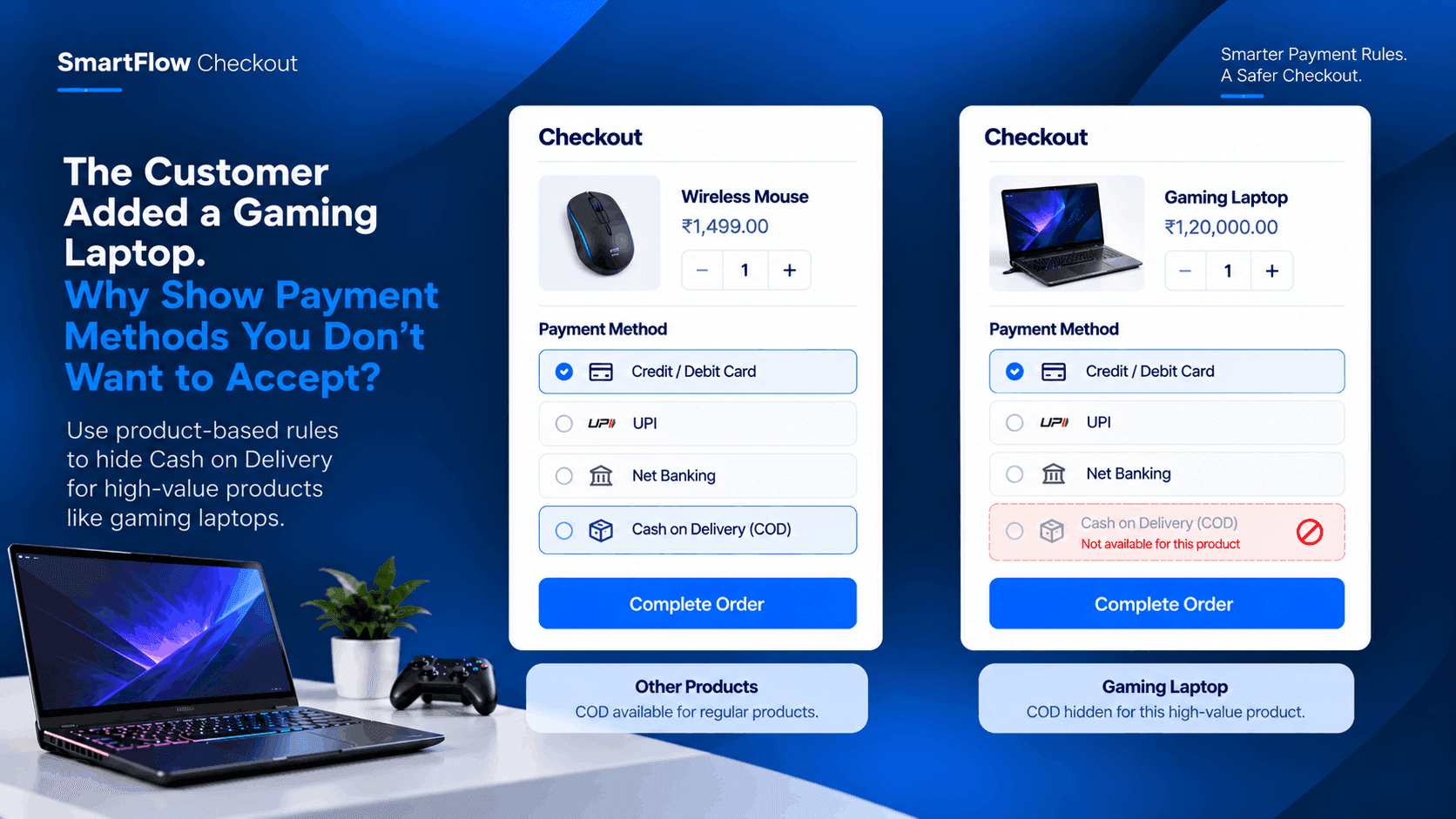
A customer finds a gaming laptop on an electronics store.
They choose the configuration they want.
They add the Gaming Laptop to their cart.
Then they reach checkout.
The store offers several payment methods, including Cash on Delivery.
But there is a problem.
The store does not want to accept COD for this particular product.
The laptop costs ₹1,20,000, and the store has decided that high-value laptop orders should use other payment methods.
The problem is not deciding the rule.
The store already knows it.
The problem is making checkout apply that rule automatically.
Not Every Product Needs The Same Payment Options
An electronics store can sell products at very different price points.
A mouse might cost ₹1,500.
A keyboard might cost ₹4,000.
A gaming laptop might cost ₹1,20,000.
It makes sense that the store's payment strategy may not be identical for every product.
The store may be comfortable offering COD for lower-value products while restricting it for expensive items.
But a standard payment setup can make the same methods available across the store.
That is where a product-based payment rule becomes useful.
The Laptop Should Trigger The Rule
The store doesn't need to ask the customer to understand its internal payment policy.
The checkout can simply check what is in the cart.
If the Gaming Laptop is present, the configured rule can apply.
The logic is straightforward:
Gaming Laptop in cart → check payment conditions → hide COD.
Other permitted payment methods can remain available.
The customer can then complete the purchase using one of the payment options the store accepts for that product.
Keep COD For Other Products
This is the important part.
The store isn't necessarily trying to remove Cash on Delivery completely.
It may still want COD for many other products.
A customer buying a keyboard could still see COD.
A customer buying a mouse could still see COD.
But when the Gaming Laptop enters the cart, the payment options can change.
That gives the merchant more control without changing the checkout experience for every customer.
The Customer Sees A Cleaner Checkout
From the customer's perspective, the experience can remain simple.
They add the Gaming Laptop.
They reach checkout.
The payment methods available to them reflect the store's configured rule.
They don't have to select COD and discover later that the order cannot be processed that way.
The restriction happens at the point where the payment method is being selected.
That makes the store's payment policy much easier to enforce.
No One Has To Check The Order Manually
Without an automated rule, the store may have to deal with the problem after the order arrives.
A COD order for the expensive laptop appears.
Someone notices the product.
They contact the customer.
They explain that COD isn't available.
They ask the customer to place the order again or choose another payment method.
A simple checkout rule can prevent that entire situation.
The product itself becomes the signal.
Build The Rule Around The Product
SmartFlow Checkout supports payment-method customization, including hiding, renaming, and reordering payment methods based on conditions such as cart products and order information. :contentReference[oaicite:0]{index=0}
For this electronics store, that means the rule can focus on the Gaming Laptop.
The store doesn't need to create a complicated customer journey.
It simply defines the condition that matters:
When this product is in the cart, don't show COD.
That is a clear business rule translated into checkout behavior.
One Product, One Payment Rule
The workflow doesn't need to become a collection of complicated payment policies.
For this use case, there is one product and one decision.
Customer adds the Gaming Laptop.
SmartFlow checks the cart.
The Gaming Laptop is present.
The configured COD restriction applies.
COD is hidden.
Other permitted payment methods remain available.
The customer continues with checkout.
The store gets the payment experience it intended without manual intervention.
Why High-Value Products Can Be Different
High-value electronics often require different operational decisions from lower-priced products.
The store may have different payment preferences, fulfillment procedures, or risk controls for expensive orders.
That doesn't mean every product needs a special checkout.
It simply means certain products may justify specific rules.
The Gaming Laptop is a good example.
The store knows that this product belongs to a different payment category.
SmartFlow lets that business decision become part of the checkout logic.
The Rule Works Before The Problem
The biggest benefit is timing.
The store doesn't have to wait until after the order is placed to discover that the selected payment method isn't suitable.
The checkout checks the product before the customer completes payment.
That moves the decision to the right point in the customer journey.
The customer sees the available payment options.
The store gets an order that follows its configured payment policy.
There is less manual correction afterward.
Make Checkout Match Your Business Rules
Your payment methods shouldn't always be identical for every product.
A customer buying a low-cost accessory may have different payment options from someone purchasing a ₹1,20,000 gaming laptop.
The business already understands those differences.
The challenge is making the checkout understand them too.
With a product-based payment rule, the store can connect the product in the cart to the payment experience shown to the customer.
That turns a manual policy into an automatic checkout decision.
Frequently Asked Questions
Can SmartFlow hide Cash on Delivery for one product?
SmartFlow supports hiding payment methods based on conditions that can include products in the cart. This allows merchants to configure payment-method rules around specific products. :contentReference[oaicite:1]{index=1}
Does the rule have to apply to the entire store?
No. Payment-method rules can use conditions, including cart-product conditions, so the merchant can create rules for particular checkout situations. :contentReference[oaicite:2]{index=2}
Can customers still use other payment methods?
Yes. The rule can be configured to hide a particular payment method while leaving other permitted methods available.
Why would a store restrict COD for a gaming laptop?
A merchant may choose different payment policies for high-value products. The specific business reason depends on the store's own operations and policies.
Can payment methods be renamed or reordered too?
Yes. SmartFlow supports hiding, renaming, and reordering payment methods using configurable conditions. :contentReference[oaicite:3]{index=3}
Let The Product Decide The Payment Experience
The customer came to buy a gaming laptop.
The store already knows that this product should not be available with Cash on Delivery.
There is no reason for the team to discover that after the order has been placed.
The checkout can make the decision while the customer is still completing the purchase.
Gaming Laptop in cart → payment rule checked → COD hidden → permitted payment method selected.
It is a small rule, but it removes an unnecessary manual correction from the order process.
SmartFlow Checkout lets the store turn that product-specific payment policy into part of the checkout experience.
When one product needs different payment options, your checkout should know that before the order is placed.