Beyond Standard Shipping: Injecting Delivery Date & Time Pickers
The Scheduling Nightmare
For traditional direct-to-consumer e-commerce brands, shipping logistics are generally straightforward: the customer pays, the warehouse packs the corrugated box, and a carrier like FedEx or USPS delivers it within a standard 3 to 5 business day window. The exact arrival date is largely irrelevant to the consumer as long as it falls roughly within the expected timeframe.
However, for a massive and growing segment of the e-commerce economy, the exact delivery date is not just a preference; it is the most critical component of the transaction. Consider florists, premium meal-prep services, local bakeries, catering companies, and large furniture retailers. A customer ordering an anniversary bouquet must have it delivered on Friday the 12th. If it arrives on Thursday, the surprise is ruined. If it arrives on Saturday, the anniversary has passed, and the product is effectively useless.
The Failure of the Cart Page Hack
Historically, Shopify's core platform has never supported a native delivery date picker within the secure checkout flow. To work around this missing infrastructure, merchants were forced to install third-party applications that injected clunky, customized calendar widgets onto the Cart Page, long before the user actually began the checkout process.
This workaround is structurally broken and creates a massive logistical headache for operations teams. Here are the primary points of failure:
- Accelerated Checkout Bypass: The most critical flaw is the express checkout problem. If a customer clicks the "Shop Pay," "Apple Pay," or "Google Pay" button directly from the product page, they completely bypass the Cart Page. The order is placed, the payment is captured, and the merchant has absolutely no idea when the customer actually expects the item to be delivered.
- Zero Capacity Enforcement: Cart-page calendar apps struggle to read real-time inventory or backend operational capacity limits. A customer might select "Friday at 2:00 PM," completely unaware that the merchant's delivery van for Friday is already 100% booked or that the kitchen is over capacity.
- Terrible User Experience: Forcing users to interact with a disconnected calendar widget before they even enter the shipping flow creates friction and confusion. If a user changes their mind and hits the back button, the calendar data is often lost.
When this fragile scheduling logic fails, the merchant is forced to manually email or call the customer to coordinate a new delivery time. This destroys the premium purchasing experience and wastes hours of administrative time. If you are also dealing with abandoned carts from confusing checkout flows, a clunky, failing cart widget only exacerbates the drop-off rate.
Dynamic Injection with SmartFlow Checkout
The scheduling requirement cannot be an afterthought placed haphazardly on the Cart Page; it must be a mandatory, native, and validated step within the actual checkout flow itself.
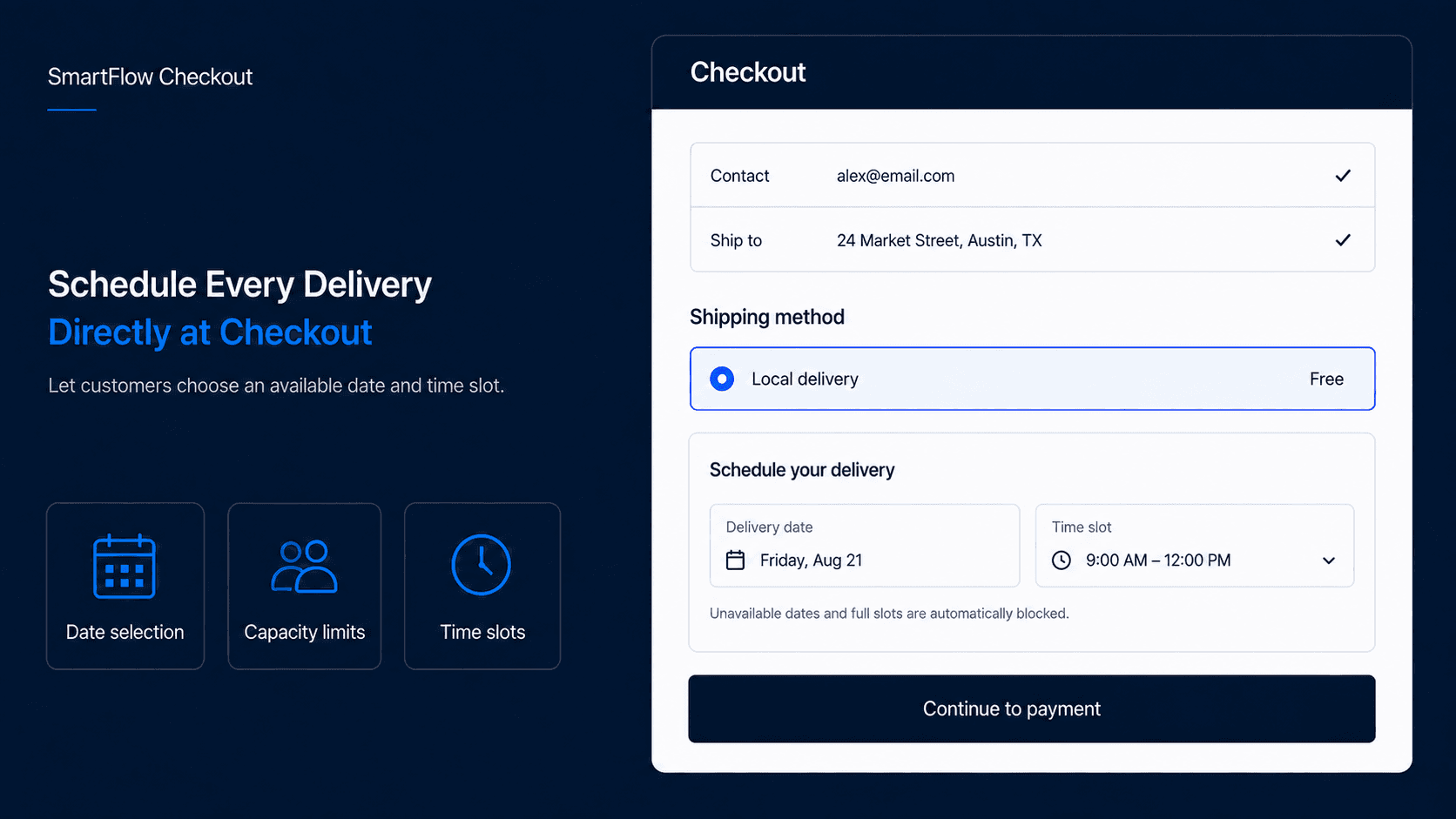
SmartFlow Checkout solves this massive infrastructural gap by leveraging Shopify's modern Checkout Extensibility APIs to inject a beautiful, highly intelligent Delivery Date and Time Slot Picker directly into the "Shipping Method" step.
Orchestrating Capacity and Logistics
SmartFlow transforms the shipping step from a static list of flat rates into an interactive, capacity-aware logistics engine. It does not just collect a string of text; it actively manages your operational bandwidth.
Here is a technical breakdown of how the dynamic injection functions:
1. Native User Interface Integration
When the customer enters their shipping address and clicks "Continue to Shipping," they are not met with a generic "Standard Shipping" radio button. Instead, SmartFlow injects a sleek, interactive calendar UI directly into the checkout DOM. Because it is built using native Checkout Extensibility components, it inherits your brand's specific fonts, colors, and border radii. It feels exactly like a built-in Shopify feature, building profound trust.
Furthermore, because it lives inside the actual checkout flow, it is completely immune to the "Shop Pay Bypass" problem. Even express checkout users are forced to select a valid slot before the final payment clears.
2. Real-Time Capacity Enforcement
SmartFlow reads your backend operational logic in real-time. You can configure granular rules based on your physical fulfillment capacity. For example, a bakery manager can dictate: "We can only handle 50 local deliveries per day. We do not deliver on Sundays. We require a strict 24-hour lead time to prep the food."
SmartFlow instantly calculates this logic on the frontend. If a customer is checking out on a Tuesday, Wednesday will be grayed out and unselectable (enforcing the 24-hour lead time). If Friday already has 50 scheduled orders, Friday will display a prominent "Sold Out" badge. The customer is physically prevented from selecting an invalid date, completely eliminating overbooking.
3. Granular Time Slots and Dynamic Pricing
For merchants who require extreme precision, such as appliance delivery, SmartFlow can drill down into specific hour windows (e.g., "9:00 AM - 12:00 PM" or "1:00 PM - 4:00 PM").
Crucially, you can attach dynamic pricing rules to these specific slots to drive incremental revenue. If a customer wants standard delivery on Thursday, it is free. If they demand a premium "Morning Rush (8:00 AM - 10:00 AM)" slot, SmartFlow dynamically updates the shipping rate line item to include a $15 surcharge.
4. Automated Tagging and Downstream Routing
Once the customer selects their slot and completes the purchase, SmartFlow cleanly formats the selected Date and Time. It injects this data directly into the Order Notes and Order Attributes. It also automatically applies a specific tag to the order (e.g., 'Delivery: 08/12/2026'). This ensures that your downstream warehouse software or route-planning applications (like Routeific, Onfleet, or ShipStation) can easily ingest the structured data without any manual copy-pasting.
Frequently Asked Questions (FAQ)
Can I block out specific holidays or blackout dates? Yes. The SmartFlow dashboard allows you to define specific blackout dates (like Christmas Day or company holidays) months in advance, ensuring no customer can book a delivery when your team is offline.
Does it work with Shop Pay or Apple Pay? Absolutely. Because it is built into the native checkout extensions, it intercepts the express checkout flow, ensuring no order is placed without a valid delivery selection.
Can I charge extra for premium time slots or weekend deliveries? Yes. You can attach dynamic pricing rules. If a customer demands a weekend delivery, SmartFlow dynamically updates the shipping rate line item to include a weekend surcharge.
Owning the Logistics Experience
For schedule-dependent merchants, the delivery date is inseparable from the product itself. By abandoning clunky cart-page hacks and migrating the scheduling logic directly into the checkout flow with SmartFlow Checkout, you eliminate logistical chaos.
You protect your drivers from overbooking, you guarantee the customer gets their product exactly when they expect it, and you sharply reduce the manual customer support overhead required to fix scheduling errors. Take control of your logistics right at the point of sale.