Prevent Customers From Ordering Products That Should Not Ship Together
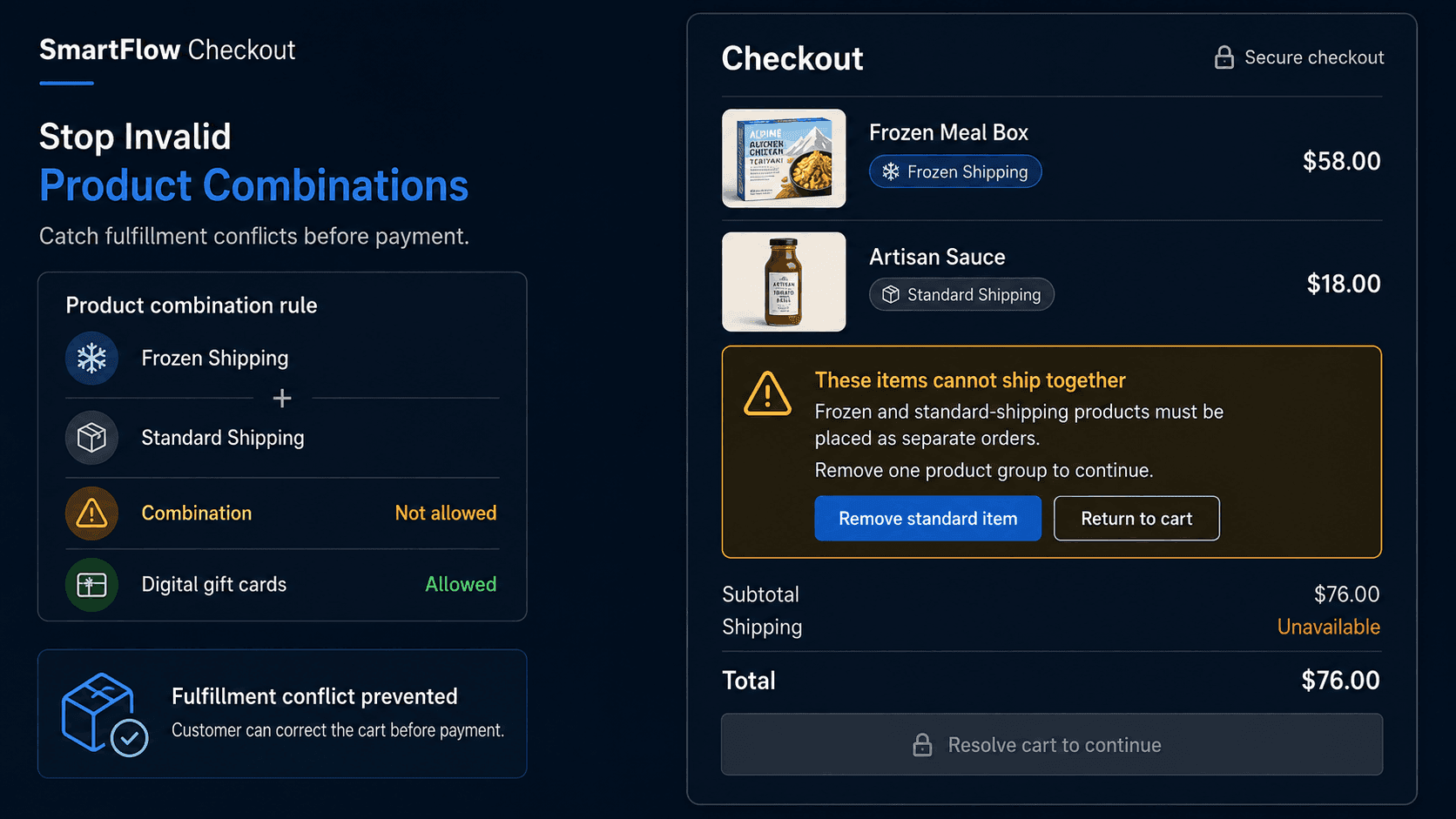
The Order Looks Fine
Imagine a store sells frozen food and normal pantry products.
A customer adds:
Frozen meal box
Glass sauce bottle
Coffee beans
Every product can be purchased individually.
The cart looks normal.
The customer pays.
Then fulfillment discovers the problem.
Frozen products ship through one temperature-controlled process.
The pantry products use a completely different fulfillment method.
The merchant does not support combining both into the same order.
Now someone has to contact the customer, explain the problem, split or change the order, adjust shipping, or issue a partial refund.
Nothing was wrong with any individual product.
The problem was the combination.
Some invalid orders are created not by one bad item, but by two perfectly valid products that should never have been purchased together.
That is where product-combination validation becomes useful.
Why Mixed Carts Break
Many Shopify stores sell products with very different fulfillment requirements.
The differences may involve shipping method, location, temperature, size, purchasing rules, or customer eligibility.
For example:
- Frozen goods and standard parcel items
- Oversized furniture and courier products
- Wholesale case packs and consumer-only products
- Products requiring separate fulfillment processes
- Items available only in selected regions
- Products that must be ordered separately
Individually, each product is valid.
Together, they may create an order the business cannot process cleanly.
Without checkout validation, the first person to notice may be someone in fulfillment.
By then, payment has already happened.
The merchant now has an operational problem instead of a checkout correction.
Define the Invalid Combination
The first step is not creating a rule.
It is defining exactly what the business cannot support.
Suppose a food merchant uses two product groups:
Frozen Shipping
and:
Standard Shipping
The business rule is:
Products from Frozen Shipping and Standard Shipping cannot be purchased in the same order.
That is much more precise than:
Do not allow mixed carts.
Another store may define:
Oversized products cannot be combined with products fulfilled through standard courier shipping.
A wholesale store might define:
Wholesale case-pack products cannot be purchased together with retail-only SKUs.
The rule should reflect the actual fulfillment limitation.
A clear business rule produces a much safer checkout rule.
Where SmartFlow Checkout Fits
With SmartFlow Checkout, merchants can configure supported checkout validation around product and cart conditions.
For example:
"If the cart contains products from both Frozen Shipping and Standard Shipping collections, prevent checkout and tell the customer to place them as separate orders."
Or:
"Do not allow products from our Freight Only collection to be purchased with Standard Parcel products."
Or:
"If a wholesale case-pack product is in the cart, prevent retail-only products from being added to the same order."
The process becomes:
Customer builds cart → Product conditions checked → Incompatible combination found → Checkout stopped → Clear correction shown
The merchant defines the business restriction.
SmartFlow Checkout helps enforce it before the order becomes a fulfillment problem.
Tell Customers What to Change
A blocked checkout is only useful if the shopper understands how to continue.
Compare:
Cart invalid
with:
Frozen products and standard-shipping products must be placed as separate orders. Remove one group of products and complete them separately.
The second message explains both the problem and the solution.
Another example:
This oversized item requires freight delivery and cannot be combined with standard parcel products. Please place it as a separate order.
Or:
Wholesale case products cannot be combined with retail products in the same checkout. Remove one product type to continue.
Useful validation should answer:
What is conflicting?
and:
How can I fix it?
The customer should not need to contact support just to understand why checkout stopped.
Do Not Block Valid Carts
Combination rules need careful conditions.
Suppose a store has products tagged:
Frozen
Standard
Gift Card
The merchant may allow gift cards to appear with either product type because they do not create a physical fulfillment issue.
A simplistic rule such as:
More than one product type → Block
would be wrong.
Another example involves accessories.
An oversized furniture product may require freight delivery, but a matching furniture-care kit might be intentionally allowed to ship with it.
The rule therefore needs to reflect the actual restriction rather than a broad product category assumption.
This is why merchants should ask:
Which exact combination creates the problem?
Not:
Which products look different?
Overly broad validation creates unnecessary checkout friction.
Handle More Than Two Groups
Real carts can become more complicated.
Imagine a merchant has:
Standard Parcel
Frozen Shipping
Freight
Local Delivery Only
Now the validation logic needs to define which combinations are allowed.
For example:
Standard + Frozen → Not allowed
Standard + Freight → Not allowed
Frozen + Freight → Not allowed
Local Delivery Only + selected local products → Allowed
The business may also have exceptions.
Perhaps some standard items can be packed with frozen orders.
Perhaps a small accessory is allowed with a freight shipment.
As the catalog grows, the important thing is keeping the logic understandable.
A checkout system should not become a maze of conflicting product rules.
Start with the combinations that create real fulfillment problems.
Add exceptions only when the business actually needs them.
Match Rules to Fulfillment
Product-combination validation should come from operational reality.
Imagine a furniture store sells:
Dining table
and:
Cushion covers
The table ships by freight.
The cushion covers normally ship by courier.
Does that automatically mean they cannot be purchased together?
Not necessarily.
The fulfillment team might already have a process for handling the order.
Now imagine the store sells:
Fresh flowers
and:
International-shipping-only gift products
If the flower delivery operation works only locally, that combination may genuinely be impossible for certain destinations.
The rule should therefore be based on:
Can we fulfill this order correctly?
Not merely:
Do these products use different shipping methods?
Checkout validation is strongest when it reflects a real constraint rather than an arbitrary catalog structure.
Test Complex Cart Paths
Before enabling a combination rule, test more than one obvious cart.
Try:
- Product A by itself
- Product B by itself
- Product A + Product B
- Product A + allowed accessory
- Three or more product groups
- Different quantities
- Different destinations
- Mobile checkout
- Products added and removed during checkout
Then verify the correction path.
If the customer removes the incompatible product, can they continue immediately?
Does the message disappear?
Does another validation unexpectedly appear?
Can a valid exception still proceed?
The rule is not finished just because it successfully blocks the invalid cart.
The customer must also be able to recover from the error easily.
Measure Fewer Repairs
The main value of this type of validation is operational.
Useful metrics can include:
- Invalid combinations blocked
- Customers who correct the cart
- Orders requiring manual splitting
- Partial refunds caused by fulfillment conflicts
- Orders canceled after payment
- Support tickets about incompatible products
- Checkout abandonment after the message
Imagine the warehouse previously received 40 mixed orders per month that required manual intervention.
After validation, most shoppers correct the cart before payment.
That is a meaningful improvement.
But if large numbers of customers abandon because the rule is difficult to understand, the merchant should investigate the message or checkout design.
The goal is not to block more orders.
It is to prevent orders the business would have needed to repair afterward.
Frequently Asked Questions
What is product-combination validation in Shopify?
Product-combination validation checks whether products in the same cart are allowed to be purchased together according to the merchant's business and fulfillment rules.
Why would two valid products be incompatible?
They may require different fulfillment methods, shipping conditions, customer eligibility, delivery regions, packaging, or other processes that the merchant cannot support in one order.
Can products from two collections be prevented from appearing in the same order?
Where supported checkout and validation conditions are available, merchants can define rules based on product or collection conditions and stop combinations that violate the business requirement.
Should different shipping methods always be separated?
No. Different fulfillment methods do not automatically mean a cart is invalid. The rule should reflect what the merchant can actually fulfill.
What should the validation message say?
It should explain which products or groups conflict and tell the customer how to continue, such as removing one group or placing separate orders.
Can some accessories be exempt from the rule?
Yes. Merchants should define exceptions when certain products are intentionally allowed with an otherwise restricted group.
Can SmartFlow Checkout help enforce these rules?
SmartFlow Checkout can help merchants configure supported product and cart validation rules so incompatible combinations are detected before the order is completed.
Fix the Cart Before Payment
A frozen product can be perfectly valid.
A standard parcel product can be perfectly valid.
A freight item can be perfectly valid.
The problem appears when the resulting order does not match the merchant's fulfillment capabilities.
Finding that problem after payment creates work.
Finding it during checkout gives the customer a chance to correct it immediately.
Build cart → Check combinations → Explain conflict → Customer corrects → Continue
SmartFlow Checkout helps merchants turn real product and fulfillment restrictions into supported checkout validation rules so incompatible orders can be corrected before they reach the warehouse.