Find Vendor Invoices That Do Not Match Purchase Orders Before Finance Pays
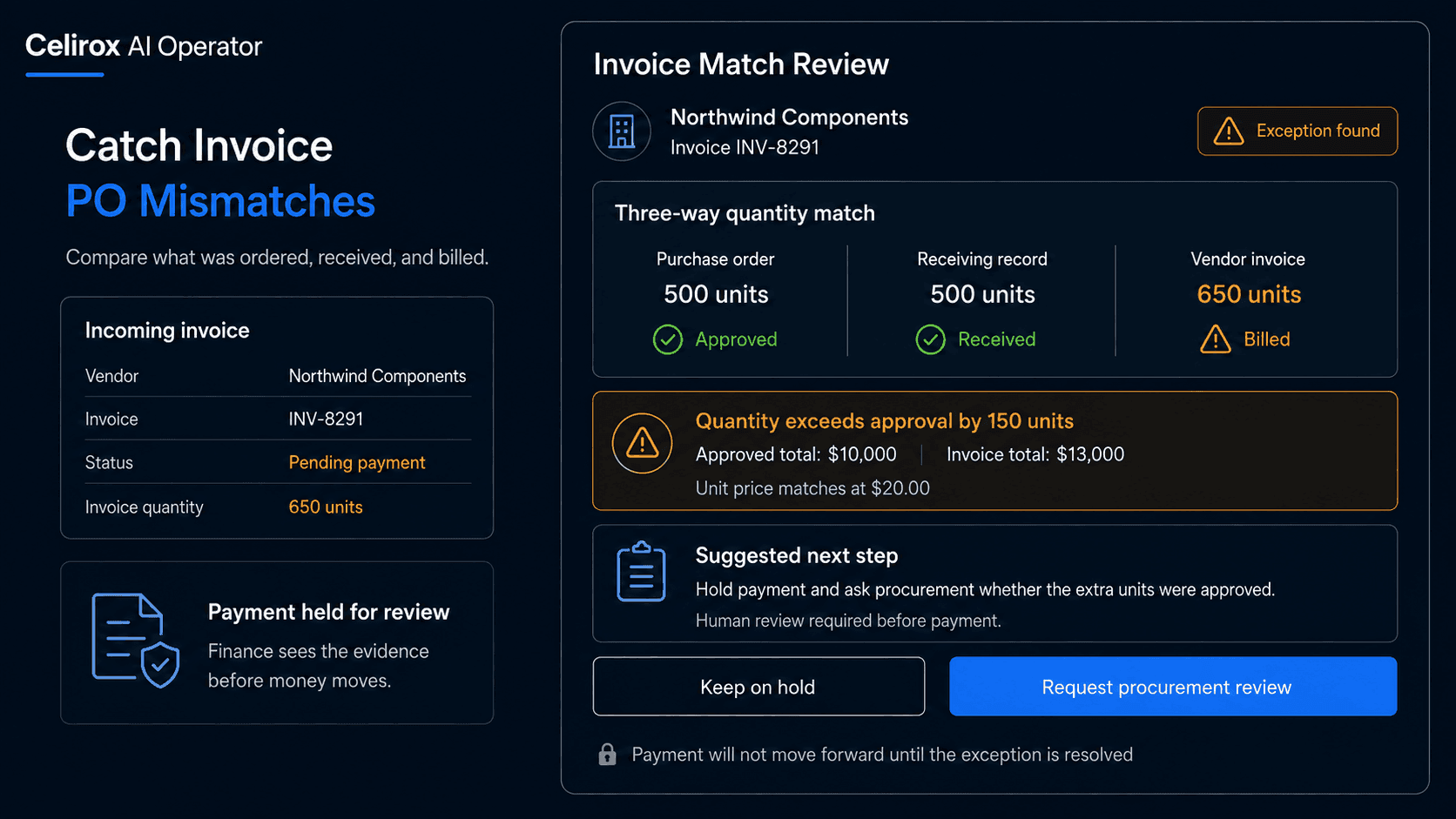
The Invoice Looks Normal
Imagine finance receives a vendor invoice for:
650 units
The invoice total looks reasonable.
The vendor name is correct.
The document appears complete.
Then someone checks the purchase order.
It approved:
500 units
Now the invoice is not a routine payable anymore.
Someone needs to determine whether the vendor shipped extra units, whether another purchase order exists, whether the invoice is incorrect, or whether the company approved a change somewhere else.
The same problem can happen when quantity matches but price does not.
Or when a freight charge appears that was never approved.
Or when the invoice is valid but the company has received only part of the order.
The important question is not whether the invoice looks complete. It is whether it matches what the business actually approved and received.
That is the real invoice-matching problem.
What Invoice Matching Means
Invoice matching compares a vendor invoice with the business records that should support it.
That often includes:
- Purchase order
- Vendor invoice
- Receiving or delivery record
- Approved pricing
- Additional charges
- Internal approval conditions
A simple case may look like:
PO quantity: 500
Received: 500
Invoice quantity: 500
Unit price: Matches
Result: Ready for normal processing
An exception may look like:
PO quantity: 500
Received: 500
Invoice quantity: 650
Result: Review required
The purpose is not simply to find different numbers.
It is to understand whether the difference is expected, approved, or a genuine problem.
Match the Right Records
Before comparing anything, the invoice needs to be matched to the correct purchase order.
That is not always trivial.
An invoice may contain a PO number.
That makes the relationship straightforward.
Other invoices may use a vendor reference, project code, contract number, delivery number, or another identifier.
There can also be several open purchase orders for the same vendor.
A useful matching process can consider:
PO number → Vendor → Invoice reference → Contract or project → Amount → Dates
The stronger the shared identifier, the safer the match.
A vendor name alone may not be enough.
If several purchase orders could belong to the invoice, the correct next step is not to guess.
It is to surface the ambiguity for review.
Where AI Operator Fits
With Celirox AI Operator, a business can describe the matching policy it wants.
For example:
"Review new vendor invoices. Find the related purchase order and receiving record. Compare quantity, unit price, taxes, freight, additional charges, and total value. If everything matches our approved terms, prepare it for normal processing. If anything differs, explain the mismatch and request review before payment."
The operating loop becomes:
Read invoice → Find PO → Check receiving → Compare terms → Investigate difference → Approve or escalate → Verify
The Operator can gather the records before someone in finance has to start searching manually.
That is especially useful when the answer depends on several systems rather than one invoice PDF.
Compare More Than Totals
Two documents can have the same final total and still contain a problem.
Imagine:
Purchase order
100 units × $20 = $2,000
Invoice
80 units × $25 = $2,000
The totals match.
The commercial terms do not.
That is why comparison should happen at the relevant field level.
Important checks may include:
- Quantity
- Unit price
- Product or service
- Taxes
- Freight
- Discounts
- Currency
- Invoice total
- Purchase order total
- Receiving quantity
The exact fields depend on the business.
A service invoice may care more about hours, milestones, or contracted rates.
A physical-goods invoice may care more about units received.
The comparison needs to match the type of purchase.
Check What Was Received
A purchase order tells finance what was approved.
It does not always tell finance what has actually been delivered.
Suppose the PO approves:
500 units
The vendor invoice also bills:
500 units
At first glance, everything matches.
But the receiving record shows:
300 units received
Should finance pay the full invoice?
Maybe.
Maybe not.
The answer depends on the company's payment terms and receiving policy.
This is why receiving data matters.
The useful comparison can become:
Approved → Received → Invoiced
For example:
PO: 500 units
Received: 300 units
Invoice: 500 units
Result: Review before payment
The invoice is not necessarily wrong.
But the company needs to understand why it is being billed for more than it has recorded as received.
Investigate Price Differences
Price mismatches are common enough that they should not automatically become accusations.
Suppose the purchase order says:
$42 per unit
The invoice says:
$45 per unit
Possible explanations include:
- Approved price increase
- Updated contract
- Expired quotation
- Currency difference
- Surcharge
- Incorrect invoice
- Purchase order not updated
A useful workflow does not simply say:
Price mismatch detected
It investigates whether supporting evidence exists.
For example:
PO price: $42
Invoice price: $45
Vendor contract amendment: $45 effective August 1
Invoice date: August 15
Result: Difference appears supported
Now finance has context.
If no supporting record exists, the exception should remain open for review.
Catch Charges Nobody Expected
Invoice mismatches are not limited to product quantity and price.
Additional charges can quietly change the economics of a purchase.
Imagine the purchase order approves:
Goods: $8,000
Shipping: Included
The invoice shows:
Goods: $8,000
Freight: $750
Now finance needs to know whether that $750 was approved somewhere else.
Other unexpected charges might include:
Handling fee
Fuel surcharge
Rush delivery
Service fee
Installation charge
A useful invoice check should separate approved base cost from additional charges.
The question becomes:
Was this extra amount part of the agreed commercial terms?
If not, it should not disappear inside the invoice total.
Keep Exceptions With Humans
Not every mismatch should be rejected automatically.
Imagine an invoice is 1.5% higher than the purchase order because of a contractually permitted freight adjustment.
The business may allow that within a tolerance.
Now imagine an invoice is 18% higher with no supporting change.
That is different.
A company can define rules such as:
Within approved tolerance → Continue
Unapproved additional charge → Review
Invoice above approval threshold → Finance approval
No matching PO → Procurement review
Quantity exceeds received amount → Hold
AI Operator can perform the comparison and prepare the evidence.
The human can focus on the commercial decision.
That is more useful than asking finance to manually reconstruct every invoice from scratch.
Detect Duplicate Billing
Another useful check is whether the invoice has already been processed.
Imagine the same vendor submits:
Invoice INV-8291
twice.
Or the vendor changes the document formatting slightly but keeps the same invoice number and amount.
A duplicate may be obvious.
Others are harder.
Useful signals can include:
Vendor + invoice number
Vendor + amount + date
Purchase order + billed quantity
The goal is not to assume every similar invoice is a duplicate.
It is to surface suspicious repetition before payment moves forward.
A useful result might say:
Potential duplicate invoice
Vendor: Northwind Components
Invoice: INV-8291
Amount: $14,200
Existing record: Same invoice number already processed
Action: Hold for review
That gives finance something concrete to verify.
Measure Exception Quality
This workflow should not be judged only by how many invoices it flags.
A system that marks everything as an exception creates more work, not less.
Useful measurements can include:
- Invoices matched successfully
- Quantity mismatches
- Price mismatches
- Unexpected charges
- Duplicate invoices detected
- Invoices without matching purchase orders
- Cases requiring approval
- False-positive exceptions
- Time spent resolving mismatches
The goal is to reduce routine manual comparison while making real exceptions easier to understand.
Another useful question is whether the same mismatch keeps appearing.
If one vendor repeatedly invoices at a different unit price from the purchase order, the problem may be upstream.
Perhaps procurement is using an outdated price list.
Perhaps the contract changed but purchase orders were never updated.
Repeated exceptions can reveal process problems beyond one invoice.
Frequently Asked Questions
What is invoice and purchase order matching?
It is the process of comparing a vendor invoice with the related purchase order and other supporting records to confirm that the quantity, price, charges, and commercial terms are consistent.
What is three-way matching?
Three-way matching generally compares the purchase order, vendor invoice, and receiving record to determine whether what was ordered, received, and billed agrees.
Should every mismatch stop payment?
Not necessarily. Businesses may define tolerances or approved exceptions. Material, unexplained, or high-risk differences should generally be reviewed.
Can AI Operator compare unit prices and quantities?
Yes. Where the relevant records are available, AI Operator can help extract and compare invoice, purchase order, and receiving information and surface differences for review.
What happens if no purchase order matches the invoice?
The workflow can flag the invoice and route it to the appropriate finance or procurement review process instead of assuming a match.
Can duplicate invoices be detected?
A workflow can compare identifiers and other invoice attributes to surface potential duplicates for verification before payment.
Can AI Operator approve invoices automatically?
The business defines the approval boundaries. Routine matched invoices may follow the normal process, while high-value, ambiguous, or mismatched cases can require human approval.
How is this different from basic invoice extraction?
Extraction reads the invoice. Matching asks whether what the invoice says agrees with the purchase order, receiving records, commercial terms, and internal approval rules.
Pay What Was Actually Approved
A vendor invoice can look perfectly legitimate.
The fields can be complete.
The math can be correct.
The document can still be inconsistent with what the company approved or received.
That is why invoice processing should not stop at:
Read the invoice
The useful operating process is:
Read → Match → Compare → Investigate → Approve → Verify
Celirox AI Operator can help businesses connect invoices to the right purchasing records, surface meaningful differences, gather supporting evidence, and route exceptions to the people who need to make the decision.
The goal is not to reject every invoice with a difference.
It is to make sure finance understands that difference before money moves.