The Vendor Confirmed. But Did Anyone Update the Event Plan?
The event is getting closer.
The decorator has confirmed.
The caterer has confirmed.
Now an audio vendor sends an email:
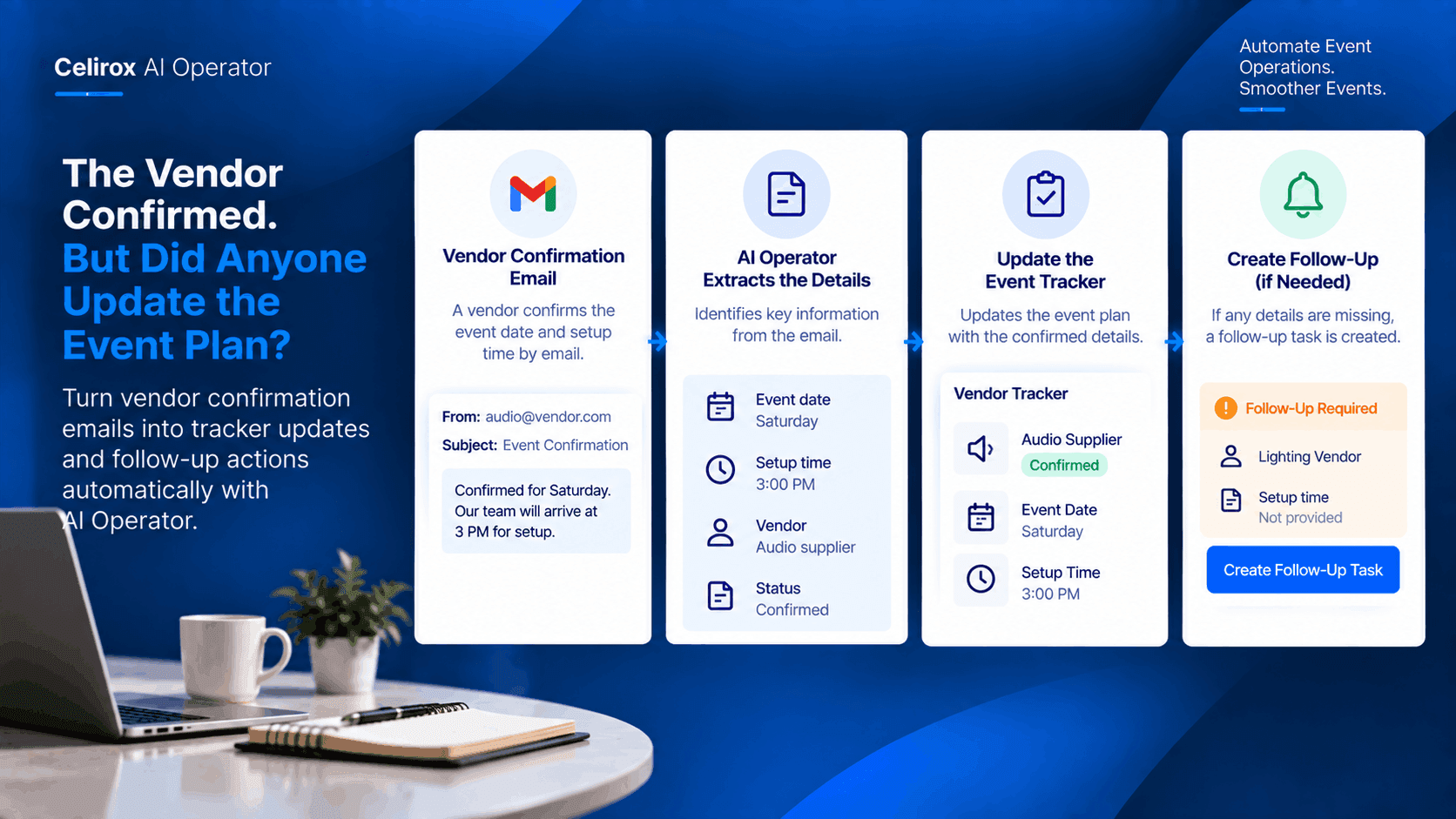
“Confirmed for Saturday. Our team will arrive at 3 PM for setup.”
The event planner reads the message.
Great.
One more vendor is confirmed.
But there is still another job hiding behind that email.
The event tracker needs to reflect the confirmation.
The setup time needs to be recorded.
And if another vendor has not confirmed yet, someone needs to know that too.
The confirmation email is useful.
But the real value comes from what happens after it arrives.
Confirmation Emails Contain Important Details
Event vendors rarely send information in exactly the same format.
One might write:
“We are confirmed for Saturday.”
Another might say:
“Our team will reach the venue around 3 PM for setup.”
Another may confirm the date but leave the setup time open.
The planner has to read these messages and translate them into the format used by the event team.
That is repetitive work.
And when there are many vendors, small omissions can become difficult to spot.
The Event Tracker Needs Updating
An event planner may maintain a tracker containing information such as:
- Vendor name
- Confirmation status
- Event date
- Setup time
- Service details
- Follow-up status
When a vendor confirms by email, those details need to move into the tracker.
Otherwise, the inbox says one thing while the event plan says another.
The planner may have to open the email again later just to remember what the vendor confirmed.
One Confirmation Should Move The Workflow
The vendor's email can be treated as the beginning of the workflow.
The basic process can be:
Vendor sends confirmation email.
The relevant details are identified.
The event tracker is updated.
Any required follow-up can then be created or communicated to the appropriate person.
Instead of stopping at “email received,” the workflow moves the information toward the place where the event team actually uses it.
The Setup Time Matters
Consider the vendor's message again:
“Confirmed for Saturday. Our team will arrive at 3 PM for setup.”
The confirmation status is important.
But so is the setup time.
If the event team has a separate schedule for vendor arrivals, the 3 PM detail needs to reach that plan.
Otherwise, the planner may know the vendor is confirmed but still have to search the inbox later to find out when they are arriving.
Capturing the operational detail is what makes the confirmation useful.
Not Every Confirmation Is Complete
Now imagine another vendor replies:
“We can confirm the event date. We will share the setup time tomorrow.”
That email is different.
The vendor has confirmed the booking.
But one important detail is still missing.
The workflow should not treat these two emails as identical.
One has a confirmed setup time.
The other needs a follow-up.
That distinction can help the planner focus attention where it is actually needed.
Turn Missing Details Into Follow-Up
The event planner doesn't want to repeatedly check every vendor email asking:
“Did they send the setup time yet?”
A workflow can make that gap visible.
For example:
Vendor: Audio supplier
Status: Confirmed
Setup time: Missing
Next action: Follow up for setup time
Now the planner has a clear action rather than an email that may be forgotten.
The workflow can be designed around the information the event team actually needs.
Keep The Planner In Control
Not every extracted detail should necessarily change an event plan without review.
Some event information may affect schedules, venue access, staffing, or vendor coordination.
AI Operator can be used as part of a workflow where information is prepared and the responsible person remains involved when a decision or approval is needed.
That keeps automation focused on reducing repetitive coordination work without removing human oversight from important event decisions.
Multiple Vendors Create The Real Problem
One vendor confirmation is easy to handle manually.
Ten vendors are more difficult.
Twenty vendors are harder still.
Now imagine several vendors responding on the same day.
The planner has to read each message, identify what changed, update the tracker, check for missing information, and remember which vendors still need follow-up.
The individual tasks are small.
Together, they consume time.
That is where connecting the steps becomes valuable.
The Inbox Shouldn't Be The Event Tracker
Email is where the vendor communicates.
The event tracker is where the team manages the event.
Those are different jobs.
When the planner leaves confirmed details inside the inbox, other team members may not know that the vendor has already confirmed.
Moving the relevant information into the operational tracker gives the team a shared view of the event.
The inbox remains the communication channel.
The tracker becomes the operational record.
A Simple Workflow For One Vendor
For the audio vendor, the workflow could look like this:
Confirmation email arrives.
AI Operator identifies the vendor confirmation and relevant event details.
The event tracker is updated with the confirmed status and 3 PM setup time.
The event team can then use that information when coordinating the day's schedule.
If a required detail is missing, the workflow can instead create the appropriate follow-up.
One email.
One structured update.
One clearer event plan.
Scale The Same Process Across Events
Once the workflow is useful for one event, the same type of process can support other events.
Wedding planners.
Corporate event teams.
Conference organizers.
Private party coordinators.
The vendors may change.
The event details may change.
But the operational pattern remains similar:
Vendor communication → structured information → event tracker → follow-up when needed.
That is the kind of repetitive coordination work automation can help organize.
AI Operator Connects The Steps
AI Operator is designed to work across connected business tools and automate multi-step workflows.
For this use case, the important idea isn't simply reading a vendor email.
It is connecting the information inside that email to the next operational step.
The planner can define what information matters and where it needs to go.
The workflow can then help move the confirmation from communication into event operations.
The Planner Gets A Clearer View
At the start of the day, the planner can look at the event tracker instead of searching through dozens of messages.
They can see:
Confirmed vendors.
Known setup times.
Missing information.
Follow-up actions.
That creates a much clearer picture of what still needs attention.
The planner can spend more time coordinating the event itself instead of repeatedly transferring information between email and spreadsheets.
Frequently Asked Questions
Can AI Operator process vendor confirmation emails?
AI Operator can automate workflows involving connected email and business tools. A vendor-confirmation workflow can use incoming email information as the starting point when the required connections and actions are available.
What information can be extracted from a confirmation?
The workflow can be designed around the details the event team needs, such as vendor confirmation status, event date, setup time, and other relevant information contained in the message.
Can missing vendor information create a follow-up?
Yes. A workflow can be designed to identify missing information and create an appropriate follow-up action when the connected tools support that action.
Does every vendor confirmation have to update the tracker automatically?
Not necessarily. The workflow can include review or approval steps where the event team wants human oversight before an important change is made.
Why move confirmation details into a tracker?
The tracker gives the event team a shared operational view, while the email remains the communication record. Moving relevant details between them can reduce the need to repeatedly search inboxes.
Make Every Confirmation Count
The vendor already did something important.
They confirmed.
But confirmation sitting in an inbox is only part of the job.
The event team still needs that information in the place where planning happens.
With a connected workflow, a vendor email can become more than another message marked as read.
It can become a structured event update, a recorded setup time, or a follow-up when something is still missing.
The goal isn't to automate event planning. It's to make sure important vendor information doesn't stop at the inbox.