The Black Friday Sale Starts at Midnight. Will Your Checkout Be Ready?
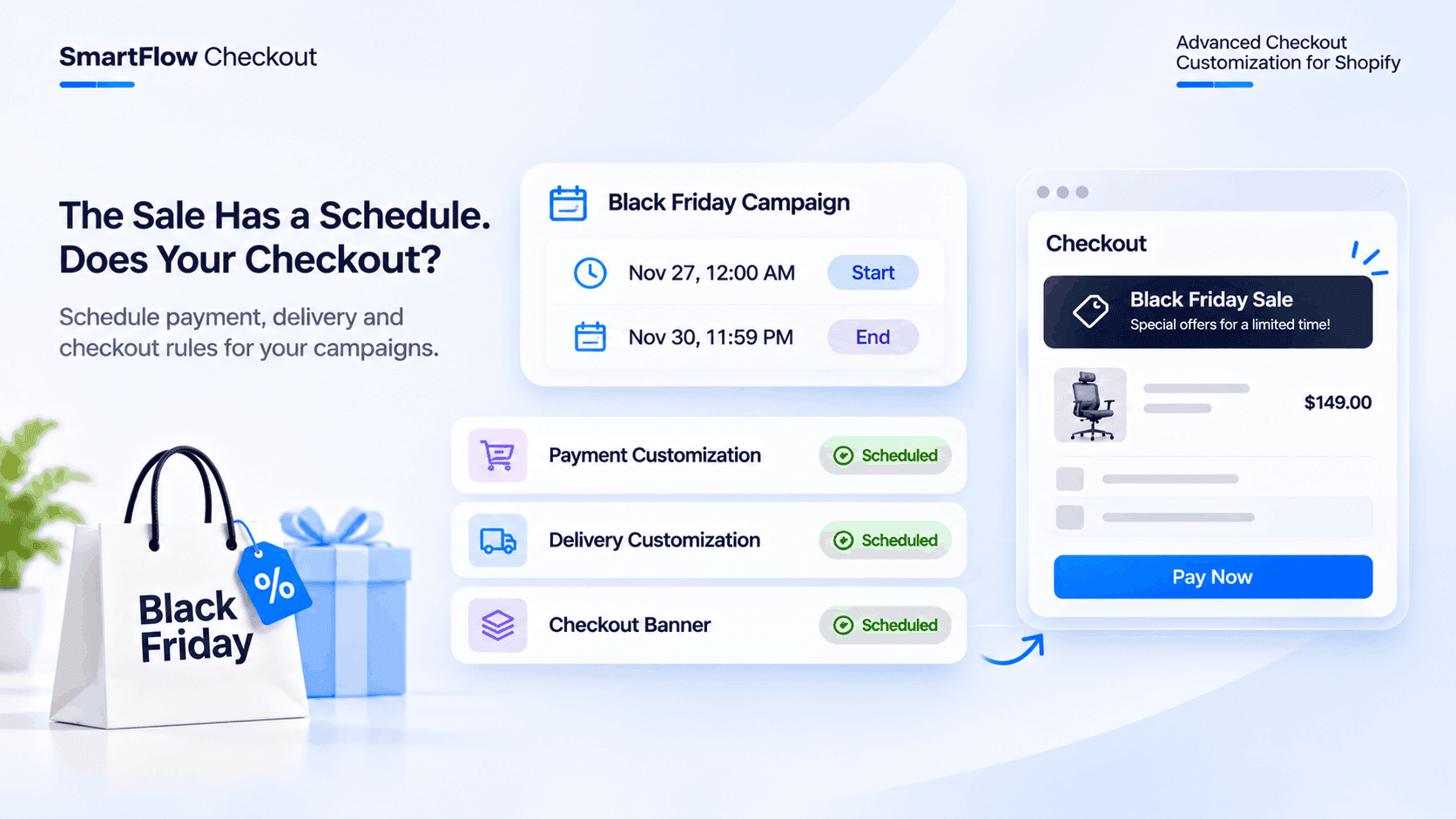
The Black Friday campaign is ready.
The advertisements have been prepared.
The discount codes are configured.
The promotional emails are scheduled.
The campaign starts at midnight on November 27.
And the store expects more orders than usual.
But there is one detail the merchant still needs to think about.
What happens to the checkout when the campaign starts?
The store has special delivery conditions for the promotional period. Some payment methods need different visibility rules. A promotional message should appear during the sale.
Someone needs to activate these configurations at the correct time.
And someone needs to remember to turn them off when the campaign ends.
What if the merchant is sleeping when the sale starts?
What if the campaign ends, but a promotional checkout banner is still active?
The marketing campaign already has a schedule.
Shouldn't the checkout follow one too?
The Campaign Has A Start Date. The Checkout Needs One Too.
Most merchants spend considerable time preparing for major shopping events.
Black Friday, Cyber Monday, holiday promotions and seasonal sales require coordination across different parts of the business.
Marketing teams prepare advertisements.
Inventory teams review stock levels.
Operations teams prepare for increased order volumes.
But checkout configurations also need attention.
Imagine a fashion store preparing for a four-day Black Friday promotion.
The campaign starts on November 27 and ends on November 30.
During this period, the merchant wants to:
- Show a particular payment method only under selected conditions.
- Change which delivery methods customers can select.
- Display a promotional banner during checkout.
- Keep these configurations active only during the campaign.
Without scheduling, the merchant may need to remember when each customization should become active and when it should stop applying.
That creates another operational task during an already busy sales period.
What Happens When Checkout Rules Are Activated Manually?
Consider a merchant running a Black Friday campaign that begins at midnight.
The merchant has prepared the checkout configurations in advance.
But the configurations are still waiting to be activated.
Someone needs to log in, locate the relevant settings and change their status.
Now imagine the campaign ends on November 30.
The promotional delivery configuration should no longer apply.
The checkout banner should stop appearing.
The payment rules should return to their intended post-campaign behavior.
If someone forgets to update these settings, the checkout may continue displaying configurations that were intended only for the promotion.
The problem isn't necessarily the checkout rules themselves.
It is the extra work involved in managing their timing.
A scheduled customization provides a more organized way to handle this.
Schedule Checkout Rules Before The Campaign Begins
Imagine configuring the Black Friday checkout experience several days before the campaign starts.
Instead of waiting until midnight to activate each customization, the merchant prepares the rules in advance and specifies when they should begin and end.
For example:
Campaign: Black Friday 2026
Start: November 27, 2026, 12:00 AM
End: November 30, 2026, 11:59 PM
Purpose: Apply selected checkout customizations during the promotional period.
The merchant configures the relevant start and end dates and saves the customizations.
The scheduled configurations can then activate and expire automatically according to the specified times.
The merchant doesn't have to wait until the campaign begins to make the changes manually.
This is especially useful when several checkout configurations need to follow the same promotional schedule.
Different Checkout Rules Can Have Different Schedules
Not every checkout customization needs to be activated at the same time.
A merchant may want to schedule payment rules for the entire campaign but display a promotional banner only during a particular period.
Another merchant may want a delivery customization to remain active for a longer holiday shipping window.
The important thing is to configure each customization according to its actual business requirement.
Schedule Payment Method Customizations
Suppose an online fashion store wants to adjust payment method visibility during Black Friday.
The merchant has specific conditions for displaying available payment methods.
For example, the store may want to hide a particular payment option for selected cart conditions during the promotional campaign.
With SmartFlow Checkout, merchants can configure payment customizations and optionally schedule their start and end dates and times.
The customization can also use conditions involving customers, carts, products and time.
This allows the merchant to prepare payment visibility rules in advance instead of relying entirely on manual activation.
The payment methods themselves remain subject to the store's configured payment options and Shopify's available capabilities.
Schedule Delivery Customizations
Delivery requirements can also change during promotional campaigns.
Imagine a store offering different shipping options during Black Friday.
The merchant may want to hide a particular delivery method or change the order in which available delivery methods appear under specific conditions.
SmartFlow Checkout supports delivery method customization, including hiding, renaming and reordering available delivery methods.
Merchants can also schedule delivery customizations with start and end dates and times.
For example, a promotional delivery configuration can be prepared before Black Friday and scheduled for the campaign period.
When the scheduled period ends, the customization expires automatically.
This makes it easier to coordinate delivery rules with temporary promotions and seasonal requirements.
Schedule Checkout Banners
Customers may need to know about a special offer while completing their purchase.
For example:
Black Friday Offer: Enjoy our special promotional benefits during the sale.
A merchant can create a custom checkout banner containing relevant promotional information.
SmartFlow Checkout supports scheduling checkout components such as custom banners with specific start and end dates and times.
The merchant can prepare the banner in advance and configure its campaign period.
The banner can then become active and expire according to the configured schedule.
There is no need to manually create the banner at midnight when the sale begins.
One Campaign, Multiple Checkout Customizations
Let's bring everything together.
Imagine a Shopify store preparing for Black Friday.
The merchant wants three different checkout experiences to follow the campaign schedule.
Payment customization: Apply the configured payment visibility rules during the campaign.
Delivery customization: Show or reorder selected delivery methods according to the campaign requirements.
Custom banner: Display a Black Friday message during the promotional period.
Each customization can be configured with its own schedule.
The merchant can prepare all three before the campaign starts.
The checkout configurations no longer need to be treated as last-minute tasks.
They become part of the campaign preparation process.
What About Campaigns That Don't Start At Midnight?
Not every promotion starts at midnight.
Some stores run weekend promotions.
Others launch flash sales for a few hours.
A merchant may want a special delivery configuration to apply only during a holiday weekend.
Another may want a checkout banner to appear during a limited promotional window.
Scheduled start and end dates are useful for these situations too.
For example:
Weekend campaign
Start: Friday, 6:00 PM
End: Sunday, 11:59 PM
Flash sale
Start: Saturday, 12:00 PM
End: Saturday, 6:00 PM
Holiday delivery configuration
Start: December 15
End: December 24
These are illustrative schedules. Merchants should configure the appropriate dates, times and timezone for their store and campaign.
The goal is simple: the checkout customization should follow the intended promotional period.
How To Schedule Checkout Customizations With SmartFlow Checkout
Setting up scheduled checkout customizations starts with preparing the rules before the campaign begins.
Here is how merchants can approach the process.
Step 1: Identify The Checkout Changes You Need
Decide which parts of checkout need to behave differently during the campaign.
For example:
- Payment method visibility.
- Delivery method visibility and ordering.
- Promotional checkout banners.
- Other supported checkout components.
You don't need to schedule every checkout customization.
Focus on the changes that are actually relevant to the campaign.
Step 2: Create The Required Customization
Open SmartFlow Checkout in your Shopify Admin.
Navigate to the relevant section, such as Payment Customization, Delivery Customization or Checkout Extensions.
Create the customization you want to use during the promotional period.
Step 3: Configure The Start And End Dates
For supported customizations, use the calendar option to select the start and end dates and times.
For example:
Start: November 27, 2026, 12:00 AM.
End: November 30, 2026, 11:59 PM.
Check that the selected times match the intended campaign schedule.
Step 4: Configure The Conditions
Some customizations also support conditions that define when they should apply.
SmartFlow Checkout provides more than 25 advanced conditions across areas such as customers, carts, products and time.
Choose the conditions that match the intended checkout behavior.
For example, a payment customization may use a cart-related condition, while a delivery customization may depend on customer or cart information.
Step 5: Save And Review The Configuration
Review the customization status, conditions and scheduled dates.
Make sure the start and end times are correct.
Check that the selected payment methods, delivery methods or checkout components match the intended campaign.
Step 6: Test Before The Campaign Starts
Don't wait until Black Friday to discover a configuration problem.
Review the settings in advance and test the checkout behavior using the available preview and testing options.
Confirm that the customization is active within its intended scheduled period and that the configured conditions behave as expected.
Scheduling Is Useful Beyond Black Friday
Black Friday is an obvious example, but scheduled checkout customizations can support many other business situations.
Christmas And Holiday Promotions
A merchant may want a holiday checkout banner to appear only during the holiday shopping period.
The banner can be prepared and scheduled in advance.
Weekend Offers
A store running weekend promotions may need selected checkout configurations to apply only during the promotional window.
Seasonal Shipping Changes
Some stores have different delivery arrangements during peak seasons.
Scheduled delivery customizations can help coordinate those changes with the relevant dates.
Limited-Time Campaigns
A flash sale may require a specific checkout message or a temporary customization.
Instead of remembering to activate and deactivate the configuration manually, merchants can prepare its schedule beforehand.
Planned Business Events
Store anniversaries, product launches and special promotional events can all involve temporary checkout changes.
A scheduled configuration gives merchants a way to prepare these changes as part of the event planning process.
Scheduling Doesn't Replace Checkout Conditions
There is an important distinction between scheduling a customization and defining when it applies.
A schedule determines the period during which a customization is active.
Conditions determine the checkout situations in which the customization should apply.
For example, a merchant may schedule a payment customization for the Black Friday weekend.
Within that period, the merchant may also configure a condition based on cart value or customer information.
The schedule and conditions serve different purposes.
One controls the time period.
The other controls the circumstances in which the rule applies.
Using both appropriately gives merchants more control over their checkout behavior.
What Merchants Should Check Before Scheduling A Campaign
Before saving scheduled checkout customizations, review a few important details.
- Are the campaign start and end dates correct?
- Are the start and end times accurate?
- Is the intended timezone being used?
- Are the correct payment or delivery methods selected?
- Are the configured conditions accurate?
- Are promotional banners showing the correct information?
- Have the relevant customizations been saved?
- Has the checkout been tested before the campaign starts?
- Have overlapping or conflicting customizations been reviewed?
- Is there a clear plan for checkout behavior after the promotion ends?
A few minutes of preparation can help prevent unnecessary last-minute changes during an important sales campaign.
Frequently Asked Questions
Can Shopify checkout rules be scheduled automatically?
Yes. SmartFlow Checkout supports scheduled start and end dates for supported payment customizations, delivery customizations and checkout components. Merchants can prepare their configurations in advance so they activate and expire according to the selected schedule.
Can I schedule payment method customization in Shopify?
Yes. SmartFlow Checkout allows merchants to schedule payment customizations with specific start and end dates and times. Merchants can configure payment methods to hide, rename or reorder according to their selected conditions.
Can I schedule delivery method changes during Black Friday?
Yes. SmartFlow Checkout supports scheduled delivery customizations. Merchants can configure delivery methods to hide, rename or reorder and define when the customization should become active and expire.
Can I schedule a promotional banner to appear during checkout?
Yes. SmartFlow Checkout supports custom checkout banners with scheduled start and end dates and times. Merchants can prepare promotional messages before a campaign and configure when they should appear.
Do I need to manually deactivate scheduled checkout customizations?
When a supported customization has a configured end date and time, it automatically expires according to that schedule. Merchants should still review their configurations after a campaign to ensure the intended checkout behavior is restored.
Can I schedule checkout customizations for a flash sale?
Yes. Supported SmartFlow Checkout customizations can be configured with specific start and end dates and times. This makes them suitable for planned promotional windows such as flash sales, weekend offers and seasonal campaigns.
Can I combine scheduled checkout rules with conditions?
Yes. SmartFlow Checkout supports conditions for payment and delivery customizations. Merchants can use a schedule to define the active period and conditions to determine when the customization applies.
Does scheduling checkout rules require Shopify Plus?
No. Payment customization and delivery customization are available across supported Shopify plans. However, visual UI checkout components, such as custom banners, require Shopify Plus. Merchants should check the requirements of the specific feature they want to use.
The Sale Has A Schedule. Your Checkout Should Follow It.
The Black Friday campaign starts on November 27.
The advertisements are ready.
The promotional offers are prepared.
The store is expecting more customers.
The merchant shouldn't have to remember to activate every scheduled checkout configuration at the exact moment the campaign begins.
Payment customizations, delivery customizations and supported checkout components can be prepared in advance with scheduled start and end dates.
The merchant can review the rules, configure the conditions and test the checkout before the promotion goes live.
When the campaign period begins, the scheduled configurations activate according to their settings.
When it ends, they expire according to the configured schedule.
SmartFlow Checkout gives Shopify merchants a way to coordinate checkout customizations with the timing of their campaigns.
Because a promotional campaign doesn't end at the marketing calendar.
The checkout experience should be ready when the campaign starts and return to its intended behavior when the campaign ends.