Show the Right Shopify Payment Methods for Each Order
More Options Are Not Always Better
Imagine a Shopify store offers several payment methods.
A customer reaches checkout and sees:
Credit card
Shop Pay
PayPal
Cash on Delivery
Bank transfer
Manual payment
At first glance, more options sounds better.
But not every option necessarily makes sense for every order.
A $25 local order may be perfectly suitable for Cash on Delivery.
A $2,000 high-value order may be different.
A business customer may need a payment arrangement that should not appear to a normal retail shopper.
A payment method available in one market may not be appropriate in another.
The question is not:
How many payment methods can we show?
It is:
Which payment methods actually make sense for this customer and this order?
That is where conditional payment rules become useful.
Payment Context Changes
Payment is not a completely isolated checkout decision.
The right options may depend on what the customer is buying and who is buying it.
Relevant conditions can include:
- Cart value
- Customer type
- Market or country
- Products in the cart
- Product category
- Order risk
- Business payment policy
Imagine two customers.
The first places a $35 order for a low-cost accessory.
The second places a $1,500 order containing expensive electronics.
Offering Cash on Delivery to the first customer may fit the merchant's policy.
The same option may create too much fulfillment exposure on the second order.
Another example is B2B.
A retail shopper may need normal consumer payment methods.
An approved business buyer may have agreed payment terms or another business-specific arrangement.
The checkout should reflect those differences.
Where SmartFlow Checkout Fits
With SmartFlow Checkout, merchants can configure supported payment customization rules around checkout conditions.
For example:
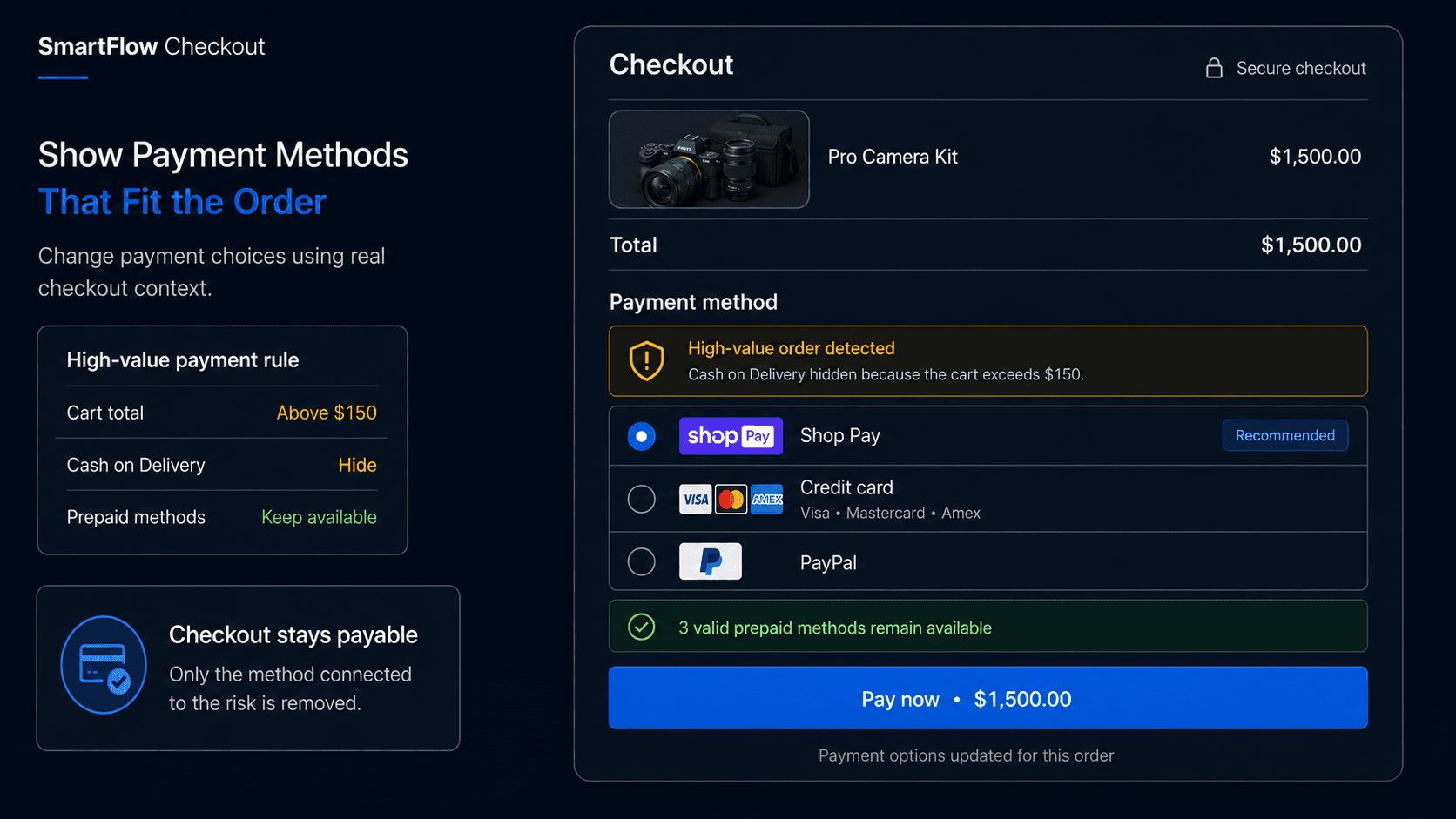
"Hide Cash on Delivery when the cart total is above $150."
Or:
"Only show our bank-transfer option to approved B2B customers."
Or:
"If the cart contains products from the High Value collection, keep prepaid methods available and hide COD."
The process becomes:
Customer reaches payment → Check conditions → Apply payment policy → Show relevant methods
The merchant defines the commercial rule.
SmartFlow Checkout helps translate that rule into the payment experience.
The goal is not to remove options unnecessarily.
It is to make the available choices match the order.
Hide Only What Needs Hiding
Payment rules can become harmful if they are too broad.
Suppose the merchant wants to reduce high-value COD exposure.
The correct rule might be:
High-value order → Hide COD
That does not automatically mean:
High-value order → Hide every payment option except one card gateway
Trusted prepaid methods may still be perfectly suitable.
Over-restricting checkout can create unnecessary abandonment.
The same applies to market rules.
If one manual payment method is unsupported in a region, remove that method.
Do not assume every alternative payment option should disappear too.
A useful principle is:
Restrict the method connected to the actual business problem.
That keeps payment logic precise instead of turning it into a blanket limitation.
Prioritize Better Options
Sometimes the merchant does not need to hide a payment method.
Reordering can be enough.
Imagine most customers successfully use:
Shop Pay
Credit card
while a manual bank-transfer option is used only occasionally.
The merchant may want the common methods to appear more prominently.
Another store may serve mostly B2B customers and prefer the approved business payment option to appear first for eligible buyers.
Payment customization can therefore be about hierarchy as well as eligibility.
The merchant can think in three layers:
Relevant and preferred → Show prominently
Relevant but secondary → Keep available
Not appropriate → Hide
That produces a more deliberate payment experience than simply showing every configured method in the same way.
Rename Methods Clearly
Payment method names can also affect customer understanding.
Internal or gateway-oriented labels may not always be obvious to shoppers.
For example, a merchant may want a supported manual payment method to use a clearer customer-facing label.
The wording should explain what the customer is choosing without creating misleading expectations.
Good naming can be especially important for:
Bank transfer
Pay on invoice
Business payment
Cash on Delivery
A customer should know what happens after selecting the option.
Renaming should improve clarity.
It should not disguise restrictions, fees, or payment requirements.
The payment method still needs to match the underlying checkout and fulfillment process.
Match Rules to Customers
Customer context can also influence payment eligibility.
Imagine an approved wholesale customer has established business payment terms.
The merchant may want that option available only to buyers who actually qualify.
Meanwhile, retail shoppers should continue seeing the normal consumer payment experience.
The rule might be:
Approved B2B customer → Business payment method available
Normal retail customer → Consumer payment methods
The same principle can apply to other defined customer groups.
But customer-based rules should be reliable.
A tag or account condition that is applied inconsistently can create checkout confusion.
If payment eligibility depends on customer status, the process that maintains that status also needs to be trustworthy.
Otherwise the payment rule may behave correctly while the underlying customer data is wrong.
Test Every Payment Path
Payment rules affect one of the most important points in checkout.
They should be tested carefully.
Useful test cases include:
- Low-value cart
- High-value cart
- Product that triggers a payment rule
- Product removed from the cart
- Different customer types
- Different countries or markets
- Discounts changing cart value
- Mobile checkout
- Returning customers
Also confirm that the customer still has a valid way to pay.
A rule that successfully hides one method but leaves no usable payment option creates a much bigger problem.
The right question is not only:
Did the rule fire?
It is:
Can the customer still complete the purchase in a valid way?
Payment customization should simplify checkout, not accidentally dead-end it.
Measure Payment Outcomes
A payment rule should be evaluated by business outcome, not by how often it runs.
Useful measurements can include:
- Usage by payment method
- Checkout completion by payment method
- Abandonment after a method is hidden
- COD refusal or return-to-sender outcomes
- Payment-method errors
- Manual payment usage
- High-value order completion
- Support questions about unavailable methods
Suppose COD is hidden above $150.
Checkout conversion drops slightly.
But prepaid completion increases and refused high-value deliveries decline.
That may be a worthwhile tradeoff.
Another rule may hide a method that customers strongly prefer without producing any operational benefit.
That one may need to change.
The objective is not:
Fewer payment methods
It is:
Better payment choices for the order being placed.
Frequently Asked Questions
Can Shopify payment methods be hidden conditionally?
Yes. Shopify supports payment customization capabilities that can hide supported payment methods according to eligible checkout conditions.
Can payment methods change based on cart value?
Yes. Cart value can be used in supported payment customization logic, allowing merchants to apply different payment policies to different order values.
Can payment methods change by customer type?
Where the relevant customer context is available and supported, merchants can use customer conditions to provide different payment experiences for groups such as approved B2B buyers.
Should high-value orders have fewer payment options?
Not automatically. Merchants should restrict only the methods that create a specific operational or financial concern and keep appropriate alternatives available.
Can payment methods be renamed or reordered?
Shopify payment customization supports operations such as hiding, renaming, and reordering supported payment methods.
Can SmartFlow Checkout manage payment rules?
SmartFlow Checkout can help merchants configure supported payment customization rules around cart, customer, product, and market conditions.
Can payment rules hurt conversion?
Poorly designed rules can. Merchants should test whether shoppers still have suitable payment choices and compare conversion changes with the operational benefit created by the rule.
Show the Right Choice
A checkout does not become better simply because it shows more payment buttons.
Some options may not apply.
Some may create unnecessary risk.
Some may belong only to specific customers.
Others may deserve more prominence because they are easier for shoppers to use.
The useful process is:
Check order → Understand context → Apply payment policy → Show relevant choices → Let customer pay
SmartFlow Checkout helps merchants make that payment experience more deliberate by applying supported rules around the actual customer and cart instead of treating every checkout exactly the same.
The goal is simple:
Show enough payment options to make purchasing easy, but only the options that actually make sense for that order.