Keep Shopify Collections Clean When Product Conditions Change
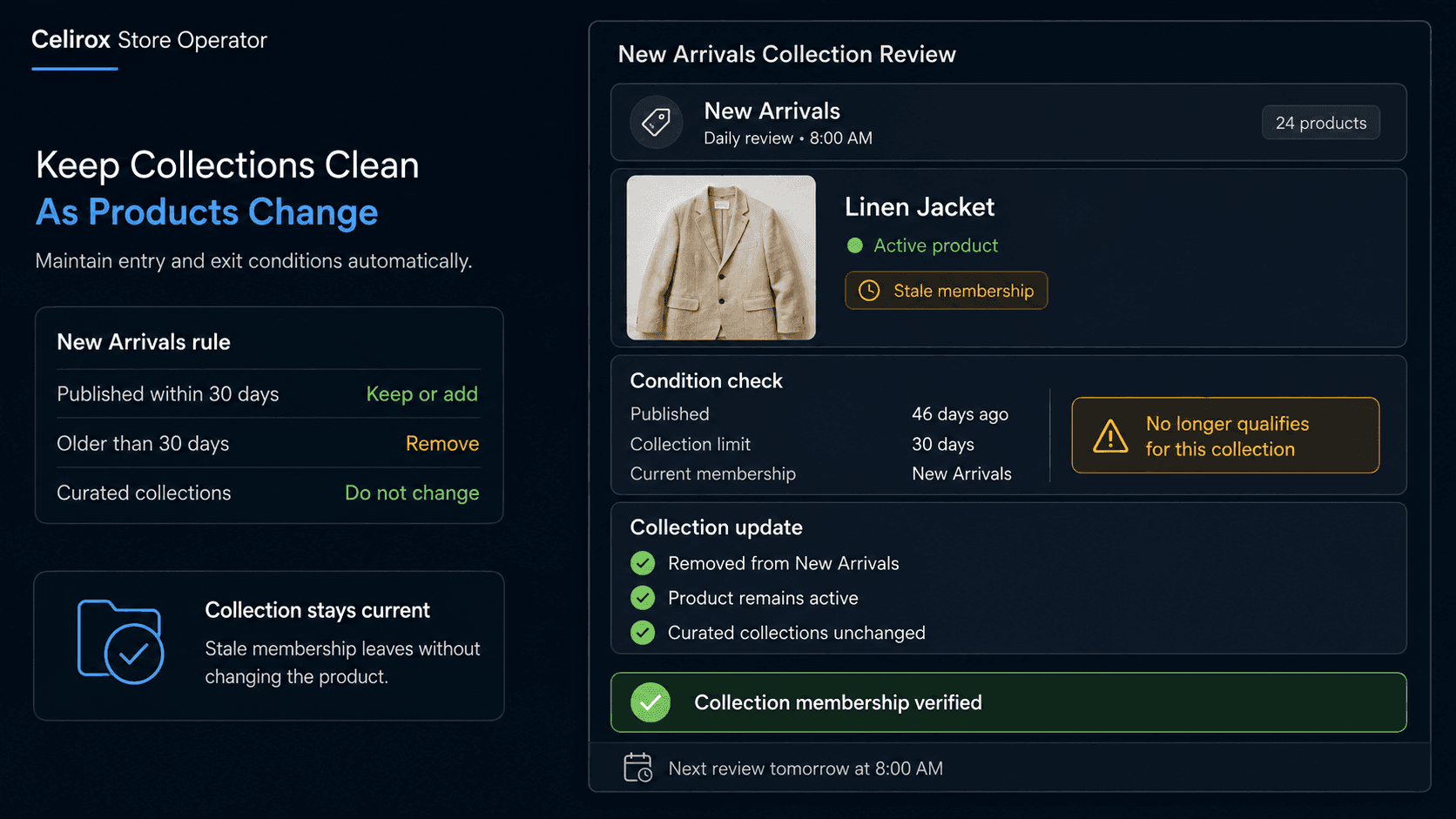
Collections Become Stale
Imagine a fashion merchant creates a New Arrivals collection.
Every new product goes there when it launches.
Three months later, someone notices a jacket that has been in the collection since spring.
It is not new anymore.
Another collection called Low Stock contains several products that were replenished last week.
A Clearance collection still contains an item whose promotional price ended.
A Back in Stock collection has products that were restocked months ago.
Nothing is technically broken.
Every collection still exists.
Every product page still works.
The problem is that the reason those products entered the collection is no longer true.
Collection maintenance becomes difficult when product membership changes faster than someone remembers to clean it up.
That is the real merchandising task.
Membership Needs a Reason
Before managing a collection continuously, the merchant needs to define why a product belongs there.
A collection called New Arrivals might mean:
Published within the last 30 days
A Low Stock collection might mean:
Available inventory below 5 units
A Clearance Review collection might mean:
Product has remained slow-moving for 90 days and has available inventory
The important part is turning the collection name into a business condition.
Without that definition, nobody knows when a product should leave.
For example, this is vague:
Keep New Arrivals updated.
This is much clearer:
Products published during the last 30 days belong in New Arrivals. Products older than 30 days should be removed.
The same principle applies to inventory, pricing, product status, tags, vendors, and other merchandising conditions.
Once the merchant defines both entry and exit conditions, maintenance becomes much easier to control.
Run Scheduled Collection Reviews
Some collection conditions change gradually rather than during one specific store event.
New Arrivals is a good example.
A product does not suddenly trigger an obvious event when it becomes 31 days old.
That makes the task well suited to a recurring review.
A merchant could tell Celirox Store Operator:
"Every morning, review products in my New Arrivals collection. Remove products that were published more than 30 days ago, and show me any active products published during the last 30 days that are missing from the collection."
The workflow becomes:
Scheduled review → Read collection → Check product dates → Find stale membership → Add or remove products → Verify
Instead of somebody opening the collection every few weeks and trying to remember what is old, the same check can happen consistently.
The schedule can reflect the business.
A fast-moving fashion store may review daily.
A smaller catalog may only need a weekly check.
The useful part is that the merchant no longer needs to remember the task.
React When Conditions Change
Other collection rules are better handled when the underlying product state changes.
Consider Low Stock.
A merchant may define:
Below 5 units → Add to Low Stock
Then inventory arrives.
The product now has 40 units.
If nothing removes it from the collection, the storefront continues telling the wrong merchandising story.
An event-driven rule can handle both directions:
"When available inventory drops below 5 units, add the product to Low Stock. When inventory rises above 20 units, remove it."
Now the collection follows the current product state.
The same approach can work for other well-defined situations.
For example:
Product becomes available again → Add to a temporary Back in Stock collection
Promotion ends → Remove from promotional collection
Product status changes → Review whether it still belongs in an active merchandising collection
The exact action depends on how the merchant organizes the store.
The key is that collection membership should change when the business condition changes.
Handle Entry and Exit
Many merchandising rules fail because only the entry condition is defined.
The merchant thinks:
When X happens, add product to collection.
But nobody defines:
When should it leave?
That creates permanent collection growth.
Imagine a merchant says:
"When a product comes back in stock, add it to Back in Stock."
That works initially.
After six months, the collection may contain dozens of products that are no longer meaningfully "back."
A stronger rule includes an exit condition.
For example:
Restocked → Add to Back in Stock
Seven days after restock → Remove
Or:
Inventory restored above threshold → Add
Product sells out again → Remove
The correct logic depends on what the collection is meant to communicate.
The important habit is to define both sides:
Why does a product enter?
What makes it stop qualifying?
That keeps temporary merchandising from becoming permanent clutter.
Protect Manual Merchandising
Not every Shopify collection should be managed entirely by rules.
Some collections are intentionally curated.
A merchant may build:
Editor's Picks
Holiday Gift Guide
Founder Favorites
Summer Lookbook
A product may belong there because of creative merchandising judgment rather than inventory, age, or another measurable condition.
Store Operator should not remove a product simply because it does not match a generic rule.
The merchant can keep certain collections outside recurring maintenance or define narrower instructions.
For example:
"Only manage New Arrivals and Low Stock. Do not change products in manually curated collections."
Or:
"Show me recommended removals from Holiday Gift Guide, but ask for approval before changing the collection."
This distinction matters.
Operational maintenance should support merchandising judgment, not overwrite it.
Watch Product-Level Exceptions
Catalog rules often become more complicated when variants and product state are involved.
Suppose a product has five sizes.
Four are sold out.
One still has inventory.
Should the entire product leave an available-products collection?
That depends on the merchant's policy.
Another product may have inventory tracking disabled.
A preorder item may intentionally remain purchasable with zero available inventory.
An archived or draft product may still carry old collection associations that deserve cleanup.
A useful collection workflow should account for these exceptions instead of assuming every inventory value means the same thing.
The merchant may define:
Only evaluate active products
Ignore products configured to continue selling when out of stock
Use total available inventory across relevant variants
Ask for approval when product state is ambiguous
These details are what turn a simple rule into a reliable merchandising process.
Use Store Pulse for Drift
Not every collection problem needs a permanent rule from day one.
Sometimes the merchant does not know which parts of the catalog are becoming stale.
This is where Store Pulse can add another layer.
Store Operator can monitor store conditions and surface opportunities that deserve attention.
For example, it might identify situations such as:
Products in a temporary collection long after the campaign ended
Products whose current state no longer matches the purpose of the collection
Collections that have not changed despite frequent product updates
The merchant can then decide whether the issue deserves a one-time correction or a recurring rule.
That creates a useful pattern:
Detect drift → Review suggestion → Define rule if needed → Apply change → Continue monitoring
Not every observation needs immediate execution.
Sometimes the valuable first step is simply noticing that the catalog has stopped matching the merchant's intent.
Measure Merchandising Hygiene
Collection maintenance should reduce real work and improve catalog accuracy.
Useful measurements can include:
- Stale products removed from collections
- Newly eligible products added
- Products requiring manual review
- Temporary collection entries that exceeded their intended duration
- Inventory-based membership corrections
- Time spent manually reviewing collections
- Collection rules that repeatedly encounter exceptions
The merchant should also watch customer-facing results.
For example, does New Arrivals actually contain recent products?
Does Low Stock reflect current inventory?
Are campaign collections cleaned up after promotions?
The goal is not to move as many products as possible.
It is to keep collection membership aligned with what each collection promises.
A collection should remain useful because its contents continue to mean something.
Frequently Asked Questions
Why do Shopify collections become outdated?
Products often enter collections because of temporary conditions such as launch date, stock level, restock status, or promotions. If there is no process for removing them when those conditions change, collection membership becomes stale.
Can Store Operator review collections on a schedule?
Yes. Merchants can create scheduled recurring tasks that review relevant products and collection conditions at intervals that fit the business.
Can products be added or removed when inventory changes?
Store Operator can use event-driven rules for supported Shopify events and conditions, allowing merchants to define actions when relevant product or inventory state changes.
Should every collection be managed automatically?
No. Curated collections often depend on human merchandising judgment. Merchants can exclude those collections or require approval before making changes.
What is the difference between this and inventory monitoring?
Inventory monitoring focuses on understanding inventory levels and identifying stock conditions. Collection maintenance focuses on whether the current product state still justifies the product's membership in a merchandising collection.
Can New Arrivals be maintained by product age?
A merchant can define a recurring rule based on a product's publication or launch timing, such as reviewing whether products older than a chosen period should remain in the collection.
What happens when a product becomes eligible again?
The merchant can define reverse conditions so Store Operator can add the product again when the relevant business condition returns.
Keep Merchandising Current
Creating a Shopify collection is easy.
Keeping it accurate month after month is harder.
Products launch.
Inventory changes.
Promotions end.
Restocks arrive.
Old products remain where somebody placed them weeks ago.
The work becomes:
Check collection → Inspect products → Remember the rule → Remove stale items → Add missing items → Repeat
Celirox Store Operator can turn that repetitive cleanup into an ongoing operating process:
Monitor → Compare conditions → Update membership → Handle exceptions → Recheck
Scheduled tasks can handle conditions that change with time.
Event-driven rules can react when product state changes.
Store Pulse can surface merchandising drift the merchant did not already know to look for.
The result is not simply cleaner collections.
It is a catalog where the storefront continues to reflect what the merchant actually means by New, Low Stock, Back in Stock, Clearance, or any other operational collection.