When Customers Make a Mistake After Ordering: Let Them Fix It Before Fulfillment
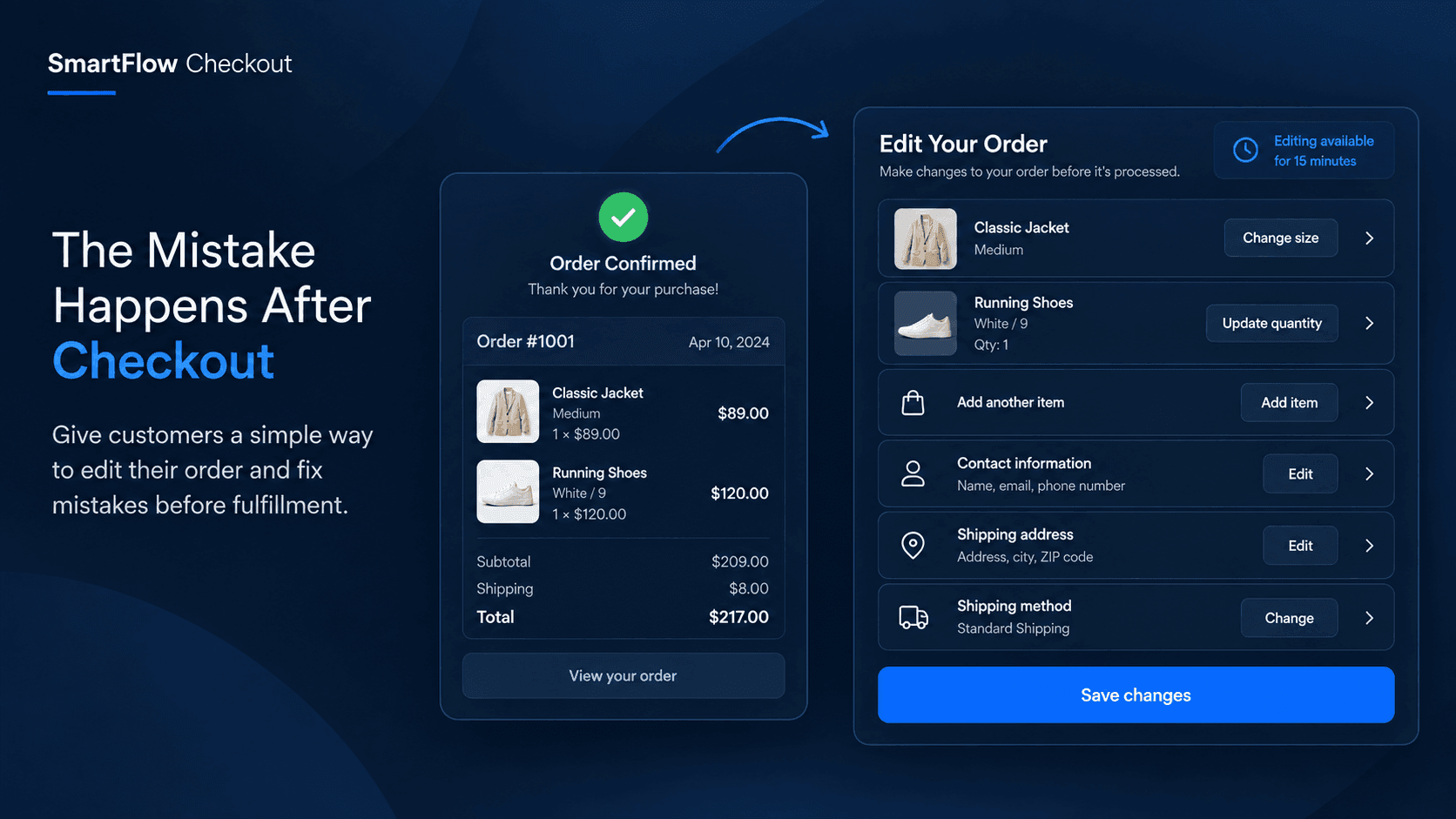
The Mistake Happens After Checkout
A customer finally completes their order.
The payment goes through. The confirmation email arrives. Everything looks finished.
Then they notice it.
They selected the wrong size.
Or maybe they ordered two units instead of one. They forgot an item. Their phone number has a typo. They entered the wrong apartment number.
The customer now has two choices: contact the store and hope someone catches the order in time, or cancel the order and place another one.
For the merchant, a tiny customer mistake can quickly become a support task.
That is where controlled order editing can make the process much easier.
Why Small Mistakes Become Big
Order mistakes are not necessarily caused by a difficult checkout.
Sometimes customers simply notice something after the order is already confirmed.
A customer might realize:
- They selected the wrong product variant.
- They need to change the quantity.
- They forgot to add another product.
- Their phone number is incorrect.
- Their shipping address needs a correction.
- They entered the wrong city or ZIP code.
- They selected the wrong shipping option.
Without an editing workflow, these changes often require a support conversation.
The merchant has to find the order, understand what needs changing, determine whether fulfillment has started, make the change, and communicate back to the customer.
That is a lot of operational work for something that could have been handled in a controlled editing window.
Give Customers A Short Window
The goal is not to let customers change an order forever.
The goal is to give them a short opportunity to correct genuine mistakes before the order moves too far into fulfillment.
For example, a merchant could allow order changes shortly after checkout.
During that window, the customer could see an option to update eligible information.
They notice the wrong size.
They change it.
They realize they forgot another item.
They add it.
They entered the wrong phone number.
They correct it.
Once the editing window closes, the order follows the normal fulfillment process.
This creates a useful balance: customers get flexibility, while merchants maintain control.
Control What Customers Can Change
Order editing should not mean unlimited changes.
Merchants need control over which fields and actions are available.
With SmartFlow Checkout, the editing workflow can support changes such as product quantities, adding or removing eligible items, product variants, customer contact information, shipping address details, and shipping methods.
Merchants can also configure conditions around when editing should be available.
That means the experience can be designed around the store's actual fulfillment process instead of giving every customer unrestricted access to every order.
A Simple Customer Experience
Imagine a customer ordering from a clothing store.
They purchase a jacket and complete checkout.
A few minutes later, they open their order and notice they selected Medium instead of Large.
Instead of emailing support, they use the available order-editing option.
They select the correct variant and confirm the change.
The merchant does not need to manually handle a size-change request.
Now consider another customer.
They place an order for two products and immediately realize they forgot one more item.
If the merchant's editing rules allow it, the customer can add the product during the available editing period.
The order can then continue through the normal fulfillment workflow.
The important part is that the merchant defines the boundaries.
Reduce Unnecessary Support Work
Many post-purchase messages are not really support problems.
They are simple corrections.
A customer saying:
"Can you change my size?"
"Can you update my phone number?"
"I entered the wrong ZIP code."
"Can you remove one item?"
"Can I add this product?"
These requests still require someone on the merchant's team to process them.
When customers can safely handle eligible changes themselves, the support team can spend more time on issues that actually require human attention.
This is especially useful when order volume increases and fulfillment teams have less time to manually modify individual orders.
Keep Fulfillment In Control
The most important part of order editing is timing.
A customer should not be able to change an order after it has already moved beyond a merchant's operational limits.
SmartFlow Checkout supports a controlled editing window so merchants can decide how long customers have to make eligible changes.
This creates a clear process:
Order placed → Editing window → Order finalized → Fulfillment
The customer gets flexibility at the right moment.
The merchant keeps control after that window closes.
Make Corrections Less Complicated
The best post-purchase experience is often the one that prevents a small problem from becoming a large workflow.
A customer should not have to create a support ticket just because they selected the wrong variant two minutes ago.
A merchant should not have to manually process a simple phone-number correction.
And a fulfillment team should not have to deal with avoidable cancellations and replacement orders.
A controlled editing workflow turns these situations into simple, structured actions.
Instead of:
Mistake → Support request → Manual investigation → Order change
the experience can become:
Mistake → Customer correction → Order continues
Build Rules Around Your Store
Every store has different fulfillment requirements.
A merchant selling apparel may care most about product variants and quantities.
A merchant selling gifts may care about shipping addresses and contact information.
A merchant selling larger products may want tighter controls around shipping methods and order changes.
SmartFlow Checkout lets merchants build order-editing behavior around these requirements rather than using one rigid workflow for every order.
The objective is simple: give customers enough flexibility to fix genuine mistakes without removing merchant control.
Turn Post-Purchase Into A Better Experience
Checkout should not be treated as the end of the customer journey.
The few minutes after an order is placed can still matter.
If customers discover a mistake and immediately have a safe way to correct it, the experience feels more forgiving.
For merchants, that can mean fewer avoidable support conversations and fewer situations where a simple mistake turns into a cancellation or replacement order.
SmartFlow Checkout brings that control into the post-purchase workflow, helping merchants create a smoother path from checkout to fulfillment.
Frequently Asked Questions
Can customers edit orders after checkout?
Yes. SmartFlow Checkout supports controlled order editing after checkout, allowing merchants to define the editing window and eligible changes.
What order details can customers change?
Depending on the merchant's configuration, supported changes can include quantities, adding or removing items, product variants, customer name, email, phone number, shipping address, city, ZIP code, and shipping method.
Can merchants control the editing period?
Yes. Merchants can configure a limited time window during which eligible order changes can be made.
Can merchants control which changes are allowed?
Yes. The editing workflow can be configured around the merchant's requirements and conditions.
Is order editing available on Shopify Plus only?
No. SmartFlow Checkout's order-editing functionality is available across Shopify plans. Shopify Plus is required for SmartFlow's separate checkout extension features.
Give Customers A Safer Way To Fix Mistakes
Customers will sometimes make mistakes after placing an order.
The question is what happens next.
Instead of turning every small correction into a support ticket, merchants can provide a controlled opportunity for customers to fix eligible details before fulfillment.
SmartFlow Checkout helps make that process structured, flexible, and easier to manage.
Give customers room to correct mistakes while keeping your fulfillment process under control.