Summarize Unread Emails Every Morning and Highlight What Needs Action
Too Many Unread Emails
Imagine opening your inbox at 8:30 in the morning.
There are 47 unread emails.
Some are newsletters.
Some are automated notifications.
A few are internal updates.
One customer needs an answer today.
A partner sent a document that needs review.
Someone confirmed a meeting for the afternoon.
A vendor asked a question that can wait.
Another message contains a deadline hidden halfway through a long email thread.
The difficult part is not reading email.
It is deciding:
What actually needs my attention?
That decision happens again every morning.
You open messages one by one, scan the subject, read enough context to understand what happened, decide whether you need to act, and try to remember the important ones.
A useful inbox summary should not tell you what every email says. It should tell you what matters and what you need to do next.
That is the difference between a basic email digest and an operational morning brief.
Summaries Need Priorities
A traditional email summary can still create too much work.
Imagine receiving:
Email 1: Product newsletter about new features
Email 2: Customer asking for a revised proposal by 2 PM
Email 3: Calendar notification
Email 4: Partner sending final agreement for review
Email 5: Weekly analytics report
A summary that gives each message equal importance does not solve the real problem.
The user still has to decide what deserves attention.
A better brief should separate messages by meaning.
For example:
Urgent
Customer needs revised proposal by 2 PM.
Needs Reply
Partner is waiting for confirmation on the agreement.
Needs Action
Review attached pricing document before tomorrow's meeting.
Informational
Weekly product analytics report arrived.
Now the inbox becomes a work plan rather than a pile of unread messages.
Where AI Operator Fits
With Celirox AI Operator, a user can describe the morning review in plain English.
For example:
"Every morning, review my unread emails from the last 24 hours. Ignore newsletters, promotional emails, and routine system notifications. Summarize important messages, highlight anything that needs my action, include deadlines or meetings mentioned, and group the results into urgent, needs reply, needs action, and informational."
The operating loop becomes:
Review unread email → Understand context → Filter noise → Extract actions → Detect deadlines → Prioritize → Create morning brief
The important part is understanding the conversation rather than relying only on subject lines.
An email titled:
Quick question
might contain an urgent customer request.
Another titled:
URGENT OFFER
might simply be marketing.
Meaning matters more than formatting.
Separate Noise From Work
A large part of inbox overload comes from messages that are technically unread but do not require a decision.
Examples include:
- Newsletters
- Product announcements
- Marketing emails
- Automated receipts
- Routine system notifications
- Social network updates
- Recurring reports
That does not mean these emails are worthless.
It means they should not compete equally with:
Customer waiting for response
Document requiring approval
Payment issue
Meeting rescheduled
Deadline approaching
AI Operator can classify the inbox according to the user's priorities.
A founder might care deeply about partnership emails.
A support manager may prioritize customer escalations.
A salesperson may care about prospect replies.
The morning summary should therefore reflect the person's role rather than one universal definition of important email.
Extract the Actual Action
Some important emails do not state the required action clearly.
Consider:
"Hi Sarah, we reviewed the latest version and everything looks good from our side. Could you update the pricing section with the numbers from yesterday's call and send the final version before Thursday afternoon? Thanks."
A useful summary should not stop at:
They reviewed the latest version.
The important part is:
Action: Update pricing section and send final version.
Deadline: Thursday afternoon.
Another email might say:
"We can move ahead. Please send over a few times next week."
The action is:
Reply with meeting availability.
Extracting the next step is what turns a summary into something operational.
The user should be able to look at the brief and immediately understand what requires attention.
Understand Conversation Context
Email threads create another problem.
The newest unread message may make little sense without the messages before it.
Imagine the latest reply says:
"Yes, option two works for us."
A basic summary might repeat that sentence.
But what was option two?
Was it a meeting time?
Pricing structure?
Implementation plan?
Contract term?
AI Operator can review the relevant conversation context before summarizing the latest message.
A useful result might become:
Acme Corp confirmed the second implementation option: phased rollout beginning September 14. No reply needed unless the date changes.
That is much more useful than:
Acme Corp said option two works.
The summary should reduce the need to reopen the thread whenever enough context already exists.
Highlight Deadlines and Meetings
Deadlines are easy to miss because they are often written casually.
A message might say:
Could you send this over by Friday?
Or:
We need approval before the 3 PM client call.
Or:
Let's review this tomorrow morning.
These details deserve more visibility than normal summary text.
A morning brief can pull them into a dedicated section:
Today
- Send revised proposal by 2 PM
- Approve campaign copy before 3 PM meeting
- Reply to onboarding question
Upcoming
- Contract comments due Friday
- Customer review meeting Monday
This helps convert email into a time-aware work list.
It also reduces the chance that an important date remains buried inside a long conversation.
Know When No Reply Is Needed
Not every important email requires a response.
Suppose a colleague writes:
"The customer approved the launch. We're deploying at 4 PM today. I'll send another update when it is complete."
That may be important.
But the user probably does not need to reply.
The brief could say:
Informational - Customer approved launch. Deployment scheduled for 4 PM. No action required.
This distinction matters.
If every important email becomes Needs Reply, the morning brief quickly becomes another noisy inbox.
A useful system should distinguish between:
Read this
Reply to this
Do something
Watch this
No action needed
That makes the output more trustworthy.
Make the Brief Actionable
The best morning brief should be short enough to scan but detailed enough to act on.
For example:
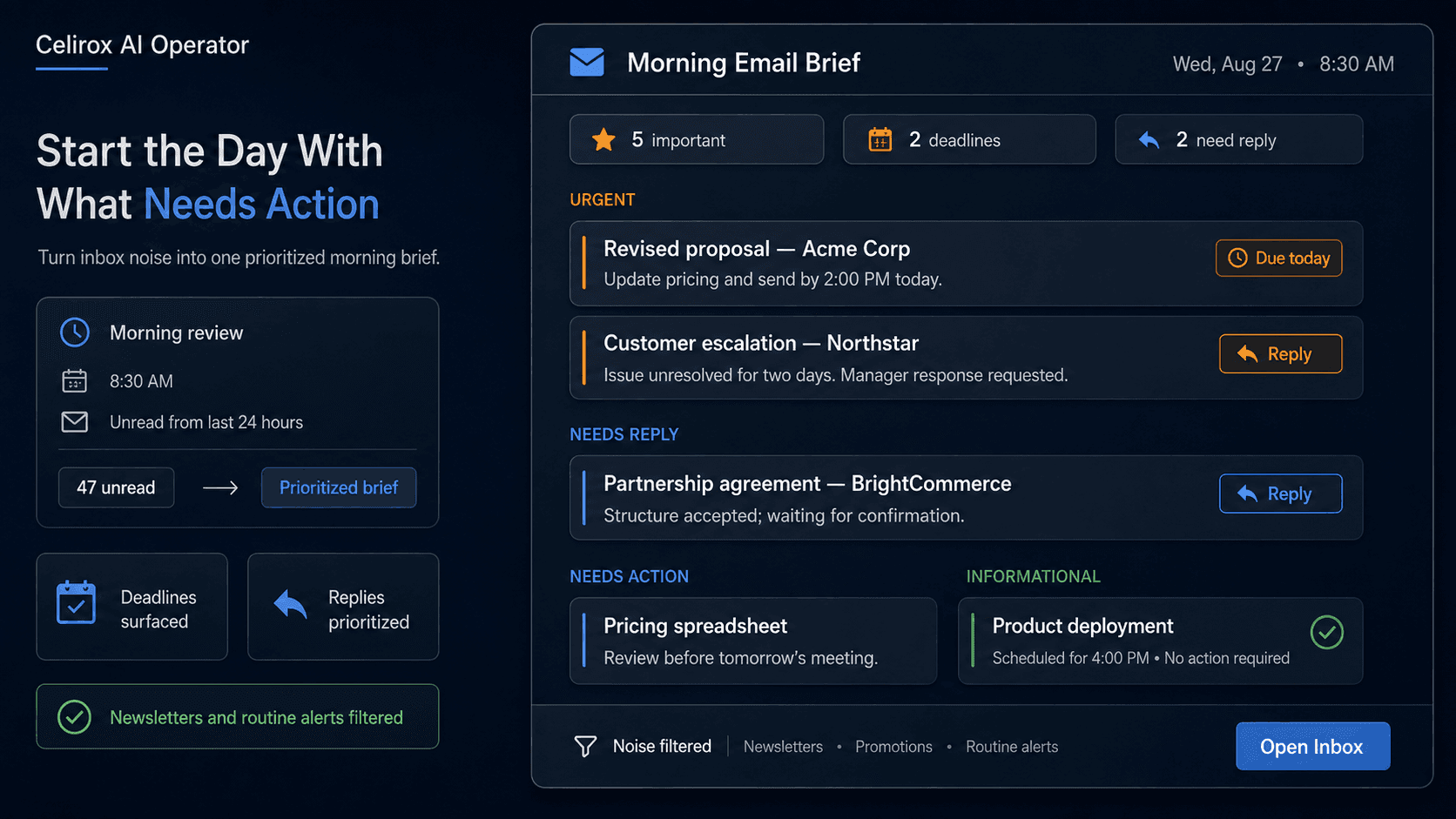
Urgent
1. Revised proposal - Acme Corp
Needs updated pricing and delivery by 2 PM today.
2. Customer escalation - Northstar
Support issue unresolved for two days. Customer requested manager response.
Needs Reply
3. Partnership agreement - BrightCommerce
They accepted the structure and are waiting for confirmation.
Needs Action
4. Pricing spreadsheet
Finance sent updated numbers to review before tomorrow's meeting.
Informational
5. Product deployment
Engineering confirmed release is scheduled for 4 PM. No action required.
That is much easier to use than 40 individual inbox notifications.
The goal is not to replace email.
It is to make the first decision about email faster.
Frequently Asked Questions
Can AI Operator summarize unread emails every morning?
Yes. A recurring task can review unread emails during a defined time window and prepare a morning summary according to the user's instructions.
Can newsletters and promotional emails be ignored?
Yes. The user can define which types of messages should be treated as low priority or excluded from the main brief.
Can it identify emails that need a reply?
AI Operator can review message context and classify relevant emails according to whether they appear to require a response, action, review, or no immediate action.
Can it detect deadlines inside emails?
Yes. It can identify dates, times, and deadline language contained in messages and highlight those details in the brief.
Can it understand an email thread instead of only the latest message?
Where the relevant conversation is available, the Operator can use thread context to create a more meaningful summary of what changed and what action is required.
Can I choose my own priority categories?
Yes. For example, a user could request categories such as urgent, needs reply, needs action, waiting on someone, and informational.
Will every unread email appear in the summary?
Not necessarily. The workflow can be configured to suppress low-value messages and focus the main brief on email that is relevant to the user's work.
Can the brief run at a specific time every day?
Yes. Scheduled recurring tasks can be configured to run at a chosen time or schedule.
Start With What Matters
Most people do not need another inbox.
They need a faster way to understand the inbox they already have.
The useful morning process is:
Review → Filter → Understand → Prioritize → Extract actions → Highlight deadlines → Brief
Instead of opening dozens of unread messages before knowing what deserves attention, the user can begin with the important work already separated from the noise.
Celirox AI Operator can turn a recurring inbox review into a daily operating routine that focuses on decisions rather than message count.
The result is simple:
Fewer emails to inspect. Clearer priorities. Less chance of missing the message that actually mattered.