The Ring Has a Matching Pair. Give Customers a Reason to Buy Both.
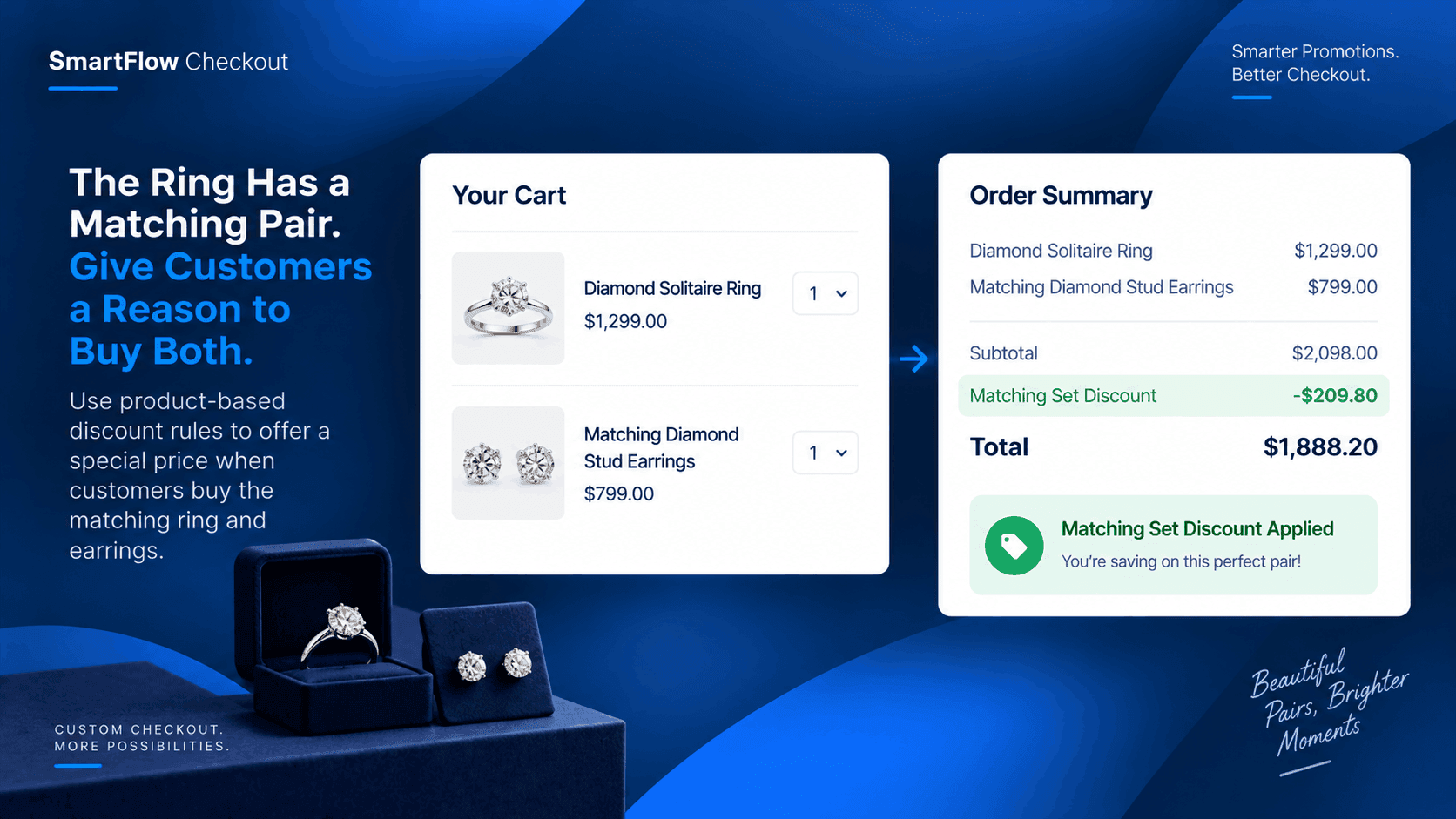
A customer finds a diamond solitaire ring they love.
They add it to the cart and head toward checkout.
But the jewelry store also sells a pair of diamond stud earrings designed to match that ring perfectly.
The store would like to encourage customers to buy both.
There is just one problem.
The promotion should not apply to every ring and every pair of earrings in the store.
The offer is specifically for this ring and its matching earrings.
That is where a product-based checkout discount becomes useful.
The Store Has a Specific Offer
Imagine a jewelry store running a simple promotion:
Buy the Diamond Solitaire Ring together with the Matching Diamond Stud Earrings and receive a special discount.
The store does not want to lower the price of the ring by itself.
It does not want to discount every pair of earrings.
And it does not want customers to combine unrelated jewelry products and receive the same offer.
The promotion needs to recognize what is actually in the cart.
A Generic Discount Isn't Enough
A standard store-wide discount could make the promotion much broader than intended.
A customer buying a different ring might receive it.
Someone purchasing unrelated earrings might receive it.
That can turn a carefully planned product promotion into a discount that applies to products the store never intended to include.
For a jewelry business, where individual products can have very different prices and margins, that distinction matters.
The offer needs to be connected to the products that make up the intended purchase.
Make The Products Trigger The Offer
SmartFlow Checkout allows stores to customize discounts using conditions related to the cart and its products.
That means the store can build a rule around the specific jewelry products involved in the promotion.
The logic can be simple:
Diamond Solitaire Ring + Matching Diamond Stud Earrings → apply the intended discount.
If the customer buys only the ring, the combination is incomplete.
If the customer buys only the earrings, the combination is incomplete.
If the customer buys unrelated jewelry, the promotion does not need to apply.
The discount is connected to the purchase the store actually wants to encourage.
The Customer Sees The Benefit
The customer does not need to understand how the rule works behind the scenes.
They simply add the matching pieces to their cart.
When the required products are present, the checkout discount can be applied according to the store's configured conditions.
That creates a much clearer shopping experience.
Instead of wondering whether a promotion applies, the customer can see the benefit associated with purchasing the intended combination.
The Rule Can Stay Product Specific
This is particularly useful for jewelry stores with collections that contain many similar products.
A store might have several rings.
It might have several pairs of earrings.
But only certain pieces may have been designed or selected as matching products.
The checkout rule can reflect that merchandising decision.
The store does not have to treat every ring as interchangeable with every pair of earrings.
It can build the promotion around the products that belong together.
More Than One Condition Is Possible
Product selection does not have to be the only condition used in a SmartFlow discount rule.
SmartFlow supports conditions involving areas such as cart products, order details, customer details, shipping information, quantity, location, and other checkout information. :contentReference[oaicite:0]{index=0}
That gives the jewelry store room to make the promotion more specific when needed.
For example, the business could combine product requirements with another condition used in its promotion strategy.
The important point is that the discount does not have to be a simple store-wide coupon.
It can be built around the actual circumstances of the order.
The Store Keeps Its Pricing Strategy
A targeted promotion also gives the merchant more control over why a discount is being offered.
The goal is not simply to reduce the price.
The goal is to encourage a particular purchasing behavior.
In this case, the store wants customers who are already interested in the diamond ring to consider the matching earrings as part of the same purchase.
The discount becomes part of the merchandising strategy.
That is very different from putting the entire jewelry catalog on sale.
One Product Combination, One Clear Rule
The workflow does not need to be complicated.
A customer adds the Diamond Solitaire Ring.
They add the Matching Diamond Stud Earrings.
SmartFlow checks the configured cart conditions.
The required products are present.
The discount is applied.
The customer continues through checkout.
The store gets the opportunity to increase the value of the purchase without creating a blanket discount across unrelated jewelry products.
Frequently Asked Questions
Can SmartFlow discount specific products?
Yes. SmartFlow supports discount customization with conditions involving products and cart information, allowing merchants to create more targeted discount rules. :contentReference[oaicite:1]{index=1}
Can the discount require two specific products?
A discount rule can be configured around product and cart conditions. This makes it possible to create promotions where the presence of particular products is part of the rule. :contentReference[oaicite:2]{index=2}
Does this have to be a jewelry promotion?
No. The same concept can be used for other product combinations. Jewelry is simply a useful example because stores often merchandise matching pieces together.
Can other conditions be used with product conditions?
SmartFlow supports multiple types of conditions, including cart products, order information, customer information, quantity, location, shipping, and other checkout factors. :contentReference[oaicite:3]{index=3}
Does the store need custom code?
SmartFlow Checkout is designed to provide checkout customization without requiring custom code for these types of rules. :contentReference[oaicite:4]{index=4}
Turn Matching Products Into An Offer
A jewelry store already knows which products belong together.
The Diamond Solitaire Ring has its matching Diamond Stud Earrings.
The merchandising decision has already been made.
The challenge is making the checkout understand that relationship when the customer shops.
Instead of applying a discount to every ring or every pair of earrings, the store can create a more targeted product-based promotion.
That gives the customer a reason to complete the matching purchase while giving the merchant control over exactly when the offer applies.
The right products can create the right offer. SmartFlow Checkout helps turn that idea into a checkout rule.