They Added the Blue-Light Glasses. Then They Left.
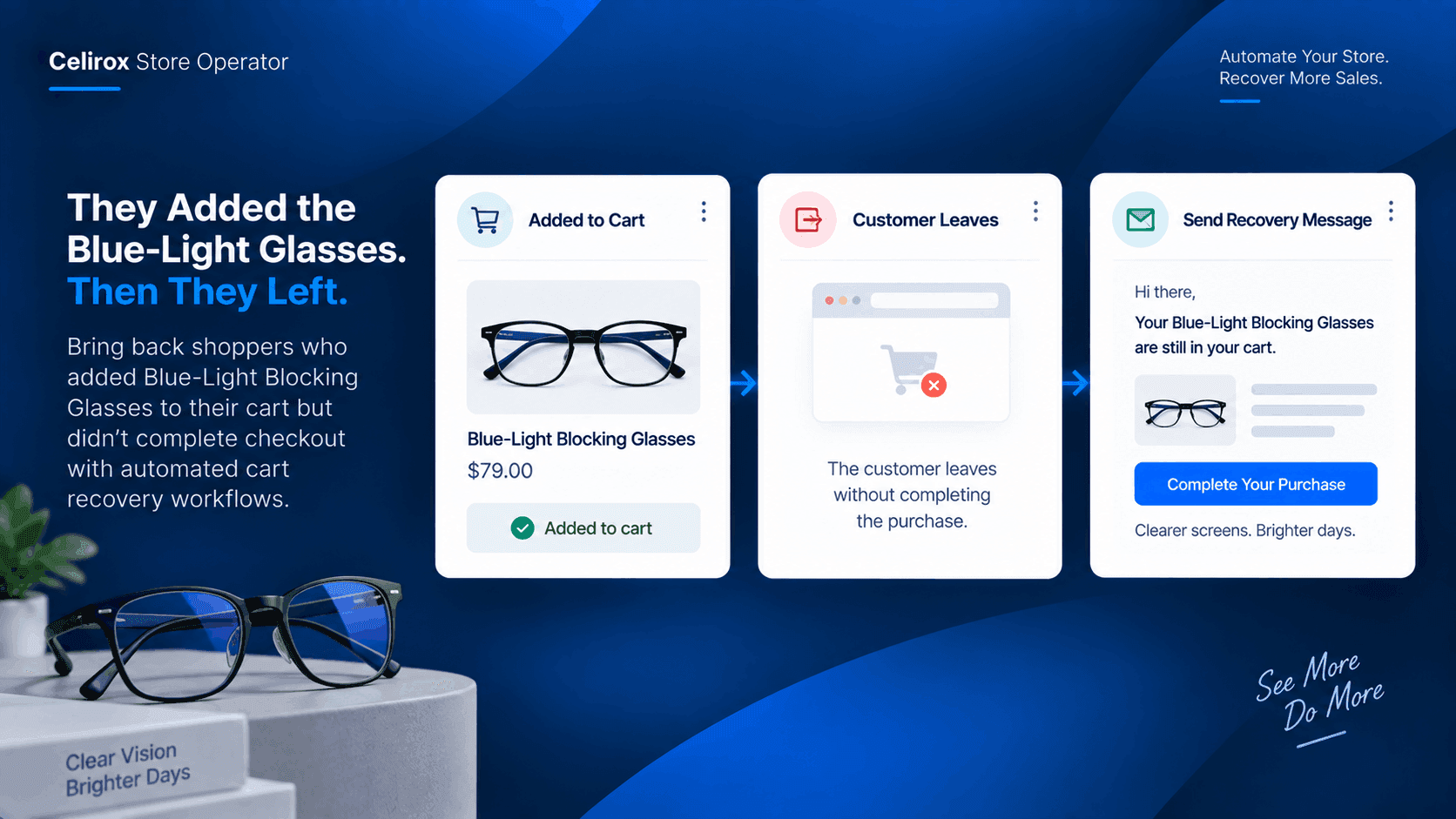
A customer finds the right pair of glasses.
They look at the product photos.
They check the details.
They decide the Blue-Light Blocking Glasses are what they want and add them to the cart.
Then something happens.
They leave.
No purchase.
The glasses are still sitting in their cart, but the customer has moved on to something else.
For an eyewear store, this is one of those frustrating moments where the customer has already done most of the work.
They found the product.
They showed buying intent.
They just didn't finish.
The Product Wasn't The Problem
The store might immediately wonder whether the product page needs to change.
But in this situation, the customer already chose the glasses.
They didn't simply browse the product and leave.
They added the Blue-Light Blocking Glasses to their cart.
That small action tells the store something important: the customer was seriously considering the purchase.
The problem is no longer getting the product noticed.
The problem is getting the customer back to the cart.
An Abandoned Cart Can Disappear
Without a recovery workflow, the store may never do anything after the customer leaves.
The cart remains abandoned.
The customer continues browsing other websites.
Eventually, the purchase may simply be forgotten.
For a store selling a product like Blue-Light Blocking Glasses, that can mean losing a sale that was already much closer to completion than a normal website visit.
The store doesn't necessarily need another campaign targeting thousands of new shoppers.
It may simply need to reconnect with shoppers who already showed interest.
Give The Customer Another Chance
This is where cart abandonment automation becomes useful.
The store can create a workflow around shoppers who add the Blue-Light Blocking Glasses to their cart but don't complete the purchase.
The process can be straightforward.
The customer adds the glasses to the cart.
They leave without completing the order.
The abandoned cart is recognized.
The store can then trigger its configured recovery experience.
The customer gets another opportunity to return.
Instead of relying on the customer to remember the product on their own, the store gives them a reason to come back and finish what they started.
Keep The Recovery About One Product
The recovery experience doesn't need to be complicated.
The customer already knows which product they wanted.
The message can bring them back to the same purchase rather than sending them into another generic shopping journey.
For example, the store can focus the recovery experience around the Blue-Light Blocking Glasses and the unfinished purchase.
The objective is simple:
You were interested. Your cart is still waiting.
That is a much more relevant message than sending the customer a random promotion for unrelated eyewear.
Intent Already Exists
One reason abandoned carts are worth addressing is that the customer has already taken a meaningful action.
They didn't just arrive at the homepage.
They didn't just view a category.
They selected a product and added it to their cart.
That means the store doesn't have to start the customer journey from zero.
The recovery workflow can begin from the action the customer already took.
For an eyewear store, that could mean focusing specifically on customers who showed interest in products such as the Blue-Light Blocking Glasses.
Don't Make Every Cart The Same
A store may sell dozens of eyewear products.
But customers abandon carts for different reasons.
One shopper may be comparing prices.
Another may get distracted.
Someone else may simply need more time before buying.
That is why the recovery experience should be relevant to the shopping action that happened.
If the customer abandoned the Blue-Light Blocking Glasses, the recovery should help them return to that purchase.
The store doesn't need to turn every abandoned cart into a completely different marketing campaign.
A Simple Store Workflow
The operational side can stay simple.
Customer adds Blue-Light Blocking Glasses.
The product enters the customer's cart.
Customer leaves without purchasing.
The order is never completed.
Store Operator identifies the abandoned cart.
The recovery workflow is triggered according to the store's configuration.
The customer gets another opportunity to purchase.
The store can bring the customer back to the product they had already chosen.
That is the entire idea.
One product.
One abandoned cart.
One opportunity to recover the sale.
Recovery Doesn't Mean Pressure
A useful recovery experience should not make the customer feel chased.
The purpose is simply to remind them that the product they selected is still available in their shopping journey.
The store can decide how the recovery experience should work and what message makes sense for its customers.
The important part is that the store does not let every abandoned cart disappear without a follow-up opportunity.
Turn Abandoned Interest Into Another Opportunity
Getting someone to discover a product takes work.
Getting them to add it to their cart means they have already moved further through the buying journey.
When that customer leaves, the store has an opportunity to reconnect rather than simply accept the abandoned cart as a lost sale.
For an eyewear store, the workflow can be as focused as:
Blue-Light Blocking Glasses → abandoned cart → recovery → return to purchase.
That is the kind of repetitive storefront task Store Operator can help automate.
Frequently Asked Questions
What is cart abandonment?
Cart abandonment happens when a shopper adds products to their cart but leaves without completing the purchase.
Why focus on the Blue-Light Blocking Glasses?
The product is already specific to the customer's shopping action. Instead of creating a generic recovery story, the store can build its recovery experience around shoppers who showed interest in this particular product.
Can Store Operator help recover abandoned carts?
Store Operator supports storefront automation and workflows designed to automate repetitive store tasks. The exact recovery behavior depends on the configured workflow and available store setup.
Does every abandoned cart need a discount?
No. A recovery experience does not have to mean automatically giving every shopper a discount. The store can decide what type of recovery experience makes sense for its customers and products.
Can this approach work for other products?
Yes. The same cart-abandonment concept can be applied to other products, but the workflow can remain focused on one product category or product when that makes the business story more relevant.
Don't Let The Cart Be The End
The customer already found the Blue-Light Blocking Glasses.
They already decided they were worth adding to the cart.
The sale simply didn't happen yet.
That is an important difference.
Instead of treating an abandoned cart as the end of the customer's journey, an eyewear store can create a recovery workflow that gives the customer another opportunity to complete the purchase.
Store Operator helps turn that follow-up from something the store team has to remember into part of the store's automated workflow.
When the customer leaves the glasses behind, the store doesn't have to leave the opportunity behind with them.