Everyone Is Looking at the Product. So Why Isn't Anyone Adding It to the Cart?
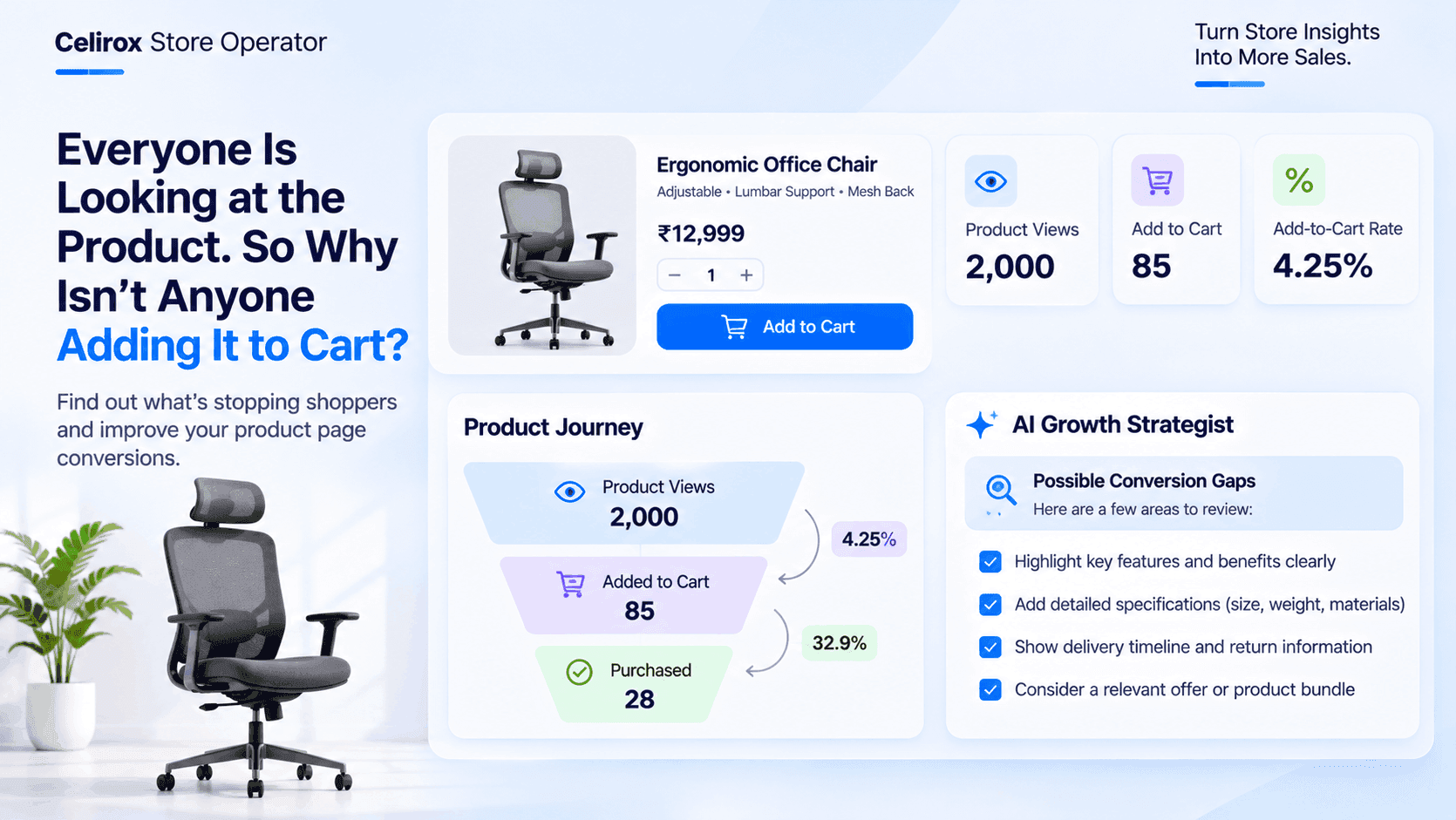
The product has been getting attention all week.
Customers are visiting its product page.
They are looking at the images.
They are reading the product description.
Some are even returning to the same page later.
But there is one problem.
Almost nobody is adding it to the cart.
Imagine a Shopify store selling premium office chairs.
The merchant recently launched a new ergonomic chair. The product has attractive photographs, a detailed description and a competitive-looking price.
Visitors are coming from advertisements, search engines and social media.
The product is getting exposure.
But the number of add-to-cart actions remains disappointing.
The merchant starts asking questions.
Is the price too high?
Are the photographs convincing enough?
Are shoppers unsure about the dimensions?
Is something important missing from the product page?
The store is receiving attention, but that attention isn't becoming buying intent.
Product Views Don't Always Mean Purchase Interest
A product page visit is an important starting point, but it doesn't necessarily mean someone is ready to purchase.
A visitor might be researching different products.
Another might be comparing prices across several stores.
Someone else may be looking for a particular feature and checking whether the product offers it.
Consider a customer shopping for an ergonomic office chair.
They visit the product page because the chair looks comfortable.
But before adding it to the cart, they want to know:
- Does it have adjustable lumbar support?
- Is the seat height adjustable?
- What is the maximum supported weight?
- Does the chair come with a warranty?
- How long will delivery take?
If the product page doesn't answer these questions clearly, the customer may leave without adding the product to their cart.
The visitor was interested enough to explore the product.
But the available information wasn't necessarily enough to make a purchasing decision.
The Product Page Might Be Missing Something Important
Merchants often spend considerable time getting visitors to their product pages.
They invest in advertisements, improve search rankings and publish social media content.
But the product page itself also needs attention.
A customer should be able to understand what the product offers, why it might be suitable and what they can expect after purchasing it.
Several small issues can make this difficult.
1. Product Images Don't Answer Customer Questions
Imagine purchasing an office chair using only one photograph.
The customer can see its general appearance, but they cannot understand every important detail.
They may want to see the adjustment mechanism, armrests, wheels, back support and seat material.
For products where appearance and construction influence purchasing decisions, additional photographs can make the product easier to evaluate.
A useful product image gallery should show meaningful details rather than several nearly identical photographs.
2. The Product Description Is Too Generic
Consider these two descriptions.
Description A:
Premium ergonomic office chair with a modern design.
Description B:
An adjustable office chair with lumbar support, a breathable mesh back and adjustable seat height, designed for everyday desk work.
The second description communicates more useful information.
Customers don't necessarily need longer descriptions.
They need relevant information that helps them understand the product.
3. Important Product Specifications Are Missing
A customer buying an office chair may want to know its dimensions, materials, adjustment options and weight capacity.
A customer buying a kitchen appliance may care about capacity, power consumption and included accessories.
A customer buying clothing may want accurate size information and fabric details.
The required information depends on the product.
If an important specification is missing, shoppers may postpone their decision or look for another seller who provides it.
4. Delivery Information Is Unclear
Customers often want to know when their product will arrive.
If delivery estimates are difficult to find, they may hesitate before committing to the purchase.
A clear delivery estimate, shipping policy and return information can make the shopping experience easier to understand.
5. The Price Needs More Context
A customer may see a product priced at $129 and immediately compare it with another product priced at $99.
But price alone doesn't explain differences in materials, features, warranty or included accessories.
The product page should communicate the value of the product honestly.
Merchants shouldn't rely on exaggerated claims or artificial urgency to justify a price.
They should explain what customers are actually getting.
Look Beyond The Number Of Visitors
Suppose the office chair receives 2,000 product page visits.
Only 85 visitors add it to their cart.
These numbers provide a useful starting point for investigation.
| Metric | Example |
|---|---|
| Product page visits | 2,000 |
| Add-to-cart actions | 85 |
| Visitors who added the product | 4.25% |
The example add-to-cart rate is calculated by dividing add-to-cart actions by product page visits and multiplying by 100.
However, this number doesn't explain why the remaining visitors didn't add the product.
It is a signal to investigate, not a diagnosis by itself.
The merchant should examine the product page, traffic sources, customer feedback and other available store data.
For example, visitors arriving from a particular advertisement may have different expectations from visitors discovering the product through organic search.
Understanding where the visitors come from can help merchants investigate whether the product page matches the promise that brought them there.
Different Visitors Can Have Different Reasons For Hesitating
Not every visitor has the same purchasing intention.
Consider three customers visiting the same office chair product page.
Customer One: The Price Comparator
This customer is comparing several office chairs.
They like the product but want to understand why it costs more than competing options.
The merchant may need to communicate the actual product specifications and included features more clearly.
Customer Two: The Information Seeker
This customer likes the chair but cannot find its dimensions or weight capacity.
They aren't ready to add it to the cart because an important question remains unanswered.
The merchant should review the missing product information.
Customer Three: The Delivery Planner
This customer wants the chair but needs it before starting a new job.
They cannot find a clear delivery estimate.
The merchant should make shipping information easier to understand.
All three customers visited the same product page.
But their reasons for hesitation are different.
That is why changing the price or adding another discount isn't always the right solution.
The merchant needs to understand the actual problem first.
Don't Immediately Respond With Another Discount
When a product receives visits but few cart additions, some merchants immediately reduce its price.
This may seem like the easiest solution.
But it isn't necessarily the correct one.
Imagine the office chair costs $129.
The merchant reduces the price to $109.
The product may become more attractive to price-sensitive shoppers.
But what if the actual problem was missing information about lumbar support?
The discount doesn't answer that question.
What if customers were unsure about delivery?
Another price reduction doesn't solve that uncertainty either.
Discounts can be useful when pricing is genuinely the issue.
But merchants should investigate the product page before assuming that every conversion problem needs a lower price.
Make The Next Customer Decision Easier
A useful product page helps customers move from interest to understanding.
For the office chair, the merchant could improve the page in several ways.
Show The Product From More Angles
Include photographs that demonstrate the chair's important components.
Show the back support, adjustment controls, seat and base.
Help customers understand what they are purchasing.
Explain The Features In Everyday Language
Instead of listing technical terms without context, explain what each feature does.
For example, describe how adjustable seat height helps customers position the chair at their desk.
Add Accurate Specifications
Include dimensions, materials, supported weight and other relevant product information.
Avoid making claims that cannot be verified.
Make Delivery And Return Information Accessible
Customers should not have to search through several pages to understand the store's delivery and return policies.
Make the relevant information easy to find.
Use Relevant Product Recommendations
If customers are comparing related products, relevant recommendations can help them discover alternatives.
For example, a store might recommend another office chair with a different feature set or price range.
Recommendations should help customers make a suitable choice rather than simply display unrelated products.
The Store Should Investigate The Product, Not Just The Traffic
When a product receives many visits but few cart additions, merchants should resist the temptation to make random changes.
A more useful approach is to investigate the complete product experience.
Start with a few questions:
- Are visitors coming from relevant traffic sources?
- Does the advertisement accurately represent the product?
- Are the main product benefits immediately understandable?
- Are important specifications missing?
- Are product images clear and useful?
- Is the price competitive for the product being offered?
- Can customers easily find delivery and return information?
- Are there recurring customer questions that the product page doesn't answer?
These questions help merchants identify areas worth improving.
They also make it easier to decide which changes should be tested first.
Where Celirox Store Operator Fits Into The Process
Running a Shopify store involves more than attracting visitors.
Merchants also need to manage products, promotions, inventory, customer experiences and everyday store operations.
Celirox Store Operator provides tools designed to help merchants manage and improve important parts of their storefront operations.
Its capabilities include product preorder management, back-in-stock notifications, upselling, discount automation and AI Growth Strategist.
For a store investigating low add-to-cart activity, the merchant can approach the problem from several directions.
Review Product Presentation
Look at the product's photographs, specifications, descriptions and other information.
Identify what a customer might need to know before deciding to purchase.
Consider Relevant Upsells
When a customer is interested in a product, related products or useful accessories may provide additional purchasing options.
For example, an office chair might have a relevant footrest or floor protection mat.
Recommendations should be related to the customer's actual needs.
Use Discounts With A Clear Purpose
If the investigation identifies a pricing concern, merchants can consider relevant discount strategies rather than applying discounts indiscriminately.
Think About Product Availability
If customers are interested in a product that is unavailable, preorder and back-in-stock experiences can help the merchant communicate availability options.
Consider The Bigger Growth Strategy
Store Operator's AI Growth Strategist is part of its broader store growth offering.
Merchants can consider their product presentation, merchandising and growth priorities together rather than treating every issue as an isolated task.
The important point is that a product receiving attention needs more than another advertisement.
It needs a product experience that helps the right customer understand why it is worth purchasing.
A Practical Checklist For Products Getting Views But No Cart Additions
Before changing the price or increasing advertising expenditure, review the product page.
- Are the product images clear and informative?
- Does the title explain what the product is?
- Are important specifications included?
- Does the description communicate real product benefits?
- Are delivery estimates easy to find?
- Are shipping and return policies accessible?
- Does the advertisement match the product page?
- Are customer questions being answered?
- Is the price reasonable for the product and its features?
- Are relevant alternatives or accessories available?
You don't need to change everything at once.
Start with the most obvious information gaps and test improvements carefully.
Frequently Asked Questions
Why do Shopify products get views but no add-to-cart actions?
Products may receive visits without generating cart additions because shoppers are still researching, comparing prices or looking for missing information. Unclear product photographs, incomplete specifications, confusing descriptions, delivery uncertainty and mismatched advertising expectations can all contribute to hesitation.
How do I improve my Shopify product page add-to-cart rate?
Start by reviewing product images, descriptions, specifications, pricing and delivery information. Make important product details easy to understand, answer common customer questions and ensure that your advertisements accurately represent the product. Measure changes using consistent analytics data rather than assuming every improvement will increase conversions.
Should I reduce the product price if customers aren't adding it to their cart?
Not automatically. Price may be one reason shoppers hesitate, but missing product information, unclear photographs or delivery uncertainty can also affect purchasing decisions. Investigate the product page before deciding whether a discount is necessary.
What is the Shopify add-to-cart rate?
The add-to-cart rate measures the percentage of product page visitors or other defined visitor sessions that result in an add-to-cart action. The exact calculation depends on the analytics definition being used. A common calculation is add-to-cart actions divided by product page visits, multiplied by 100.
Why do customers visit a product page but leave without buying?
Customers may be comparing alternatives, checking product specifications, researching prices or waiting until later to purchase. Some may also leave because the product page doesn't answer important questions about features, availability, delivery or returns.
Can product recommendations help Shopify merchants increase cart additions?
Relevant product recommendations can help customers discover complementary products and suitable alternatives. Their usefulness depends on how closely the recommendations match the customer's needs. Unrelated recommendations may distract rather than help.
How does Celirox Store Operator help Shopify merchants?
Celirox Store Operator provides store management and growth features, including preorders, back-in-stock notifications, upselling, discount automation and AI Growth Strategist. Merchants can use these capabilities to support product availability, merchandising and broader store growth activities.
The Product Is Getting Attention. Now Find Out What Is Missing.
The office chair is receiving visitors.
People are discovering it through advertisements, search and other channels.
But the number of cart additions remains low.
The merchant could immediately spend more money on advertising or reduce the price.
But neither decision answers the most important question.
Why aren't interested visitors taking the next step?
The answer may be in the product images, missing specifications, unclear delivery information or a mismatch between customer expectations and the actual product page.
The first step is to investigate the experience rather than guess.
Make the product easier to understand.
Present relevant information.
Help customers compare suitable options.
Use discounts and recommendations where they genuinely add value.
Celirox Store Operator helps Shopify merchants manage important storefront operations and explore better ways to grow their stores.
Because getting visitors to a product page is only part of the job.
The next challenge is giving them a good reason to add the product to their cart.