CRM Enrichment for Sales: Walk Into Every Meeting Better Prepared
The Meeting Starts Soon
You open your calendar.
The next call is with a company you spoke to briefly three weeks ago.
You remember the name.
You do not remember what they discussed last time, which product they were interested in, who else is joining, what changed since the previous conversation, or which questions you promised to answer.
So you start opening tabs.
CRM.
Company website.
Calendar invite.
Previous emails.
Search results.
Maybe LinkedIn.
Five minutes later, you have plenty of information but very little time left to decide what actually matters.
That is the real sales research problem.
It is not a lack of information.
It is turning scattered context into something useful before the conversation begins.
What CRM Enrichment Means
CRM enrichment is the process of adding useful context to existing contact, company, or account records.
That context can come from several places:
- Existing CRM activity
- Calendar attendees
- Previous conversations
- Internal notes
- Company websites
- Approved public or enrichment sources
The objective is not to fill every possible CRM field.
The objective is to improve the information that helps someone understand the account and decide what to do next.
A CRM with 100 populated fields is not automatically more useful than one with 20 accurate, relevant fields.
For a salesperson preparing for a meeting, the most useful questions are usually simpler:
Who am I meeting?
Why are we talking?
What happened last time?
What still needs to be understood?
Has anything meaningful changed?
Good CRM enrichment should make the next conversation better, not simply make the database bigger.
Start With Internal Context
A scheduled meeting already gives you a useful starting point.
The calendar can tell you who is attending, when the call begins, what the meeting is called, who organized it, and sometimes why it was scheduled.
From there, the workflow can connect those attendees to CRM contacts, companies, opportunities, previous activities, and other approved internal context.
Internal information should usually come before external research.
Imagine a company recently announced a new office.
That may be interesting.
But your CRM says:
Customer requested security documentation before the next call.
That matters more.
A sensible preparation order is:
Calendar → CRM → Previous interactions → Open commitments → Relevant public information
This helps prevent external research from distracting the rep from information the business already knows.
Where AI Operator Fits
With Celirox AI Operator, a sales team can describe what useful meeting preparation should look like.
For example:
"Before external sales meetings, review the attendees, find the relevant CRM company and contacts, summarize previous interactions, check approved public sources for meaningful company changes, and prepare a short brief. If important CRM information appears missing or outdated, prepare suggested updates for review."
The workflow becomes:
Upcoming meeting → Identify attendees → Find CRM records → Review history → Gather relevant context → Prepare brief → Surface uncertain data
The output should not be a large research report.
It should be something a salesperson can understand in a few minutes.
The Operator can gather information across connected tools, but the goal is still straightforward:
Help the rep know where to begin the conversation.
Build a Useful Brief
A strong pre-call brief should be short enough to scan and detailed enough to prevent the salesperson from starting from zero.
It might include:
- Who is attending
- What the company does
- Why the meeting exists
- Important previous context
- Relevant recent changes
- Open questions or suggested focus
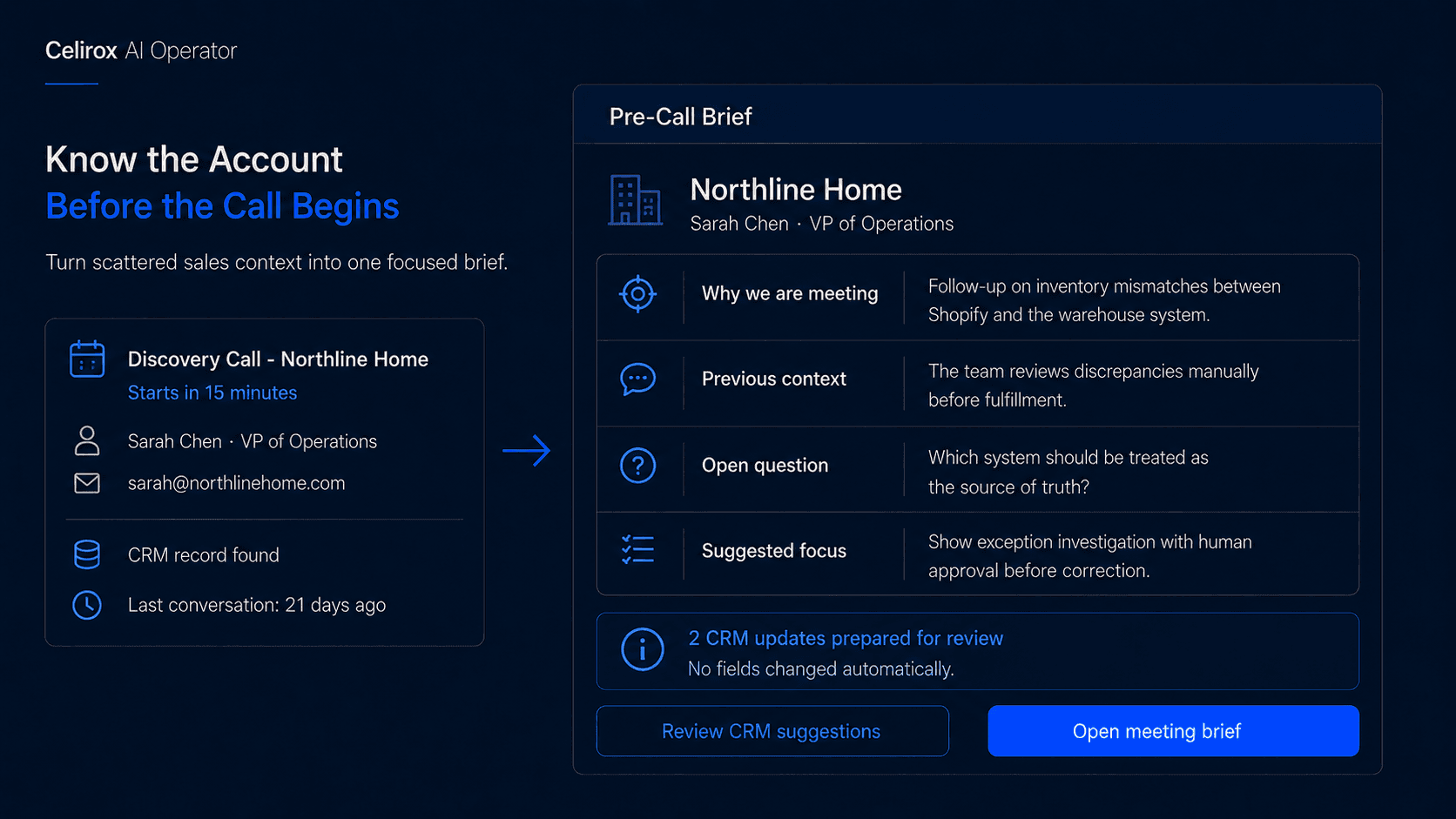
Imagine the calendar shows:
Discovery Call - Northline Home
The CRM shows that Sarah Chen is VP of Operations, the previous conversation happened three weeks ago, and the account is evaluating workflow software.
The previous note says their team is struggling with inventory discrepancies between two internal systems.
A useful brief could look like:
Contact: Sarah Chen, VP of Operations
Why we are meeting: Follow-up on inventory mismatch handling between internal systems.
Previous context: The team currently investigates discrepancies manually.
Open question: Which system should be treated as authoritative when records disagree?
Suggested focus: Understand how often mismatches occur and which cases require human approval.
That is immediately useful.
The rep does not need to rediscover the previous conversation during the first ten minutes of the call.
Research Only What Matters
Public research can add useful context, but more information is not always better.
A company might have hundreds of publicly available data points: office locations, employee counts, social profiles, hiring activity, funding announcements, product launches, partnerships, and website technologies.
Only a small portion may matter for the upcoming conversation.
Before including something in the brief, ask:
Will this help the rep understand the company, the problem, the buying situation, or the next conversation?
If the answer is no, leave it out.
The same applies to personal information.
A prospect posting about a marathon may be publicly visible, but that does not mean it belongs automatically in a sales brief.
The goal is preparation, not surveillance.
Public information also needs verification.
Company names can be similar. Search results can be outdated. An article may refer to a subsidiary or another organization with the same name.
Important claims should be tied to credible sources rather than treated as true because they appeared somewhere online.
Treat CRM Updates Carefully
Research can reveal missing or outdated CRM information, but that does not mean every discovered value should overwrite the existing record automatically.
Suppose one source suggests a company has 700 employees while another says 950.
A better workflow might prepare:
Suggested employee range: 501-1,000
Evidence: Company careers page and approved company profile
Status: Review recommended
That is safer than silently replacing the existing field with whichever number appeared most recently.
Some CRM fields should remain strongly human-owned.
Deal stage, purchase intent, budget confirmation, decision-maker status, customer sentiment, and forecast category often depend on sales judgment.
A company website cannot reliably tell you that a prospect is ready to buy.
A funding announcement cannot tell you that the opportunity should move from Discovery to Proposal.
External data should provide context.
It should not be confused with confirmed sales reality.
Keep the Brief Short
A salesperson with eight minutes before a meeting does not need a seven-page account report.
A useful brief should answer the most important questions quickly.
For example:
Company
Two or three sentences explaining what the business does.
Attendees
Names, roles, and relevant relationship context.
Previous Context
A short summary of the last conversation, open commitments, and known problems.
Relevant Changes
Only information that may affect the upcoming discussion.
Open Questions
A few questions worth answering during the call.
Suggested Focus
One short paragraph explaining where the conversation could continue.
If the brief contains twenty data points and the salesperson ignores nineteen of them, the research is too broad.
The best brief reduces noise.
Prepare Before and After
Meeting preparation is only half of the CRM problem.
After the conversation, new context appears.
The team may learn about another stakeholder, a new requirement, an unresolved concern, a promised follow-up, or a new meeting date.
If nobody records that information, the next salesperson faces the same research problem again.
A stronger sales workflow works in a loop:
Prepare → Meet → Capture → Update → Prepare again
Before the meeting, the Operator gathers relevant context.
After the meeting, approved notes or connected meeting data can help prepare CRM updates and follow-up actions for review.
Over time, each interaction leaves better context for the next one.
That is more valuable than repeatedly rebuilding the account story from scratch.
Deliver It at Right Time
Timing matters.
If a brief is prepared five days before the call, relevant information may change and the salesperson may forget about it.
If it appears thirty seconds before the meeting, there is not enough time to use it.
The right timing depends on how the team works.
Some teams may prefer a morning summary of the day's meetings. Others may want briefs surfaced shortly before each call.
The important part is that the salesperson should not need to remember to open another research dashboard.
The preparation should arrive where the rep already works and with enough time to understand it.
Just-in-time does not mean last-second.
It means delivering the information when it is most useful.
Measure Whether It Helps
Do not measure CRM enrichment only by the number of fields populated.
A much better question is whether salespeople are actually better prepared.
Useful signals include:
- Briefs opened or reviewed
- Suggested CRM updates accepted
- Incorrect suggestions rejected
- Time spent researching before meetings
- Follow-up commitments captured
- CRM records becoming more complete
- Reps reporting clearer next questions
The quality of the brief matters more than its size.
If the workflow collects more data but still forces the salesperson to search through five applications before every call, it has not solved the real problem.
The outcome should be less searching and more useful preparation.
Frequently Asked Questions
What is CRM enrichment?
CRM enrichment adds useful information to existing contact, company, or account records using internal data, connected systems, approved enrichment sources, and relevant public information.
Can AI prepare sales meeting briefs?
Yes. AI can help gather and summarize CRM history, meeting context, previous interactions, and relevant research into a shorter briefing document.
Should public research come before CRM history?
Usually not. Existing CRM history, previous conversations, open commitments, and internal account context are often more important than general public research.
Should every enriched CRM field update automatically?
No. Conflicting, uncertain, sensitive, or judgment-based information should generally be reviewed rather than silently overwriting existing records.
Which CRM fields should stay human-owned?
Fields such as deal stage, forecast category, purchase intent, customer sentiment, and budget confirmation often require direct sales judgment.
Can Celirox AI Operator prepare CRM updates too?
Yes. AI Operator can gather relevant context, identify potentially missing or outdated information, and prepare suggested updates for review as part of the wider meeting-preparation workflow.
Ask a Better First Question
The purpose of sales preparation is not to impress a prospect with how much information you collected about them.
It is to avoid wasting the first part of the meeting rediscovering things your company already knows.
A useful brief lets the salesperson walk into the call understanding:
Who is here?
Why are we talking?
What happened previously?
What changed?
What do we still need to understand?
That creates more room for an actual conversation.
Celirox AI Operator helps gather and organize that context across connected business tools, prepare relevant CRM suggestions, and surface the useful information before the meeting begins.
Gather → Prioritize → Brief → Meet → Capture → Improve
The goal is not more research.
It is better preparation.