The Bestseller Has 5 Units Left. Will Your Team Know Before It Sells Out?
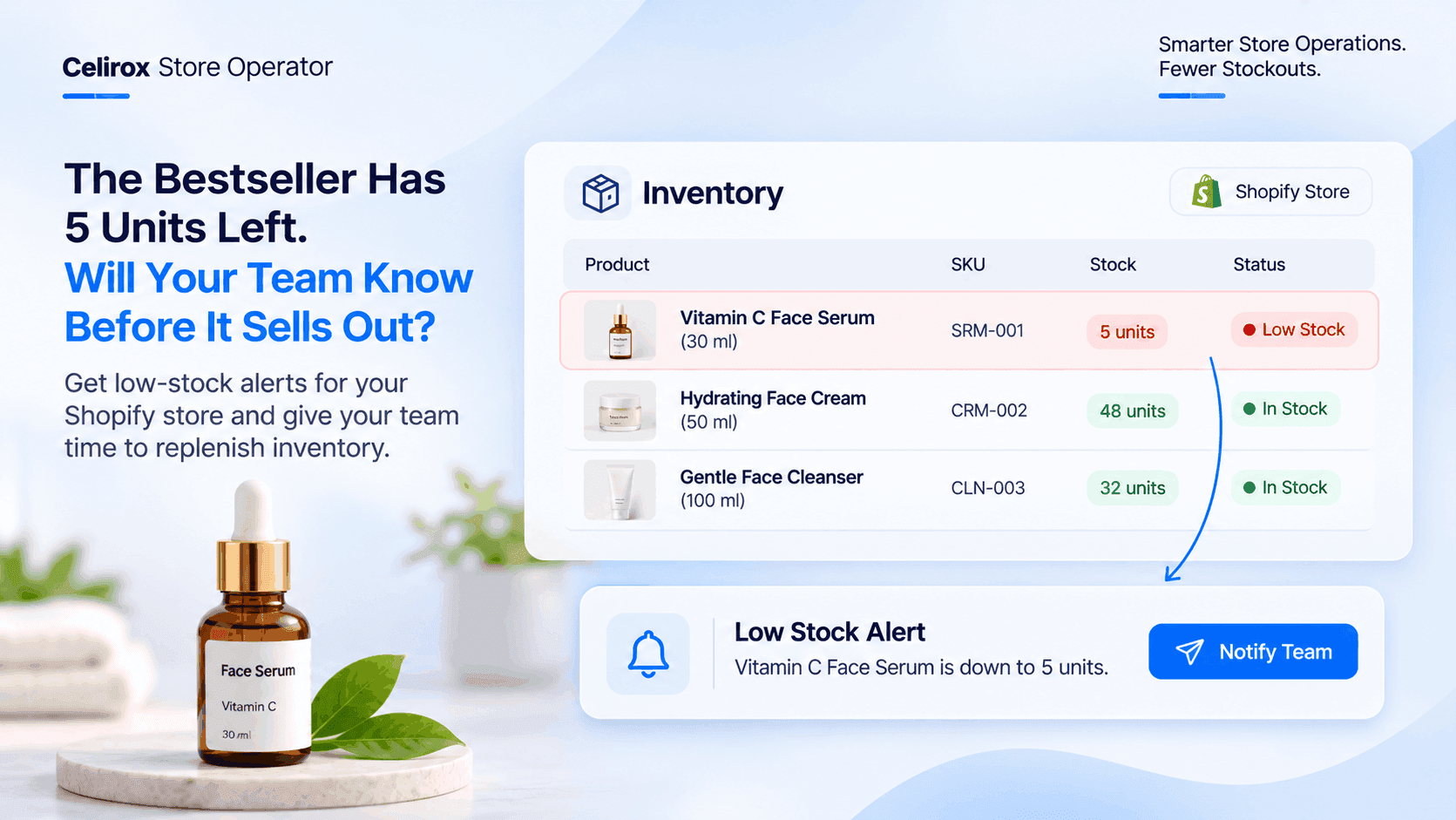
A customer has just ordered the bestselling skincare product from an online store.
Another customer places an order a few minutes later.
Then another.
The product has been selling consistently throughout the week.
From the customer's perspective, everything is working perfectly. The product is available, the order can be placed, and the store is accepting purchases.
But there is something the store team hasn't noticed.
Only five units are left.
Nobody has started preparing the next purchase order.
The supplier hasn't been contacted.
The product is still available, but the store is getting closer to a stockout with every new order.
The problem isn't that the product sold out. The problem is that nobody noticed it was getting close.
The Bestseller Is Running Out Quietly
Popular products can create an inventory problem that isn't immediately obvious.
Sales are a positive sign. Customers are buying, revenue is coming in, and the product is performing well.
But every successful order also reduces the available inventory.
Consider a Shopify store selling a popular face serum.
The product initially has 100 units in stock.
Customers continue purchasing throughout the week.
The inventory gradually changes:
| Day | Available inventory |
|---|---|
| Monday | 100 units |
| Tuesday | 62 units |
| Wednesday | 35 units |
| Thursday | 18 units |
| Friday | 8 units |
| Saturday | 5 units |
The product hasn't sold out yet.
But the remaining inventory is getting low.
If the team only pays attention when the product reaches zero, it may already be too late to arrange the next replenishment without interrupting sales.
The Team Is Busy Managing Orders
Most Shopify merchants have several things happening simultaneously.
Someone is processing orders.
Someone is managing customer questions.
Someone is updating product listings.
Someone is coordinating with suppliers.
Inventory monitoring becomes another responsibility in an already busy operation.
A team member might check inventory in the morning and move on to other tasks.
By the afternoon, several more orders may have been placed.
The stock level changes, but nobody necessarily notices immediately.
This is especially important for stores with multiple products, variants and frequent daily orders.
Checking every product manually throughout the day isn't always practical.
The store needs a way to bring attention to products that actually require action.
Waiting Until Zero Stock Creates A Different Problem
Imagine the same skincare product reaches zero inventory on Saturday evening.
A customer visits the product page and discovers that it is unavailable.
Another customer searches for the product but cannot purchase it.
The store now has a stockout situation to manage.
The team needs to contact the supplier, confirm availability, arrange replenishment and update the product inventory when new stock arrives.
Some of these steps take time.
The store may also need to manage customer questions about availability.
None of this means every low-stock product will necessarily sell out.
But when a product has consistent demand, waiting until inventory reaches zero leaves the team with fewer opportunities to prepare.
A low-stock warning gives the team an opportunity to act before the problem becomes a stockout.
Don't Wait For The Product To Disappear
The store doesn't necessarily need to wait for a product to become unavailable before taking action.
It can define an inventory threshold that indicates when attention is required.
For example, the merchant may decide that the skincare product should trigger an alert when only 10 units remain.
When inventory reaches that level, the relevant team receives a notification.
The team can then review the product and decide what to do next.
This could include:
- Checking current sales activity.
- Reviewing the remaining inventory.
- Contacting the supplier.
- Confirming the next replenishment quantity.
- Checking the expected delivery date.
- Reviewing whether the product needs a temporary sales restriction.
The important difference is timing.
Instead of discovering the problem after the product sells out, the team becomes aware while inventory is still available.
A Low-Stock Alert Should Reach The Right People
An inventory warning is only useful when someone who can act on it receives the information.
Imagine a store owner receives a notification that the bestselling face serum has reached its low-stock threshold.
The notification identifies the product and communicates that its inventory needs attention.
The owner can then ask the purchasing team to review the replenishment requirements.
The purchasing team can check supplier availability and decide whether another order should be placed.
The warehouse team can continue handling existing orders while the replenishment process is being arranged.
The alert doesn't need to make the purchasing decision automatically.
It needs to make sure the right people know that a decision is required.
Different Products Need Different Stock Thresholds
One inventory threshold doesn't necessarily make sense for every product in a store.
Consider a business selling skincare products, phone accessories and home appliances.
A bestselling face serum may sell several units every day.
A phone accessory may sell only a few units each week.
A larger home appliance may have a much longer supplier replenishment cycle.
If the merchant uses the same low-stock threshold for every product, the warnings may not reflect the actual requirements of the business.
A better approach is to consider the individual product.
Fast-moving products
Products with frequent orders may need earlier warnings because inventory can decrease quickly.
For example, a popular skincare product with 10 units remaining may require immediate attention if it regularly sells several units each day.
Slow-moving products
A product that sells occasionally may not need the same threshold as a bestselling item.
Its replenishment requirements can be different.
Products with longer supplier lead times
Some products take longer to restock.
If a supplier needs several weeks to deliver new inventory, the merchant may need to trigger an alert earlier than they would for products that can be replenished quickly.
The purpose is to make inventory warnings useful for the actual purchasing situation.
Variants Need Attention Too
A product can have several variants with different inventory levels.
Consider a clothing store selling a popular linen shirt in four sizes.
The overall product may still appear available.
But the individual size inventory could look very different.
| Variant | Available stock |
|---|---|
| Small | 24 units |
| Medium | 5 units |
| Large | 19 units |
| XL | 12 units |
The store still has inventory for the product.
However, the medium size is getting close to running out.
If the merchant only looks at the total inventory, the low stock of a particular variant may not receive enough attention.
For businesses selling products with multiple sizes, colors or other variants, monitoring inventory at the appropriate variant level is important.
A low-stock warning should help the team identify what actually needs replenishment rather than treating the entire product as one inventory number.
The Store Needs A Warning Before The Stockout
The process can remain straightforward.
The merchant defines a stock threshold for a product.
Inventory changes as customers place orders.
When the available inventory reaches the configured threshold, the low-stock alert is triggered.
The relevant team receives the notification.
The team reviews the situation and decides whether replenishment is required.
Here is how the workflow looks:
Product inventory: 100 units
Configured low-stock threshold: 10 units
Customer orders: Inventory gradually decreases.
Inventory reaches 10 units: Low-stock condition is met.
Notification: The team receives an alert.
Next action: The team reviews inventory and prepares replenishment if needed.
The workflow doesn't require the team to discover every low-stock product by repeatedly opening the inventory page.
The important information comes to their attention when the configured condition is reached.
How Celirox Store Operator Helps With Low-Stock Monitoring
Shopify merchants need to manage inventory while keeping up with orders, customer requests and other store operations.
Manually checking every product can become difficult as the catalog grows.
Celirox Store Operator helps merchants automate important store operations, including low-stock monitoring and team alerts.
Instead of relying entirely on someone remembering to inspect inventory, merchants can use configured inventory conditions to bring attention to products approaching their stock limits.
For the skincare store, the workflow could look like this:
- The merchant identifies the bestselling face serum.
- A low-stock threshold is configured for the product.
- Customers continue placing orders.
- Inventory reaches the configured threshold.
- The team receives a low-stock alert.
- The team reviews the inventory and prepares replenishment.
The notification helps the team recognize that a product requires attention.
The merchant still decides how much to reorder, which supplier to contact and when to place the next purchase order.
The goal is not to remove the team's involvement.
It is to make sure the team receives important inventory information at the right time.
A Low-Stock Alert Is Not The Same As A Reorder
It is important to understand the difference.
A low-stock notification tells the merchant that inventory has reached a particular condition.
A replenishment decision involves additional information.
The merchant may need to consider:
- How quickly the product is selling.
- How much inventory is already on the way.
- How long the supplier takes to deliver.
- Whether the product is seasonal.
- Whether demand is expected to change.
- How much storage space is available.
For example, a product with five units remaining may not always require an immediate order if a large replenishment shipment is already arriving the next morning.
Likewise, a product with 20 units remaining may need attention if supplier delivery takes several weeks.
The alert identifies the situation.
The team uses its purchasing information to decide what happens next.
What Merchants Should Review When Setting Low-Stock Alerts
A useful inventory warning starts with a sensible threshold.
Before configuring alerts, merchants should consider a few things.
1. Review How Quickly The Product Sells
Look at the product's recent sales activity.
A product that sells 15 units per day needs a different inventory warning from one that sells two units per week.
2. Consider Supplier Delivery Time
If replenishment takes a long time, the team needs to know about low inventory earlier.
The warning should provide enough time for the merchant to review and arrange the next order.
3. Check Variant-Level Inventory
Don't overlook individual sizes, colors or other variants.
A particular variant may be running low even when the overall product still has plenty of inventory.
4. Avoid Unnecessary Notifications
Alerts should communicate meaningful inventory conditions.
If every product generates repeated warnings without requiring attention, the team may eventually start ignoring them.
Choose thresholds that reflect genuine replenishment requirements.
5. Decide Who Needs To Respond
An alert should reach the person or team responsible for inventory decisions.
This makes it easier to move from identifying a low-stock product to reviewing what should happen next.
Frequently Asked Questions
What are low-stock alerts in Shopify?
Low-stock alerts are notifications that inform merchants or their teams when product inventory reaches a predefined threshold. They help stores identify products that may need replenishment before they become unavailable.
How do I get notified when a Shopify product is running low?
Merchants can use inventory monitoring and alert functionality to detect when stock reaches a configured level. A supported automation can then notify the relevant team so they can review the product and prepare replenishment.
Can Shopify low-stock alerts help prevent products from selling out?
They can help merchants recognize declining inventory earlier and prepare replenishment before stock reaches zero. However, an alert cannot guarantee that a product will never sell out because actual demand and supplier delivery times can change.
Should every Shopify product have the same low-stock threshold?
Not necessarily. Different products have different sales speeds, supplier lead times and replenishment requirements. A bestselling product may need an earlier warning than a slow-moving item.
Why is variant-level inventory monitoring important?
A product may have several sizes or colors with different stock levels. Monitoring only the overall product inventory can hide the fact that a particular variant is running low.
Can Celirox Store Operator help with low-stock notifications?
Yes. Celirox Store Operator provides low-stock monitoring and team alert capabilities to help merchants identify products that need inventory attention and prepare their next actions.
Does a low-stock alert automatically place a supplier order?
A low-stock alert communicates that inventory has reached a configured threshold. The merchant or purchasing team still needs to review the replenishment requirements and decide whether to place a supplier order.
Five Units Left Shouldn't Be A Surprise
The bestselling skincare product is still available.
Customers are still placing orders.
The store is still making sales.
But the inventory is getting closer to zero.
Without an early warning, the team may only notice the problem when the product becomes unavailable.
With low-stock monitoring, the team has an opportunity to identify the situation earlier, review the product and prepare replenishment.
It doesn't mean every stockout can be prevented.
It means the store doesn't have to rely entirely on someone remembering to check inventory manually.
Celirox Store Operator helps Shopify merchants bring important inventory conditions to their team's attention through automated low-stock monitoring and alerts.
A bestseller should be celebrated for selling well, not remembered because nobody noticed it was about to run out.