Stop Customers Combining Discounts You Never Intended
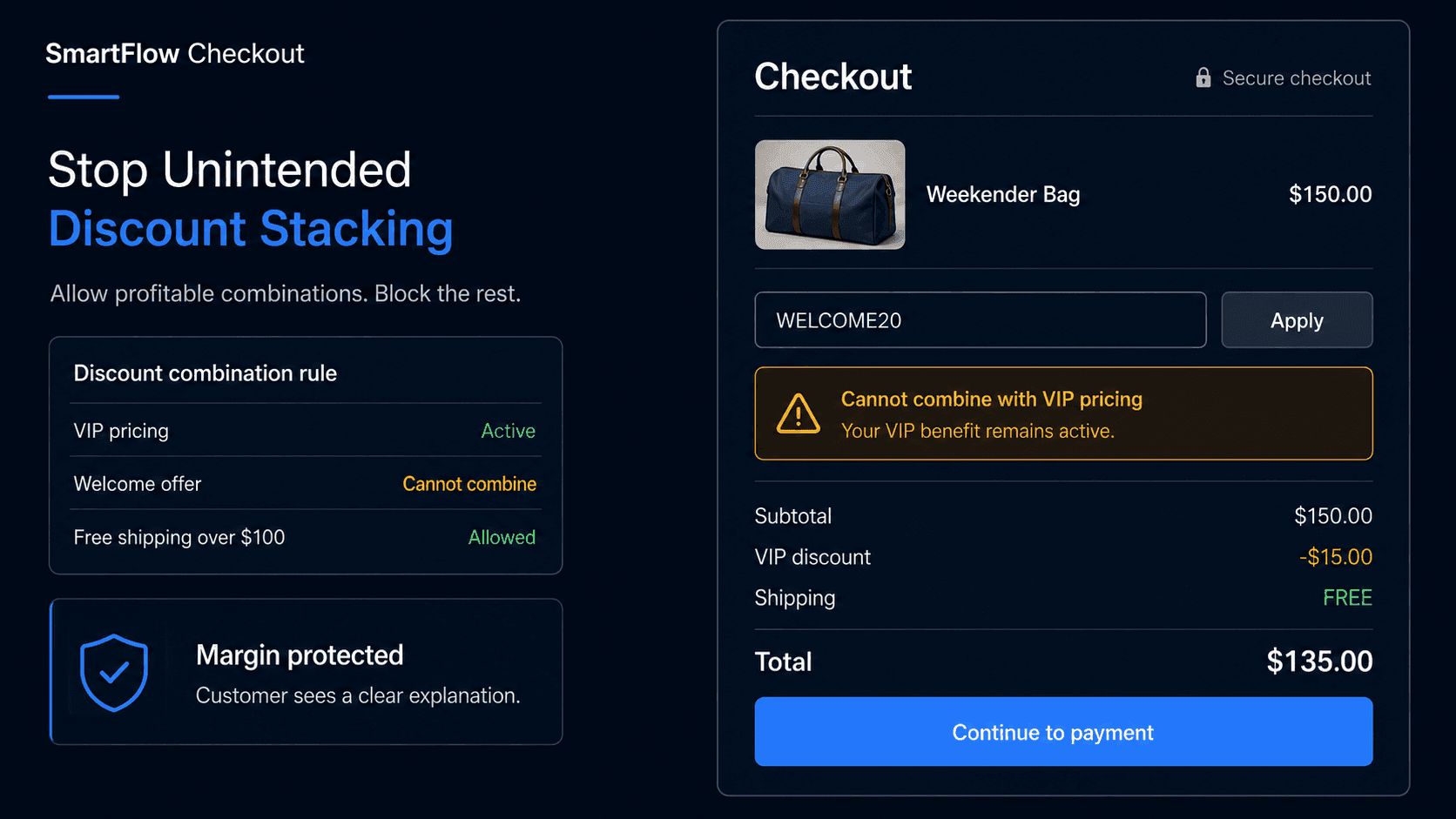
Five Good Offers Become One Bad Order
Imagine a Shopify store running several promotions at the same time.
The merchant has:
15% welcome offer
10% VIP discount
Free shipping over $75
20% off selected products
Creator campaign code
Each promotion makes sense on its own.
Then a customer reaches checkout with a sale product, qualifies as a VIP customer, enters an influencer code, and has a cart large enough for free shipping.
The merchant expected one or two benefits.
The resulting order receives much more.
The sale still converts.
But the margin behind it is very different from what the merchant planned.
That is the real discount-stacking problem.
The question is not how many discounts you can create. It is which combinations your business actually intends to allow.
Why Discount Stacking Gets Messy
Promotions are usually created one campaign at a time.
Marketing launches a welcome offer.
The loyalty program adds a VIP benefit.
A creator receives a campaign code.
Merchandising discounts a slow-moving collection.
Operations adds free shipping above a threshold.
Each decision may be reasonable.
The problem appears when those separate offers meet inside one cart.
Consider:
Original cart: $150
Product promotion: -20%
VIP discount: -10%
Creator code: additional discount
Shipping: Free
The final economics may be very different from the campaign assumptions behind each individual promotion.
This becomes especially important for stores with low-margin products, expensive fulfillment, or aggressive acquisition offers.
Discount policy needs to be designed as a system.
Not as five unrelated campaigns.
Decide What Can Combine
Before creating rules, the merchant should define the intended promotion policy.
For example:
VIP discount + free shipping → Allowed
VIP discount + first-order discount → Not allowed
Sale product + creator code → Not allowed
Full-price product + creator code → Allowed
Low-margin collection + percentage discount → Excluded
The correct combinations depend on the business.
There is no universal rule that every store should use.
A premium brand may rarely allow discount stacking.
A high-margin consumables business may be comfortable combining loyalty benefits with free shipping.
The important thing is to decide deliberately.
If the merchant cannot explain which offers should combine, checkout will eventually expose that ambiguity.
Where SmartFlow Checkout Fits
With SmartFlow Checkout, merchants can build checkout logic around supported promotion and order conditions.
For example:
"VIP customers can use their VIP offer, but it should not combine with our first-order promotion. Free shipping can still apply when the cart is above $100."
Or:
"Do not allow creator discount codes on products from the Clearance collection."
Or:
"Our 20% welcome offer should apply only to customers with no previous completed orders."
The process becomes:
Customer reaches checkout → Eligibility checked → Promotion conditions evaluated → Valid offers allowed → Conflicting offer prevented or explained
The merchant defines the commercial policy.
SmartFlow Checkout helps translate that policy into the checkout experience.
The objective is not to prevent customers from receiving good offers.
It is to prevent combinations the merchant never intended to fund.
Protect Low-Margin Products
Not every product can absorb the same discount.
Imagine a store sells:
Accessory A
Retail price: $50
Healthy margin.
And:
Product B
Retail price: $300
Much thinner margin after supplier and fulfillment costs.
A storewide 20% code may be perfectly acceptable for the accessory.
It may make Product B unattractive financially.
The merchant might therefore decide:
General promotion → Exclude selected low-margin products
Or:
Percentage discount → Allowed only on full-price collections
This becomes even more important when another benefit such as free shipping is also applied.
A discount rule should consider the economics of the resulting order.
Not simply whether the code technically works.
Check Customer Eligibility
Some promotions should apply only to specific customers.
A first-order offer is the simplest example.
Imagine the store advertises:
20% off your first order
A returning customer tries the code.
If the business genuinely intends the offer only for new customers, the checkout should respect that rule.
The same idea applies to:
- VIP customers
- Wholesale customers
- Members of selected customer groups
- Campaign-specific audiences
- Employee or partner offers
The merchant should define what makes someone eligible.
A code existing does not automatically mean every customer should be able to use it.
This also helps reduce confusion between public promotions and benefits intended for specific customer relationships.
Make Rejections Understandable
Blocking a discount without explaining why creates unnecessary frustration.
Compare:
Discount code isn't valid
with:
This welcome offer is available only on a customer's first order. Your other eligible offers can still be used.
Or:
This promotion does not apply to products already included in our Clearance sale.
The second version tells the shopper what happened.
That matters because the customer may have seen the offer in an advertisement, email, creator post, or campaign landing page.
If checkout simply rejects the code, the customer may assume the store is broken.
A useful message should explain the actual eligibility rule without exposing unnecessary internal complexity.
The goal is:
Clear rule → Clear explanation → Customer can continue
Not:
Code rejected → Customer guesses why
Watch Threshold Interactions
Cart thresholds can create unexpected promotion behavior too.
Imagine a store offers:
Free shipping above $100
The customer's cart is $110.
Then a $20 discount is applied.
Should free shipping remain?
That depends on how the merchant defines the offer.
Is the threshold based on:
Original merchandise value
or:
Final discounted cart value
The same question appears with:
Spend $150, get 15% off
If another offer reduces the qualifying amount first, does the customer still meet the threshold?
These details should be decided before campaigns overlap.
Otherwise two reasonable promotion rules can produce an unexpected result when evaluated together.
Threshold logic should reflect the wording customers actually saw in the promotion.
Test Campaigns Together
A discount campaign should not be tested only in isolation.
Before a major promotion goes live, test how it interacts with existing offers.
Useful scenarios include:
- New customer with welcome code
- Returning customer using welcome code
- VIP customer with another promotion
- Sale product plus campaign code
- Low-margin excluded product
- Cart just below a threshold
- Cart exactly at the threshold
- Cart above threshold before and after discount
- Multiple eligible offers
The important question is not simply:
Does this discount work?
It is:
Does the final order reflect the commercial policy we intended?
Testing combinations before launch is much easier than discovering an expensive interaction after hundreds of orders.
Measure Margin, Not Just Conversion
Promotions are often judged by conversion rate or revenue.
Those numbers do not tell the whole story.
Useful measurements can include:
- Average discount per order
- Orders using multiple benefits
- Gross margin after promotion
- Discount usage by customer group
- Checkout abandonment after rejected offers
- Revenue from excluded vs eligible products
- Free-shipping cost combined with discounts
Imagine a new promotion increases checkout conversion.
That sounds positive.
But if most of the additional orders combine multiple offers and produce very little contribution margin, the campaign may not be as successful as it appears.
The goal is not simply:
Get more discounted orders
It is:
Use promotions to create profitable customer behavior.
Discount rules should protect that objective.
Frequently Asked Questions
What is discount stacking in Shopify?
Discount stacking happens when more than one promotion or customer benefit applies to the same order. Whether a combination should be allowed depends on the merchant's promotion rules and Shopify configuration.
Should Shopify discounts always be allowed to combine?
No. Merchants should decide which combinations make sense for their margins, customer programs, and campaign promises.
Can VIP discounts be prevented from combining with welcome offers?
Where the merchant's supported Shopify discount and checkout setup allows it, eligibility and combination rules can be designed so customer-specific benefits do not overlap with promotions they were not intended to use together.
Should sale products accept coupon codes?
That depends on the promotion strategy. Some merchants allow additional discounts on sale products, while others exclude already-discounted collections to protect margin.
What should happen when a discount is rejected?
The customer should receive a clear explanation whenever possible, such as which eligibility condition was not met or which products are excluded.
Should free shipping combine with product discounts?
That is a business decision. Merchants should evaluate the total order economics and define whether shipping benefits can combine with other promotions.
Can SmartFlow Checkout help control discount combinations?
SmartFlow Checkout can help merchants build supported checkout and promotion rules around customer eligibility, products, cart conditions, exclusions, and other business requirements.
Make Promotions Work Together
A welcome offer may be good.
A VIP program may be good.
A creator campaign may be good.
A product sale may be good.
Free shipping may be good.
That does not mean every combination of them is good.
The merchant needs one consistent promotion policy behind all of those campaigns.
Define eligibility → Define combinations → Protect exclusions → Explain conflicts → Test together → Measure margin
SmartFlow Checkout helps merchants turn those promotion decisions into supported checkout rules so customers receive the benefits they qualify for without accidental combinations quietly changing the economics of the order.