Automatically Find Slow-Moving Shopify Inventory Before It Becomes Dead Stock
Inventory Can Sit Quietly
Imagine a fashion store with 2,000 active products.
Every morning, new orders arrive.
Some products sell quickly.
Others sell occasionally.
And a few have been sitting in the warehouse for months.
Nothing is technically broken.
The products are active.
Inventory is available.
The storefront still works.
But capital is tied up in products that customers are barely buying.
The merchant could find those products manually.
They could review inventory, compare recent sales, check how long stock has been sitting, identify weak variants, add tags, and decide what deserves attention.
Then they would need to do it again next week.
And the week after that.
Slow-moving inventory becomes expensive partly because it is easy to ignore while everything still looks normal.
The useful task is not checking inventory once.
It is continuously identifying which products are beginning to become a problem.
Define What Slow Means
There is no universal definition of slow-moving inventory.
A product that has not sold for 30 days may be concerning for one business and completely normal for another.
A fashion store may expect seasonal products to move quickly.
A furniture company may naturally have much longer purchase cycles.
A merchant therefore needs to define the conditions that matter for their store.
For example:
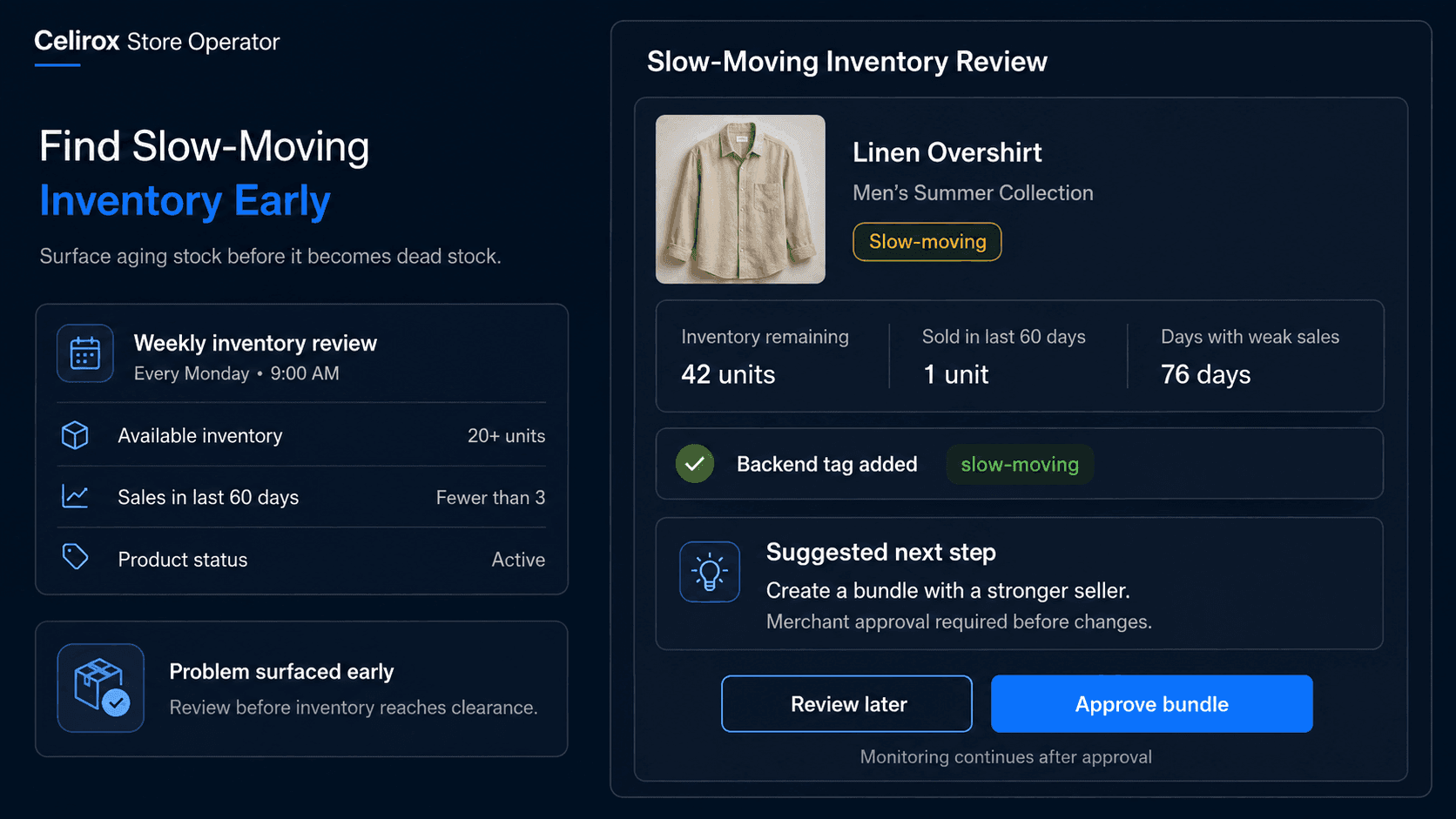
Available inventory: More than 20 units
Recent sales: Fewer than 3 units in 60 days
Product status: Active
That might indicate a product worth reviewing.
Another merchant may use:
Inventory remaining: More than 50%
Recent sales: No units sold in 45 days**
The exact thresholds are business decisions.
The important thing is creating a repeatable definition so the team does not rely only on somebody noticing a product that "feels slow."
Run the Check Regularly
This is where a scheduled Store Operator task becomes useful.
A merchant could say:
"Every Monday morning, review active products with available inventory. Find products that have sold fewer than three units during the last 60 days and still have at least 20 units available. Show me the products that need attention and how much stock remains."
Instead of someone rebuilding the same report each week, Store Operator can run the task on the defined schedule.
The process becomes:
Scheduled review → Check inventory → Review recent sales → Apply criteria → Surface slow movers
The merchant does not need to remember to start the analysis.
The task keeps running according to the schedule they defined.
That matters because inventory problems usually develop gradually.
A product rarely becomes dead stock overnight.
It becomes less healthy over time.
Turn Conditions Into Tags
Finding slow inventory is useful.
Keeping the backend organized makes the result even more useful.
Suppose the merchant defines two stages:
60 days with weak sales → slow-moving
90 days with weak sales → clearance-review
Store Operator can maintain those product tags as conditions change.
For example:
Product reaches slow-moving condition → Add slow-moving tag
Then later:
Product reaches 90-day condition → Add clearance-review
If sales recover:
Product no longer meets condition → Remove outdated tag
Now the tags represent the current product situation instead of becoming permanent labels somebody forgot to maintain.
The merchandising team can use them to create internal product views, review collections, prioritize purchasing decisions, or feed other store workflows.
This is different from manually tagging products once.
The product state can continue changing.
The tags should change with it.
Let Store Pulse Surface Problems
The merchant may not always know which inventory problem to ask about.
That is where proactive monitoring can become useful.
Store Pulse can watch store activity and surface situations that deserve attention.
For example:
42 units remaining
1 sale in the last 60 days
Sales continuing to decline
Instead of waiting for the merchant to discover the product during a manual review, Store Operator can surface it as an inventory issue or opportunity.
The useful output is not simply:
Low performance detected
It should provide enough context to make a decision.
For example:
Product: Linen Overshirt
Inventory: 42 units
Units sold in last 60 days: 1
Current status: Slow-moving
Suggested next step: Review merchandising, bundle opportunity, pricing, or clearance strategy.
The merchant can then decide what action makes sense.
Suggest Before Changing Things
Finding a weak product does not automatically tell you what should happen next.
A slow-moving item might need a discount.
Or it might simply need better placement.
It could work inside a bundle.
It could be seasonal inventory that should remain untouched.
It may have one weak variant while another is performing normally.
That is why Store Operator should not treat:
Slow sales → Discount immediately
as a universal rule.
A better process is:
Detect → Investigate → Suggest → Merchant decides
Possible suggestions might include:
- Feature the product in a relevant collection
- Create a bundle with a stronger seller
- Review product pricing
- Prepare a limited promotion
- Move it into a clearance workflow
- Avoid purchasing additional inventory
The merchant stays in control of consequential merchandising decisions.
The Operator helps identify the situation and prepare the next step.
Look Below Product Level
Product-level totals can sometimes hide the actual inventory problem.
Imagine a shirt with:
Black / M: 3 units remaining
Black / L: 4 units remaining
Green / M: 38 units remaining
Green / L: 42 units remaining
The overall product may still generate regular sales.
But the green variants may barely move.
If the merchant looks only at the product total, they may miss inventory concentrated in weak variants.
That can matter for fashion, footwear, accessories, and other stores with meaningful variant combinations.
A stronger review can consider whether the merchant wants to monitor:
Entire product performance
or:
Individual variant performance
The rule should match the operational decision.
If purchasing happens by size and color, variant-level visibility may be far more useful than one combined product number.
Monitor What Happens Next
Suppose Store Operator surfaces a slow-moving jacket.
The merchant approves a bundle with a popular accessory.
The task is not necessarily finished.
The next useful question is:
Did the inventory start moving?
A recurring review can check whether performance changes after the action.
For example:
Before action: 1 unit sold in 60 days
After bundle: 7 units sold in the next 30 days
The product may no longer meet the merchant's slow-moving condition.
The tag can then be removed.
If performance remains weak, Store Operator may surface it again for another decision.
This creates a loop:
Detect → Suggest → Approve → Act → Monitor → Reevaluate
That is much more useful than generating one static inventory report that becomes outdated immediately.
Measure Inventory Health
The goal is not to create as many slow-moving tags as possible.
The goal is to reduce inventory that remains unnoticed for too long.
Useful measurements can include:
- Products entering slow-moving status
- Products remaining slow-moving over time
- Inventory value tied to flagged products
- Products moving into clearance review
- Products recovering after merchandising actions
- Variants holding disproportionate inventory
- Time between detection and merchant action
The merchant can also watch whether the problem is improving.
Are fewer products reaching the 90-day threshold?
Are purchasing decisions changing?
Are repeated slow movers coming from the same vendor, collection, product type, or variant pattern?
Those patterns can become useful input for future buying decisions.
The value is not just identifying today's weak inventory.
It is learning why the store keeps creating it.
Frequently Asked Questions
What is slow-moving inventory in Shopify?
Slow-moving inventory generally refers to products or variants that remain available but sell more slowly than the merchant considers healthy. The exact definition should reflect the store's product type, sales cycle, inventory cost, and business model.
Can I define my own slow-moving rules?
Yes. A merchant may define conditions using factors such as available inventory, recent sales activity, product status, time period, collections, or other relevant product criteria.
Can Store Operator check slow inventory on a schedule?
Yes. Scheduled recurring tasks can be used for jobs such as weekly or periodic product and inventory reviews.
Can products be tagged automatically?
Store Operator can help maintain backend product tags according to merchant-defined conditions, such as adding slow-moving or clearance-review tags and removing them when the conditions no longer apply.
Does every slow-moving product need a discount?
No. Depending on the situation, the better action may be merchandising, bundling, reduced future purchasing, seasonal patience, or another strategy. Pricing changes should not be treated as the automatic answer.
Can Store Operator suggest what to do?
Yes. Store Pulse and Store Operator can surface store opportunities or issues and suggest relevant actions, while the merchant can remain in control of whether those actions are executed.
Can the workflow monitor variants separately?
Where the relevant inventory and sales information is available, the merchant can define rules around product or variant-level conditions depending on how they manage their catalog.
What happens after an action is taken?
The recurring workflow can continue monitoring the product. If performance improves or the product no longer meets the defined condition, related tags or future recommendations can change accordingly.
Stop Waiting for Dead Stock
Slow inventory rarely announces itself.
There is no error message.
No failed checkout.
No urgent notification.
Products simply remain available while weeks and months pass.
That is why manual inventory reviews are easy to postpone.
A better operating process keeps checking:
Schedule review → Find slow movers → Update status → Suggest action → Get approval → Execute → Monitor result
Celirox Store Operator can handle that recurring backend work, use Store Pulse to surface inventory situations worth attention, and help merchants act on them without requiring someone to repeatedly export data and review the same catalog by hand.
The merchant still decides what "slow" means and what action is appropriate.
Store Operator makes sure the problem does not remain invisible simply because nobody had time to check.