When a New SaaS Customer Pays but Onboarding Never Starts
The Customer Already Paid
Imagine a B2B SaaS company closes a new annual customer.
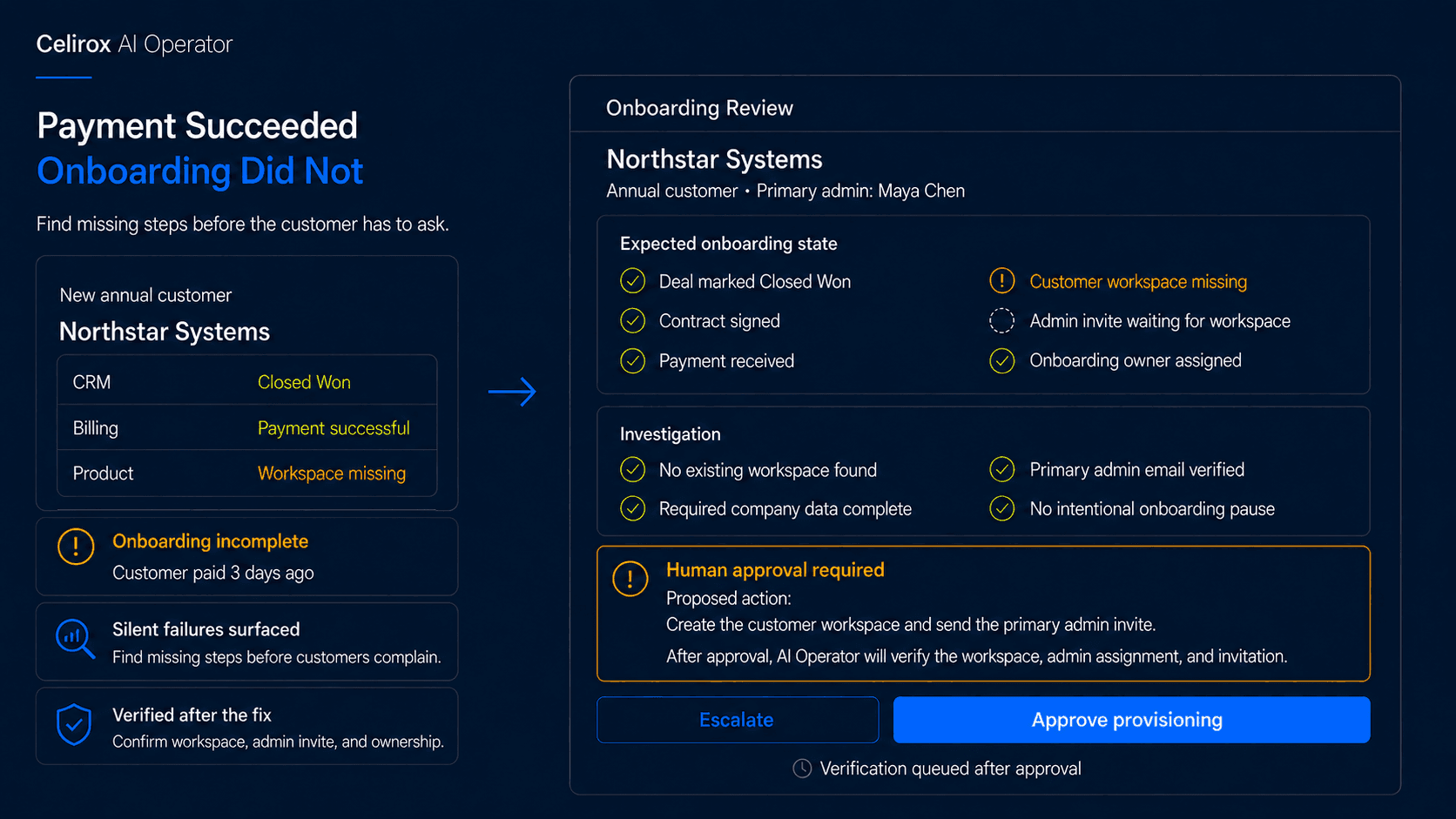
The CRM shows:
Stage: Closed Won
Billing shows:
Payment: Successful
The implementation manager assumes onboarding has started.
Sales moves on to the next opportunity.
Three days later, the customer emails:
"We paid last week. Are we supposed to receive an account invite?"
Someone investigates.
The customer exists in the CRM.
The payment succeeded.
The contract is signed.
But the workspace was never created.
One onboarding step silently failed.
Every major system looked fine when viewed independently.
The customer experience was not.
A successful sale is not the same as a successfully onboarded customer.
That is why onboarding needs to be monitored as a complete business outcome rather than a collection of individual tasks.
Onboarding Spans Many Systems
Modern SaaS onboarding rarely happens inside one application.
A new customer may pass through:
CRM → Contract → Billing → Product → Implementation → Support
The CRM may contain the commercial relationship.
The billing platform knows whether payment succeeded or payment terms were approved.
The product knows whether the customer workspace exists.
An implementation platform may contain onboarding tasks.
Support may need the correct account tier or priority.
Each system owns one part of the process.
The problem appears when one part does not match the others.
For example:
CRM: Closed Won
Billing: Paid
Product: Workspace missing
Or:
Product: Workspace created
Admin invite: Never sent
Or:
CRM: Enterprise customer
Support: Standard account
None of those necessarily produces an obvious system-wide failure.
They simply leave the customer somewhere between purchased and operational.
Define What Complete Means
Before onboarding can be monitored, the business needs to define what a completed onboarding state actually looks like.
For one SaaS company, it might mean:
- Deal marked Closed Won
- Contract signed
- Payment received or approved terms recorded
- Customer workspace created
- Primary admin invited
- Onboarding owner assigned
- Required implementation tasks created
- Support account tier updated
Another company may have a completely different process.
The important thing is to define the expected state clearly.
A rule might be:
Every Closed Won annual customer with confirmed payment must have an active workspace and assigned onboarding owner within 24 hours.
Now the company has something concrete to monitor.
Without that definition, the team can only check whether individual tasks happened.
With it, the team can ask a better question:
Has this customer actually reached the state we promised?
Where AI Operator Fits
With Celirox AI Operator, a business can describe that expected onboarding state in plain English.
For example:
"Every day, review customers that became Closed Won during the last seven days. Confirm that payment or approved payment terms exist, the workspace has been created, the primary admin has been invited, an onboarding owner is assigned, and the required implementation tasks are open. If anything is missing, investigate why. Fix safe issues, ask for approval where needed, and verify the customer is fully onboarded afterward."
The operating loop becomes:
Find customer → Check expected state → Detect gap → Investigate → Decide → Act → Verify
This is different from simply creating another onboarding checklist.
The Operator can keep checking whether the expected outcome actually exists across the connected systems.
If a step fails silently, the process does not have to remain broken until the customer notices.
Investigate Before Acting
A missing onboarding step does not always mean the same thing.
Suppose the workspace does not exist.
Possible reasons include:
- Product provisioning failed
- Payment is still pending
- Contract approval is incomplete
- Required customer information is missing
- Another workspace already exists
- The account was intentionally paused
- An implementation dependency has not been completed
The wrong response would be:
Workspace missing → Create workspace immediately
That may create duplicate accounts or bypass an approval requirement.
A better workflow investigates the surrounding context first.
For example:
CRM: Closed Won
Payment: Successful
Contract: Signed
Existing workspace: None found
Required company data: Complete
Now the proposed action is much clearer:
Create customer workspace and verify provisioning
If important information is missing or conflicting, the correct action may instead be:
Request human review
AI Operator is useful because the path can change depending on what it discovers.
Catch Silent Failures Early
Some onboarding failures are obvious.
An API call returns an error.
A task fails.
Someone sees the alert.
The harder problems are silent.
Imagine the workflow successfully creates the workspace but fails to send the admin invite.
The customer technically has an account.
They cannot access it.
Or the implementation project is created, but nobody is assigned as owner.
The project exists.
Nobody is working on it.
Or billing is correct, but support never receives the customer's enterprise tier.
The customer opens an urgent issue and is treated like a standard account.
These are not dramatic infrastructure failures.
They are small operational gaps that become customer problems later.
A monitoring workflow can look for those missing states directly rather than relying only on errors from the original action.
Keep Humans at Key Decisions
Not every onboarding gap should be corrected without review.
Imagine the Operator discovers:
CRM: Closed Won
Billing: Payment failed
Product: Workspace already active
Should access be removed?
Not necessarily.
Perhaps the customer has approved Net-30 terms.
Perhaps finance is resolving the payment.
Perhaps the account was intentionally activated before collection.
The Operator needs business context.
A company can define boundaries such as:
Missing routine onboarding task → Create automatically
Duplicate workspace possibility → Require review
Failed enterprise payment → Finance approval
Access removal → Human approval
Conflicting contract information → Escalate
The goal is not to remove people from onboarding.
It is to bring them the exceptions that actually require judgment instead of making them manually verify every customer.
Verify the Customer Is Ready
Taking an action is not the same as completing onboarding.
Suppose the Operator sends a workspace-creation request.
The API responds successfully.
Is the customer ready?
Not yet.
The workflow should verify that the workspace actually exists and has the expected configuration.
The same applies to invitations.
Invite sent does not necessarily mean the invitation exists or went to the correct administrator.
A stronger loop is:
Detect missing step → Perform action → Read resulting state → Confirm success
For example:
Workspace creation requested → Workspace found → Admin assigned → Invite confirmed → Onboarding state updated
Verification prevents the workflow from declaring success simply because it attempted the right action.
The business should care about the resulting customer state.
Find Recurring Onboarding Problems
One missing admin invite can be corrected.
Ten missing admin invites in the same week indicate a bigger problem.
Imagine the Operator finds that every customer created through one sales region is missing the onboarding owner.
Correcting those records is useful.
But the more important finding is:
The same onboarding step is failing repeatedly.
That could point to a broken field mapping, expired integration authorization, incomplete workflow logic, or a process change that was never reflected in the system.
AI Operator can help surface repeated patterns instead of repairing the same symptom forever.
That turns onboarding monitoring into a source of operational feedback.
The team can fix the underlying process instead of waiting for the next customer to experience the same problem.
Measure Onboarding Completion
Do not measure onboarding only by how many tasks were created.
The stronger question is whether customers reached the expected state on time.
Useful metrics can include:
- Customers missing required onboarding steps
- Time from Closed Won to workspace creation
- Time until admin invitation
- Customers without an onboarding owner
- Failed provisioning attempts
- Cases requiring human approval
- Repeated failure patterns
- Customers who contact support before onboarding is complete
The goal is not to maximize workflow activity.
It is to reduce the number of customers who pay and then wait because an internal step was missed.
Imagine onboarding normally requires five system updates.
Completing four of them is not 80% success from the customer's perspective if the fifth is the account invitation they need to begin using the product.
Measure the business outcome.
Not just the number of completed tasks.
Frequently Asked Questions
What is SaaS onboarding monitoring?
SaaS onboarding monitoring checks whether each new customer has reached the expected onboarding state across the systems involved in sales, billing, product provisioning, implementation, and support.
Why can onboarding fail even after payment succeeds?
Payment is only one part of the process. Workspace creation, account invitations, implementation tasks, account ownership, entitlements, and other downstream steps can still fail or remain incomplete.
How is this different from an onboarding checklist?
A checklist tells the team what should happen. Monitoring checks whether those things actually happened across the connected systems and identifies customers whose onboarding state is incomplete.
Should every missing step be fixed automatically?
No. Routine, low-risk corrections may be appropriate to perform automatically, while ambiguous, financial, duplicate-account, access-related, or high-value situations may require human approval.
Can AI Operator detect repeated onboarding failures?
Yes. Repeated missing steps can be surfaced as recurring operational patterns, helping teams identify an underlying integration or process problem instead of correcting each customer individually.
Can AI Operator work across several onboarding systems?
Yes. Celirox AI Operator is designed for workflows that involve connected business applications such as CRM, billing, product systems, implementation tools, support platforms, and other operational systems.
Why is verification necessary after fixing a problem?
Because requesting an action does not guarantee the expected result occurred. Verification checks the resulting system state before the onboarding issue is considered resolved.
Make Sure Onboarding Happened
A deal can close.
A contract can be signed.
A payment can succeed.
And the customer can still be waiting.
That is the problem with treating onboarding as a chain of independent actions.
The business cares about something broader:
Did the customer actually become ready to use what they purchased?
A useful operating process keeps checking until that answer is yes.
Observe → Check state → Find gap → Investigate → Act → Verify
Celirox AI Operator helps businesses monitor onboarding across connected systems, identify missing steps, investigate why the process stopped, handle safe corrections, involve people where judgment is needed, and verify that each customer reaches the intended onboarding state.