Stop Invalid Orders Before Payment With Shopify Checkout Validation
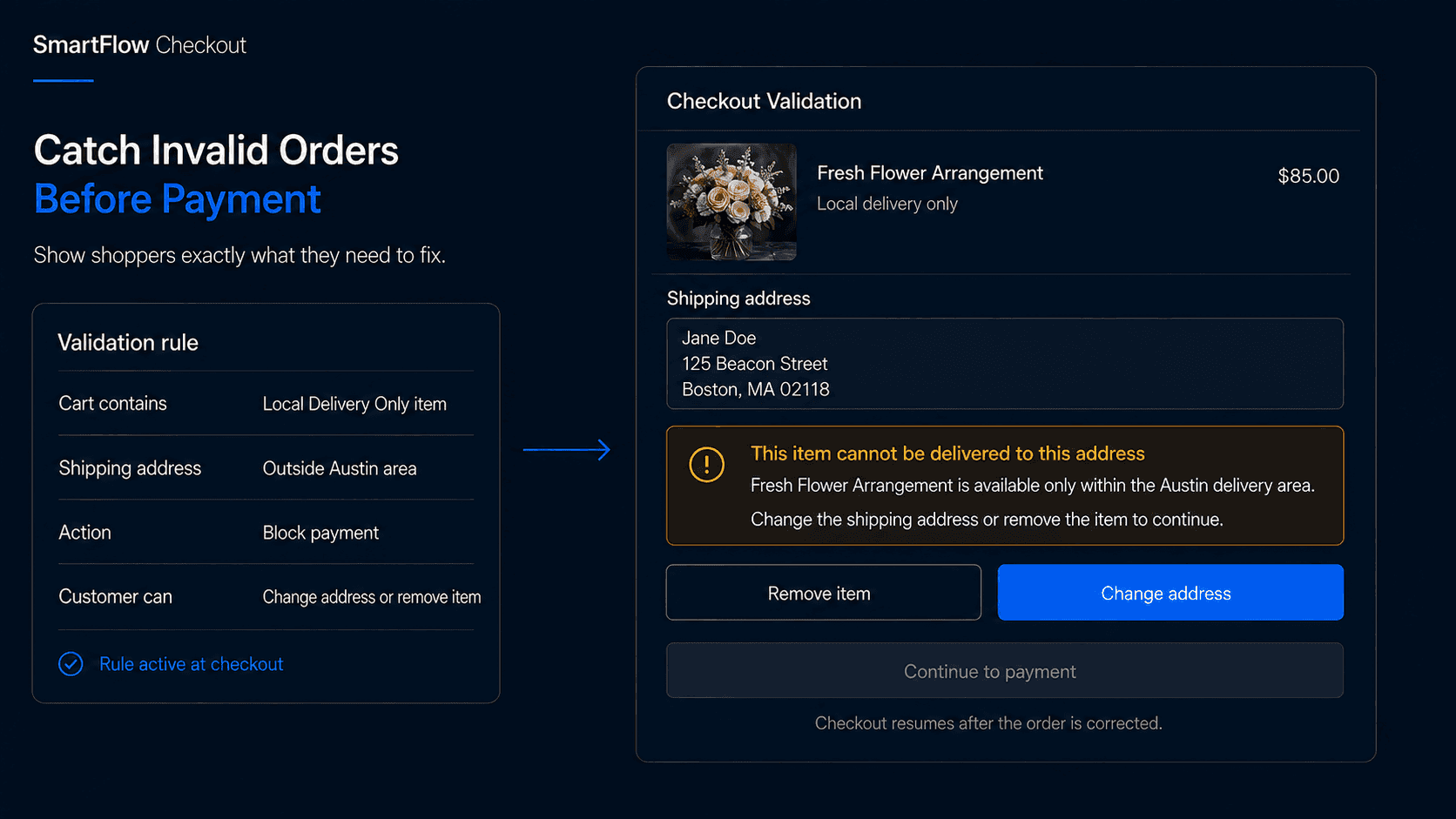
Catch Invalid Orders Earlier
Imagine a customer adds four products to their cart.
Three can ship normally.
The fourth is available only for local delivery.
The customer enters an address outside the supported delivery area and continues toward payment.
Without the right checkout rule, the order may still reach your team.
Now someone has to contact the customer, explain that part of the order cannot be fulfilled, change the order, issue a refund, or cancel it entirely.
The customer did not do anything wrong.
The store simply allowed them to create an order the business could not fulfill as presented.
That is where checkout validation becomes useful.
The best time to catch an invalid order is while the customer can still correct it themselves.
Instead of discovering the problem after payment, the checkout can evaluate important conditions before the order is completed.
What Checkout Validation Means
Shopify checkout validation checks whether a cart or checkout satisfies defined business requirements before the customer places the order.
The rule might ask:
- Does the cart meet a minimum quantity?
- Are restricted products being purchased together?
- Is this product allowed for the selected destination?
- Is required order information present?
- Does this buyer qualify for the product?
- Does the cart satisfy a required value or quantity condition?
If everything is valid, checkout continues normally.
If not, the customer receives a message explaining what needs to change.
A simple flow looks like:
Customer reaches checkout → Rules evaluated → Condition passes → Continue
or:
Customer reaches checkout → Rule fails → Explain problem → Customer corrects cart → Continue
The objective is not to create more barriers.
It is to prevent orders the merchant already knows cannot be handled correctly.
Validate Real Business Rules
A useful validation rule should come from a real operational requirement.
Suppose a merchant sells wholesale cases containing 12 units.
The product should not be purchased in quantities of 7 or 15.
The business rule is:
Wholesale case product → Quantity must be a multiple of 12
If the customer enters 15, checkout can explain:
This product is sold in cases of 12. Please change the quantity to 12, 24, 36, or another full case quantity.
That is better than accepting the order and asking someone to fix it afterward.
Another merchant may have a minimum order requirement:
Wholesale customer → Order must be at least $500
Or a product restriction:
Hazardous shipping category → Not available to selected destination
The specific rule will differ by store.
The important thing is that validation reflects how the business actually operates.
Where SmartFlow Checkout Fits
With SmartFlow Checkout, merchants can configure checkout validation rules around supported cart, customer, product, destination, and order conditions.
For example:
"Do not allow checkout when a wholesale customer has fewer than 12 units of products from the Wholesale Cases collection."
Or:
"If the cart contains products from our Local Delivery Only collection, prevent checkout for addresses outside our supported region."
Or:
"Require orders containing this product to have at least two units."
The merchant defines the business requirement.
SmartFlow Checkout helps turn that requirement into a checkout rule and customer-facing message.
A typical process becomes:
Identify problem → Define condition → Decide when to block → Write correction message → Test → Enable
The strongest validation rules are usually simple enough that both customers and support teams can understand them immediately.
Block Only When Necessary
Not every unusual situation needs to stop checkout.
Some conditions should create guidance.
Others should create a hard validation error.
Imagine a customer buys a fragile product.
The merchant wants to remind them that delivery may take longer.
That may be better handled with a message.
Now imagine the same product cannot legally or operationally be delivered to the selected destination.
That may require blocking checkout.
This distinction matters.
If every small preference becomes a hard validation rule, customers may face unnecessary friction.
A useful question is:
What happens if we allow this order to continue?
If the answer is:
"Nothing serious. We just prefer something different."
a warning or informational message may be enough.
If the answer is:
"We cannot fulfill the order correctly."
validation is much easier to justify.
Use blocking rules for conditions that genuinely need correction before purchase.
Explain How to Fix It
A validation message should never leave the customer wondering what went wrong.
Compare:
Order invalid
with:
This product can only be purchased in quantities of 6. Please update the quantity to 6, 12, 18, or another multiple of 6.
The second message gives the customer a path forward.
Another example:
This item is available only for local delivery. Remove it from your cart or enter an address within our supported delivery area.
Or:
Your wholesale order must be at least $500 before checkout. Add $84 more to continue.
Useful validation messages should answer two questions:
What is wrong?
What should I do next?
Avoid internal terminology, error codes, or vague statements.
The customer should be able to correct the problem without contacting support.
Handle Complex Carts Carefully
Validation becomes more important when several cart conditions interact.
Imagine an order contains:
Product A: Ships worldwide
Product B: Available only in the United States
Product C: Must be purchased in pairs
The customer enters a Canadian shipping address and has three units of Product C.
There are now two separate problems.
A useful checkout experience should surface the relevant corrections clearly rather than returning one generic error.
The customer may need to remove Product B and change Product C from three units to either two or four.
This is why rule combinations need testing.
Two individually sensible rules can sometimes interact in ways the merchant did not expect.
Before enabling validation broadly, test carts containing multiple products, multiple quantities, discounts, different customer types, and different destinations.
The rule should still make sense when the cart becomes more complicated than the original example.
Avoid Conflicting Rules
As more checkout rules are added, the merchant needs to think about how they interact.
Imagine one rule says:
Wholesale customers must order at least $500
while another says:
Selected promotional customers can place any order above $250
Now imagine a customer qualifies for both conditions.
Which rule wins?
Another conflict could be:
Product requires quantity of 6
and:
Customer maximum quantity is 4
That customer can never create a valid cart.
The technical rule may work exactly as configured.
The business logic does not.
A good validation system therefore needs more than individual rules.
The merchant should understand precedence, exceptions, and whether combinations can create impossible checkout conditions.
Keep the rule set small enough that somebody can still explain it.
Test the Customer Journey
A checkout validation rule is not complete when the condition technically fires.
The entire correction journey should work.
For each rule, test:
- A valid order
- An order just below the threshold
- An order exactly at the threshold
- An order just above the threshold
- Mixed carts
- Discounts that change cart value
- Mobile checkout
- Different customer types
- Different destinations
Then read the error as if you were the customer.
Does it explain what happened?
Can the shopper fix it immediately?
Does the message disappear after the problem is corrected?
Does another rule unexpectedly appear afterward?
Testing the valid path matters as much as testing the invalid one.
A rule that blocks the wrong customers may create more damage than the operational problem it was intended to prevent.
Measure Fewer Bad Orders
Do not judge validation only by the number of errors displayed.
A high number of blocked checkout attempts is not automatically good.
Useful metrics can include:
- Invalid checkout attempts
- Customers who successfully correct the problem
- Orders requiring manual correction after purchase
- Orders canceled for preventable rule violations
- Support requests related to checkout restrictions
- Checkout abandonment after validation
The goal is to reduce preventable operational problems without creating unnecessary checkout friction.
Imagine a rule blocks 200 customers per month, but 180 immediately correct the cart and complete their purchase.
That may be useful.
Now imagine another rule blocks 200 customers and almost all of them leave.
That rule deserves investigation.
Perhaps the business requirement is too strict.
Perhaps the message is unclear.
Perhaps the customer cannot realistically fix the issue.
Measure what happens after the error appears.
Frequently Asked Questions
What are Shopify checkout validation rules?
Checkout validation rules evaluate cart or checkout conditions before an order is completed and can prevent checkout when defined business requirements are not satisfied.
What kinds of orders can validation prevent?
Merchants can use supported validation logic for situations such as quantity requirements, restricted product combinations, order thresholds, buyer eligibility, destination restrictions, and other business-specific conditions.
Should every checkout rule block the customer?
No. Hard validation should generally be reserved for conditions that genuinely need correction before purchase. Informational situations may be better handled with messages or other checkout components.
What makes a good validation error message?
It should explain what is wrong and tell the customer exactly how to correct it. Avoid vague errors such as "Invalid order."
Can several validation rules apply to one cart?
Yes, which is why combinations should be tested carefully. Rules can conflict or create impossible conditions if exceptions and priorities are not considered.
Can SmartFlow Checkout create checkout validation rules?
SmartFlow Checkout can help merchants configure supported validation rules around checkout conditions and provide clear customer-facing messages when those conditions are not satisfied.
Will validation reduce conversion?
Poorly designed rules can create friction. Necessary, clearly explained validation can instead prevent customers from completing orders the merchant would later need to modify or cancel.
Stop Problems Before Payment
Some checkout problems are easier to solve while the shopper is still there.
A quantity can be changed.
A restricted product can be removed.
A missing requirement can be completed.
A destination can be corrected.
After payment, the same problem may require support conversations, refunds, cancellations, or fulfillment intervention.
That is why checkout validation should not be viewed simply as a way to block customers.
It is a way to keep invalid orders from becoming operational problems.
Check condition → Explain problem → Customer corrects it → Continue checkout
SmartFlow Checkout helps merchants turn real business requirements into supported checkout validation rules so customers can fix preventable order problems before payment instead of leaving the operations team to repair them afterward.