A Customer Bought the Right Product. But Your Team Still Needs One More Detail
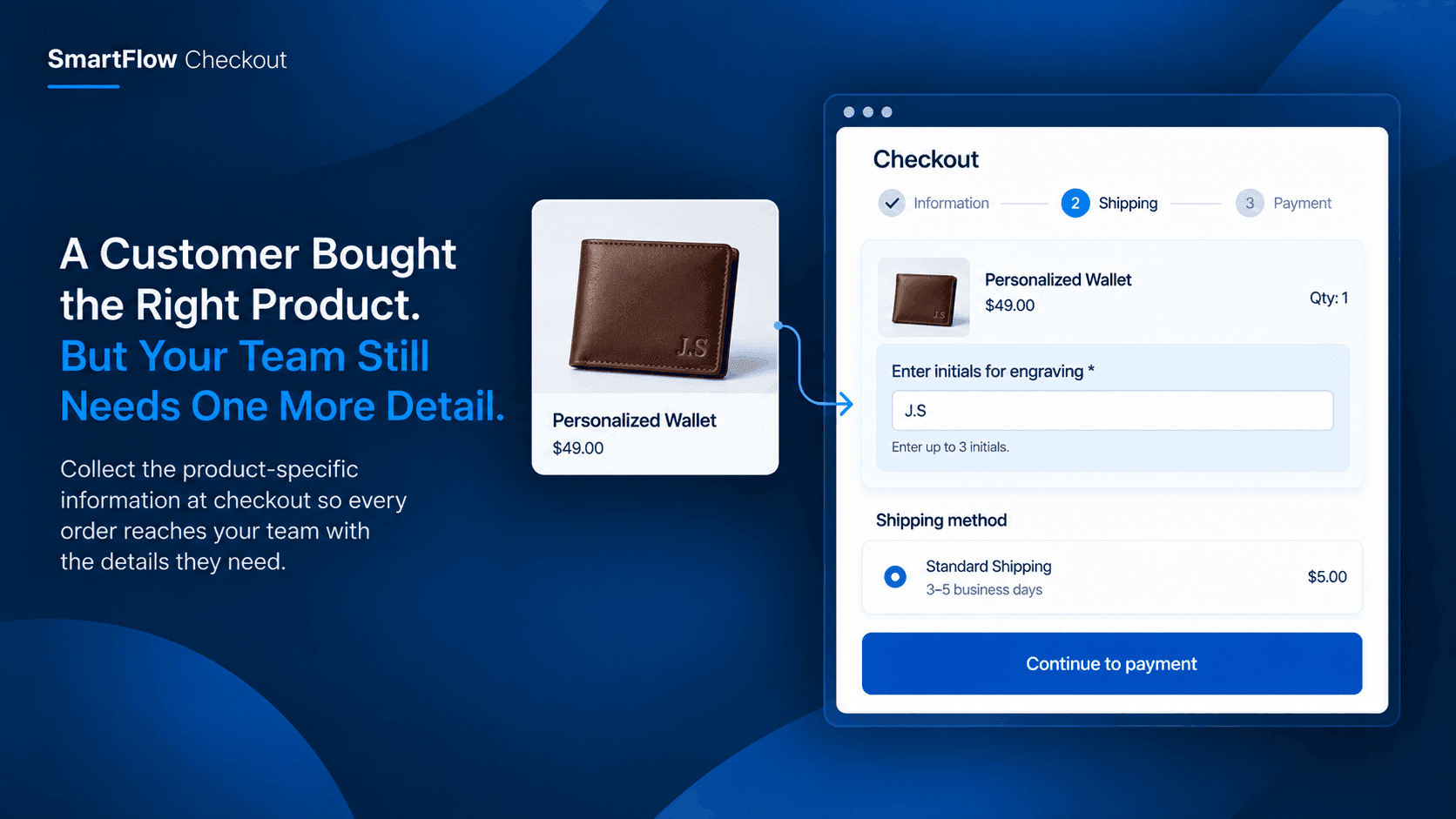
A customer places an order.
Payment is successful. The order appears in Shopify. Everything looks normal.
Then someone on the fulfillment team opens it and realizes there is a problem.
The product is personalized, but the engraving text is missing.
Or the customer ordered a customized item, but nobody knows the requested measurement. The team now has to stop fulfillment and contact the customer.
The order was technically completed.
But it was not actually ready to be fulfilled.
When a Paid Order Is Not Ready
This happens more often than merchants expect.
A customer can choose the correct product, enter their shipping address, pay successfully, and still leave out information that your team needs to prepare the order correctly.
The problem is especially common with products that are customized, personalized, configured, or prepared differently based on customer instructions.
For example, imagine a store selling personalized leather wallets.
The product page clearly says customers can add initials.
A customer adds the wallet to the cart and completes checkout.
The payment succeeds.
But the order does not contain the initials.
Now someone has to contact the customer, wait for a response, find the order again, and make sure the information reaches the person preparing the product.
That small missing detail can turn a simple order into a manual follow-up.
The Fulfillment Team Finds It Later
The worst time to discover missing information is after the order has already entered your workflow.
By then, your team may already have other work in progress.
Someone may have printed the order.
Another person may have started picking the product.
The fulfillment team may even notice the issue only when the order reaches the customization stage.
That creates unnecessary back-and-forth.
The customer gets an email asking for information they thought they had already provided.
The team has to remember which orders are waiting for replies.
And fulfillment gets delayed for something that could have been collected before the order was completed.
The issue is not really payment.
It is the gap between a successful checkout and a fulfillment-ready order.
Ask for Information When It Matters
The better approach is to collect product-specific information at the moment the customer is placing the order.
But there is an important distinction here.
You do not want every customer filling out a long form with questions that have nothing to do with their purchase.
A customer buying a standard product should be able to check out normally.
A customer buying a personalized product may need one or two additional pieces of information.
That means the information should appear because of what the customer is buying.
For example:
- Personalized product → ask for engraving text
- Made-to-measure product → ask for required measurement
- Customized gift → ask for the personalization message
- Special preparation → ask for the customer's instruction
This keeps checkout relevant instead of turning it into a generic questionnaire.
One Product Can Change Checkout
This is where conditional checkout logic becomes useful.
Suppose a Shopify store sells two types of products.
Most products are standard and can be fulfilled immediately.
But one collection contains products that customers can personalize.
The store does not need to ask every shopper for personalization information.
It only needs to ask customers whose cart contains a product that requires it.
That small difference can make the checkout experience much cleaner.
Instead of asking:
"What should we know about your order?"
the checkout can ask something much more specific:
"Enter the initials you would like engraved on your wallet."
The customer understands why the question is there.
The fulfillment team understands what the answer is for.
And the order can move forward with less manual chasing.
Make The Question Easy To Answer
Collecting information is only useful if customers understand what they are supposed to enter.
A vague field such as "Additional information" puts the responsibility on the customer to guess what the merchant needs.
A better question explains the exact requirement.
For example:
"Enter up to 3 initials for engraving."
Or:
"Enter the name exactly as you want it printed on the product."
Or:
"Enter your preferred waist measurement in inches."
Small instructions like these can prevent another round of clarification later.
Think about the person who will actually use the answer.
If the fulfillment employee needs a short engraving name, ask for the engraving name.
If they need a measurement, ask for the measurement.
If they need a customization instruction, ask for that instruction.
The checkout should collect information for a reason, not simply collect more information.
Keep Standard Orders Simple
A common mistake is trying to solve a fulfillment problem by adding more questions to every order.
That creates a different problem.
Customers purchasing standard products should not have to navigate fields that are irrelevant to them.
Imagine buying a regular T-shirt and being asked for personalization instructions.
Even if the field is optional, it adds noise.
Now imagine buying a personalized T-shirt and being asked for nothing.
The first experience has unnecessary friction.
The second creates fulfillment work.
Conditional information collection solves both problems.
The customer only sees the additional question when their order actually needs it.
That means a normal order stays normal.
A customized order gets the extra information required to complete it correctly.
Build The Rule Around The Product
With SmartFlow Checkout, merchants can use checkout customization logic to create rules around the order and what is being purchased.
For this use case, the important idea is simple:
If the cart contains a product that requires additional fulfillment information, show the relevant field or request at checkout.
That creates a direct connection between the product and the information your team needs.
The workflow might look like this:
- Customer adds a personalized product.
- Checkout recognizes the relevant condition.
- The customer is asked for the required information.
- The customer completes checkout with that information.
- The fulfillment team receives an order with the necessary details.
The goal is not to make checkout more complicated.
It is to move a question that would otherwise happen after payment into the checkout moment where the customer is already providing order information.
Stop Chasing Customers After Payment
For a small store, one missing detail may feel like a minor inconvenience.
But multiply that by dozens of customized orders.
Now someone is spending part of every day checking orders, identifying what is missing, sending messages, waiting for responses, and updating order information.
The work is repetitive because the same question keeps coming up.
"Which engraving should we use?"
"What measurement did you want?"
"What text should we print?"
"Which customization option did you mean?"
Customers do not necessarily mind answering these questions.
They just should not have to answer them after the order has already been placed.
Collecting the information earlier gives both sides a cleaner process.
The customer knows what is needed before paying.
The merchant receives a more complete order.
The fulfillment team has fewer reasons to stop and ask for clarification.
Think About The Handoff
There is another benefit that is easy to overlook.
Checkout is not the end of the customer journey.
It is the beginning of the fulfillment process.
The information collected during checkout eventually needs to be useful to someone else inside the business.
That might be the person preparing the product, the person packing the order, or the person responsible for customization.
So when deciding what to collect, ask one simple question:
"What information will the next person need to do their job?"
That question usually produces better checkout fields than asking what information might be "nice to have."
For example, a fulfillment employee does not need a customer's favorite color if it has nothing to do with the order.
They may absolutely need the exact text that has to be engraved.
The difference is operational value.
FAQ
Can I collect information only for certain products?
Yes. The useful approach is to make the request conditional on the products or order circumstances that actually require additional information, rather than showing the same fields to every customer.
What kind of information can a merchant collect?
The exact information depends on the product and fulfillment process. Examples include personalization text, measurements, customization instructions, or other details your team needs to prepare the order correctly.
Why not contact the customer after the order?
You can, but it creates additional work and can delay fulfillment. Collecting required information during checkout gives customers an opportunity to provide it while they are already completing the order.
Will every customer see the additional question?
Not necessarily. The goal of conditional checkout logic is to show relevant information requests only when the order meets the condition that requires them.
Does this work for customized products?
Yes. Customized and personalized products are a particularly useful example because fulfillment often depends on information that is not otherwise part of a standard order.
Does SmartFlow Checkout require custom coding?
SmartFlow Checkout is designed to let merchants configure checkout and post-purchase logic without building custom code for these workflows.
Make More Orders Fulfillment-Ready
A successful payment does not always mean your team has everything needed to fulfill the order.
For standard products, that may not matter.
But when a product needs personalization, measurements, or special instructions, one missing detail can stop the entire process.
The better experience is to ask for that information when it is relevant.
Not for every customer.
Not after the order has already reached fulfillment.
And not through another manual follow-up that someone on your team has to remember.
With SmartFlow Checkout, merchants can build checkout logic around the products customers actually purchase and collect the information needed to move those orders forward.
That turns checkout into more than a payment step.
It becomes the point where the order becomes ready for the people who have to fulfill it.
Ready to make checkout work better for your fulfillment process?