The Customer Already Gave You the Answer. Why Is Your Team Asking Again?
The customer already answered the question.
The answer is sitting in an email.
Nobody needs to contact the customer again.
But two days later, someone on the team needs that exact information.
They search Slack.
Nothing.
They check the project tracker.
Nothing.
They ask a teammate.
The teammate says they remember seeing it somewhere.
Then comes the familiar sentence:
"I think the customer mentioned that in an email."
Now someone has to search through the inbox.
The information already exists.
The problem is finding it when it matters.
The Answer Is Already There
Imagine a small agency working on a client's website.
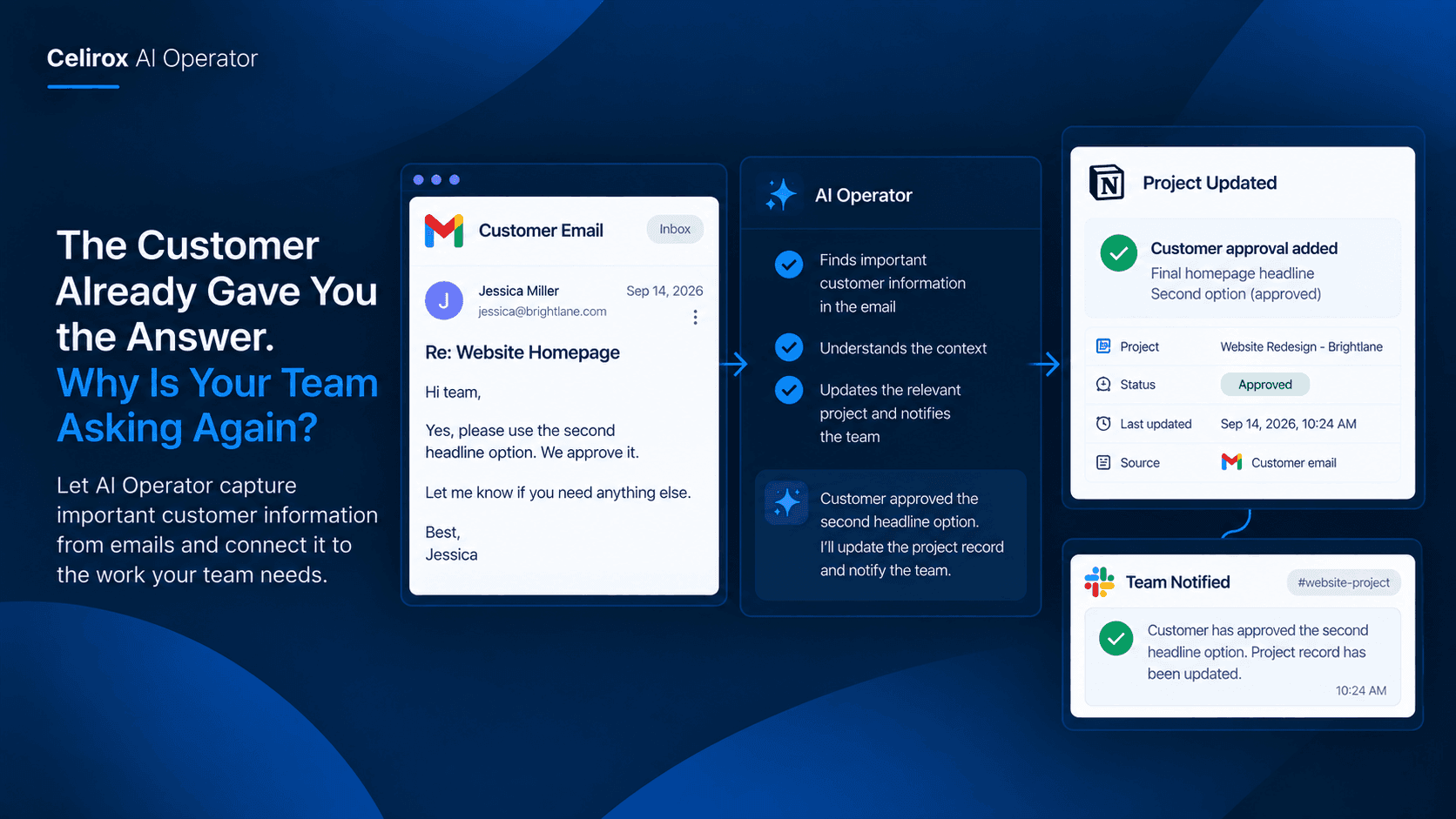
The team needs confirmation about the final homepage headline before the developer can publish the page.
The account manager emails the client.
A few hours later, the client replies:
"Yes, please use the second headline option. We approve it."
The account manager sees the message and continues with other work.
The next morning, the developer asks:
"Which headline did the client approve?"
The account manager remembers that the client replied.
But they do not remember the exact wording.
So they search Gmail.
They find the email.
Then they copy the answer into Slack.
It takes only a few minutes.
But imagine doing this across dozens of customers and hundreds of conversations.
The problem is no longer finding one email.
It becomes part of the team's everyday workload.
Important Details Get Buried
Email is excellent for communication.
It is not always a good place to keep information that other people will need later.
A customer might confirm:
- A delivery address
- A project requirement
- A product specification
- An approval
- A requested change
- A preferred meeting time
- A billing detail
- A deadline
At the moment the email arrives, the person reading it knows what to do.
Weeks later, another employee may need the same information.
That employee may not have been included in the original conversation.
They now have to reconstruct what happened.
The information is somewhere in the company's communication history.
The team simply has to find it.
Searching Is Not The Real Work
Opening Gmail and typing a customer's name is easy.
The difficult part is knowing what to search for.
A customer may have sent twenty emails.
The answer might be inside a long conversation.
The important detail may not appear in the subject line.
The customer may have changed their mind later.
The relevant email may have been sent to one employee but never shared with the rest of the team.
That means the person searching isn't just looking for a message.
They are trying to understand the history of a conversation.
Which message matters?
Is it the latest decision?
Was the request approved?
Did the customer change anything afterward?
The time goes into reconstructing context.
Put The Information Where Work Happens
The better approach is to move important information closer to the work that depends on it.
Suppose a customer confirms a project requirement by email.
Instead of leaving that information inside the account manager's inbox, the relevant detail can become part of the project's working context.
The team member working on the project does not need to search through an old conversation.
They can see the information where they already manage the work.
The same principle applies to many types of customer communication.
A customer answers a question.
The answer should be available to the person who needs it.
A customer approves something.
The approval should not disappear into an inbox.
A customer provides an important requirement.
The team should not have to ask for it again.
The goal is simple:
Don't make people search for information the company already has.
Start With A Specific Signal
Good workplace automation does not need to react to every email.
That would create more noise instead of reducing it.
The useful approach is to identify the kinds of customer information that actually matter to the business.
For example:
Customer approval → Update the project record
Customer confirms requirement → Inform the assigned team member
Customer provides a new deadline → Update the relevant task or record
Customer confirms delivery details → Make the information available to the responsible team
The exact process depends on the company.
The important part is that the business defines what counts as useful information.
AI Operator can then help coordinate the work around that information instead of requiring employees to manually repeat the same steps.
The Customer Shouldn't Repeat Themselves
There is also a customer experience problem here.
Imagine a customer spends ten minutes carefully explaining a requirement.
The account manager reads it.
The team discusses it.
A few days later, someone from the company emails:
"Could you please confirm that requirement again?"
From the company's perspective, it may simply be a missing piece of information.
From the customer's perspective, they already answered.
Having to repeat information can make a company feel disorganized.
It can also slow down projects.
The customer should not have to act as the company's information system.
If the business already received the answer, the team should make a reasonable effort to use it.
Connect Conversations To Work
This becomes especially useful when several people work with the same customer.
The salesperson may have the original conversation.
The account manager handles the relationship.
The delivery team performs the work.
Finance handles billing.
Support may become involved later.
Each person may interact with the same customer at a different point.
Without a good information flow, every department develops its own version of the customer story.
The salesperson remembers one detail.
The account manager has another email.
The delivery team has a Slack message.
Finance has a spreadsheet.
Nobody necessarily has the complete picture.
Connecting useful information to the appropriate business process helps reduce that fragmentation.
The objective is not to copy every conversation everywhere.
It is to make important information available where it is actually needed.
Keep The Original Context
Moving information from an email into another system should not mean losing the context around it.
Consider a customer who says:
"The Friday deadline works, but only if the revised product images are included."
If someone records only:
Deadline: Friday
the most important part of the message has been lost.
The customer did not simply agree to Friday.
They agreed under a condition.
That is why useful information handling needs to preserve meaning, not just extract isolated words.
The team should be able to understand what the customer actually agreed to.
When information affects a project, order, account, or decision, the surrounding context can matter just as much as the individual fact.
Let People Handle Exceptions
Not every customer email should trigger an automatic business action.
Some messages are straightforward.
Others are ambiguous.
A customer might say:
"Friday should probably work, but I'll confirm tomorrow."
That is not the same as a confirmed deadline.
Another customer might make a request that conflicts with an existing agreement.
A third might send sensitive information that should not automatically be copied into another system.
These situations deserve human attention.
AI Operator can be useful by helping prepare the relevant information and workflow while leaving important judgment to the people responsible for the customer relationship.
Automation should reduce unnecessary searching.
It should not turn uncertainty into an automatic decision.
Make Customer Information Easier To Find
The real benefit becomes visible when a company grows.
One employee may be able to remember most customer conversations when there are ten active projects.
That becomes much harder with fifty.
New employees join.
Responsibilities change.
Customers work with multiple departments.
Projects continue for months.
Information that was obvious last week can become surprisingly difficult to find next month.
A good workflow makes important information easier to carry forward.
The employee who originally received the email does not have to become the permanent owner of that information.
The information can move with the work.
That means the business becomes less dependent on individual memory.
Stop Asking For Answers You Already Have
The problem is not that employees cannot search email.
They can.
The problem is that searching for old customer information is often work that adds no value.
The customer already provided the answer.
The team already received it.
Someone simply needs to connect that information to the work that happens next.
AI Operator can help coordinate that process across connected workplace tools, allowing businesses to build workflows around the information and actions that matter to them.
The result is not about making email disappear.
Email remains where customers communicate.
The difference is what happens afterward.
Customer provides information → Relevant context is identified → Work is updated → The right person knows what changed
That is a much better process than:
Customer provides information → Email gets buried → Someone needs it later → Team searches → Customer gets asked again
Frequently Asked Questions
Why does important customer information get lost in email?
Email is designed for communication, so important decisions and details can remain inside conversations instead of becoming part of the team's ongoing working context.
What kind of customer information can teams keep track of?
This depends on the business, but examples include customer approvals, project requirements, deadlines, delivery details, requested changes, and other information that affects ongoing work.
Can AI Operator automatically process every customer email?
That is not necessarily the right approach. Businesses should define which types of information and situations are useful to act on. Ambiguous or sensitive situations may still require human review.
Why is context important when extracting customer information?
A single sentence can depend on what came before it. For example, a customer agreeing to a deadline only under a specific condition should not be reduced to the deadline alone.
Can this help different teams work from the same customer information?
Yes. A useful workflow can make relevant information available to the people or systems responsible for the next step instead of leaving it inside one employee's inbox.
Does the customer need to send the information again?
The goal is to reduce situations where customers are asked to repeat information they have already provided and the business simply failed to make accessible internally.
Can human employees review the information before an action happens?
Yes. Human review remains important for ambiguous requests, sensitive information, or decisions that require business judgment.
Is this only useful for customer support teams?
No. The same problem can appear in sales, account management, project delivery, operations, finance, and other teams that depend on customer-provided information.
What is the best way to start?
Choose one type of customer information that repeatedly gets buried in email and causes employees to search or ask questions again. Build the workflow around that specific situation before expanding it.
What is the main benefit of connecting customer information to work?
It reduces the gap between communication and action. Instead of leaving important information inside an old conversation, the team can make that information available where the next piece of work actually happens.
Let Information Move With The Work
Customers should not have to repeat themselves because their previous answer is buried somewhere in an employee's inbox.
Teams should not have to spend twenty minutes searching through old conversations to find a decision that was already made.
And one employee should not become the only person who knows what a customer said three weeks ago.
The information already exists.
What is missing is a reliable way to carry useful information from the conversation into the work that follows.
That is where AI Operator can help.
Instead of treating every customer email as something that simply arrives and disappears into an inbox, businesses can build workflows around the information that actually matters.
Customer communication → Useful information → Business context → Next action
The goal is not to automate communication for the sake of automation.
It is to make sure that when a customer gives your company an important answer, the people who need that answer can actually find and use it.
Don't ask customers twice for information you already have.