The Customer Has Questions at Checkout: Answer Them Without Losing the Sale
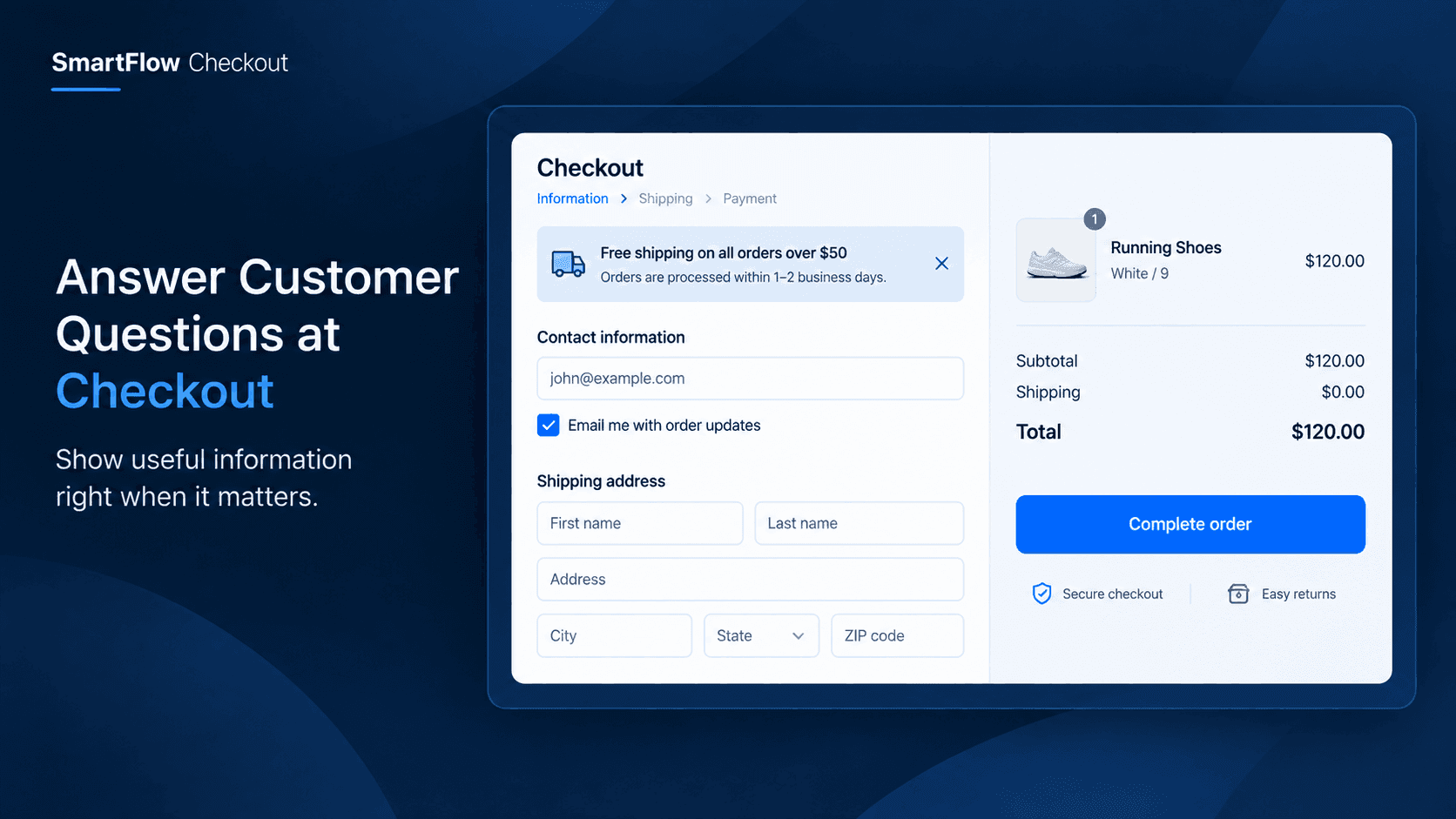
The Customer Is Ready To Buy
A customer has done almost everything.
They found the product.
They looked through the details.
They added it to the cart.
They reached checkout.
Then they stop.
They have one question.
"When will my order ship?"
They look around for the answer but cannot immediately find it.
Maybe they open another page.
Maybe they search the store.
Maybe they decide to come back later.
A purchase that was almost complete suddenly has friction at the most important moment.
Checkout Questions Can Create Hesitation
Customers can have many reasons to pause before completing an order.
They may want to know what happens after purchase.
They may need reassurance about a store policy.
They may want to know how to get help if something goes wrong.
They may simply need one important piece of information before feeling comfortable clicking the final button.
The problem is not always that the information does not exist.
Sometimes the information is simply not visible when the customer needs it.
That timing matters.
Put The Answer Where It Matters
Instead of asking customers to leave checkout and search for information, merchants can bring useful information directly into the checkout experience.
SmartFlow Checkout's custom banner capability gives merchants a way to add relevant messaging to checkout.
For example, a merchant could display a short message explaining an important shipping expectation.
Another store could highlight a support option.
Another could communicate a useful store policy.
The customer gets the information without having to leave the purchase flow.
Keep The Message Focused
A checkout banner should not become another page of content.
Customers are already trying to complete an order.
The most effective message is usually short and directly connected to the customer's decision.
For example:
Need help? Our support team is available if you have any questions about your order.
Or:
Orders placed before the daily cutoff are processed on the next business day.
The merchant decides what information is useful for their customers.
SmartFlow provides the place to present it.
Answer Last-Minute Questions
Imagine a customer buying a premium product.
They reach checkout and hesitate because they want to understand what happens if they need assistance after ordering.
Instead of leaving checkout to find the answer, they see a clear message explaining how the store handles customer support.
That small piece of information may be enough to remove the hesitation.
The customer continues.
The order is completed.
Nothing complicated happened.
The store simply answered the question at the right moment.
Build Confidence Before Purchase
Checkout is more than a form for entering information.
It is also the final moment when a customer decides whether they feel comfortable completing the purchase.
A useful message can reinforce that confidence.
Depending on the store, merchants might use checkout messaging to communicate:
- Important shipping information.
- Customer support availability.
- Useful purchase instructions.
- A relevant store policy.
- Important information customers should know before completing the order.
The goal is not to add more content.
It is to remove uncertainty.
Don't Send Customers Searching
Consider two checkout experiences.
In the first, a customer has a question.
They open another page.
They search the navigation.
They look through FAQs.
They return to checkout.
In the second, the answer is already visible in a concise checkout message.
The second experience requires less effort.
That matters because every extra step introduces another opportunity for distraction.
A well-placed checkout message keeps the customer focused on completing the purchase.
Match Messages To Your Store
Different businesses have different checkout concerns.
A fashion merchant may want to communicate an important fulfillment expectation.
A custom-product store may need to remind customers about processing requirements.
A growing brand may want to make support information easy to find.
A store selling premium products may want to reinforce important purchase information.
There is no single message that works for every merchant.
The useful approach is to identify the questions customers repeatedly ask and decide which answers belong directly in the checkout experience.
Turn Customer Questions Into Improvements
Customer questions can reveal where checkout needs more clarity.
If customers repeatedly ask the same question before purchasing, the issue may not be the customer.
The information may simply be difficult to find.
For example, if customers constantly ask about shipping expectations, that is a signal.
If customers repeatedly ask how to get support, that is another signal.
If shoppers regularly hesitate over an important store policy, the checkout experience may benefit from clearer communication.
A custom checkout banner gives merchants another way to address these recurring questions.
Keep Checkout Clean
More information is not automatically better.
A checkout filled with banners, messages, icons, and promotions can create its own friction.
The purpose of a custom banner should be clear:
Give the customer useful information without distracting them from completing the order.
That means choosing messages carefully.
One useful answer is better than five competing messages.
The merchant should prioritize the information that actually helps customers make the purchase decision.
Use The Right Message At The Right Moment
Good checkout messaging is about timing.
A shipping explanation may be useful at checkout.
A product-discovery message may belong earlier in the shopping journey.
A detailed company story probably does not need to appear when someone is entering payment information.
SmartFlow Checkout helps merchants place relevant custom messaging directly into the checkout experience, where the customer is already making the final purchase decision.
The message becomes part of the workflow rather than another destination the customer has to visit.
Make The Final Step Easier
Customers do not need endless information.
They need the right information when uncertainty appears.
That is the opportunity with checkout messaging.
Instead of allowing a small unanswered question to interrupt the purchase, merchants can provide a concise answer directly inside checkout.
The result is a simpler journey:
Question → Relevant information → More confidence → Completed checkout
It is a small change, but small reductions in friction can matter when they happen at the final step of the purchase.
Turn Checkout Into A Clearer Experience
A successful checkout does not only process an order.
It gives customers enough confidence to finish one.
SmartFlow Checkout lets merchants add custom banners that can communicate useful information without forcing shoppers to leave the checkout flow.
The best message may be only one or two sentences.
But if those sentences answer the question holding a customer back, they can make the final step feel much easier.
Frequently Asked Questions
What is a custom checkout banner?
A custom checkout banner is a merchant-controlled message displayed within the checkout experience to provide useful information to customers.
What can merchants communicate with a checkout banner?
Merchants can use banners for relevant checkout information such as shipping expectations, support information, purchase guidance, or other store-specific messages.
Should a checkout banner contain a lot of information?
No. Checkout messaging should remain focused and useful. The goal is to answer relevant questions without distracting customers from completing their order.
Can checkout banners help reduce customer hesitation?
They can help address uncertainty by making relevant information visible during the checkout process instead of requiring customers to search for it elsewhere.
Is this feature available on Shopify Plus only?
SmartFlow Checkout's core post-purchase and checkout functionality, including its custom banner capability described in the product guide, is available across Shopify plans. Separate Shopify Checkout Extensions are the features that require Shopify Plus.
Answer Questions Before They Cost The Sale
A customer who pauses at checkout is not necessarily lost.
Sometimes they simply need one final answer.
Instead of sending shoppers away from checkout to find that information, merchants can put the answer directly where the decision is being made.
With SmartFlow Checkout, custom banners give merchants a simple way to make checkout clearer, more informative, and more confidence-building.
Answer the question before the customer has to leave to ask it.