You Spend 30 Minutes Figuring Out What Happened Yesterday
The First 30 Minutes Go Missing
Every morning starts the same way.
You open Gmail.
Then Slack.
Then your calendar.
Then you start scrolling through yesterday's conversations.
Someone finished something.
Someone is still waiting for an answer.
A customer has an issue.
A meeting changed.
Someone mentioned a deadline in Slack.
Another update is sitting inside an email thread.
Nothing is necessarily difficult.
But before you can actually start today's work, you spend 20 or 30 minutes figuring out what happened yesterday.
And tomorrow, you do it again.
The Information Is Already There
The frustrating part is that you usually do not need more information.
You already have it.
The problem is that it is scattered.
Gmail contains customer conversations and decisions.
Slack contains quick updates and team discussions.
Calendar contains meetings, schedule changes, and upcoming commitments.
Your task system may contain work that is still open.
Each application shows part of the picture.
You have to put the picture together yourself.
A Manager's Morning Looks Like This
Imagine managing a small team.
At 9:00 AM, you open Slack.
You find a message from yesterday saying a customer issue was resolved.
Good.
Then you open Gmail and discover another customer is waiting for pricing information.
Not so good.
Then you check your calendar.
There is a meeting at 10:00 AM that was moved from the afternoon.
You did not notice the change.
Then someone messages you:
"Did you see the update from yesterday?"
You spend another few minutes searching for it.
None of these tasks is particularly difficult.
Together, they create a frustrating start to the day.
What Actually Needs Attention?
The hardest part is not reading the messages.
It is deciding what matters.
A morning review should answer practical questions:
What happened yesterday?
What is still pending?
What changed?
What needs my attention today?
A hundred Slack messages do not necessarily mean a hundred important updates.
Twenty emails do not necessarily mean twenty things need action.
The useful brief is the one that separates normal activity from information that actually affects the day ahead.
Bring The Work Together
This is where a cross-app workflow becomes useful.
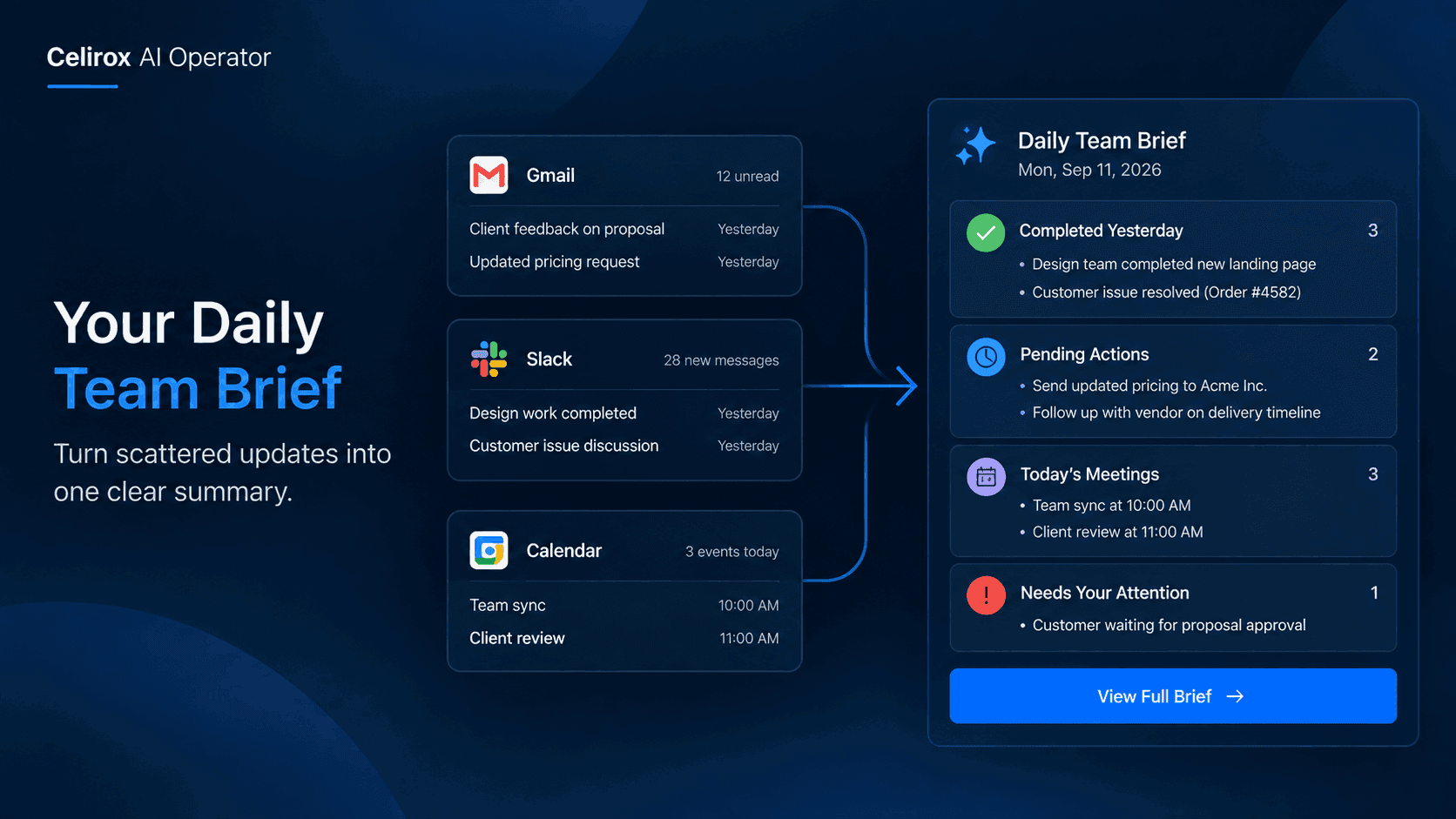
Instead of reviewing each application separately, AI Operator can work across connected workplace tools and bring relevant information together.
For example, a daily brief could include:
- Important work completed yesterday.
- Customer issues that are still open.
- Commitments or tasks that remain pending.
- Important decisions made in conversations.
- Meetings coming up today.
- Items that require your attention.
The purpose is not to reproduce every message.
It is to give you the context you would otherwise spend the morning collecting yourself.
Don't Just Summarize Everything
A useful morning brief should not look like an inbox dump.
Imagine receiving this:
"Yesterday, there were 47 emails, 82 Slack messages, and 6 calendar events."
Technically, that is a summary.
Practically, it does not help much.
What you actually want is something closer to:
Customer: Pricing proposal is still waiting for approval.
Team: Design completed the new landing page.
Pending: Vendor has not responded to the delivery question.
Today: Client review at 11:00 AM.
Attention: Follow up on the unresolved customer issue.
That is information you can act on.
See What Changed Overnight
The morning brief becomes especially useful when something changed while you were away.
A customer may have replied late at night.
A teammate may have completed an important task.
A meeting may have moved.
A decision may have been made in Slack after you logged off.
Without a consolidated view, you discover these things one by one.
A cross-app brief can surface the changes together so you can understand the state of work before starting the day.
Keep The Human In The Loop
The purpose of a daily brief is not to replace judgment.
It is to reduce the time required to gather context.
You still decide:
What is important?
What should happen next?
Who needs to be involved?
What can wait?
AI Operator helps with the repetitive part: collecting and organizing the relevant information from the places where work is already happening.
You get the context.
You make the decisions.
Make Meetings More Useful
A morning brief can also change how you enter meetings.
Instead of joining a customer meeting and spending the first few minutes remembering what happened previously, you can see the latest relevant updates beforehand.
For example:
The customer asked a question yesterday.
The sales team responded.
A follow-up is still pending.
Today's meeting is about the next step.
That context is much more useful than simply knowing that a meeting exists on your calendar.
The calendar tells you when.
The surrounding work tells you why.
Stop Reconstructing Yesterday
There is a hidden cost to scattered work information.
It makes people repeatedly reconstruct the past.
"What happened with that customer?"
"Did the team finish that?"
"Who was supposed to follow up?"
"Was that meeting moved?"
"Did we already send the document?"
The answers may exist across email, Slack, and calendar history.
But finding them takes time.
A daily brief can give you a starting point instead of making you rebuild the previous day from scratch.
Start The Day With Decisions
The best morning routine is not:
Open app → search → scroll → search again → piece together context
It is:
Review what changed → see what needs attention → decide what to do
That difference may only save 20 minutes a day.
But 20 minutes every working day adds up quickly.
More importantly, it gives the team a clearer start.
You are no longer spending the first part of the day figuring out where everything stands.
You can start working on what actually matters.
Make The Brief About Work
The value of a daily brief is not the format.
It is the thinking behind it.
The brief should answer the questions a person naturally asks at the beginning of the day.
What did we finish?
What did we miss?
What changed?
What is waiting?
What is happening today?
What needs my attention?
When information from different workplace tools is considered together, those questions become easier to answer.
One Morning, One Clear Picture
You still have Gmail.
You still have Slack.
You still have Calendar.
Nothing about the way your team communicates has to change.
The difference is what happens before you start working.
Instead of opening every application and manually connecting the dots, AI Operator can help turn the scattered activity into one practical view of the day.
That means less time searching.
Less time remembering.
Less time asking for updates.
More time actually moving work forward.
Frequently Asked Questions
What can a daily work brief include?
It can focus on relevant updates such as completed work, pending actions, important conversations, upcoming meetings, decisions, and items that need attention.
Does this replace Slack or Gmail?
No. The goal is not to replace workplace applications. It is to bring relevant information from connected tools together so people spend less time manually searching through them.
Is every message included in the brief?
A useful brief should focus on meaningful information rather than repeating every message. The objective is to highlight what changed and what requires attention.
Can the brief include calendar information?
Yes. Calendar information can provide useful context around meetings and the work associated with them when the relevant calendar connection is available.
Who can benefit from a daily brief?
Managers, founders, team leads, and anyone who works across multiple communication tools can benefit from having important updates brought together instead of manually reviewing each application.
Stop Spending Your Morning Catching Up
The first part of the workday should not disappear into inboxes and chat history.
You should not need to spend 30 minutes every morning reconstructing yesterday just to understand what needs to happen today.
Your team's work is already happening across Gmail, Slack, Calendar, and other tools.
The opportunity is to bring that information together in a way that helps you make decisions faster.
Celirox AI Operator helps turn scattered workplace activity into useful context, so you can spend less time catching up and more time getting things done.