You Keep Finding Store Problems Too Late: How to Catch Issues Before Customers Do
You Find Out From Customers
A customer sends you a message.
"Is this product supposed to look like this?"
You open the store.
Something is wrong.
Maybe a section is not displaying correctly.
Maybe a product page is creating unexpected friction.
Maybe a promotion is no longer making sense.
Maybe customers have been reaching a page and leaving without buying.
You fix the problem.
But then another thought appears:
How long was that happening before I noticed it?
For many Shopify merchants, that is the frustrating part.
The problem is not always fixing the store.
The problem is knowing something needs fixing in the first place.
Your Store Changes Every Week
A Shopify store is rarely static.
Products are added.
Collections change.
Promotions start and end.
Inventory moves.
New landing pages go live.
Traffic comes from different campaigns.
Customer behavior changes.
A change that worked last month may not work the same way today.
That makes manually checking every important part of the store difficult.
You may look at your sales dashboard every morning and still miss what is happening inside the customer journey.
Revenue tells you what happened.
It does not always tell you where the problem started.
The Problem Can Hide In Plain Sight
Imagine a merchant running a clothing store.
One product is getting plenty of traffic.
The merchant assumes that is good news.
But customers keep visiting the product page and leaving.
Nothing looks obviously broken.
The product is live.
The price is correct.
Inventory is available.
The page loads.
Yet something in the journey is stopping people from continuing.
Without looking deeper, the merchant may simply assume the product is not popular.
That is where monitoring becomes valuable.
Look For The Drop-Off
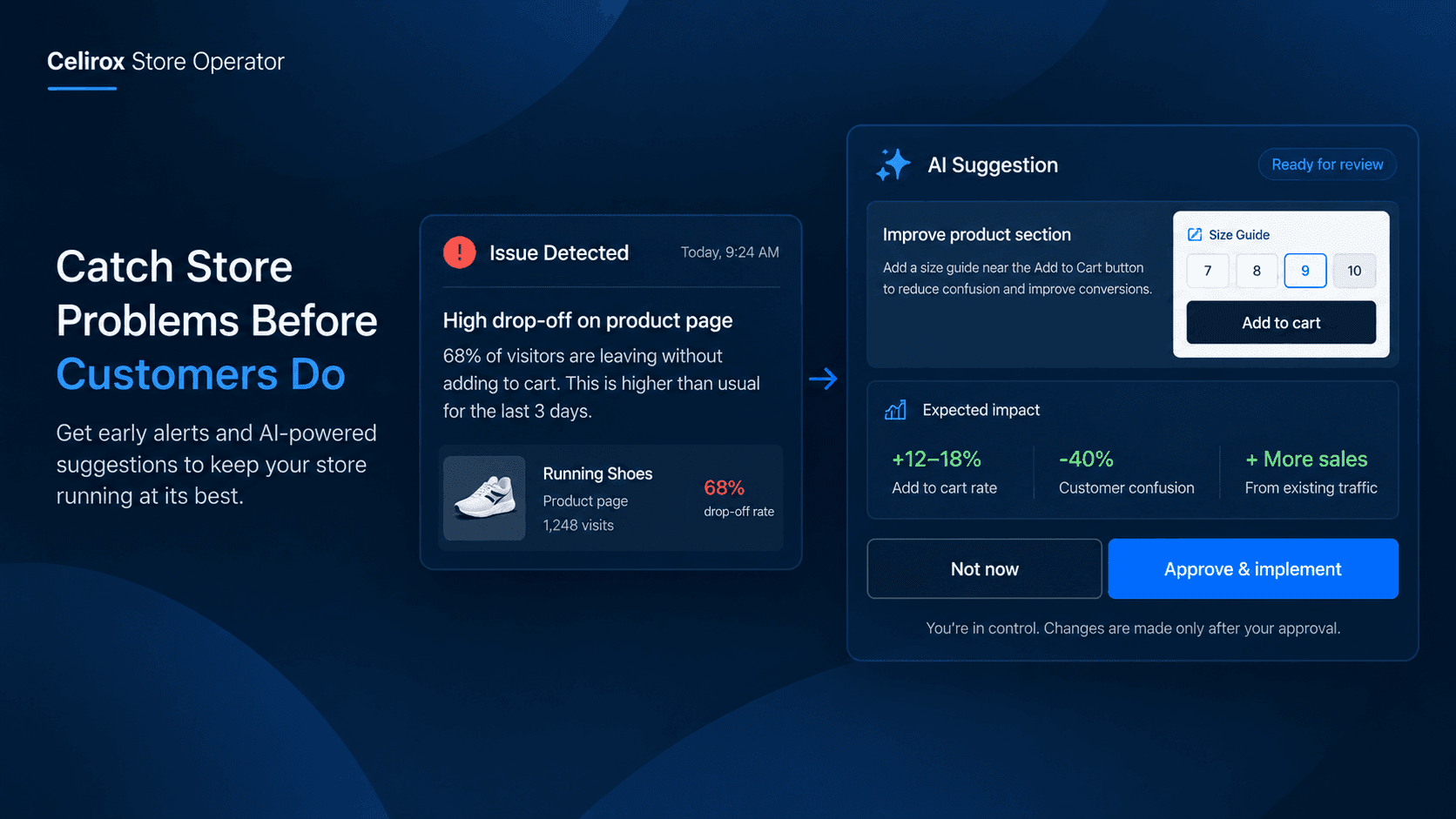
Store Operator is designed to continuously watch the store for signals such as customer drop-offs, conversion leaks, stock opportunities, and traffic changes. :contentReference[oaicite:1]{index=1}
Instead of expecting the merchant to manually inspect every customer journey, the system can surface an opportunity when the data suggests something deserves attention.
The important difference is this:
You do not have to start by asking,
"What is wrong with my store?"
The system can help bring the question to you.
A Problem Should Come With Context
A notification saying "your conversion rate dropped" is not particularly useful by itself.
A merchant needs to understand what changed.
Where is the problem?
Who is affected?
What appears to be happening?
What could be done about it?
Store Operator's Store Pulse is built around turning store activity into simpler reports and suggestions. Merchants can choose how frequently the store is scanned, review customer drop-off stories, receive weekly suggestions, and then approve an action. :contentReference[oaicite:2]{index=2}
That context is what makes a store alert actionable rather than just another number.
Catch Problems Before They Spread
Small storefront problems can become expensive when nobody notices them.
Consider a product receiving traffic from an advertising campaign.
If customers repeatedly arrive but fail to purchase, every additional visitor increases the amount of traffic being sent into the same weak part of the journey.
The merchant may continue spending on the campaign because the traffic numbers look healthy.
The real problem is further down the funnel.
Finding that earlier gives the merchant a chance to investigate before more traffic is wasted.
The same principle applies to other parts of the store.
The earlier you see the problem, the earlier you can decide what to do about it.
You Still Make The Decision
This is important.
Store monitoring should not mean an AI changes your store whenever it sees something unusual.
A merchant needs control over what actually goes live.
Celirox uses an Approve-to-Execute model for critical backend automations and storefront changes. The assistant explains why it is recommending an action, and the merchant provides the final approval. :contentReference[oaicite:3]{index=3}
So the workflow is closer to:
Store activity → Problem detected → Recommendation explained → Merchant reviews → Approve → Fix deployed
The merchant remains in control.
Stop Checking Everything Manually
Most merchants do not have time to inspect every product page, collection, customer journey, and storefront experience every day.
They have orders to process.
Customers to answer.
Suppliers to manage.
Marketing campaigns to run.
New products to launch.
That is why continuous monitoring can be more useful than another dashboard.
A dashboard waits for you to open it.
A monitoring system can bring an important issue to your attention.
That difference matters when you are running the business yourself.
Turn Store Data Into Decisions
Data is only useful when it leads to a decision.
Seeing that customers are dropping off is information.
Understanding where they are dropping off and getting a suggested next step is more useful.
Store Operator is built around that second idea.
Its Growth Strategist continuously monitors the store and can identify conversion leaks, stock opportunities, and traffic spikes, then suggest a solution. :contentReference[oaicite:4]{index=4}
The objective is not to give merchants another pile of analytics.
It is to help answer:
"What should I look at next?"
A Better Morning Store Check
Imagine starting your morning without manually opening ten different reports.
Instead, you see:
Something needs attention.
You open the recommendation.
You understand what the system found.
You decide whether the suggested change makes sense.
You approve it if it does.
Then you get back to running the business.
That is a much more useful workflow than discovering the same problem three days later through a customer complaint.
Not Every Alert Needs Action
Good monitoring also means knowing what not to change.
A temporary sales fluctuation does not automatically mean something is broken.
A product having a slow day does not necessarily require a new promotion.
A merchant needs context before making a decision.
That is why recommendations should be treated as opportunities to investigate, not automatic instructions to change the store.
The merchant knows the business.
The monitoring system provides another set of eyes.
Keep Learning From The Store
A store does not stay the same after one fix.
Customer behavior changes.
New products create new patterns.
Promotions affect different shoppers.
Seasonality changes demand.
That means store monitoring should be an ongoing process.
Find an issue.
Understand it.
Act on it.
Measure the result.
Then keep watching.
Store Operator also provides feature-level analytics so merchants can review clicks, conversions, revenue, device performance, and other results from deployed features. :contentReference[oaicite:5]{index=5}
That closes the loop between finding an opportunity and understanding whether the action actually helped.
The Goal Is Fewer Surprises
Running an online store will always involve surprises.
A product suddenly takes off.
A promotion performs differently than expected.
A customer journey changes.
Inventory moves faster than planned.
You cannot prevent every unexpected event.
But you can make it easier to notice important changes.
That is the real value of continuous store monitoring.
You are not trying to watch your store every minute.
You are trying to make sure important problems do not stay invisible for days.
Frequently Asked Questions
What does Store Operator monitor?
Store Operator can continuously monitor the store for signals including customer drop-offs, conversion leaks, stock opportunities, and traffic changes. :contentReference[oaicite:6]{index=6}
Does Store Operator automatically change my store?
For critical backend automations and storefront changes, Celirox uses an Approve-to-Execute approach. The system proposes the solution and explains the reason before the merchant gives final approval. :contentReference[oaicite:7]{index=7}
How often can the store be scanned?
Store Operator's Store Pulse can be configured to scan the store at 6-hour, 12-hour, or 24-hour intervals. :contentReference[oaicite:8]{index=8}
What happens after Store Operator finds an issue?
The merchant can review the report or recommendation, understand the opportunity, and approve a proposed action when appropriate. The system can then build and deploy the approved solution. :contentReference[oaicite:9]{index=9}
Can merchants measure whether a fix worked?
Yes. Store Operator provides feature-level analytics including clicks, conversions, revenue, device performance, and other performance information for deployed features. :contentReference[oaicite:10]{index=10}
Don't Wait For Customers To Tell You
The hardest store problems are not always the ones that look dramatic.
Sometimes it is a small issue that sits quietly for three days.
Customers notice it.
A few leave.
A few more leave.
And the merchant only discovers it when someone finally sends a message.
You cannot personally inspect every customer journey every day.
But you can have a system watching for meaningful signals.
Celirox Store Operator helps merchants see what is happening inside their store, understand why it matters, and decide what to do next.
Because finding a problem before your customer does is a much better way to run a store.