How to Add Custom Fields to Shopify Checkout
Collect Details Before Fulfillment
Imagine you run a florist.
A customer places a $90 birthday order, pays successfully, and then sends an email two minutes later:
"Please deliver this on Friday, not Thursday. Also, can you add 'Happy Birthday, Mia!' to the card?"
Now someone on your team has to notice that message before fulfillment begins.
If the warehouse prepares the order first, the delivery date may be wrong. If the message never reaches the person printing the card, the gift arrives without the note.
The customer did nothing unusual. Your checkout simply never gave them the right place to provide the information.
That is where custom Shopify checkout fields become useful.
Instead of asking customers to send important details after purchasing, the store can collect the information while they are already placing the order.
What Are Custom Fields?
Custom checkout fields collect information that is relevant to the order but is not part of Shopify's standard customer, shipping, or payment details.
Common examples include:
- Gift messages
- Preferred delivery dates
- Purchase order or VAT information
- Personalization details
- Building or delivery instructions
The purpose is simple: collect the information before the order enters fulfillment.
Without the right field, customers may put information in a cart note, send an email after purchase, contact support, or assume the store does not support their request at all.
That creates several possible places where important order information can hide.
The more places your team has to check, the easier it becomes to miss something.
A custom field creates one clearer handoff between the customer placing the order and the team responsible for fulfilling it.
Match Fields to Orders
Different businesses need different information.
A gift store may need a message for the recipient. A florist may need a preferred delivery date. A wholesale business may need a purchase order number or company tax information. A local delivery business may need building or gate instructions.
The field should exist because the business has a genuine use for the answer.
For example, a candle store could add:
Gift message
"Write the message you'd like us to include with the order."
A florist could add:
Preferred delivery date
rather than asking customers to type free-form instructions such as:
"Friday"
"Next Saturday"
"After lunch"
A date picker gives the merchant a more structured value and gives the customer a clearer choice.
The same idea applies to business orders. If the accounting team always needs a PO number before processing a wholesale purchase, collecting it at checkout is cleaner than asking for it through email afterward.
The right field removes a future conversation the customer should not have needed to start.
Use the Right Input
The type of field should match the information you need.
A short text input works well for information such as a purchase order number, company reference, or apartment number. A text area is better for gift messages or longer delivery instructions. Date pickers work better when you need a structured date, while dropdowns are useful when the merchant wants the customer to choose from a controlled set of options.
For example:
How should we package this order?
- Standard packaging
- Gift packaging
- Minimal packaging
Structured choices are often easier to use later than unrestricted text.
Checkboxes can also be useful for simple confirmations or preferences, but merchants should be careful about using a normal checkout field for legal or regulatory requirements. Collecting a checkbox response does not automatically satisfy every compliance obligation.
The important principle is to collect the information in the format that makes it easiest for both the customer and the team using it later.
Required or Optional?
Not every custom field should be mandatory.
Ask:
Can we fulfill the order correctly without this answer?
If the answer is no, requiring the field may make sense.
A personalized engraving store, for example, may need the engraving text before the customer can place the order.
A gift message is different. Customers who are purchasing for themselves should not be forced to enter something simply because the field exists.
The same applies to marketing questions such as:
How did you hear about us?
That information may be useful, but it is not necessary to fulfill the purchase. A post-purchase or Thank You page survey may be a better location because it avoids creating another requirement before payment.
The checkout should prioritize information needed to complete and fulfill the order.
Every additional question should earn its place.
Connect Fields to Operations
Collecting information is only useful when the right person can use it.
Imagine the customer enters:
Gift message: Happy 30th Birthday, Sarah!
The checkout looks perfect.
But after payment, can the fulfillment team find the message? Can customer support see it? Does the process used to prepare packing slips or gift cards include it? Does the downstream system that needs the information receive it?
If nobody sees the answer, the field solved only half the problem.
Always think through the complete flow:
Customer enters information → Order created → Team can find it → Fulfillment uses it
This matters especially for delivery dates.
If your checkout asks customers to select a delivery date but your warehouse cannot ship on Sundays, the available choices should reflect that operational reality.
Otherwise, the field creates a promise the business may not be able to keep.
A clearer experience might say:
Preferred delivery date
"Please choose your preferred date. Weekend delivery is not currently available, and custom orders require at least 48 hours' notice."
The field collects the customer's preference.
The business still needs rules that determine what is actually possible.
Keep Checkout Focused
Once merchants discover custom fields, it is easy to add too many.
Gift message.
Delivery preference.
Birthday.
Referral source.
Marketing interests.
Product feedback.
Phone preference.
Now the checkout starts looking like a survey.
That works against the main goal of the page.
Before adding a field, ask whether the information is genuinely needed, who will use it, what changes because it was collected, and whether checkout is really the best moment to ask.
Some information belongs on the product page.
Product-specific personalization, for example, may be easier to understand while the customer is choosing the product rather than after several items have already entered the cart.
Other information belongs after purchase.
Customer feedback and marketing-attribution questions often fit better there.
The goal is not to collect as much information as possible.
It is to collect the right information at the right point in the journey.
Set Up SmartFlow Fields
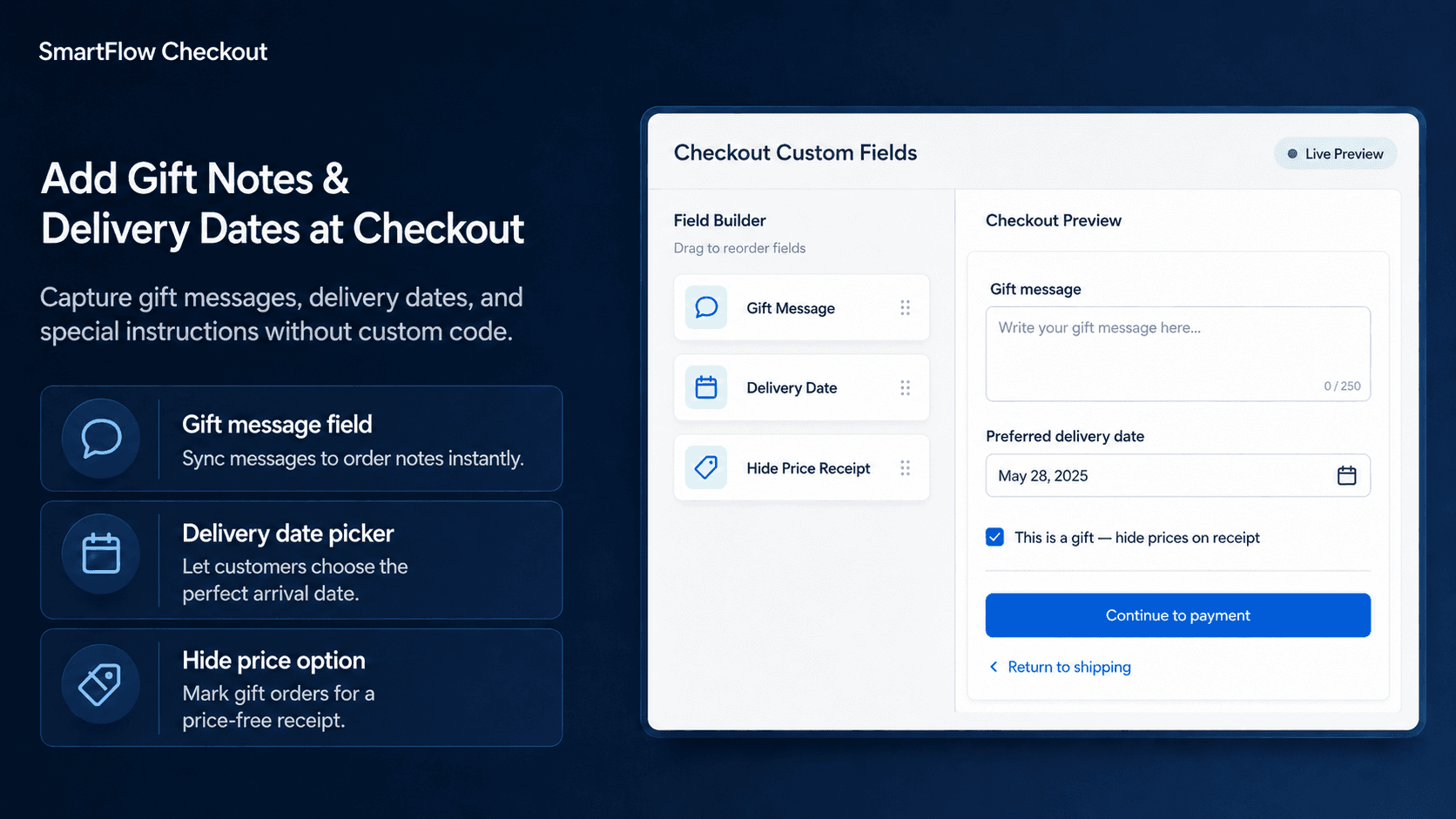
With SmartFlow Checkout, merchants can add custom components to supported checkout experiences and use them to collect order-specific information.
Imagine a boutique florist wants two fields:
Gift message
and:
Preferred delivery date
The merchant can add a text area for the gift message and a date picker for the delivery preference, decide which fields should be required, and place them where they make sense in the checkout experience.
Before publishing, test the entire flow.
Make sure the fields appear correctly on desktop and mobile, required validation behaves as expected, the information remains available after the order is placed, and the people responsible for fulfillment can actually find it.
Also test what happens when the request cannot be fulfilled.
A field asking for a preferred delivery date should not imply that the carrier is guaranteed to deliver on that exact date. Likewise, a field saying:
Leave package behind the gate
does not guarantee the carrier will follow that instruction.
Custom data captures a request.
It does not automatically enforce the operation that comes afterward.
Frequently Asked Questions
Can I add custom fields to Shopify checkout?
Yes. Shopify supports checkout customization through supported checkout extension capabilities, with availability depending on the checkout surface and Shopify plan.
What kinds of custom fields can SmartFlow Checkout add?
Depending on the setup, merchants can use components such as text inputs, text areas, date selections, choices, and other supported checkout fields for collecting order-specific information.
Can a checkout field be required?
Fields can be configured as required where that behavior is supported and appropriate. Merchants should require only information that is genuinely necessary for the order.
Can I collect gift messages?
Yes. A text area is a common way to collect gift messages, personalization notes, and similar instructions.
Can I add a delivery date picker?
Yes. A date picker can collect a preferred delivery date. Merchants should clearly communicate availability rules and remember that collecting the preference does not itself guarantee carrier delivery on that date.
Should marketing questions go in checkout?
Not always. If the information is not needed to complete or fulfill the order, a post-purchase survey may create a cleaner checkout experience.
Will custom fields slow checkout?
SmartFlow Checkout uses Shopify's supported checkout extension system rather than arbitrary checkout DOM modifications. Merchants should still test the complete checkout experience, including mobile performance, after adding custom components.
Collect It the First Time
A forgotten gift message looks like a small problem.
So does one missing PO number.
So does one customer emailing to change a delivery date.
But when these situations happen repeatedly, someone on the team becomes responsible for finding, interpreting, and forwarding information that could have been collected correctly when the order was placed.
That is the real value of custom checkout fields.
They make the ordering process better aligned with what the business actually needs to fulfill the purchase.
SmartFlow Checkout helps merchants add those fields while keeping checkout focused on its main job:
Help the customer complete the order with the right information attached to it.