Back in Stock Notifications: Bring Shoppers Back at the Right Time
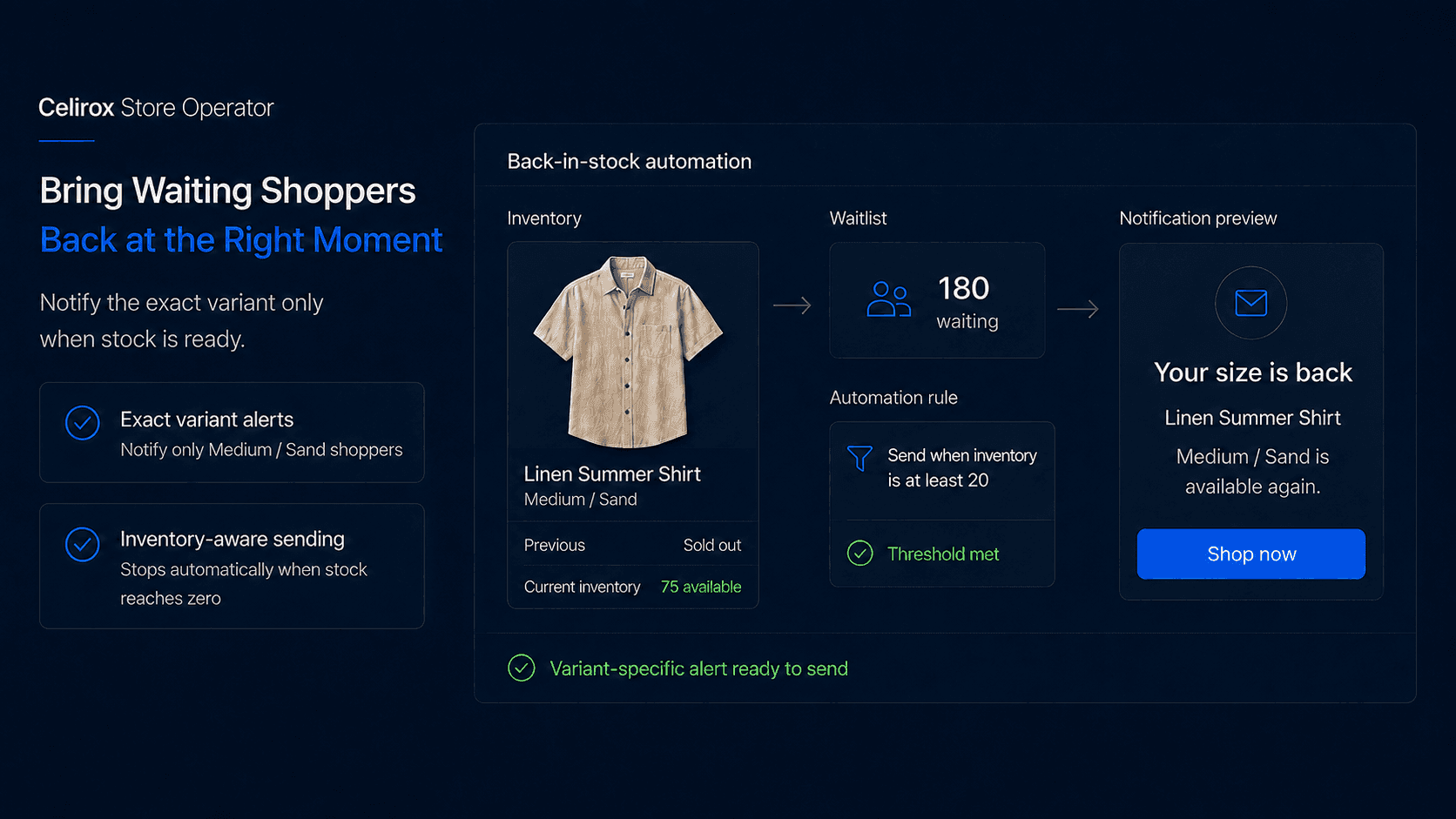
They Wanted It, but Lost It
Imagine a customer finds the exact pair of shoes they have been looking for.
They choose Black / Size 10.
Sold Out.
Instead of leaving completely, they enter their email under Notify me when available.
Two weeks later, another shipment arrives.
That customer has already told you something valuable:
"I want this product when you have it again."
The opportunity now depends on what happens next.
If someone notices the restock several days later and only then starts preparing a campaign, the shopper may already have purchased somewhere else.
A back-in-stock notification exists for one simple reason:
Reconnect with interested shoppers when the exact product they wanted becomes available again.
The difficult part is not sending the email.
It is deciding when the product is truly ready to sell, which customers should hear about it, and what should happen if inventory disappears again.
How Restock Alerts Work
A back-in-stock notification tells a shopper that a product or variant they were waiting for is available again.
The basic journey is straightforward:
Product sells out → Shopper joins waitlist → Inventory returns → Shopper receives alert → Shopper decides whether to buy
But real stores quickly introduce more complexity.
A product may have several sizes and colors. Only a small number of units may return. Thousands of customers may be waiting. Someone may already have purchased after joining the list.
This means a useful restock system should understand more than:
Inventory changed from 0 to 1.
It should understand what returned, how much returned, and who is actually waiting for it.
Manual Restocks Get Messy
A small store can manage restock alerts manually.
A product sells out, customers join a waitlist, inventory eventually arrives, someone notices the quantity changed, the waitlist is reviewed, and a campaign is prepared.
That works when it happens occasionally.
It becomes much harder when dozens or hundreds of variants move in and out of stock every week.
Now someone has to remember which products have waiting customers, which exact variants returned, whether enough inventory is really available, who has already been notified, and whether previous customers have already purchased.
The work is not difficult because any single step is complicated.
It is difficult because somebody has to keep watching for the right moment.
That is where Store Operator can help turn the process into a repeatable store rule instead of another task someone has to remember.
Build Rules Through Chat
With Celirox Store Operator, a merchant can describe the restock experience they want in plain English.
For example:
"Watch the Summer Collection. When an unavailable variant comes back in stock, notify customers waiting for that exact variant. Don't send an alert if only a very small amount of inventory returns, and stop the notifications if it sells out again."
The workflow becomes:
Watch inventory → Detect relevant restock → Check waitlist → Check quantity → Notify eligible customers → Continue monitoring
The merchant can then refine the behavior.
For example:
"Only start notifications when at least 20 units are available. Notify the oldest waitlist customers first, and don't contact anyone who already purchased the product."
The important part is not the underlying inventory event.
It is that the merchant can define what the business should do when that event happens.
Notify the Right Customer
Variant-level matching matters.
Imagine a sneaker is available in five sizes.
A customer waiting for Black / Size 10 does not care that Black / Size 7 returned.
A generic product-level email can create another disappointing experience:
Your product is back!
The shopper clicks.
Their size is still unavailable.
A better rule keeps the customer's request connected to the exact variant they wanted.
For example:
Waiting for: Black / Size 10
Restocked: Black / Size 10
Result: Notify
But:
Waiting for: Black / Size 10
Restocked: Black / Size 7
Result: Do not notify
That sounds like a small detail, but it determines whether the message feels useful or misleading.
The same principle applies to color, size, pack quantity, or other variant options.
Match Alerts to Inventory
Inventory above zero does not always mean everyone should receive an email.
Suppose one unit becomes available because a customer canceled an order.
Meanwhile, 2,000 people are on the waitlist.
Sending all 2,000 shoppers an alert would create a poor experience.
A merchant may instead choose a rule such as:
Notify only when at least 20 units are available.
Another store may be comfortable starting at five units. A frequently restocked household product may use a completely different threshold from a limited-edition fashion item.
Large waitlists create the same issue.
Imagine:
Available inventory: 300 units
Waiting customers: 2,500
The merchant could notify everyone immediately, notify customers in stages, or prioritize people based on when they joined the waitlist.
There is no universal best rule.
The notification strategy should reflect the amount of inventory available and how quickly the product normally sells.
The goal is to avoid telling thousands of people:
It's back!
when most of them will arrive only to see:
Sold Out. Again.
Keep the Message Simple
A waitlist shopper already knows the product.
The message does not need a long marketing pitch.
Something simple can work:
Your size is back
The Black Trail Runner in Size 10 is available again.
Shop Now
The customer should immediately understand what returned and how to get back to it.
Whenever possible, the link should return the shopper directly to the relevant product or variant rather than forcing them to start again from the homepage.
The path should feel like:
Alert → Product they wanted → Purchase decision
not:
Alert → Homepage → Search → Find product → Select variant again → Purchase
Also avoid fake urgency.
If you do not know that only a few units remain, do not write:
"Almost gone!"
just because urgency might increase clicks.
The message is already relevant because the shopper specifically asked to receive it.
Stop When It Stops Matter
Back-in-stock workflows should respond to what the customer does afterward.
Imagine Sarah joins a waitlist for a jacket.
The jacket returns.
Sarah receives the notification and buys it.
A month later, another shipment arrives.
Sarah probably should not receive the same alert again simply because her old waitlist record still exists.
The workflow should account for whether the shopper has already been notified, whether they purchased, whether they joined the waitlist again, and whether the product genuinely returned after another stockout.
A useful flow is:
Waitlisted → Restock detected → Notification sent → Customer purchases → Remove or suppress from workflow
This keeps the waitlist focused on current buying intent rather than turning it into a permanent promotional list.
The same applies when products repeatedly move in and out of stock. A shopper should not receive unnecessary alerts every few days simply because inventory fluctuates.
The goal is not to send as many notifications as possible.
It is to contact someone while the message is still useful.
Waitlist or Preorder?
Back-in-stock alerts are not always the best solution.
Suppose your bestselling hoodie sells out today, but you already have 500 confirmed units arriving in three weeks.
You could keep a waitlist and notify shoppers after those units arrive.
Or you could accept preorders now if you are comfortable taking the order and communicating the future fulfillment date clearly.
A waitlist is useful when availability is uncertain or when you do not want to accept payment yet.
A preorder may make more sense when incoming inventory and timing are reasonably clear and the business is prepared to make that commitment.
The decision should follow what the merchant can responsibly promise.
Restock alerts should not become the default answer to every out-of-stock situation.
Measure Restock Performance
Email opens alone do not tell you whether the restock process works.
More useful signals include:
- Waitlist signups
- Customers notified
- Purchases after notification
- Time from restock to notification
- Units available when alerts begin
- Customers notified after inventory was already gone
That last metric is especially useful.
If shoppers repeatedly click restock emails only to discover that the product is unavailable again, the notification strategy needs adjustment.
You can also compare different products.
A basic consumable that restocks every week may behave very differently from a limited seasonal product that sells out within hours.
The analytics should help answer:
Are we reconnecting customers while there is still a realistic opportunity to buy?
That is more valuable than simply maximizing the number of alerts sent.
Set Up the Workflow
A merchant could begin with:
"For the Summer Collection, let shoppers join a waitlist when their selected variant is unavailable. When that exact variant returns with at least 20 units available, notify the waiting customers. Stop notifications if inventory reaches zero again, and don't notify customers who already purchased."
Before enabling the workflow, review the important decisions:
- Which products or collections should participate?
- Should the waitlist track exact variants?
- How much inventory should trigger an alert?
- Should everyone be notified together or in stages?
- What happens after a customer purchases?
- What happens if the product sells out again?
Store Operator helps turn those answers into a repeatable process.
The merchant still decides what experience makes sense for the store and its customers.
Frequently Asked Questions
What is a Shopify back-in-stock notification?
A back-in-stock notification tells a shopper that a product or variant they asked about has become available again.
Should restock alerts be variant-specific?
Where possible, yes. Someone waiting for a particular size, color, or option should ideally be contacted only when that specific variant returns.
Should I notify everyone when stock reaches one?
Not necessarily. Consider the available quantity, size of the waitlist, normal product demand, and why the inventory changed before triggering a large notification.
Should every waitlist customer receive the message at once?
Not always. When demand is much larger than available inventory, staged notifications or another prioritization strategy may create a better customer experience.
Should customers remain on the waitlist after purchasing?
Usually not for the same request. Once the shopper has purchased, the workflow should avoid sending unnecessary reminders unless they explicitly join the waitlist again later.
When is a preorder better?
Preorders can make more sense when future inventory is reasonably certain and you are prepared to accept an order before the product is available.
Can Celirox Store Operator manage restock rules?
Yes. Merchants can describe their waitlist, inventory, notification, and customer conditions in plain English, and Store Operator can help create and manage the resulting workflow.
Contact Shoppers at Right Time
A waitlist customer is different from a random visitor.
They found the product.
They wanted it enough to ask you to contact them again.
That makes the restock moment valuable.
But the goal should not be to send the fastest possible email to the largest possible list.
It should be to reconnect with the right shopper when the exact product they wanted is genuinely available to buy.
Celirox Store Operator helps merchants turn that idea into a store process by connecting inventory changes, variant-specific waitlists, notification rules, purchase behavior, and follow-up logic.
The merchant defines what should happen.
Store Operator helps make sure someone does not have to manually watch every restock to make it happen.