Your Checkout Has Important Information. Why Is It Buried?
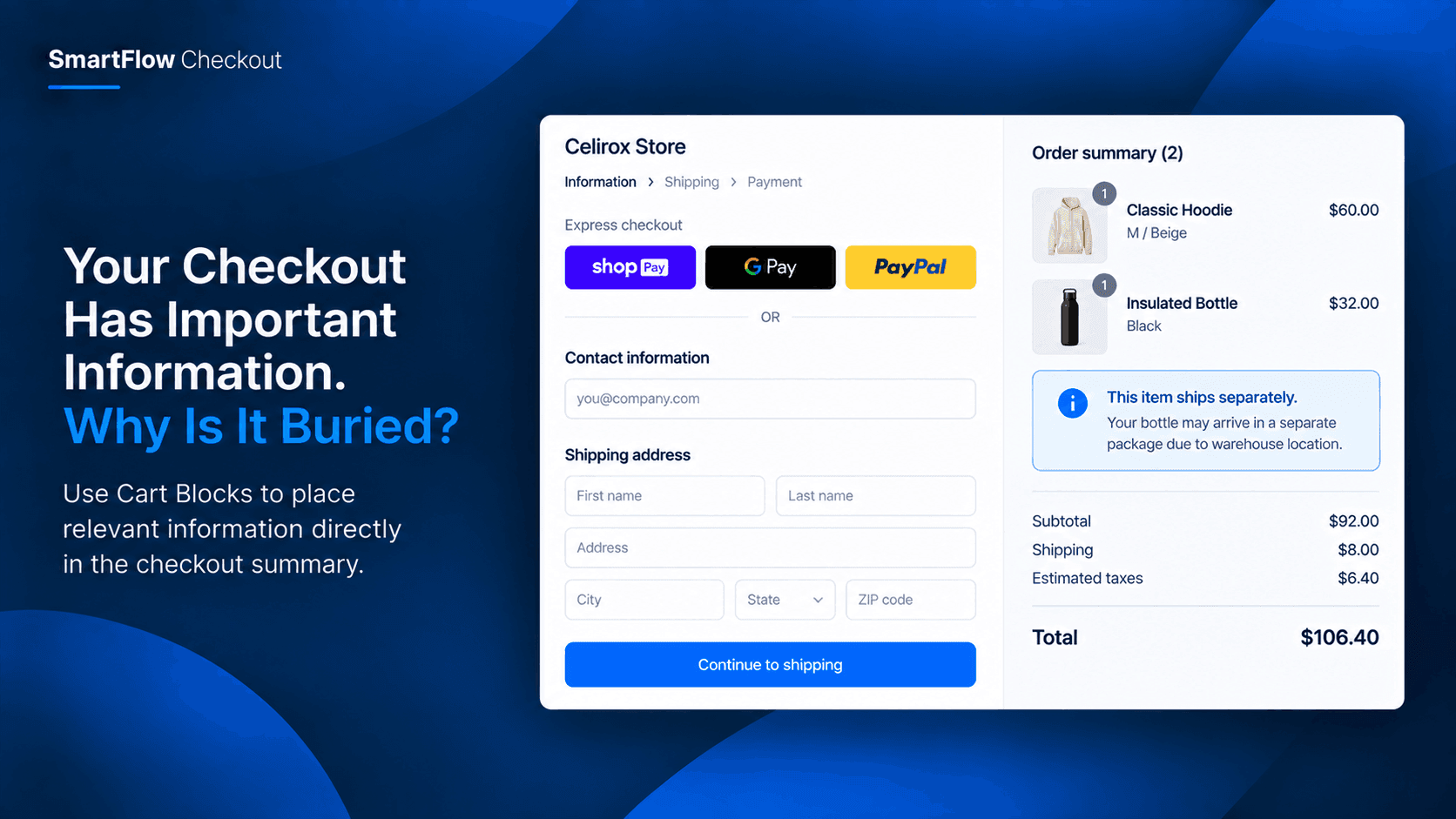
The customer is almost ready to pay.
They have reviewed the products.
They have checked the quantity.
They have looked at the total.
Everything seems straightforward.
But there is one important thing the merchant wants them to notice.
Maybe the order contains a product that requires special handling.
Maybe the merchant wants to remind the customer about an important purchase detail.
Maybe there is a useful piece of information that applies specifically to what is in the cart.
The information exists.
The problem is where the customer sees it.
If it is somewhere else on the store, there is no guarantee the customer will notice it at the most important moment.
That is where the checkout cart summary can become useful.
Customers Already Look At The Summary
The checkout summary is one of the most natural places for customers to review their purchase.
They can see what they are buying.
They can see quantities.
They can see the order total.
They are already paying attention to that area.
So when information is directly related to the order, putting it near the order summary can make more sense than sending customers somewhere else.
The goal is not to add more content.
It is to put the right content in the right place.
The Information Gap
Imagine a merchant selling products that require customers to understand a specific condition before completing the order.
The information is already available on the product page.
It is also mentioned in the store's FAQ.
But customers can still reach checkout without remembering it.
The merchant does not want to interrupt the purchase with a long explanation.
They simply want a short reminder while the customer is reviewing the final order.
This is a placement problem.
The merchant already has the information.
The customer simply needs to see it at the right moment.
Put Useful Context Beside The Order
SmartFlow Checkout provides Cart Blocks for Shopify Plus stores.
These native checkout components can place custom UI within the checkout experience, including the cart summary area. :contentReference[oaicite:1]{index=1}
That creates a different approach to checkout communication.
Instead of asking customers to leave checkout and search for information, the merchant can bring relevant information into the area where the purchase is being reviewed.
For example:
Important: This item requires special handling. Please review the delivery information before completing your order.
The message is short.
It is close to the products.
And the customer sees it while reviewing the purchase.
Keep Checkout Information Relevant
The purpose of a Cart Block should not be to fill the checkout with messages.
Too much information creates another problem.
Customers need to know what matters to their order.
A merchant could use a short message such as:
“This product ships separately.”
Or:
“This item is prepared after purchase and requires additional processing time.”
Or:
“Please review the product instructions before completing your order.”
The exact message depends on the business.
The principle stays the same:
Show useful context where the customer is already looking.
A Better Place For Order-Specific Messages
There is a difference between general store information and order-specific information.
A return policy applies broadly.
A homepage announcement applies broadly.
A product description applies before checkout.
But some information matters specifically when the customer is reviewing a particular purchase.
That is where the cart summary becomes valuable.
The customer is no longer browsing.
They have made a buying decision.
They are checking the final details.
A short, relevant message can help close the information gap before payment.
Make The Checkout Feel More Complete
A good checkout should answer the important questions a customer has before completing an order.
Sometimes that means payment information.
Sometimes it means delivery information.
Sometimes it means understanding something specific about the products being purchased.
The checkout summary already brings together the key parts of the order.
Adding relevant supporting information in that same area can make the experience feel more complete.
The merchant does not need to send the customer searching through the store again.
Use The Space For Something Useful
Checkout space is limited.
Every additional element needs a reason to exist.
A useful Cart Block should help the customer make sense of the order rather than distract them from completing it.
Good examples include:
Product-specific instructions
A short reminder about something important to know before purchasing.
Special handling information
A note explaining that a particular product follows a different fulfillment process.
Order context
A concise explanation of something that affects the current purchase.
Important customer guidance
A short message that prevents confusion at the final stage.
The best message is usually the one that answers a question the customer might otherwise ask later.
Avoid Repeating The Entire Product Page
A Cart Block is not a replacement for product information.
Customers should not have to read the same description again at checkout.
The better approach is to summarize only what matters at the final stage.
For example:
Instead of:
“Our handmade furniture is carefully crafted using...”
Use:
“This item is made to order and requires 5–7 business days before dispatch.”
The second message is much more useful at checkout.
It gives the customer the information they need without making them read unnecessary content.
Keep The Message Close To The Decision
Customers are more likely to pay attention when information appears close to the decision it affects.
A product instruction shown weeks before purchase may be forgotten.
A message shown while the customer is reviewing the final order is harder to miss.
That makes placement important.
SmartFlow's Cart Blocks give Shopify Plus merchants a native way to place custom UI into the checkout experience rather than relying only on information elsewhere in the storefront. :contentReference[oaicite:2]{index=2}
Think Beyond Promotions
Checkout customization is often associated with discounts and promotions.
But not every checkout improvement needs to increase the cart value.
Sometimes the goal is simply to help the customer understand what they are buying.
A merchant might use a Cart Block to answer:
“Is there anything important I should know before I pay?”
That can be just as useful as another promotional message.
A clearer checkout can prevent confusion without adding another sales pitch.
A Simple Merchant Workflow
Consider a Shopify Plus store selling products with different fulfillment requirements.
The merchant identifies one product category that needs a short reminder before purchase.
Instead of adding another popup or sending customers to an FAQ page, the merchant creates a checkout Cart Block.
The block contains one concise message.
The customer reaches checkout.
They see the product.
They see the total.
And they see the relevant reminder directly within the checkout summary.
No extra page.
No additional support conversation.
No long explanation.
Just the information at the moment it matters.
Make Checkout Information Work Harder
The checkout summary already performs an important job.
It helps customers review their purchase.
Adding relevant supporting information can make that area more useful without turning it into a crowded information center.
The key is restraint.
One useful message is better than five unnecessary ones.
A merchant should ask:
Does this information help the customer understand this purchase?
If the answer is yes, the checkout may be the right place for it.
Frequently Asked Questions
What are Cart Blocks in SmartFlow Checkout?
Cart Blocks are native checkout-extension components that allow Shopify Plus merchants to add custom UI to areas such as the checkout cart summary. :contentReference[oaicite:3]{index=3}
Are Cart Blocks available on every Shopify plan?
The documentation identifies Cart Blocks as part of Shopify Checkout Extensions, which are available to Shopify Plus merchants. Core SmartFlow features such as payment customization, delivery customization, checkout validation, post-purchase extensions, and order editing work across Shopify plans. :contentReference[oaicite:4]{index=4}
What can I show in a Cart Block?
The documentation describes Cart Blocks as flexible UI components for checkout communication and trust. The exact content should depend on the merchant's use case and what customers need to know at checkout. :contentReference[oaicite:5]{index=5}
Should I put long information in a Cart Block?
Usually, the most useful approach is to keep the message concise and focused on information directly relevant to the current purchase.
Is this mainly for promotions?
No. Cart Blocks can be useful for operational information, product context, and other checkout communication—not only promotional content.
The Right Information In The Right Place
A customer should not have to remember everything they read before reaching checkout.
Some information becomes important again when they are reviewing the final order.
That is why placement matters.
With SmartFlow Checkout Cart Blocks, Shopify Plus merchants can put useful custom UI directly into the checkout cart summary. :contentReference[oaicite:6]{index=6}
The goal is simple:
Don't make customers search for information that matters to the order they're about to place.
Put it where they are already looking.
Make The Checkout Summary More Useful
SmartFlow Checkout gives Shopify merchants tools to customize the checkout and post-purchase experience using rule-based logic. For Shopify Plus stores, its native checkout extensions include Cart Blocks for adding custom UI to the checkout experience. :contentReference[oaicite:7]{index=7}
When a piece of information matters specifically to the purchase, the checkout summary can be more than a list of products and a total.
It can also provide the context customers need to complete the order with a clearer understanding of what they are buying.