The Client Changed Their Requirements. Now Your Team Has to Find Everything That Needs Updating.
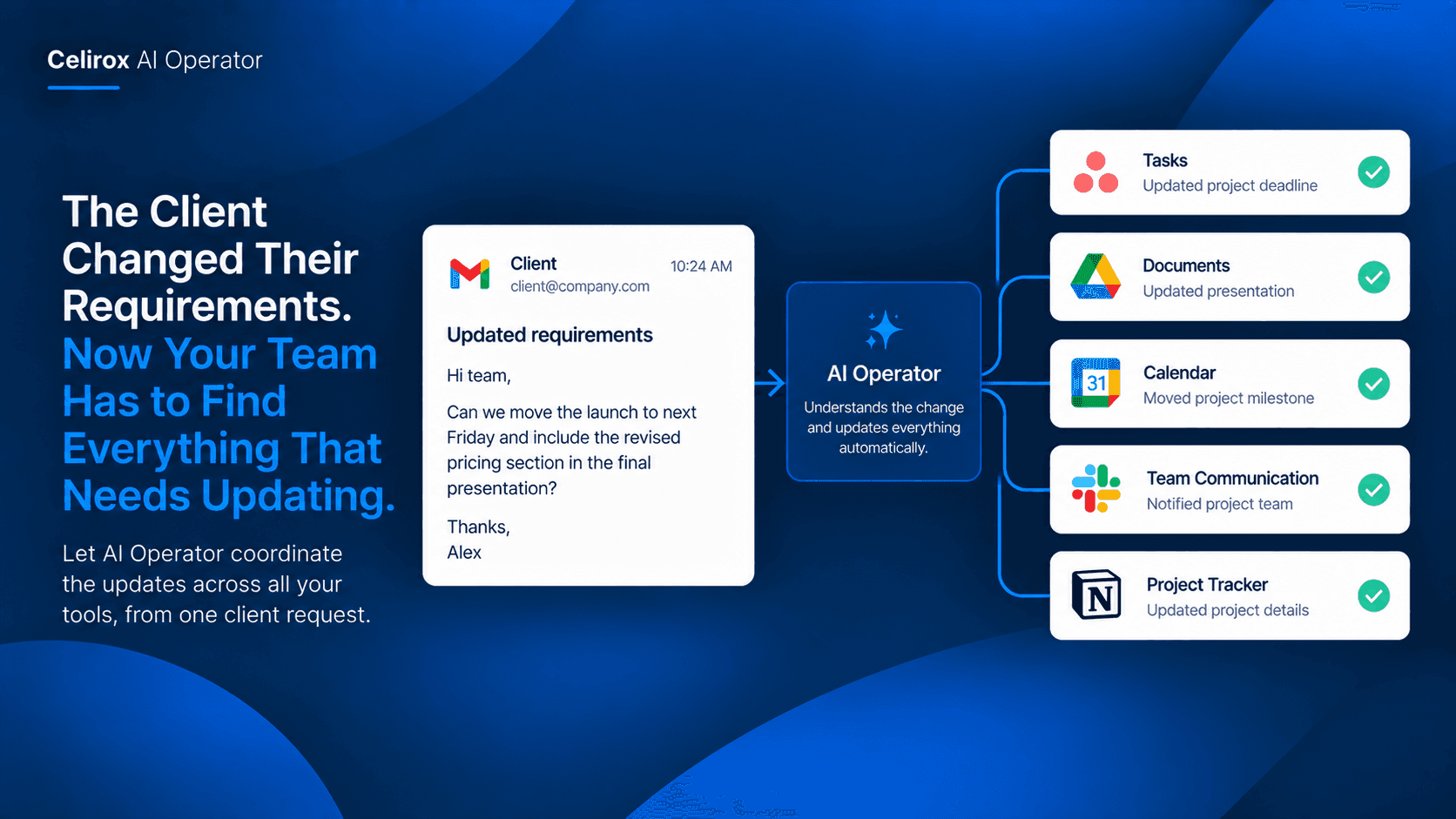
It was a normal Tuesday morning.
Then a client sent an email.
The project deadline had moved forward by one week.
There was also a small change to the final deliverable.
Nothing about the email looked complicated.
But the project manager immediately knew what it meant.
The task deadline needed to change.
The project document needed to reflect the new requirement.
The team needed to know about the change.
The calendar milestone needed to move.
And someone needed to make sure nothing related to the old deadline was left behind.
One email had created five different jobs.
The difficult part was not reading the client's message.
It was figuring out everything that message changed.
One Change Can Affect Everything
Business information rarely lives in one place.
A client may communicate through Gmail.
Project work may live in a task management system.
Important documents may be stored in Google Drive.
Meetings and deadlines may live in Google Calendar.
Internal communication may happen in Slack.
Each system can work perfectly on its own.
The problem appears when one change needs to move through all of them.
A client does not think in terms of applications.
They think:
“We need this delivered next Friday instead.”
The business has to translate that sentence into several operational changes.
The Email Is Only The Beginning
Imagine a client writes:
“Can we move the launch to next Friday and include the revised pricing section in the final presentation?”
For the project manager, that message contains multiple actions.
The deadline has changed.
The presentation needs an update.
The team needs to know.
The project timeline may need adjustment.
A calendar milestone may need to move.
The email itself is not the workflow.
It is the trigger for the workflow.
That distinction matters.
A person has to read the request, understand what it means, remember all the systems involved, and then update each one.
That is where small details can get missed.
Why Manual Updates Break Down
The first update is usually easy.
Change the task deadline.
The second is still manageable.
Update the project document.
Then comes communication.
Someone posts the change to Slack.
Then they remember the calendar.
Then they check whether another task depends on the old deadline.
The more systems involved, the more opportunities there are for something to remain unchanged.
Maybe the team sees the new deadline but the calendar still shows the old one.
Maybe the document gets updated but the project task does not.
Maybe everyone is informed except the person responsible for the final presentation.
The client made one change.
The team now has to maintain consistency across several systems.
Think In Terms Of Consequences
A useful AI workflow should not simply copy an email somewhere else.
It should understand the consequence of the information.
If a client changes a deadline, the important question is not:
“Where should I save this email?”
It is:
“What work is affected by this change?”
That could mean identifying the relevant project, locating the associated task, updating the deadline, communicating the change, and keeping the supporting information connected.
This is where AI-based workflow automation becomes different from a simple trigger-and-action rule.
The workflow can start with the client's message and reason about what needs to happen next.
Let AI Operator Coordinate The Work
Celirox AI Operator is designed to work across connected business applications and coordinate multi-step business workflows.
Instead of treating the client's email as an isolated event, the workflow can use it as the starting point for the related operational work.
For example:
Client email arrives
↓
AI identifies the requirement change
↓
Related project is identified
↓
Affected task and deadline are updated
↓
Relevant project information is updated
↓
Team receives the change
↓
Calendar information is adjusted when required
The important part is the coordination.
The merchant or team member does not have to manually move the same piece of information from system to system.
A Deadline Change Becomes A Workflow
Let's return to the client who moved the launch forward by one week.
The old process might look like this:
Read email.
Open project management tool.
Find the project.
Find the relevant task.
Change the deadline.
Open the project document.
Update the timeline.
Open Slack.
Write an explanation.
Open Calendar.
Move the milestone.
Check everything again.
That can easily become a 20–30 minute interruption.
With an AI-driven workflow, the client message can become the starting point for the entire sequence.
The AI can identify the requested change and coordinate the relevant actions across connected tools.
The value is not saving a few clicks.
The value is avoiding the need for one person to remember the whole chain.
Keep The Team On The Same Page
A changed requirement is only useful if the people working on it know about the change.
Imagine the project manager updates the task but forgets to tell the designer.
The task technically contains the correct deadline.
But the person doing the work is still operating with yesterday's information.
That creates another problem.
The team needs a shared understanding of the current project state.
AI Operator can make internal communication part of the same workflow rather than treating it as a completely separate manual step.
The change can be communicated to the relevant team while the operational records are being updated.
Documents Can Change Too
Some requirements live inside project documents.
A client might request:
“Use the new pricing structure in the proposal.”
That is not simply a task update.
The relevant document may need attention too.
A connected workflow can identify the document associated with the project and incorporate the requested change into the broader process.
This is especially useful when the client request affects information that people repeatedly reference during the project.
The objective is to keep the operational information and the working information aligned.
Not Every Change Is The Same
A good workflow should not blindly update everything whenever an email arrives.
Some client messages are simple questions.
Some are requests for information.
Some are genuine changes to project requirements.
The workflow needs context.
For example:
“Can you send me the current proposal?”
is different from:
“Please change the delivery date to next Friday.”
The first may require retrieving information.
The second may require changes across multiple systems.
AI-driven workflows are useful here because the starting message can be interpreted rather than treated as a simple keyword trigger.
Make Changes Traceable
Business changes should also remain understandable to the people involved.
When a deadline changes, the team should be able to understand why.
The original client communication provides the context.
The updated project task reflects the current state.
The team notification explains what changed.
The connected workflow creates a chain between the request and the operational response.
That makes the change easier to follow than a collection of unrelated manual updates.
Where AI Automation Helps Most
This type of workflow becomes especially valuable when a business regularly receives changes from clients.
Agencies.
Consulting teams.
Development companies.
Design studios.
Marketing teams.
Professional service businesses.
In these environments, client requirements can change throughout a project.
The difficult part is rarely updating one record.
It is making sure every affected place catches up with the change.
That is exactly where connected AI workflows can remove repetitive coordination work.
From One Message To One Coordinated Workflow
The biggest difference is how the business thinks about the task.
The old approach is:
Email → person → several apps → several updates
The AI-driven approach is:
Client change → AI understands the request → connected workflow → relevant systems updated
The person can then focus on reviewing the result rather than manually carrying information between applications.
That is a much more useful role for AI than simply summarizing another email.
Frequently Asked Questions
Can AI Operator work across multiple applications?
AI Operator is designed for connected business workflows, allowing information and actions to move across supported applications rather than keeping the workflow inside one tool.
What kinds of client changes can start a workflow?
Examples include changes to deadlines, deliverables, requirements, project information, or other requests that create follow-up work across connected systems.
Does every client email need to trigger an automation?
No. The workflow should be designed around meaningful business events. A simple question does not necessarily require changes across multiple systems.
Can the workflow update more than one system?
Yes. The purpose of this type of workflow is to coordinate multiple connected actions when one business event affects several systems.
Why is this different from an email-to-task automation?
An email-to-task workflow generally creates one predetermined action. A client change can have several consequences, requiring context and coordination across multiple applications.
Stop Making One Person The Connection Between Every Tool
The client did not send five requests.
They sent one.
But the business had to translate that one request into multiple operational changes.
That is where teams often lose time.
Not because any individual task is difficult.
Because someone has to remember all the places where the information matters.
AI Operator can turn that coordination problem into a connected workflow.
The client changes the requirement.
The workflow identifies what needs to happen.
The relevant systems are updated.
The team is informed.
And the business keeps moving without making one person the manual bridge between every application.
Let Business Changes Move With The Work
Modern businesses already use multiple tools because each one solves a different problem.
The challenge is keeping those tools synchronized when something important changes.
AI Operator provides a way to approach that problem from the business event itself.
Instead of asking:
“Which app do I need to update?”
the team can think:
“What changed, and what needs to happen because of it?”
That shift—from individual app automation to coordinated business workflows—is where AI agents become genuinely useful for everyday operations.