The Customer Ordered the Wrong Variant. Now What?
The order looks completely normal.
The customer bought the right product, paid successfully, and the order entered the merchant's system.
Then a message arrives:
"I ordered medium, but I actually need large."
For a store selling clothing, shoes, electronics, furniture, accessories, or products with multiple variants, this is a familiar situation.
The problem is not that the customer wants something different. The problem is that the order has already been placed.
The Small Mistake Becomes Work
A wrong variant can create more work than expected.
The merchant has to find the order, check whether fulfillment has started, confirm the requested change, update the order, and make sure the warehouse does not ship the original variant.
If the original order cannot be changed, the process can become even more complicated.
The customer may need to cancel the order and place another one. The merchant may need to refund the original payment, check inventory again, and make sure the replacement order is handled correctly.
A simple variant mistake has now become a support and fulfillment task.
Let Customers Correct It Earlier
The better opportunity is to handle the mistake while the order is still within a controlled editing window.
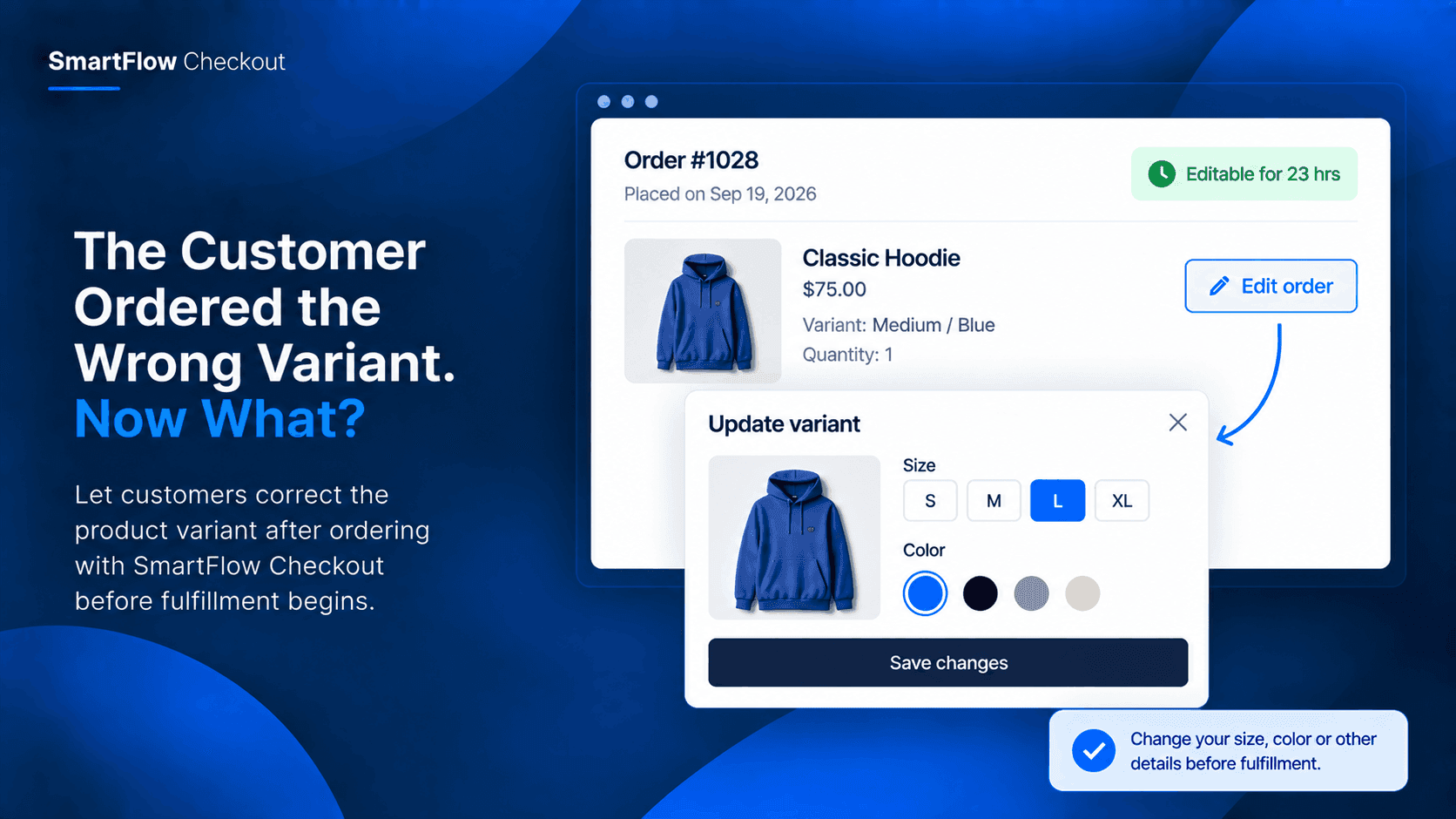
With SmartFlow Checkout, merchants can allow eligible customers to edit their orders after checkout. The available editing options can include changing product variants, quantities, customer details, shipping information, and other supported order fields.
That means a customer who notices "I selected the wrong size" does not necessarily need to start the ordering process again.
:contentReference[oaicite:0]{index=0}
Build A Variant Correction Window
Consider a clothing store that sells shirts in several sizes.
A customer places an order for a medium.
Ten minutes later, they realize they need a large.
Instead of sending a support email and waiting for the merchant to manually correct the order, the store can provide an order-editing option during its configured editing window.
The customer can request the variant change while the order is still eligible for editing.
The merchant keeps control over when and under what conditions order editing is available.
Keep Fulfillment In Control
Order editing should not mean customers can change anything at any time.
That is why the editing window matters.
A merchant can define when an order remains editable and apply conditions to determine which orders qualify. Once the order moves beyond that controlled period, the editing opportunity can close.
This creates a useful boundary between customer convenience and fulfillment operations.
The goal is simple: give customers room to correct genuine mistakes without leaving orders permanently open to changes.
:contentReference[oaicite:1]{index=1}
Where Variant Changes Matter
Variant corrections are especially useful when products have choices that customers can easily select incorrectly.
Examples include:
- Clothing sizes
- Shoe sizes
- Product colors
- Device models
- Furniture finishes
- Storage capacities
- Pack sizes
- Product configurations
The common pattern is the same: the customer wants the same product, but the selected variant is wrong.
Reduce Unnecessary Order Recreation
Without order editing, a variant mistake can lead to unnecessary order recreation.
The customer may cancel the original order and place a new one.
That creates another order record, another checkout, another fulfillment event, and potentially another customer-service interaction.
When the original order is still eligible for editing, correcting that order can be a much simpler operational path.
The merchant does not have to treat every variant mistake as an entirely new purchase.
Make The Rule Work For You
The important part is not simply enabling order editing.
It is deciding how the workflow should behave.
A merchant can think about questions such as:
- How long should an order remain editable?
- Which customers should have access?
- Which products should allow changes?
- Should editing be available before fulfillment begins?
- What happens when the requested variant is unavailable?
These decisions turn order editing into an operational rule rather than an unrestricted customer feature.
A Better Post-Purchase Experience
The checkout is often treated as the end of the buying journey.
But small mistakes frequently appear immediately afterward.
A customer checks the confirmation email and notices the wrong size. They look at the order again and realize they selected the wrong color. They remember that they needed a different model.
Giving them a controlled opportunity to correct the order can remove friction at exactly the point where the mistake is discovered.
SmartFlow Checkout provides order editing capabilities that merchants can configure around their own workflow. :contentReference[oaicite:2]{index=2}
Common Questions
Can customers change variants after ordering?
SmartFlow Checkout supports product variant changes through its order editing functionality, subject to the merchant's configured editing rules and eligibility conditions.
Can merchants control when editing is allowed?
Yes. SmartFlow Checkout provides a controlled time window for order editing, allowing merchants to determine how long eligible orders can be changed.
Is this only useful for clothing stores?
No. Variant corrections can apply to any Shopify product with selectable variants, including electronics, furniture, accessories, shoes, and other configurable products.
Can customers change other order details?
SmartFlow Checkout's order editing functionality can support changes to several order details, including quantities, product variants, customer information, addresses, and shipping methods, depending on the configured workflow.
:contentReference[oaicite:3]{index=3}
Fix The Mistake Before Shipping
Customers will sometimes make small mistakes.
The important question is what happens after they notice them.
A wrong size or color should not automatically turn into a cancellation, replacement order, or lengthy support conversation.
With a controlled post-purchase editing window, merchants can give customers a practical way to correct eligible orders while keeping fulfillment rules in place.
That turns a common post-checkout problem into a manageable part of the store's workflow.
Try SmartFlow Checkout
Give customers a controlled way to correct eligible orders before fulfillment.