Your Bestselling Dog Food Is Almost Gone. What Happens Next?
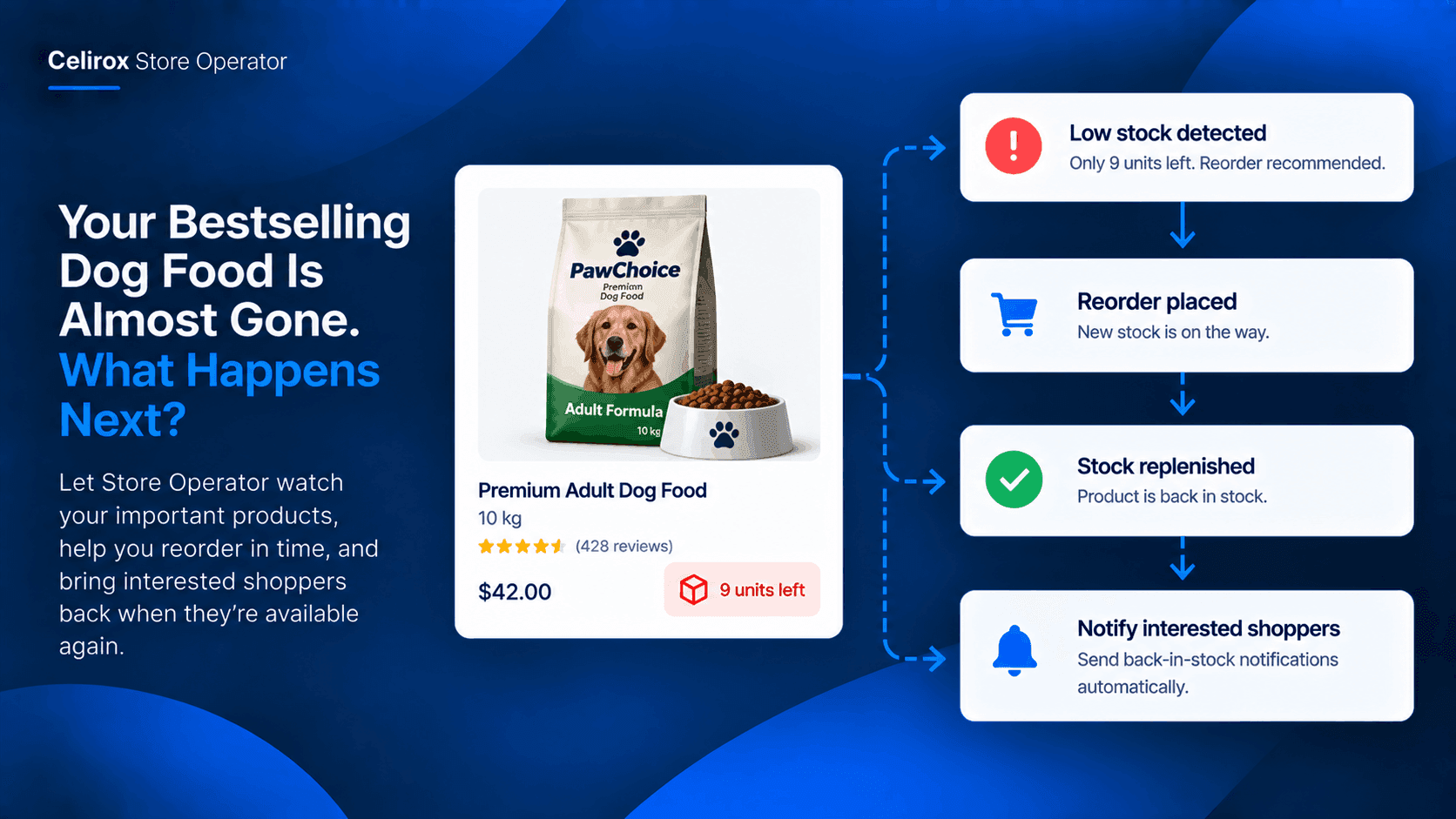
It is one of those products the store sells without much effort.
Customers already know it. Dogs keep eating it. Orders keep coming in.
Then someone checks the product and notices there are only a few bags left.
The problem is not knowing that the product sells. The problem is noticing the inventory decline before customers notice the product is gone.
For a pet store, that matters because a customer looking for their regular dog food may not wait several days for it to return.
One Product Can Create A Problem
Imagine a pet store selling a popular 10 kg bag of premium dog food.
It sells consistently every week.
There is nothing unusual about today's sales. No major campaign is running. No alert suddenly tells the team something is wrong.
But inventory has quietly fallen from 60 bags to 9.
At nine bags, the product may still look available.
At zero, the problem becomes obvious.
By then, the merchant has already lost the opportunity to prepare.
Catch Low Stock Before Zero
This is where product-level inventory monitoring becomes useful.
Instead of waiting for a product to reach zero, the merchant can keep an eye on important products and identify when inventory is getting low.
For the pet store, that could mean watching its bestselling dog food product.
When stock reaches the merchant's chosen threshold, the issue can be surfaced so the team has time to act.
The goal is not to predict exactly when every product will sell out.
It is to make sure an important product does not quietly approach zero without anyone noticing.
Turn Low Stock Into Action
Finding low inventory is only half the job.
The next question is:
What should the merchant do about it?
For a frequently purchased dog-food product, the answer may be to reorder before the remaining stock disappears.
Instead of discovering the problem after the product is sold out, the team can start the replenishment process while inventory is still available.
That gives the merchant a simple operational flow:
Low stock → reorder → replenish → keep selling
Celirox Store Operator is designed to help merchants monitor store conditions and surface issues that need attention, rather than requiring them to repeatedly check the store manually.
What If It Sells Out?
Sometimes replenishment does not happen quickly enough.
The dog food reaches zero.
Now the merchant has a second problem.
Customers who wanted the product can no longer purchase it.
But the customer's interest has not necessarily disappeared.
They may still want the same dog food next week.
That is where a back-in-stock workflow can become useful.
Bring Interested Shoppers Back
A customer who encounters a sold-out product has already shown interest.
They were not randomly browsing.
They found a product they wanted, but inventory prevented the purchase.
A back-in-stock notification gives the store a way to reconnect when that product becomes available again.
For the pet store, the journey can look like this:
Customer wants dog food → product sells out → customer requests notification → inventory returns → customer comes back
Instead of treating a stockout as the end of the customer's journey, the store has a way to continue it.
Build A Replenishment Loop
The bigger opportunity is connecting the two situations.
Low inventory should create an opportunity to act before the product disappears.
If the product does sell out, interested shoppers should not simply be forgotten.
That creates a simple replenishment loop:
Monitor → Reorder → Replenish → Notify → Recover sales
For a bestselling dog-food product, this is much more useful than simply knowing that inventory is low.
The merchant has a process around what happens next.
Why Pet Products Fit Well
Pet stores have products customers often purchase repeatedly.
Dog food is a clear example.
A customer may buy the same product every few weeks because their pet already uses it and the owner does not want to change brands or formulas unnecessarily.
That makes availability particularly important.
When a familiar product disappears, the customer may search elsewhere simply because they need it now.
Keeping popular products available—or reconnecting with shoppers when they return—can therefore become an important part of store operations.
Start With One Product
Merchants do not need to begin with their entire catalog.
Start with one product that matters.
For example:
Product: Premium Adult Dog Food, 10 kg
Category: Dog Food
Reason: Consistent repeat purchases
Risk: Inventory can fall quickly
Action: Watch stock, reorder early, recover shoppers if sold out
Once the workflow makes sense for that product, the same approach can be applied to other important products.
This keeps the automation tied to a real business need rather than creating another complicated store-wide process.
Let Store Operator Watch
Store owners already have enough things to check every day.
Orders need attention. Products change. Customers need responses. Inventory moves.
A product that quietly drops from 60 units to 9 should not depend entirely on someone remembering to check its inventory.
Celirox Store Operator can help merchants identify store issues and bring important changes to their attention through its autonomous store-management workflows.
The merchant can then decide what action should happen next.
Common Questions
Can this work for pet products?
Yes. The workflow can be applied to products such as dog food, cat food, treats, litter, grooming products, and other pet-store products where availability matters.
Why monitor one bestselling product?
A single high-demand product can generate recurring sales. Monitoring it separately lets the merchant focus attention on inventory that has a meaningful effect on the store.
What happens if the product sells out?
The merchant can use a back-in-stock notification workflow to give interested shoppers an opportunity to return when the product becomes available again.
Does low-stock monitoring replace reordering?
No. Monitoring identifies the inventory situation and helps the merchant act earlier. The actual replenishment process depends on the merchant's store and supplier workflow.
Keep The Product Available
For a pet store, a bestselling dog-food product is more than another item in the catalog.
It can be something customers return to buy again and again.
That makes the moment before a stockout important.
Catch the decline early, start the reorder process, and if the product does sell out, give interested shoppers a reason to come back when inventory returns.
With Celirox Store Operator, the goal is not simply to watch inventory.
It is to turn low stock into an action and a stockout into a recovery opportunity.
Try Celirox Store Operator
Give your store a smarter way to keep important products moving from low stock to replenishment and back to available.