The Customer Wants To Add One More Item After Paying
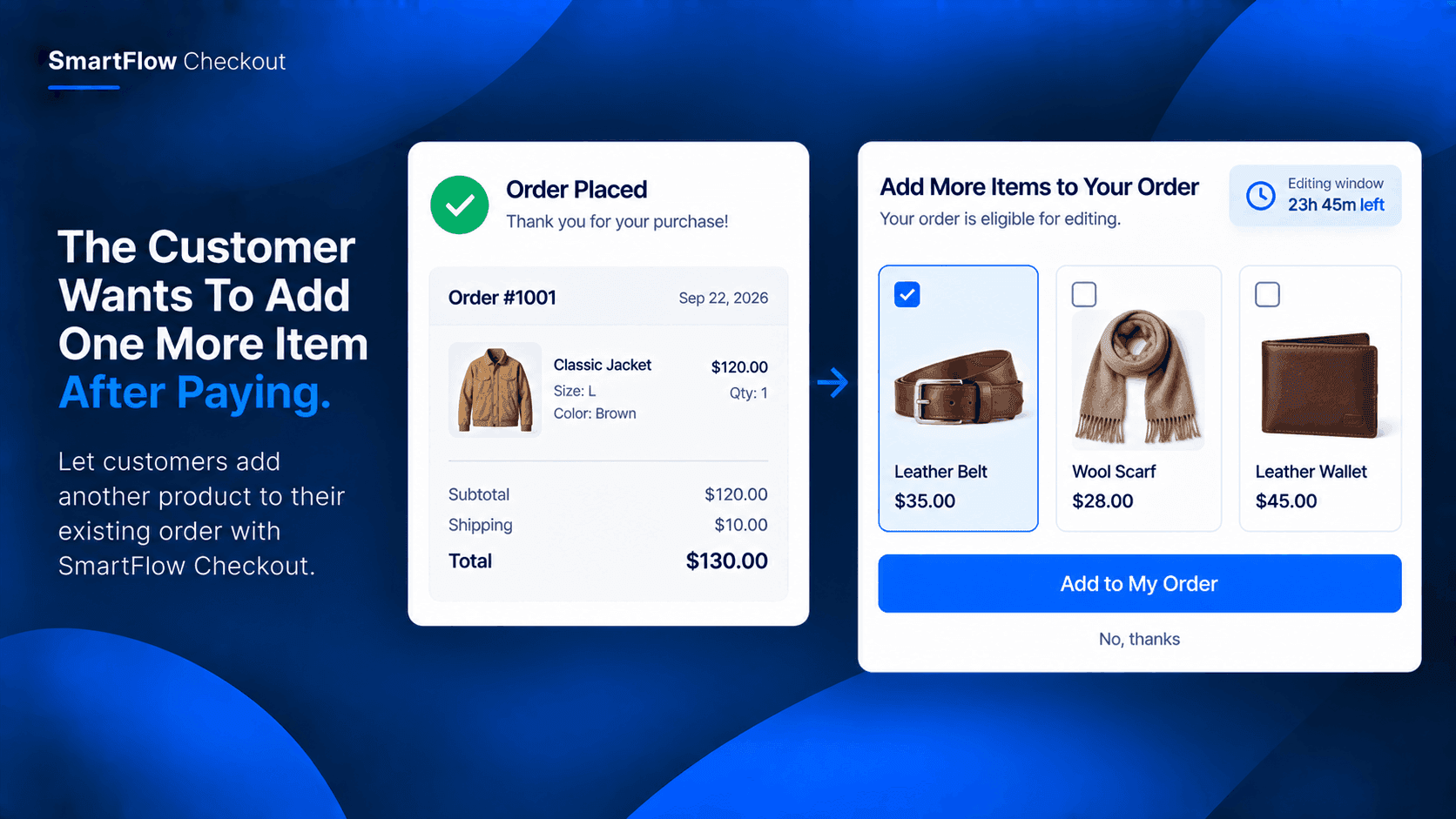
The customer just placed an order.
They bought the jacket they wanted.
Then they remember something.
"I should have added the matching belt."
The order is already paid.
Now the customer has two choices: place another order or contact the store and ask whether the original order can still be changed.
For the merchant, a simple forgotten item can turn into another order to process.
The Second Order Is Unnecessary
Imagine a fashion store selling jackets and matching accessories.
A customer buys a jacket and completes checkout.
A few minutes later, they realize the matching belt would complete the outfit.
The customer does not really want two separate deliveries.
They simply forgot one product.
Creating another order means another checkout and potentially another fulfillment process.
There is a simpler possibility.
Let the customer add the product to the existing order while it is still eligible for editing.
Let Customers Fix The Order
SmartFlow Checkout includes order editing functionality that can allow customers to modify eligible orders after checkout.
Depending on the merchant's configuration, customers can make supported changes such as adding or removing items and changing quantities or product variants.
That means the customer does not necessarily need to start over just because they remembered one more item.
:contentReference[oaicite:0]{index=0}
Add The Forgotten Product
The experience can be straightforward.
The customer places the jacket order.
Then they realize they also want the matching belt.
If the order is still within the merchant's configured editing window, they can edit the order and add the belt.
The result is:
Original order: Jacket
Updated order: Jacket + Belt
One customer.
One order.
One fulfillment process.
Keep The Merchant In Control
Post-purchase editing should not mean an order can be changed forever.
The merchant can define a controlled editing window for eligible orders.
That gives the store a clear operational boundary.
While the order is still editable, the customer can make supported changes.
Once the editing period ends, the order can move forward without remaining open for changes.
SmartFlow Checkout supports controlled order-editing conditions for this purpose. :contentReference[oaicite:1]{index=1}
A Small Change Saves Work
Adding one product may sound like a small request.
But manually handling that request can involve several steps.
Someone has to find the order.
Then they need to check whether it has already moved into fulfillment.
Then they may need to update the order and communicate with the customer.
If the customer instead places another order, the fulfillment team now has two orders to manage.
Allowing an eligible order to be updated can simplify the situation.
Think About Complementary Products
This works particularly well when products naturally belong together.
For example:
Jacket + Belt
Camera + Memory Card
Shoes + Shoe Care Kit
Laptop + Laptop Sleeve
Dress + Matching Accessories
The customer may initially purchase the main product and only afterward realize that another item would be useful.
The merchant does not need to force the decision before checkout.
The customer can still correct the order afterward when the store's workflow allows it.
Keep Orders Together
There is another practical advantage.
When the additional product is added to the existing order, the merchant can keep the purchase connected to the original transaction rather than treating the forgotten item as an entirely separate purchase.
That can make the customer's purchase history and fulfillment process easier to understand.
The exact behavior depends on the merchant's configured order-editing rules.
Give Customers A Short Window
The useful part of this feature is not unlimited editing.
It is a short, controlled opportunity to correct or complete an order.
For example, a merchant may decide that eligible orders can be edited before fulfillment progresses.
During that period, a customer who remembers the forgotten belt can make the change.
Afterward, the order continues through the normal fulfillment process.
That creates a practical balance between customer convenience and operational control.
Start With A Simple Rule
A store does not need a complicated editing strategy.
It can start with a straightforward process:
Customer places order
↓
Order remains eligible for editing
↓
Customer remembers another product
↓
Customer adds product
↓
Order continues to fulfillment
The merchant can then refine the conditions based on how the store actually operates.
Common Questions
Can a customer add another product after checkout?
SmartFlow Checkout supports adding items through its order-editing functionality for eligible orders, subject to the merchant's configured rules.
Can merchants control the editing period?
Yes. SmartFlow Checkout provides a controlled time window for order editing.
Is this the same as creating another order?
No. The use case is to modify the existing eligible order rather than requiring the customer to create a completely separate purchase.
Can customers change more than products?
Yes. Depending on the configured workflow, SmartFlow Checkout can support other order changes, including quantities, variants, customer details, addresses, and shipping methods.
:contentReference[oaicite:2]{index=2}
Let Customers Complete The Purchase
Customers do not always remember everything they want before clicking Pay.
Sometimes the missing item comes to mind immediately afterward.
A matching belt.
A memory card.
A protective case.
A care product.
Without order editing, that small realization can create another checkout and another order.
With SmartFlow Checkout, eligible customers can have a controlled opportunity to add the forgotten product to their existing order before fulfillment moves ahead.
It is a small post-purchase capability, but for the right store, it can make the ordering experience considerably simpler.
Try SmartFlow Checkout
Give customers a controlled way to update eligible orders after checkout.