The Tenant Reported a Leak. But Who Is Handling It?
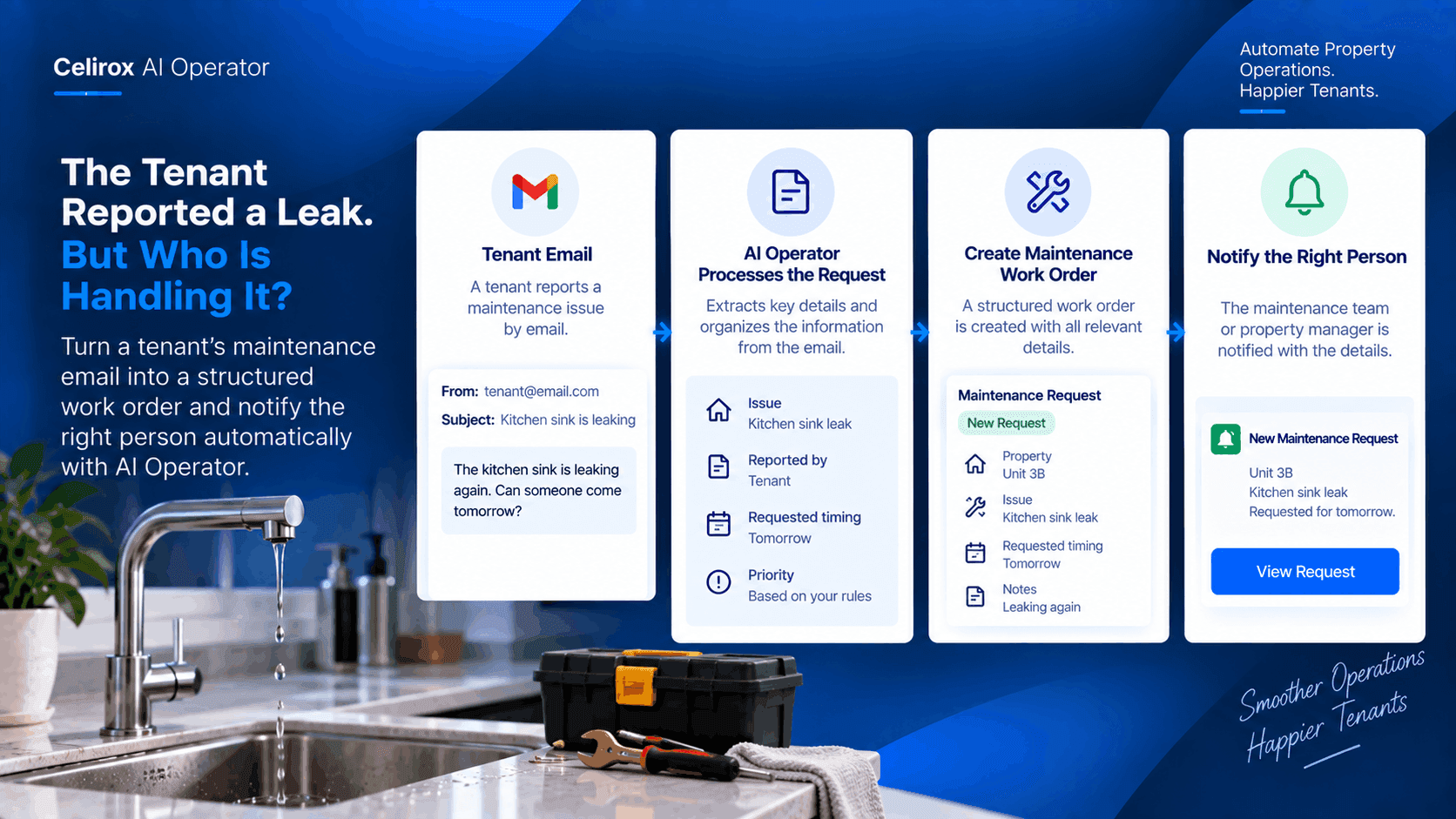
A tenant opens their email and types:
“The kitchen sink is leaking again. Can someone come tomorrow?”
The property manager sees the message.
They know something needs to happen.
But the email itself isn't a maintenance workflow.
Someone still needs to understand what the tenant reported, identify the property and issue, create the appropriate work request, decide who needs to handle it, and make sure the request doesn't disappear into the inbox.
That is where the real work begins.
A Maintenance Email Starts The Process
For a property management company, maintenance messages can arrive throughout the day.
A tenant reports a leaking sink.
Another reports a broken light.
Someone else says the air conditioner has stopped working.
The messages are different, but they create the same operational problem.
The property manager has to turn an informal message into something the team can act on.
The leak email is therefore not just an email.
It is the beginning of a maintenance workflow.
The Important Details Are In The Message
The tenant may not submit a perfectly structured maintenance form.
Instead, they might write:
“The kitchen sink is leaking again. Can someone come tomorrow?”
That short message contains useful information.
There is a maintenance problem.
The affected area is the kitchen sink.
The tenant says it has happened before.
They are also asking about a possible visit tomorrow.
A property manager can interpret this manually, but doing the same thing repeatedly takes time.
The workflow needs to turn the message into useful operational information.
Reading The Email Is Not Enough
Imagine the manager reads the message and thinks:
“I'll deal with this later.”
Then another tenant email arrives.
Then a supplier calls.
Then a lease needs attention.
By the afternoon, the maintenance email is still sitting in the inbox.
The problem isn't that the manager failed to read it.
The problem is that reading the email didn't automatically create the next action.
This distinction matters in property management.
A request is only useful when it moves toward resolution.
Turn The Request Into A Work Item
AI Operator can be used as the starting point for a workflow that takes information from a message and turns it into structured work.
For the leaking sink example, the workflow could capture:
Maintenance issue: Kitchen sink leak
Reported by: Tenant
Request: Maintenance visit
Requested timing: Tomorrow
Priority: Based on the property's configured process
The exact systems and fields depend on the tools connected to the workflow.
The important change is that the message becomes an actionable piece of work rather than remaining only as text inside an inbox.
The Right Person Needs The Information
Creating a task is only part of the process.
Someone needs to know about it.
A maintenance coordinator may need to review the request.
A property manager may need to approve the next step.
A maintenance provider may eventually need to receive the job details.
The workflow can organize the relevant information before the request is passed along.
That reduces the chance of someone having to search through the original email just to understand what happened.
Previous Requests Add Useful Context
The tenant said the sink is leaking again.
That small word can matter.
If the property manager has previous records for the same issue, the new request may deserve additional attention.
Instead of treating every email as an isolated message, the workflow can help the team keep the maintenance request connected to the property's existing operational context when the connected systems support that information.
The goal is not simply to create another task.
It is to create a task with useful context.
The Manager Can Keep Control
Not every maintenance request should automatically trigger an external action.
Some requests may require review first.
A property manager may want to check the details before contacting a contractor.
AI Operator can fit into an approval-based workflow where the important action is prepared first and the responsible person remains in control of the final decision.
That is useful when the workflow involves costs, external vendors, access to a property, or other actions that should be reviewed.
The Inbox Becomes A Starting Point
The property manager's inbox still matters.
But it no longer has to be the place where the entire maintenance process lives.
The email provides the initial information.
The workflow turns that information into an operational task.
The responsible person gets the information they need.
The request can then move through the company's normal maintenance process.
The inbox becomes the starting point instead of the final destination.
A Small Request Can Create Many Steps
From the tenant's perspective, the request is simple.
“The kitchen sink is leaking.”
For the property management team, there can be several follow-up steps.
The issue needs to be recorded.
The correct property and tenant context needs to be associated.
Someone needs to review the request.
A maintenance person may need to be contacted.
The appointment may need to be coordinated.
The request eventually needs to be closed.
AI Operator is useful when the goal is to connect these operational steps instead of leaving the manager to coordinate each one manually.
Keep The Workflow Focused
The best automation doesn't need to solve every property-management problem at once.
This workflow has one clear trigger:
A tenant sends a maintenance request.
From there, the workflow has one clear objective:
Turn the message into actionable maintenance work.
That makes the automation easier to understand and easier for the team to use.
It also gives the property manager a clear place to intervene when human judgment is required.
From Tenant Email To Action
The complete flow can be simple:
Tenant sends a maintenance email.
AI Operator processes the relevant information from the message.
The maintenance request is structured and organized.
The appropriate person or workflow receives the next action.
The manager can review or continue the process.
Instead of repeatedly asking, “Did anyone handle that email?”, the company has a clearer operational path from request to action.
Frequently Asked Questions
Can AI Operator work with maintenance emails?
AI Operator can automate workflows around connected business tools and information sources. A maintenance-email workflow can use an incoming message as the trigger when the required email connection and workflow actions are available.
What information can be taken from a tenant message?
The workflow can be designed around the information the property management team needs, such as the reported issue, affected area, requested timing, and relevant tenant or property context when that information is available.
Does every maintenance request need to be handled automatically?
No. The workflow can be designed so that a person reviews an action before important changes or external steps are taken.
Why create a work item from an email?
An email is primarily communication. A work item gives the team an actionable next step that can be tracked through the company's existing process.
Can the workflow include notifications?
Yes, when the relevant notification or communication tools are connected, the workflow can include notifying the person responsible for the next step.
Don't Let Maintenance Requests Stop At Email
The tenant did their part.
They reported the leaking kitchen sink.
The property manager also did their part.
They read the email.
But neither action guarantees that someone will actually handle the problem.
The missing piece is the workflow between “reported” and “assigned.”
AI Operator can help connect those steps so a simple tenant message can become structured, actionable work.
For a property management company handling dozens of maintenance requests, that means less time turning emails into tasks and a clearer path for getting each request to the right person.
The goal isn't to automate the tenant's problem. It's to automate the work that begins after the tenant reports it.