Recover Abandoned Carts Before the Customer Disappears
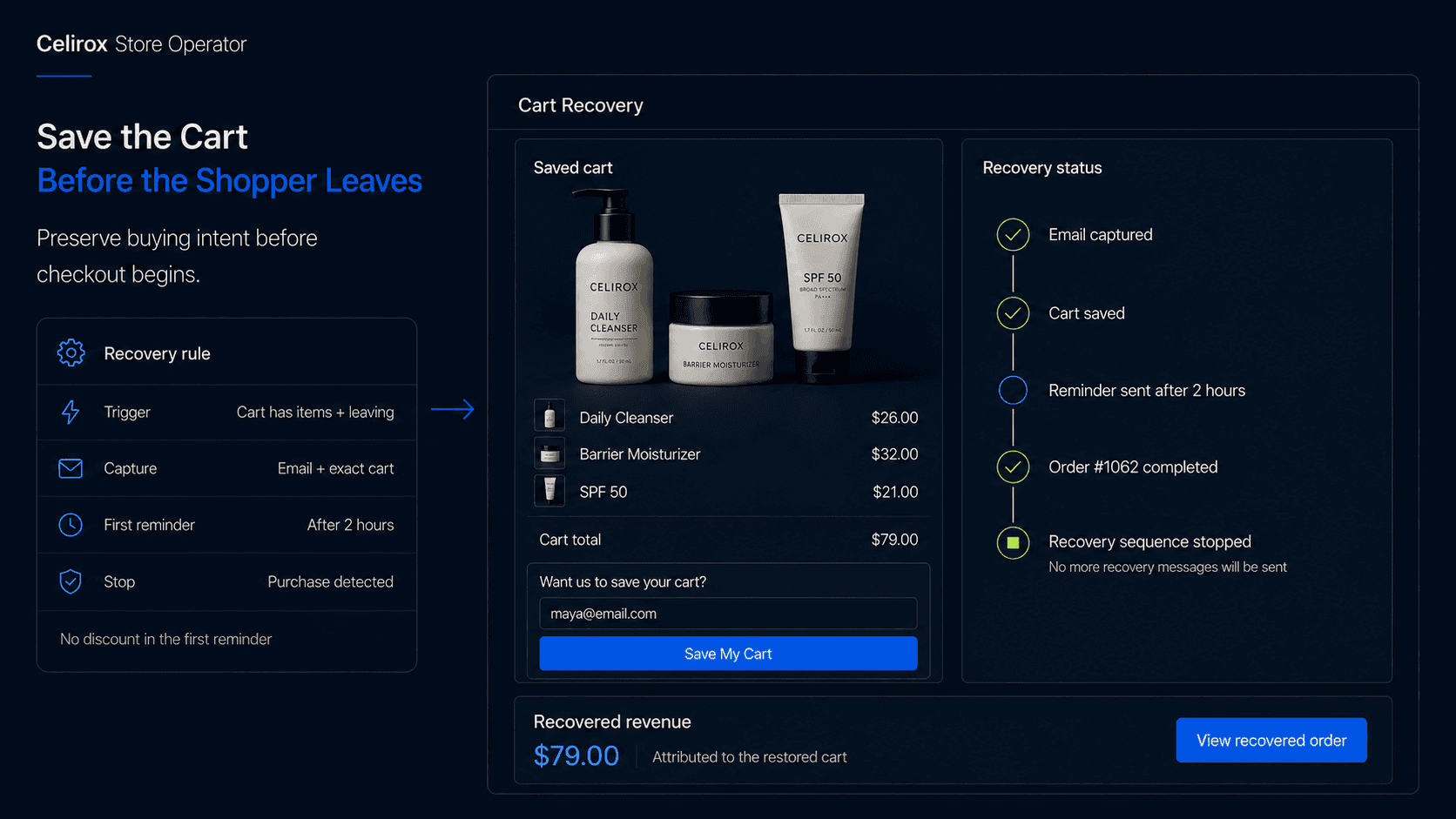
Capture Intent Before It Disappears
A shopper lands on your store after seeing one of your products online.
They browse, choose a variant, add it to the cart, and spend another minute looking around.
The cart now contains a $79 skincare bundle.
That matters because the shopper has moved beyond casual browsing. They have shown real buying intent.
Then they start to leave without entering checkout.
At this point, the store may know exactly what they wanted but still have no reliable way to contact them. No email address has been entered, no account has been created, and checkout has not started.
If the visitor leaves, that buying intent may disappear with the session.
The first cart recovery problem is often not what email to send. It is how to preserve the buying intent before the shopper becomes unreachable.
Cart and Checkout Differ
Cart abandonment and checkout abandonment happen at different moments.
A shopper who adds products to the cart and leaves before starting checkout has abandoned a cart.
A shopper who begins checkout, provides identifying information, and leaves before paying has abandoned checkout.
That distinction matters because checkout recovery usually starts after the merchant already has enough information to identify the shopper.
Cart abandonment can happen earlier.
Imagine 1,000 visitors add products to their carts, but only 600 reach the point where contact information is available.
A recovery system that begins only during checkout has no practical way to reconnect with the other 400.
That is where a storefront capture experience can help.
Instead of immediately offering a discount, the store can give the shopper a useful reason to identify themselves:
Want us to save your cart?
The customer is not being asked to join an unrelated newsletter.
They are being offered a way to continue something they already started.
Build the Recovery Journey
With Celirox Store Operator, a merchant can describe the complete recovery experience through chat.
For example:
"When someone has products in their cart and looks like they are leaving, show a small popup asking if they want us to save their cart. Capture their email. If they leave without buying, send the saved cart after two hours, remind them again the next day, and stop all recovery messages if they purchase."
The journey becomes:
Cart activity → Leaving signal → Email captured → Cart saved → Reminder sent → Customer returns → Purchase detected → Sequence stops
The value comes from connecting the whole process.
The popup gets permission to reconnect.
The saved cart gives the shopper something useful to return to.
The email sequence brings them back.
Purchase detection stops irrelevant follow-ups.
Analytics show whether the workflow actually contributes to recovered orders.
It is not one feature.
It is one connected recovery journey.
Capture Without Creating Friction
An exit recovery popup should not appear to every visitor.
Someone who has not added anything to the cart has shown very different intent from someone who already selected products and spent time considering the purchase.
A merchant might show the recovery experience only when the cart contains products, the shopper has not already provided an email, and the popup has not been shown recently.
It may also be better to suppress it when another modal or important storefront message is already visible.
A store that stacks a newsletter popup, discount wheel, country selector, chat prompt, cookie banner, and cart recovery message can quickly become frustrating.
The objective is not to capture the maximum number of email addresses.
It is to create one useful recovery opportunity at the right moment.
Desktop and mobile also need different logic.
Desktop pointer movement can sometimes provide a useful leaving signal.
Mobile does not have the same mouse-exit behavior.
Exit intent should therefore be treated as a signal rather than perfect knowledge about what the shopper will do next.
Save More Than Email
Capturing an email without preserving the cart solves only half the problem.
Suppose a customer adds:
Trail Runner - Black / Size 10
and:
Performance Socks - Black / Medium
They provide their email and leave.
If tomorrow's recovery message sends them back to the homepage, they still need to find the products, choose the variants again, and rebuild the cart.
A stronger recovery flow aims for:
Recovery message → Saved cart → Continue purchase
rather than:
Recovery message → Homepage → Search again → Rebuild cart
The restored cart still needs to respect current store conditions.
A product available yesterday may be sold out today.
Prices, discounts, variants, or eligibility may also change.
A saved cart preserves the shopper's previous buying context.
It does not reserve inventory or guarantee yesterday's conditions forever.
Build a Useful Sequence
The merchant should decide when reminders are sent and what each one is trying to accomplish.
A simple sequence could send the first message after two hours, another the next day, and perhaps a final reminder later.
Those timings are examples, not universal rules.
A $30 impulse purchase and a $500 considered purchase may need very different recovery windows.
The first message can simply help the shopper return:
Subject: Still thinking it over?
You left a few items in your cart. We saved them so you can continue where you stopped.
Return to Your Cart
That may be enough.
The second message can address hesitation with useful information about shipping, returns, product details, or support.
A later message might include an incentive if the economics justify it.
A useful pattern is:
Reminder first → Helpful follow-up → Incentive only when justified
There is no reason every abandoned cart should immediately receive a discount.
Giving away margin too early can turn recovery into unnecessary discounting.
Stop After the Purchase
This is one of the most important parts of the workflow.
A customer receives the first reminder, returns to the store, and completes the purchase.
If they receive another email the next day saying:
You forgot something in your cart
the recovery system immediately feels disconnected from the store.
Before every follow-up, the workflow should check whether the relevant purchase has already happened.
The desired sequence is:
Cart captured → Reminder sent → Customer purchases → Recovery stops
No second reminder.
No unnecessary discount.
No message asking them to buy something they already purchased.
The merchant should also decide what happens when the shopper returns and purchases different products.
Some stores may stop recovery after any recent purchase.
Others may continue the original cart flow if those products are still relevant.
There is no universal answer.
The important thing is to define the rule deliberately and give every sequence a clear endpoint.
Measure Real Recovery
A dashboard showing:
Recovery emails sent: 4,200
does not tell the merchant whether the workflow is commercially useful.
More important questions are:
How many carts were captured? How many shoppers returned? How many completed a purchase? How much revenue came from recovered carts? Which messages contributed to recovery?
Useful metrics can include:
- Captured carts
- Recovered orders
- Recovered revenue
- Recovery rate
- Average recovered order value
- Return sessions after recovery messages
Attribution matters too.
Suppose a shopper clicks a recovery link, restores the original cart, and completes the purchase shortly afterward.
That is a strong recovery signal.
Now imagine someone receives a recovery email, never opens it, comes back five days later through another channel, and buys unrelated products.
Automatically crediting that order to cart recovery would overstate the workflow's impact.
Recovered revenue should follow clear attribution rules.
The goal is not to produce the largest possible number.
It is to understand what the recovery system actually influenced.
Improve Using Store Data
Once the recovery flow is running, the merchant can learn from customer behavior.
Imagine the first reminder drives most recovered orders while the final discount email contributes very little.
That may suggest the discount is unnecessary.
Another store may discover that high-value carts need more time than low-value carts.
A $250 cart might benefit from a longer consideration window.
A $30 cart may recover after one simple reminder.
That could lead to different rules:
Lower-value cart → Short recovery sequence
Higher-value cart → Longer consideration window
Or:
Healthy-margin products → Incentive allowed
Low-margin products → No discount
The popup should be measured too.
If it captures many emails but also causes more shoppers to leave immediately, it may be too aggressive.
A useful recovery system improves the complete purchase journey.
Not just one metric.
Frequently Asked Questions
What is abandoned cart recovery?
Abandoned cart recovery is a process for reconnecting with shoppers who add products to their cart but leave before completing the purchase.
How is cart abandonment different from checkout abandonment?
Cart abandonment can happen before the shopper starts checkout or provides contact information. Checkout abandonment happens later after the shopper has entered the checkout journey.
Can Store Operator capture shoppers before checkout?
Store Operator can help merchants create storefront recovery experiences that capture shopper information before checkout where the merchant's setup supports it.
Can the original cart be restored later?
A recovery flow can preserve cart information and provide a path back to the selected products, subject to current inventory, pricing, variants, and other store conditions.
Can merchants choose when reminders are sent?
Yes. The merchant can define the timing, number of reminders, and conditions for the recovery sequence.
Should every abandoned cart receive a discount?
No. Many shoppers may return after a simple reminder. Discounts should be used only when they fit the merchant's margin and recovery strategy.
Should recovery emails stop after purchase?
Yes. The workflow should check whether the relevant purchase has already happened before continuing the sequence.
Can Store Operator track recovered revenue?
A recovery workflow can track captured carts, recovered orders, and attributed recovery revenue according to the merchant's configured rules.
Does exit intent work the same on mobile?
No. Desktop and mobile provide different interaction signals, so the recovery experience should not assume mouse-based exit behavior works everywhere.
Recover the Buying Intent
A shopper adds a product to the cart.
That action says:
I'm interested.
If they leave before the store can identify them, that intent may disappear with the session.
A stronger recovery experience connects the whole journey:
Recognize intent → Offer to save cart → Capture shopper → Preserve cart → Follow up → Detect purchase → Stop messaging → Measure recovery
That is more useful than treating the popup, cart restoration, email sequence, and analytics as separate features.
Celirox Store Operator helps merchants describe that recovery journey through chat and manage the rules around it while keeping the merchant in control of when customers are contacted, what they receive, and how recovery is measured.