When Stripe Says Paid but Your CRM Says Open: Fixing Data Mismatches
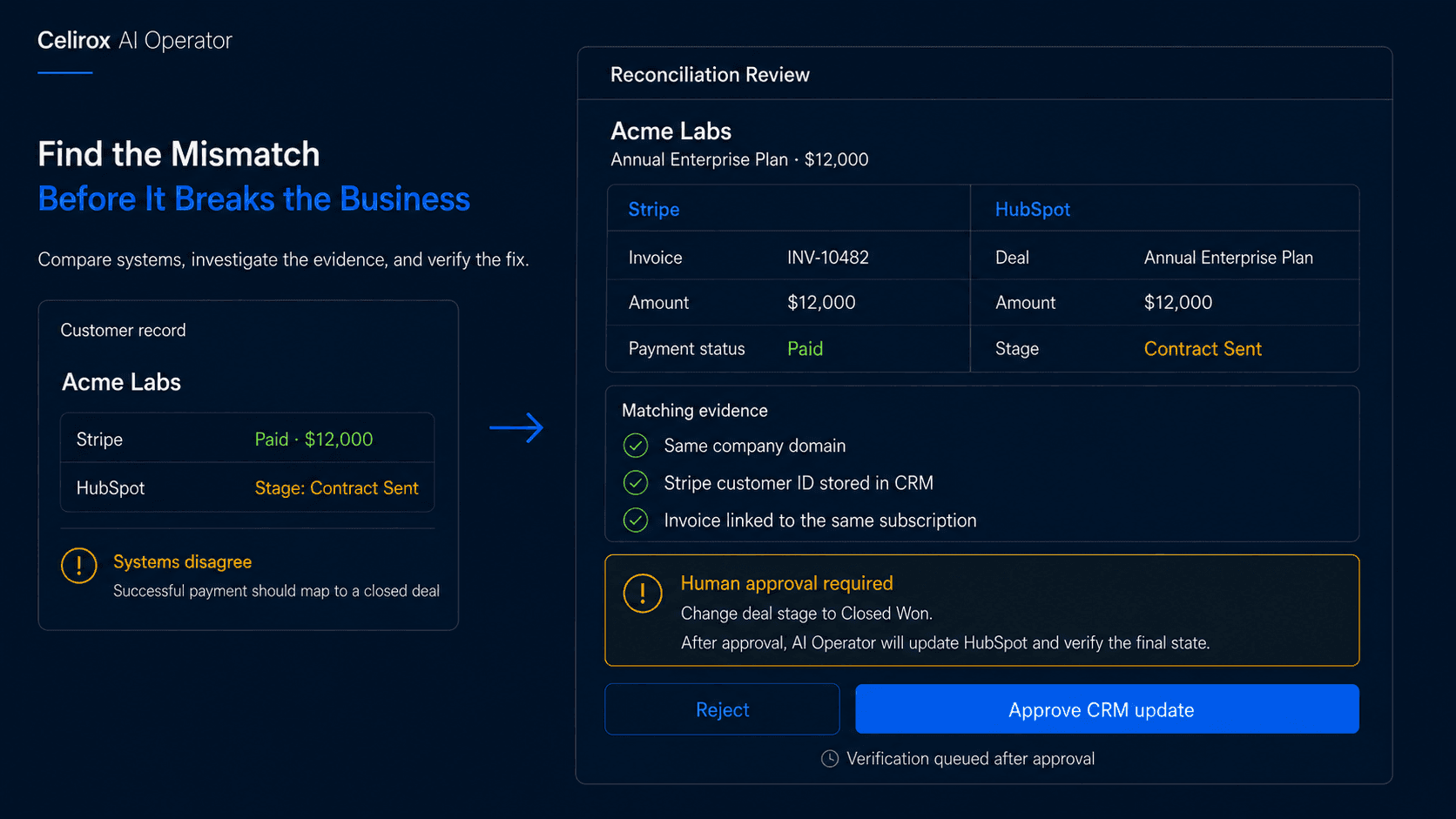
When Systems Stop Agreeing
Imagine a customer completes a $12,000 annual payment.
Stripe shows:
Payment successful
The money has been collected.
But the CRM still says:
Stage: Contract Sent
Nobody notices.
Sales keeps receiving follow-up reminders.
Forecasting still treats the deal as open pipeline.
Customer success does not start the onboarding flow.
Finance sees revenue that sales reporting does not.
Every individual system appears to be working.
The business process is not.
The problem is not that one application failed. It is that multiple systems no longer agree about the same business reality.
That is a reconciliation problem.
What Reconciliation Really Means
Cross-system reconciliation means comparing records that should represent the same business state and identifying when they no longer match.
Finance teams already use this idea when comparing bank transactions, accounting records, invoices, and payment processors.
The same problem now appears across almost every business function.
For example:
Billing: Subscription active
CRM: Customer marked churned
Or:
CRM: Deal closed won
Billing: No successful payment found
Or:
Identity system: Employee terminated
Application: User still active
The useful question is not simply:
Which values are different?
It is:
Which system reflects the expected state, why do they differ, and what should happen next?
Triggers Do Not Guarantee Results
Consider a normal integration:
Stripe payment succeeds → Update CRM deal to Closed Won
That is useful.
But what happens if the CRM update fails?
The payment still succeeds.
The trigger still fires.
The integration still attempts the action.
Yet the business is left with:
Stripe: Paid
CRM: Open
The workflow ran.
The intended result did not happen.
That distinction matters.
A stronger operating rule is:
Every successfully paid annual customer should have the correct commercial status in the CRM.
That rule cares about the final state.
Not just whether one event fired successfully.
This is why reconciliation can remain useful even when a business already has webhook-based integrations.
Where AI Operator Fits
With Celirox AI Operator, a business can define the state it expects across connected systems.
For example:
"Every successful annual subscription payment should have the correct customer and deal status in our CRM. Check regularly for mismatches. If you find one, investigate the payment, customer, and related deal. Prepare the correction when the relationship is clear, require approval for high-value records, and verify the systems agree afterward."
The operating loop becomes:
Observe → Compare → Investigate → Decide → Act → Verify
This is different from simply responding to one event.
The Operator can check whether the expected business condition still holds after the event has passed.
If not, it can investigate why.
That makes the workflow more like an operating control than a simple connector.
Match the Right Records
Finding a mismatch is only useful if the systems are referring to the same customer, account, invoice, or contract.
Real systems rarely use identical identifiers.
Stripe may use:
cus_R93X...
The CRM may use:
Company ID 583921
Finance may use:
Customer Code ACME-001
The stronger the shared identifier, the safer the reconciliation.
Useful matching signals can include:
- Stored external IDs
- Invoice or subscription IDs
- Customer IDs
- Email or verified domain
- Contract or deal references
- Other unique business identifiers
A company name alone may not be enough.
There may be several organizations called "Acme."
If the evidence is strong, the workflow may prepare a correction.
If several possible records could match, the safer response is to ask for review.
Reconciliation should reduce bad data.
It should not create new bad data through overconfident matching.
Understand the Business Rule
Two systems can show different values without anything actually being wrong.
Imagine:
CRM: Active Customer
Billing: Trialing
That might be inconsistent.
Or it may be exactly what the company expects during onboarding.
The system needs to understand the business rule behind the fields.
For example:
Expected rule: Customer status becomes Active only after the first successful payment.
Now the comparison has meaning.
The same applies to a CRM deal marked Closed Won when no payment exists.
That may indicate a problem.
But perhaps the customer has Net-30 terms and the payment is not due yet.
A useful reconciliation might show:
CRM: Closed Won
Billing: No successful payment
Payment terms: Net-30
Invoice due: September 18
Result: No correction required yet
This is why reconciliation is about business meaning, not simply comparing strings.
Define the Source of Truth
When two systems disagree, the Operator should not automatically change whichever one looks different.
The business needs an authority model.
For example:
Billing status → Billing system is authoritative
Sales stage → CRM is authoritative
User access → Identity system is authoritative
Contract terms → Contract system is authoritative
This prevents circular corrections.
Imagine billing says a subscription is canceled while CRM still says the customer is active.
It may be tempting to disable access immediately.
But if the billing cancellation was accidental, that would make the situation worse.
The Operator should understand which system is authoritative for each business fact and when an exception needs investigation before correction.
A reconciliation system should know what is supposed to be true before it decides what to change.
Keep Humans for Risky Changes
Not every mismatch should be corrected automatically.
Imagine the Operator finds:
Stripe payment: $9
and:
CRM deal: $90,000 enterprise contract
The company names happen to match.
That is not enough evidence.
Or imagine:
Billing: Subscription canceled
CRM: Strategic enterprise customer active
Automatically disabling customer access could be highly disruptive if billing is wrong.
A business may define rules such as:
- Low-risk corrections can proceed
- High-value financial records require approval
- Enterprise account changes require account-owner review
- Access removal requires security approval
- Ambiguous record matching always stops for review
The Operator can still perform the investigation before the human becomes involved.
A strong approval request should include the evidence.
For example:
Mismatch: Paid invoice, open CRM deal
Customer: Acme Labs
Invoice: INV-10482
Payment: $12,000, paid
CRM deal: Annual Enterprise Plan, $12,000, Contract Sent
Matching evidence: Stored Stripe customer ID and matching subscription
Proposed action: Change stage to Closed Won
Now the reviewer can understand why the action is being proposed.
Verify Every Correction
An approved update does not automatically mean the problem is fixed.
The write request can fail.
Permissions may have changed.
A validation rule may reject the update.
Another workflow may overwrite the field again.
That is why verification should close the loop.
The process should be:
Detect → Investigate → Correct → Verify
After the change, the Operator checks the relevant system again and confirms that the expected state now exists.
The same idea applies across billing, CRM, product access, accounting, support, and identity systems.
A workflow should not declare success simply because an API call returned without an obvious error.
The business outcome should be checked.
Find Recurring Failure Patterns
Reconciliation becomes even more useful when it reveals the same mismatch repeatedly.
Imagine the CRM status becomes wrong every Monday.
The Operator corrects it every Monday.
That is useful initially.
After the fifth occurrence, the more important question becomes:
Why does this keep happening?
Possible causes might include an old integration, weekend import, conflicting workflow, incorrect field mapping, or another system overwriting the record.
Repeated reconciliation issues should become operational signals.
The system should not repair the same symptom forever without surfacing the pattern.
This can help teams find broken integrations that would otherwise remain hidden because individual records keep getting manually corrected.
Measure Data Consistency
Cross-system mismatches can damage more than individual workflows.
They can quietly distort reporting.
Suppose billing shows:
127 active annual customers
while the CRM shows:
119
Now leadership asks:
Which number is correct?
That inconsistency can affect revenue reporting, sales forecasts, renewal planning, customer success workload, account segmentation, and expansion analysis.
Useful reconciliation metrics can include:
- Mismatches detected
- Mismatches corrected
- Cases awaiting approval
- Failed corrections
- False record matches
- Time mismatches remain unresolved
- Recurring mismatch patterns
The useful dashboard question is:
Where is our operational data becoming inconsistent, and is the problem improving?
That is more meaningful than simply counting how many integration tasks ran.
Frequently Asked Questions
What is cross-system reconciliation?
Cross-system reconciliation compares records in different applications that should represent the same business reality and identifies inconsistencies that need investigation or correction.
How is reconciliation different from synchronization?
Synchronization usually moves or updates data between systems. Reconciliation checks whether those systems actually ended up in the expected state.
Why reconcile if integrations already exist?
Because downstream updates can fail, integrations can disconnect, users can change data manually, and other processes can overwrite previous results. Reconciliation checks the final state rather than assuming the original update succeeded.
Can reconciliation involve more than two systems?
Yes. A business rule may depend on billing, CRM, product access, support, accounting, identity, procurement, or other connected applications representing the same customer or process correctly.
Should every mismatch be fixed automatically?
No. High-value, ambiguous, sensitive, or low-confidence cases should normally be escalated for human review.
Can AI Operator reconcile billing and CRM records?
Yes. Celirox AI Operator can be used to compare connected records, investigate mismatches, prepare corrections, request approval where appropriate, and verify the resulting state.
Can reconciliation help find broken integrations?
Yes. Recurring mismatch patterns can reveal field-mapping problems, conflicting workflows, failed integrations, imports, or other processes that repeatedly create inconsistent data.
Care About the Final State
A workflow can run successfully and the business can still end up wrong.
The payment happened.
The webhook fired.
The integration attempted the update.
But the CRM still says the deal is open.
What matters is not simply that software performed a sequence of actions.
What matters is whether the expected business condition is actually true.
That is the difference between:
When something happens, run this action
and:
Make sure this business state stays correct
Celirox AI Operator is designed around that broader operational problem.
It can help businesses compare connected systems, investigate inconsistencies, prepare or perform approved corrections, involve people when judgment is required, detect recurring failure patterns, and verify that the intended state has been restored.
Observe → Compare → Investigate → Decide → Act → Verify
That is what turns integration into ongoing operations.