Three Suppliers Sent Their Quotes. Which One Is Actually Cheaper?
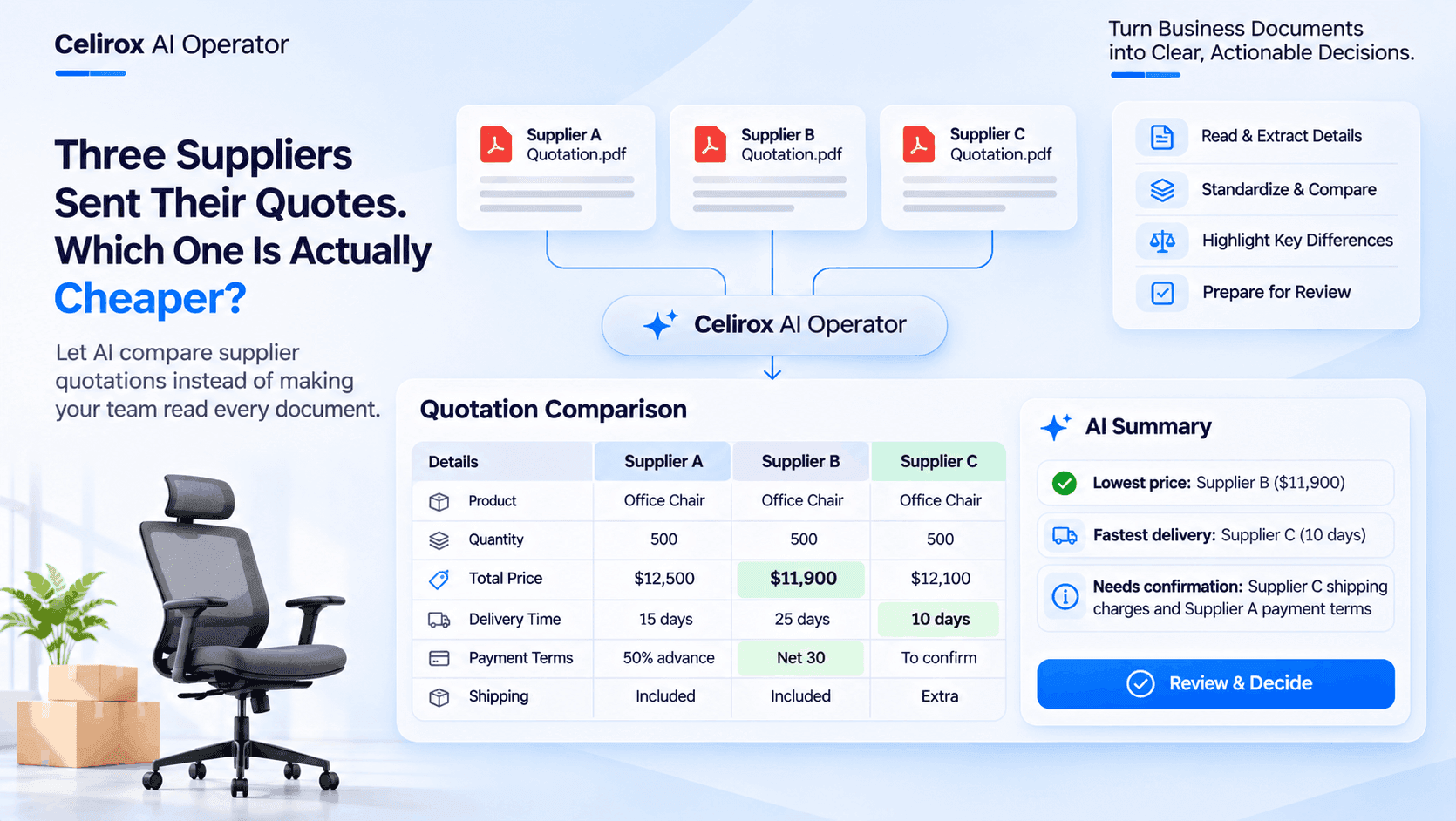
The purchasing manager needs 500 office chairs.
Three suppliers have been contacted.
All three have responded.
The first supplier sends a PDF quotation.
The second sends an Excel spreadsheet.
The third sends a quotation as an email attachment.
Now the purchasing manager has three documents to review.
Supplier A offers a particular price with 15-day delivery.
Supplier B has a lower quoted price but needs 25 days to deliver.
Supplier C promises faster delivery, but shipping charges are listed separately.
The purchasing manager starts opening each document, reading the details and writing numbers into a spreadsheet.
The prices are different.
The delivery conditions are different.
The payment terms are different.
And the lowest quoted price doesn't necessarily mean the best overall offer.
Three suppliers have submitted their quotations. But someone still has to understand what each supplier is actually offering.
The Problem Starts After The Quotations Arrive
Getting supplier quotations is a normal part of purchasing.
A business identifies what it needs, contacts suppliers and requests pricing.
The suppliers respond with their offers.
But receiving quotations is only one part of the process.
The purchasing team still needs to compare them.
Consider a company purchasing 500 office chairs for a new office.
It receives three quotations:
| Supplier | Quoted price | Delivery time | Payment terms |
|---|---|---|---|
| Supplier A | $12,500 | 15 days | 50% advance |
| Supplier B | $11,900 | 25 days | Net 30 |
| Supplier C | $12,100 | 10 days | Shipping extra |
At first glance, Supplier B appears to be the cheapest.
But Supplier C offers faster delivery.
Supplier A has different payment conditions.
Supplier C has additional shipping charges that need to be confirmed.
The purchasing manager cannot make a reliable decision by looking at only one number.
They need to understand the complete offer.
Reading Three Quotations Is Not The Same As Comparing Them
Supplier quotations rarely follow one universal format.
One supplier may provide a detailed table with product descriptions, unit prices and taxes.
Another may include the same information inside paragraphs.
A third may send a spreadsheet containing multiple product variations and additional charges.
The information may be available in all three documents, but it isn't necessarily presented in the same way.
The purchasing manager has to identify the relevant details and organize them before making a comparison.
For every quotation, they may need to check:
- Product description and specifications.
- Quantity offered.
- Unit price.
- Total quoted amount.
- Applicable taxes.
- Shipping and handling charges.
- Delivery timeline.
- Payment conditions.
- Quotation validity.
- Warranty or additional service terms.
This process takes time, particularly when the company receives quotations for several products or purchasing requirements at once.
The Cheapest Quotation Isn't Always The Best Offer
Imagine the purchasing manager only compares the total prices.
Supplier B offers the lowest quoted amount at $11,900.
Supplier C offers $12,100.
Supplier A offers $12,500.
It would be easy to select Supplier B immediately.
But there are other details to consider.
Supplier B needs 25 days to deliver.
Supplier C can deliver in 10 days, but shipping costs haven't been included.
Supplier A offers a 15-day delivery timeline and requires 50% advance payment.
If the office needs the chairs before a scheduled opening, delivery time could be more important than a small difference in the quoted price.
If the company has strict cash-flow requirements, payment conditions may also influence the decision.
A useful comparison should make these differences visible.
It shouldn't simply identify the smallest number.
Why Manual Quotation Comparison Becomes Difficult
For a business receiving only one quotation occasionally, manual review may be manageable.
But purchasing teams often handle multiple requirements simultaneously.
One employee may be comparing office furniture.
Another may be reviewing packaging suppliers.
Someone else may be collecting quotations for computer equipment.
Every requirement creates another set of documents to review.
The team repeatedly performs similar tasks:
- Open the supplier document.
- Find the product details.
- Locate the quoted prices.
- Check additional charges.
- Read delivery and payment terms.
- Copy the information into a comparison sheet.
- Review the differences.
The difficulty isn't necessarily understanding the quotations.
It is the repeated effort required to collect and organize the same types of information from different documents.
That is where document-processing automation can help.
What If AI Could Read The Quotations First?
Imagine the purchasing manager receives all three supplier documents.
Instead of manually copying every detail into a spreadsheet, a configured AI workflow processes the available documents.
It identifies relevant information such as:
- Supplier name.
- Product description.
- Quoted quantity.
- Unit price.
- Total amount.
- Delivery charges.
- Delivery timeline.
- Payment terms.
- Quotation validity.
The extracted information is then organized into a common comparison structure.
Supplier A, Supplier B and Supplier C can be reviewed side by side.
The purchasing manager doesn't need to begin by searching through three separate documents to find the quoted price.
The important information is already organized for review.
AI is not making the purchasing decision.
It is helping the purchasing team spend less time collecting information and more time evaluating the actual offers.
Turn Different Documents Into One Comparison
Let's return to the office chair purchase.
The three quotations contain different layouts and descriptions.
After extracting the relevant information, the comparison could look like this:
| Comparison detail | Supplier A | Supplier B | Supplier C |
|---|---|---|---|
| Quantity | 500 | 500 | 500 |
| Quoted total | $12,500 | $11,900 | $12,100 |
| Delivery | 15 days | 25 days | 10 days |
| Payment terms | 50% advance | Net 30 | To confirm |
| Shipping | Included | Included | Extra |
| Review status | Review | Review | Review |
Now the purchasing manager can see the differences without repeatedly switching between documents.
Supplier B has the lowest quoted amount.
Supplier C offers the fastest delivery.
Supplier A has a different advance payment requirement.
The missing shipping amount from Supplier C also becomes an important item to investigate.
This is more useful than a simple price ranking because it gives the purchasing team a broader view of the offers.
AI Should Also Identify Missing Information
Extracting information is useful, but identifying what is missing can be equally important.
Suppose Supplier C provides a total price without clearly stating shipping charges.
A comparison that ignores this missing information could make the offer appear cheaper than it actually is.
Or perhaps Supplier A mentions a delivery timeline but doesn't specify whether it includes installation.
These details may affect the final purchasing decision.
A well-designed comparison workflow should distinguish between:
- Information explicitly stated in the quotation.
- Information that has been calculated from available values.
- Information that is missing.
- Information that requires confirmation.
For example:
Supplier C — Shipping charges
Status: Not specified in the quotation.
Next step: Confirm shipping costs with the supplier before comparing final purchase costs.
This prevents an extracted value from being treated as complete information when an important condition is still unknown.
The Original Documents Still Matter
A comparison table is useful, but it should not replace the original supplier quotations.
The purchasing manager may need to verify a particular price, check a product specification or review a condition that was included in the original document.
For that reason, the workflow should retain the connection between extracted information and its source document wherever the integration supports it.
If AI extracts a unit price of $25, the employee should be able to verify where that number came from.
If a delivery condition is identified, the original quotation should remain available for confirmation.
This is especially important when quotations contain complex pricing, multiple products or special conditions.
AI can organize the information.
The source document remains the reference for verification.
From Quotation Comparison To A Purchasing Task
Finding the differences between supplier quotations is only the beginning.
Someone still needs to decide what happens next.
Imagine the comparison identifies three items that require attention:
Supplier B: Lowest quoted price, but longest delivery timeline.
Supplier C: Fastest delivery, but shipping charges are missing.
Supplier A: Advance payment requirement needs review.
Instead of leaving these findings inside an email or spreadsheet, a configured workflow can organize them into follow-up tasks.
For example:
- Ask Supplier C to confirm shipping charges.
- Request clarification from Supplier A about payment conditions.
- Ask the operations team whether Supplier B's delivery timeline is acceptable.
- Prepare the comparison for the purchasing manager's review.
The team now has specific next steps.
It doesn't need to reread every document just to remember which details require clarification.
How Celirox AI Operator Helps With Supplier Quotation Workflows
Businesses receive important information through many different channels.
Supplier quotations arrive through email, document attachments and spreadsheets.
Purchasing teams then move between applications to organize the information, discuss the offers and prepare the next action.
Celirox AI Operator helps businesses coordinate AI-powered workflows across connected applications.
With its document-processing capabilities and integration ecosystem, businesses can create workflows that gather information, extract relevant details and organize business processes.
For a supplier quotation comparison workflow, the process could look like this.
1. Receive Supplier Quotations
Supplier quotations arrive through the configured business communication or document workflow.
The documents may be PDFs, spreadsheets or other supported formats.
2. Extract Relevant Information
AI processes the available documents and identifies relevant purchasing details such as supplier names, product descriptions, quantities, prices and delivery conditions.
3. Organize The Information
The extracted details are structured into a consistent format so the purchasing team can compare the suppliers.
4. Identify Differences
The workflow highlights important differences, missing information and conditions that may require additional review.
5. Prepare Follow-Up Actions
If information is missing, the workflow can help organize the next steps, such as requesting clarification or creating an internal review task, depending on the connected integrations and configured actions.
6. Keep The Purchasing Decision With The Team
The purchasing manager reviews the comparison and original quotations before deciding which supplier to select.
The workflow helps organize the decision-making process.
It doesn't need to make the purchasing decision on behalf of the business.
Why Human Approval Matters In Procurement
Supplier selection can affect a company's budget, delivery schedule and operational requirements.
An automated workflow should not select a supplier based only on the lowest extracted price.
Consider what could happen if an important detail is missed.
A supplier might offer a lower price but exclude installation.
Another might have additional transportation charges.
A third might offer a product specification that doesn't meet the company's requirements.
Even when the extracted information looks correct, the purchasing manager needs to evaluate whether the offer actually meets the business requirements.
A responsible workflow separates information processing from purchasing authorization.
AI prepares the comparison. The authorized employee makes the decision.
This approach helps businesses benefit from automation without losing control over important purchasing decisions.
The Same Workflow Can Help With Different Purchasing Requirements
Supplier quotation comparison isn't limited to office furniture.
The same document-processing approach can be useful across several business departments.
Packaging Materials
A business purchasing shipping boxes may receive quotations from suppliers offering different dimensions, material thicknesses, minimum order quantities and delivery conditions.
AI can help organize these details so the purchasing team can compare equivalent requirements.
Computer Equipment
A company purchasing laptops may receive offers with different processors, memory configurations, warranties and delivery dates.
The team needs to compare product specifications alongside the prices.
Raw Materials
A manufacturing business may receive quotations for the same material with different grades, quantities, transportation charges and payment terms.
A structured comparison can help highlight where the offers differ.
Office Supplies
A purchasing team buying stationery and other regular supplies may need to review several supplier offers for recurring requirements.
Organizing the extracted details can make the comparison process easier to manage.
The specific workflow depends on the document formats, information available and applications connected to the process.
What Businesses Should Check Before Automating Quotation Comparison
A useful comparison starts with a clear understanding of what the business is purchasing.
Before creating the workflow, consider these points.
1. Compare Equivalent Products
Two suppliers may use different product descriptions for similar items.
But similar descriptions don't always mean identical specifications.
Confirm that the products meet the same requirements before comparing prices.
2. Check Quantities And Units
One supplier may quote per unit while another provides a price for an entire package.
The quantities and units should be standardized before comparing totals.
3. Include Additional Charges
Shipping, handling, installation and other charges can affect the actual purchase cost.
Don't compare only the headline price.
4. Review Taxes And Payment Conditions
Check whether taxes are included and whether payment conditions differ between suppliers.
These details can influence the final purchasing decision.
5. Check Quotation Validity
Supplier quotations may only remain valid for a limited period.
An older quotation should not automatically be treated as a current offer.
6. Verify Extracted Information
Important values should be checked against the original quotation, especially when documents contain tables, scanned pages or unclear formatting.
7. Require Approval Before Committing
Selecting a supplier and placing an order should follow the company's purchasing authorization process.
Automating document comparison should not bypass those controls.
Frequently Asked Questions
How can AI compare supplier quotations automatically?
AI can process supplier quotation documents, extract information such as prices, quantities, delivery timelines and payment conditions, and organize the details into a consistent comparison format. Purchasing teams can then review the differences without manually copying every value from each document.
Can AI extract prices from supplier quotation PDFs?
Yes. AI-powered document processing can extract pricing information from supported PDF documents. The accuracy depends on document quality, formatting and the extraction capabilities of the configured workflow. Important values should be verified against the original quotation.
What information should businesses compare in supplier quotations?
Businesses should compare product specifications, quantities, unit prices, total costs, taxes, shipping charges, delivery timelines, payment terms, warranty conditions and quotation validity. The relevant details depend on the products and purchasing requirements.
Can AI identify the cheapest supplier?
AI can organize quoted prices and calculate comparisons when the required information is available. However, the lowest quoted price isn't necessarily the best overall offer. Delivery conditions, additional charges, product specifications and payment requirements should also be considered.
Can AI compare quotations received in different formats?
A configured document-processing workflow can work with multiple supported document formats, such as PDFs and spreadsheets. The available formats and extraction accuracy depend on the connected tools and document-processing capabilities being used.
Can Celirox AI Operator automate supplier quotation workflows?
Celirox AI Operator helps businesses coordinate AI-powered workflows across connected applications. Businesses can configure processes involving document information extraction, data organization and follow-up actions, depending on the integrations and available actions.
Does AI automatically select the best supplier?
AI can help organize supplier information, highlight differences and prepare comparisons. The final selection should remain with an authorized employee who can consider business requirements, verify the original documents and approve the purchase.
Can supplier quotation comparison also create follow-up tasks?
Yes, a configured cross-application workflow can organize missing information and prepare follow-up tasks through supported integrations. For example, the purchasing team can be asked to confirm shipping charges or request clarification about payment terms.
Three Quotations Shouldn't Mean Three Hours Of Manual Comparison
The purchasing manager has three supplier quotations.
One is a PDF.
Another is a spreadsheet.
The third arrived as an email attachment.
Each contains important information, but the details are presented differently.
The team could spend time opening documents, copying prices, checking delivery conditions and preparing a comparison sheet.
Or it could use an AI-powered workflow to extract the relevant information and organize the differences for review.
The purchasing manager still needs to verify the original documents, evaluate the suppliers and approve the final decision.
But they no longer need to begin every comparison by manually collecting the same information from scratch.
Celirox AI Operator helps businesses turn document-heavy processes into more organized workflows across connected applications.
The goal isn't to let AI choose a supplier simply because its quotation contains the smallest number.
It is to help the purchasing team understand every offer, identify missing details and make a more informed decision.
The cheapest quotation is easy to find. Understanding the complete offer is what makes a purchasing decision valuable.