The Same Customer Exists in Three Systems. Which Record Is Correct?
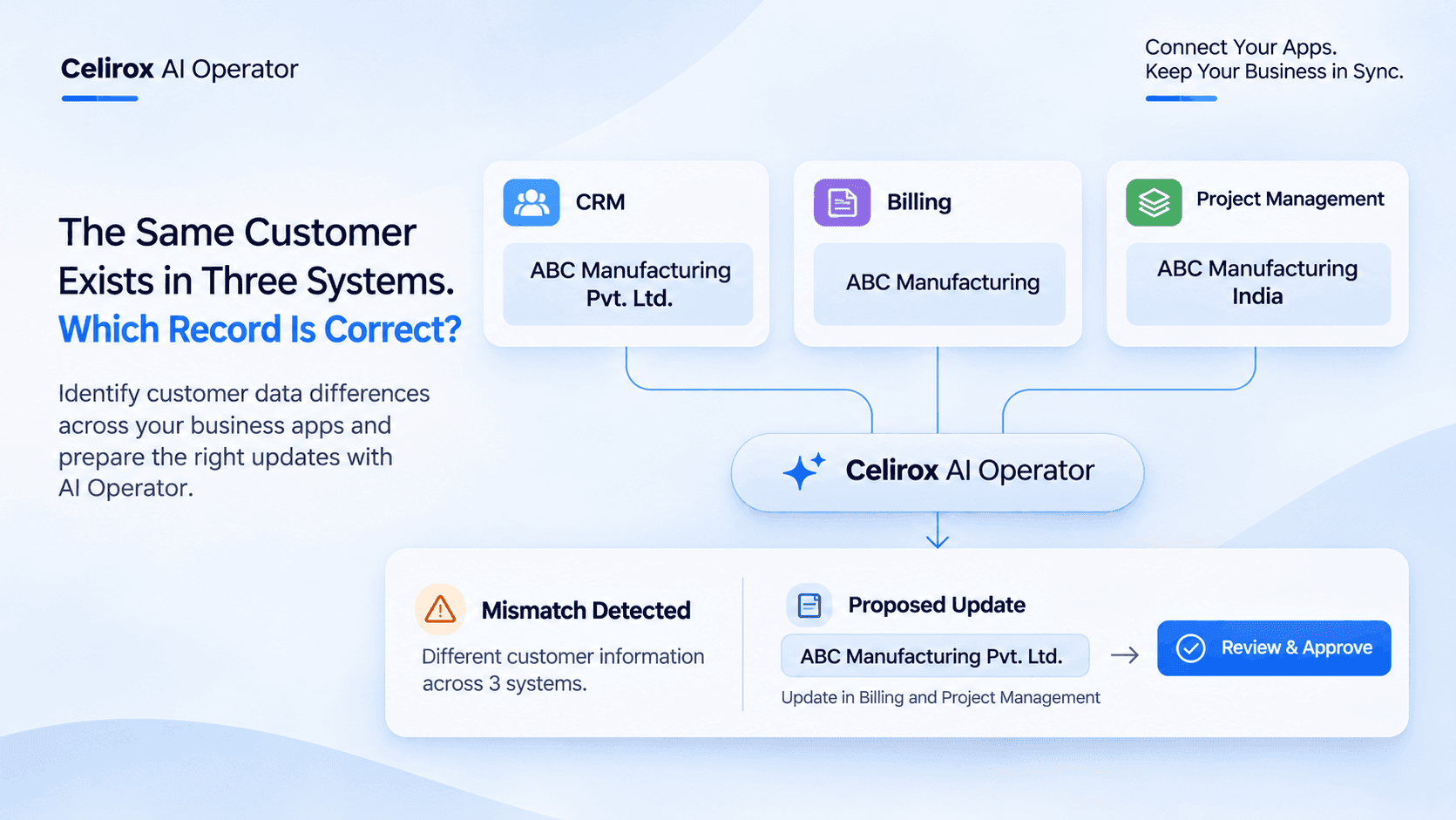
A sales employee opens the CRM to check a customer's information.
The customer is listed as ABC Manufacturing Pvt. Ltd.
The employee opens the billing application to review the latest invoice.
There, the same customer appears as ABC Manufacturing.
Then the project manager opens the project management system.
The customer is listed as ABC Manufacturing India.
Three applications.
Three different names.
But are they all referring to the same business?
The sales team believes they are.
The billing team isn't completely sure.
The project team is using the information already available in its system.
Nobody has a complete picture of what changed or which record should be treated as the correct reference.
The problem isn't a lack of customer information. It's that the information doesn't agree across the systems the business uses.
One Customer, Three Different Records
Businesses rarely operate using just one application.
A sales team might use a CRM to manage customer relationships.
The finance team might use separate billing software to manage invoices and payments.
The operations team might use a project management application to coordinate customer work.
Each application has its own purpose.
But they often contain information about the same customers.
Consider a company working with ABC Manufacturing.
Its records might look like this:
| Application | Customer name | Contact email |
|---|---|---|
| CRM | ABC Manufacturing Pvt. Ltd. | accounts@abc.example |
| Billing | ABC Manufacturing | accounts@abc.example |
| Project Management | ABC Manufacturing India | finance@abc.example |
The differences may appear small.
One application includes the legal company suffix.
Another uses a shortened name.
The third contains a different email address.
Some differences may be harmless formatting variations.
Others may indicate outdated or incorrect information.
The team needs to understand which is which before changing anything.
The Information Was Updated, But Not Everywhere
Imagine the customer recently changed its billing contact.
The sales employee receives the updated information and changes the CRM record.
The billing application still contains the previous contact.
The project management system has not been updated either.
A few days later, the finance team sends an invoice using the old information.
The project manager sends an update to the previous contact.
The sales team believes the information was already corrected.
Nobody intentionally made a mistake.
The problem occurred because different teams were working with information stored in different applications.
This is one of the difficulties businesses face when customer information is maintained across multiple systems.
Updating one record doesn't automatically mean every other application contains the same information.
Someone Has To Compare The Records
When information doesn't match, employees often start checking applications manually.
They open the CRM.
They compare the customer name and email address.
They open billing software.
They check the invoice history.
Then they visit the project management application to understand which information the operations team is using.
If there are several differences, the process takes even longer.
The employee may need to check previous emails, customer documents or internal notes to understand what actually happened.
This work is not particularly complicated.
But it takes time, especially when the business manages hundreds or thousands of customer records.
The challenge becomes greater when the same information is spread across applications used by different departments.
Not Every Difference Is A Mistake
There is an important distinction between inconsistent information and genuinely different customer records.
For example, these two names may refer to the same organization:
- ABC Manufacturing
- ABC Manufacturing Pvt. Ltd.
The second name may simply be the registered legal name.
But consider another situation.
Two companies have similar names, operate in the same industry and have different billing addresses.
Treating them as the same customer could create a much bigger problem.
This is why businesses shouldn't automatically replace every different value with the information found in another application.
A comparison needs context.
The team may need to examine:
- Customer identification details.
- Registered business names.
- Contact information.
- Billing addresses.
- Existing customer relationships.
- Previous updates and supporting documents.
The goal is to identify meaningful differences, not simply make every record look identical.
What If The Systems Could Be Compared Together?
Imagine the employee doesn't have to begin by opening three different applications.
Instead, a configured workflow gathers the relevant customer information from the connected systems.
The information is presented together.
The employee can see the CRM record, the billing record and the project record in one review process.
The differences become easier to understand.
For example:
CRM record
Customer: ABC Manufacturing Pvt. Ltd.
Email: accounts@abc.example
Billing record
Customer: ABC Manufacturing
Email: accounts@abc.example
Project record
Customer: ABC Manufacturing India
Email: finance@abc.example
The workflow can identify that the names and email addresses differ.
It can then gather the available context and prepare a summary for the employee.
Instead of searching through every application independently, the employee starts with the information that requires attention.
AI Can Help Understand The Difference
Traditional automation is useful when a business needs to move information from one application to another based on a defined trigger.
But comparing business information can involve more than checking whether two fields contain identical text.
Consider these examples:
- A company name may contain an abbreviation in one application.
- A contact email may have changed recently.
- A billing address may be different because the customer has a separate registered office.
- A project record may use an internal customer reference instead of the legal company name.
An AI-powered workflow can help interpret the available information, identify differences and organize the relevant context for review.
This doesn't mean AI should decide that every difference represents an error.
It should distinguish what it can establish from what still requires human confirmation.
For example, it may identify that two records have matching contact details but different company names.
That is useful information.
But it doesn't automatically prove that the records should be merged or overwritten.
The business still needs to confirm the correct relationship.
Turn A Data Mismatch Into A Reviewable Task
Finding a difference is only the beginning.
Someone needs to decide what should happen next.
Imagine AI identifies that the billing contact in the finance application doesn't match the recently updated CRM information.
Instead of leaving that finding inside a report, the workflow can prepare a structured review task.
The task might include:
Customer: ABC Manufacturing
Issue: Different billing contact information across applications.
CRM information: accounts@abc.example
Billing information: finance-old@abc.example
Suggested next step: Verify the updated billing contact before changing the billing record.
Review status: Pending approval.
The finance employee now has a specific issue to investigate.
They don't need to discover the mismatch themselves.
They can review the information, confirm the correct contact and authorize the next action where the connected workflow supports it.
The difference is that information has been turned into an actionable task.
Why Automatic Changes Need Human Oversight
It may seem convenient to automatically replace incorrect information across every connected application.
But customer records can contain information that affects invoices, contracts, payments and ongoing projects.
An incorrect update could create more problems than the original mismatch.
Consider a situation where two businesses have similar names.
An automated system that merges their records without proper verification could associate the wrong invoices or project information with a customer.
That is not a risk worth taking just to save a few minutes.
A better workflow separates identification from approval.
The AI helps gather information and identify differences.
The employee reviews the evidence.
The authorized person decides whether the proposed correction is appropriate.
Only after approval should the workflow perform the configured update.
This keeps important customer information under business control.
How Celirox AI Operator Helps Coordinate Cross-App Workflows
Businesses already use multiple applications to manage their daily operations.
The challenge is often getting those applications to work together in a meaningful way.
Celirox AI Operator is designed to help businesses coordinate workflows across connected applications through AI-powered automation.
With its integrations and workflow capabilities, businesses can connect different tools and organize processes that would otherwise require employees to move between applications manually.
For a customer-record review workflow, the process could be structured around several steps.
1. Gather Customer Information
The workflow retrieves relevant information from the connected applications using the configured integrations and permissions.
This could include customer names, contact details and other available business fields.
2. Compare Available Records
AI can help examine the gathered information and identify differences that deserve attention.
For example, it may identify different customer names or conflicting contact details.
3. Organize The Findings
Instead of presenting unrelated information, the workflow can prepare a structured summary showing which records differ and what information requires verification.
4. Prepare The Next Action
A review task can be created or the relevant team can be notified, depending on the configured workflow and connected applications.
5. Keep The Decision Under Human Control
The responsible employee reviews the proposed correction and approves the next action before any consequential record change is made.
The exact steps depend on the applications connected, available integration actions and the permissions configured for the workflow.
The purpose is to reduce the manual work involved in finding and organizing inconsistent information.
One Workflow Can Connect Different Business Applications
The same idea can apply to several business situations.
A CRM and billing application may contain different customer contact details.
A project management tool may use an outdated company name.
A sales application may contain a different account reference from the finance system.
An employee may have updated a customer record in one place without realizing that another team uses the same information elsewhere.
With Celirox AI Operator, businesses can build workflows around their connected applications rather than treating every system as an isolated workspace.
Its integration ecosystem includes more than 350 integrations, providing businesses with ways to connect the tools involved in their operations.
The specific workflow depends on the applications and actions available for the selected integrations.
Other Situations Where This Approach Can Help
Customer information is only one example.
The same comparison-and-review approach can be useful in other business processes.
Different Supplier Details
A supplier may have updated its contact information, but the purchasing system still contains the previous details.
A workflow can help identify the difference and prepare a review task before the next purchase order is processed.
Different Invoice References
An invoice reference in the finance application may not match the reference recorded in an internal project system.
Comparing the available information can help the finance team investigate the discrepancy.
Different Project Information
A project may have an updated deadline in one application while another team continues working with the previous schedule.
A workflow can bring the conflicting information to the project manager's attention.
Outdated Contact Information
A customer may have changed their primary business contact.
The sales application may contain the updated details while another connected tool still uses the old contact.
A comparison workflow can help identify where the information needs review.
These situations are different, but the underlying challenge is similar.
Important business information is spread across multiple applications, and employees need a reliable way to identify what doesn't match.
What Businesses Should Consider Before Building This Workflow
Connecting applications is only one part of the process.
The business should also decide how information will be compared and who is responsible for approving changes.
A few considerations are important.
Identify The Records That Should Be Compared
Customer names alone may not be enough to establish that two records belong to the same organization.
Use relevant identifiers and supporting information wherever available.
Decide Which Information Is Authoritative
The CRM may be the preferred source for sales contacts, while the billing application may be the authoritative source for invoice-related details.
Different fields can have different authoritative sources.
Define What Counts As A Mismatch
A difference in formatting may not require action.
A different billing email address may require investigation.
The workflow should distinguish between these situations.
Protect Important Updates
Changes to customer records should follow the business's approval and permission requirements.
Not every identified difference should trigger an automatic update.
Review The Workflow Regularly
Connected applications and business processes change over time.
Reviewing the workflow helps ensure that it continues to compare the right information and notify the right people.
Frequently Asked Questions
Why do customer records become inconsistent across business applications?
Customer information is often maintained by different departments using separate applications. When an employee updates one system but the change isn't reflected elsewhere, the same customer can end up with different names, contact details or other information across the business.
How can businesses compare customer information across multiple systems?
Businesses can use connected application workflows to gather relevant customer fields, compare the available records and identify differences. AI can help interpret the information and organize findings for employees to review.
Can AI identify duplicate or inconsistent customer records?
AI can help compare available information, identify similarities and highlight potential inconsistencies. However, similar names or contact details don't always prove that two records belong to the same customer. Important matches should be verified before records are merged or changed.
Can AI automatically update customer information in every application?
That depends on the connected applications, available integration actions, permissions and workflow configuration. For important customer records, a review and approval step is advisable before making changes across systems.
How does Celirox AI Operator help with multiple business applications?
Celirox AI Operator helps coordinate AI-powered workflows across connected applications. Businesses can use its integrations to gather information, organize processes, identify relevant differences and prepare follow-up actions according to their configured workflows.
Does Celirox AI Operator support multiple integrations?
Yes. Celirox AI Operator offers an integration ecosystem with more than 350 integrations, helping businesses connect different applications and build cross-app workflows. The available actions depend on the individual integration.
Should every difference between customer records be corrected automatically?
No. Some differences are legitimate, such as an abbreviated company name or a separate billing address. Businesses should establish which information is authoritative and review meaningful discrepancies before approving corrections.
The Problem Isn't Three Applications. It's Three Versions Of The Truth.
The sales team has its CRM.
The finance team has its billing application.
The operations team has its project management system.
Each team is doing its job.
But when the same customer information appears differently across these applications, someone has to spend time finding out what happened.
They open records, compare details, check previous updates and contact other departments.
It is a small task when it happens once.
It becomes a recurring operational problem when it happens across hundreds of customer records.
AI-powered workflows can help bring the information together, identify differences and prepare the next action for review.
Celirox AI Operator helps businesses coordinate these processes across their connected applications, turning disconnected information into more organized workflows.
The goal isn't to make every application identical without question.
It is to help employees understand where information differs, why it may matter and what needs to happen next.
When the same customer exists in three systems, your team shouldn't have to investigate all three manually just to understand what changed.