Stop Failed Deliveries: Deploying Address Validation at Checkout
The Hidden Tax of Shipping Errors
In the logistics of direct-to-consumer (D2C) e-commerce, the "last mile" of delivery is the most expensive and fragile segment of the supply chain. When a package leaves your 3PL (Third-Party Logistics) provider, you rely on major carriers like UPS, FedEx, or USPS to complete the journey. However, these carriers rely entirely on the accuracy of the shipping data provided by the customer at checkout.
Unfortunately, customers are famously inaccurate. Rushing through the checkout on a mobile device, a customer might:
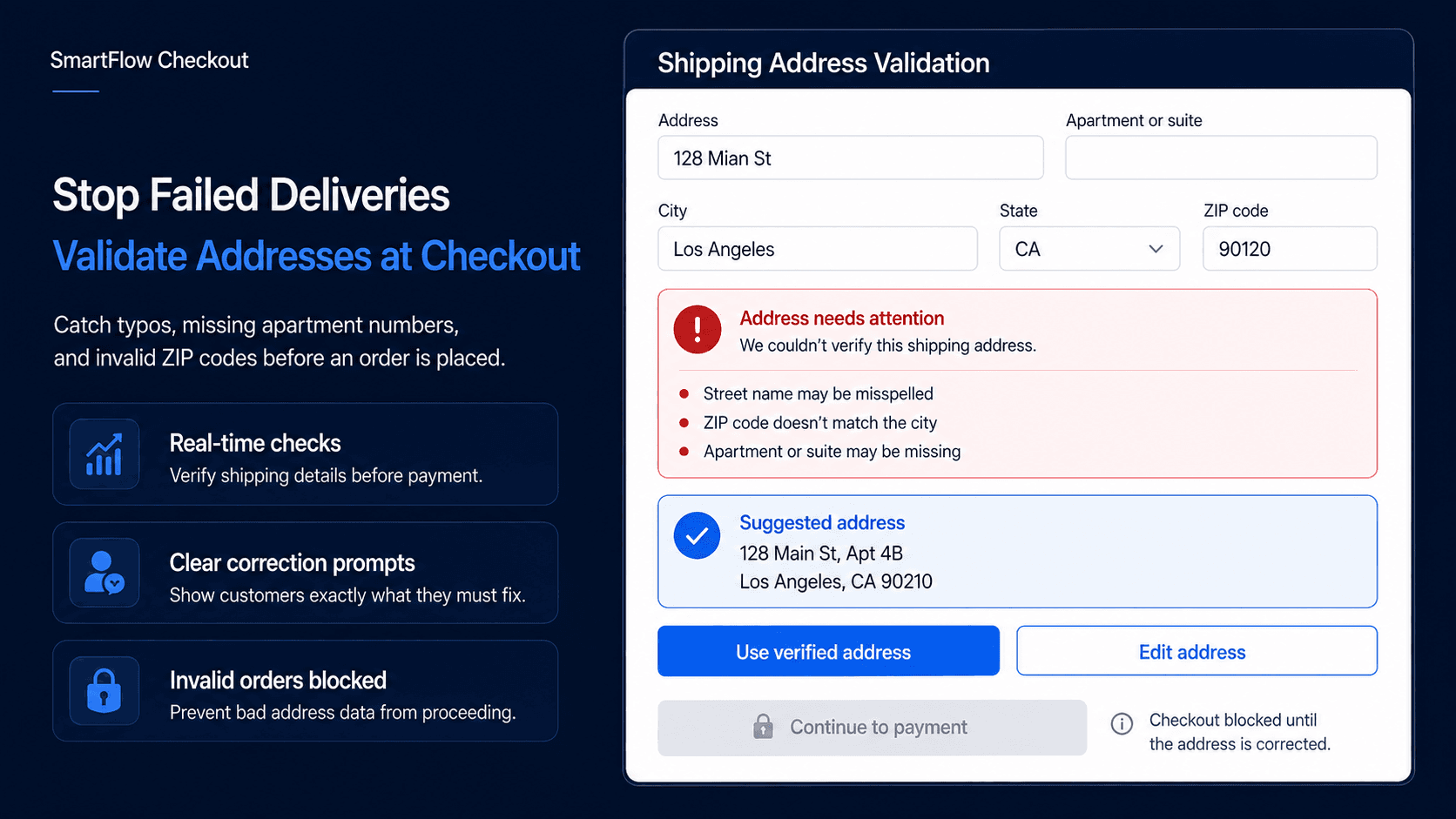
- Transpose the digits in their Zip Code (e.g., 90210 becomes 90120).
- Misspell the name of their street (e.g., "Main St" becomes "Mian St").
- Forget to include a critical apartment or suite number.
When a carrier attempts to deliver a package to an invalid address, it triggers a costly cascade of operational failures. The package is flagged as "Undeliverable" and returned to the sender. The merchant is forced to absorb the initial outbound shipping cost, a potential return penalty fee, and the cost of reshipping the item once the customer eventually complains to support.
For a high-volume merchant, these "Return to Sender" (RTS) fees act as a silent, severe tax on overall profitability.
The Limitations of Autocomplete
Shopify's native checkout does utilize Google Autocomplete to help suggest addresses as the user types. While helpful, it is structurally a suggestion tool, not an enforcement tool.
If a customer ignores the Google Autocomplete dropdown and stubbornly types an invalid address, or if they forget to put their apartment number in the "Address Line 2" field, the standard Shopify checkout will still happily process their credit card and create the order. The merchant won't discover the error until the shipping software throws a validation flag during fulfillment, causing a massive bottleneck in the warehouse.
Enforcing Accuracy with SmartFlow Checkout
The only way to truly eliminate shipping errors is to shift the validation process to the very front of the funnel. You must prevent the order from being placed if the address is at its core un-shippable.
In the past, adding hard validation rules to the checkout required an expensive Shopify Plus subscription and thousands of dollars in custom developer hours to manipulate the deprecated checkout.liquid file.
SmartFlow Checkout changes the paradigm by utilizing Shopify's modern Checkout Extensibility framework. It allows merchants to inject real-time, API-driven address validation directly into the payment flow with zero custom coding.
The Mechanics of Real-Time Validation
By integrating SmartFlow Checkout into your store, you transform the shipping step from a passive data collection form into an active validation gateway.
Here is how the automated validation architecture functions:
1. Instant API Verification
When a customer clicks "Continue to Shipping" after entering their address, SmartFlow intercepts the payload. It instantly queries an enterprise-grade address validation API (such as SmartyStreets or Google Maps Geocoding API). This happens in milliseconds, ensuring the customer experiences zero latency.
2. Proactive Error Blocking
If the API returns a flag indicating the address is invalid (e.g., the Zip Code does not match the State, or the street number does not exist on that block), SmartFlow actively blocks the checkout progression. It injects a highly visible error banner directly above the shipping fields, stating: "The address provided could not be verified by our carriers. Please check for typos or ensure you have included your apartment number."
The customer literally cannot proceed to the payment step until they rectify the error.
3. Apartment/Suite Number Enforcement
One of the most common causes of failed deliveries in urban areas is missing secondary address data. SmartFlow allows you to configure specific conditional rules to combat this. For example, you can build a rule: If the address is flagged as a multi-dwelling unit (apartment complex or office building) by the validation API, but 'Address Line 2' is empty, block the checkout and prompt the user for their apartment number.
4. PO Box Restrictions
Many merchants sell heavy, oversized items that must be shipped via FedEx or UPS Ground. These carriers legally cannot deliver to USPS PO Boxes. A standard checkout allows the customer to enter a PO Box anyway, leading to a fulfillment nightmare. SmartFlow can be configured to instantly detect "PO Box" variants in the address line and display a specific warning: "We are unable to ship large items to PO Boxes. Please provide a physical residential address."
The Impact on the Bottom Line
Deploying hard address validation is an exercise in pure operational efficiency. By forcing the customer to correct their own typos before the transaction clears, you eliminate the need for your support team to chase down customers via email to fix addresses. More importantly, you significantly reduce your RTS shipping penalties.
Merchants utilizing SmartFlow's validation tools consistently see their failed delivery rate drop by over 80%. Stop paying for your customers' typos. Enforce shipping accuracy at checkout and protect your profit margins.