Shopify Address Validation: Catch Shipping Errors Before the Order
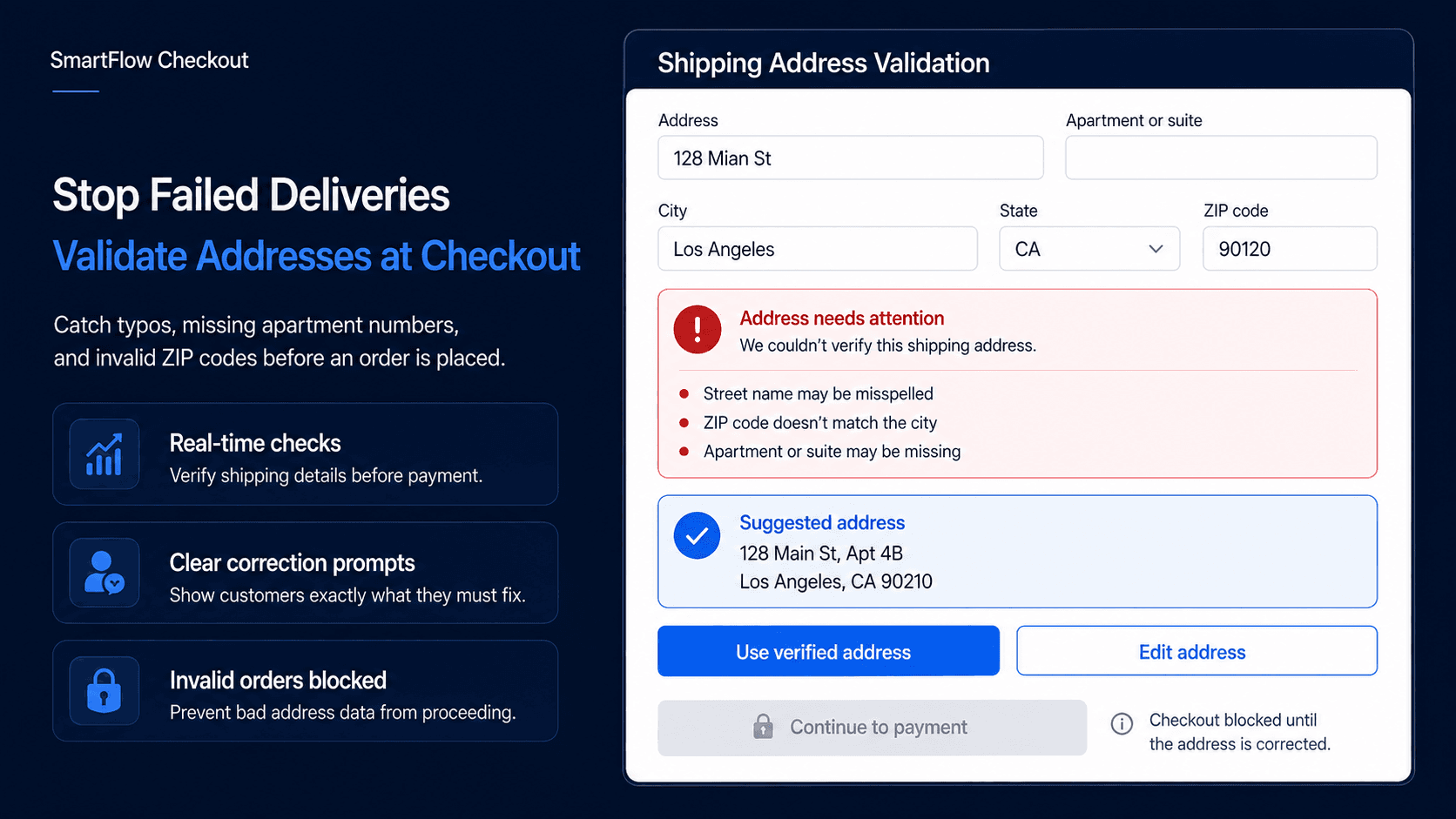
Catch Address Problems Earlier
A customer places an order for $120.
Payment succeeds.
The warehouse prepares the package.
Then the shipping system flags the address.
The postal code does not match the state.
Or the street number is missing.
Or the customer entered a PO Box for an order that requires a physical delivery address.
Now the order stops.
Someone has to contact the customer, wait for the correction, update the order, and make sure fulfillment starts again.
The mistake may have taken the customer five seconds to make.
Fixing it later can involve several people.
That is why address validation is most useful before the order is completed.
Catch avoidable address problems while the customer is still there to correct them.
What Address Validation Does
Shopify checkout address validation checks shipping information against defined rules or address data before the purchase is completed.
Depending on the setup, it can help identify:
- Missing postal codes
- Invalid region and postal-code combinations
- Restricted delivery areas
- PO Box restrictions
- Missing required address information
- Values that need correction or confirmation
The goal is not to prove that every package will be delivered successfully.
It is to prevent obvious address problems from reaching fulfillment when the shopper could have corrected them during checkout.
A useful flow looks like:
Customer enters address → Address checked → Issue found → Clear message shown → Customer corrects it → Continue checkout
The value is not simply blocking an order.
It is helping the customer understand what needs to change.
Validation Is Not Autocomplete
Address autocomplete and address validation solve related but different problems.
Autocomplete helps customers enter an address faster by suggesting likely matches as they type.
Validation asks whether the information provided satisfies the store's requirements.
A customer may still enter an address manually, choose an incomplete suggestion, or provide an address that conflicts with a merchant's delivery rules.
For example:
City: Los Angeles
State: California
ZIP Code: 10001
Each field may look valid on its own.
Together, they are inconsistent.
A useful validation message could say:
Please check your postal code. It does not appear to match the selected state.
That is much more useful than discovering the mismatch while somebody is trying to create the shipping label.
Autocomplete makes entry easier.
Validation helps determine whether the result is usable.
Match Rules to Fulfillment
Address rules should come from the merchant's actual shipping operation.
A local florist may deliver only to selected postal codes.
A furniture store may require a physical address because certain freight services cannot deliver to PO Boxes.
A food business may operate inside defined delivery zones.
A B2B supplier may require receiving information for certain orders.
The rule should answer a real operational question:
What delivery problem are we trying to prevent?
For example, if a furniture order requires physical freight delivery, a rule could detect a PO Box and explain:
This order requires a physical delivery address. Please replace the PO Box before continuing.
That does not mean every PO Box is invalid.
It means the merchant has a specific fulfillment requirement for that particular order.
The same principle applies to regional restrictions, required address fields, and other shipping conditions.
Avoid Overly Strict Rules
Address validation can become frustrating when it treats harmless differences as errors.
Consider:
123 Main St
and:
123 Main Street
Those may represent the same destination.
Apartment formatting, abbreviations, accents, locality names, and regional address conventions can vary significantly.
A useful system should distinguish between clearly invalid information, missing required information, restricted destinations, harmless formatting differences, and uncertain cases.
Missing apartment information is a good example.
An address such as:
245 Park Avenue
may be perfectly valid.
If the destination appears to be a multi-unit building, a helpful prompt might say:
Does this address require an apartment, suite, or unit number? Please add it if applicable.
That is different from blocking every customer who does not provide an apartment number.
The objective is to prevent genuine fulfillment problems without making valid customers fight the checkout.
Use Clear Error Messages
A validation rule is only useful if the customer understands how to fix the problem.
Messages such as:
ADDRESS_VALIDATION_ERROR_04
or:
Invalid address
provide almost no guidance.
A better message explains both the issue and the next action:
We couldn't verify the postal code for this address. Please check it and try again.
Or:
We can't ship this order to a PO Box. Please enter a physical delivery address.
The customer should not have to guess what the store wants.
Good validation should reduce support questions rather than create new ones.
This is especially important when a rule prevents the customer from continuing.
If checkout is going to stop, the explanation needs to be clear enough for the shopper to resolve the issue immediately.
Where SmartFlow Checkout Fits
With SmartFlow Checkout, merchants can create checkout validation rules around the shipping requirements of their business.
Instead of waiting for fulfillment to discover a problem, the checkout can surface guidance or stop completion when a defined condition is not satisfied.
For example, a merchant could configure rules around unsupported PO Boxes, delivery-region restrictions, or required address information.
A typical flow could be:
Customer enters address → Check business rules → Pass → Continue
or:
Customer enters address → Problem detected → Explain issue → Customer fixes it → Continue
For rules that must prevent checkout from proceeding, Shopify provides supported validation capabilities that can enforce defined checkout requirements.
SmartFlow Checkout helps merchants put the business logic around those capabilities without turning the experience into a collection of confusing warnings.
Use External Data Carefully
Some merchants need more than simple rule-based checks.
An external address service may help with address suggestions, postal-code lookup, formatting, geolocation, or coverage in regions where built-in suggestions are limited.
That can add useful context.
But a failed lookup does not automatically mean the address is impossible.
Address databases can be incomplete. New developments may not appear immediately. Regional formats may be interpreted differently.
That means uncertain results should be handled carefully.
A useful workflow may ask the shopper to confirm an address rather than immediately blocking it.
The merchant should decide which situations are true errors and which are simply uncertain.
External data should improve the checkout decision.
It should not become an unquestioned source of truth.
Test the Full Address Flow
Suppose an online furniture store has three recurring problems:
PO Boxes
Orders outside the delivery region
Missing apartment or unit information
A practical setup could restrict unsupported PO Boxes, check whether the destination is inside the service area, and provide a prompt when additional unit information may be needed.
Then test the entire experience.
Try:
- A normal valid address
- An incorrect postal code
- A restricted region
- A PO Box
- An apartment building
- An international address
- Mobile checkout
Also test the messages.
Can the customer understand exactly what needs to change?
Can they correct it without leaving checkout?
Does a valid address still proceed normally?
The objective is not simply to prove that the validation rule fires.
It is to make sure the rule improves the actual purchase journey.
Measure Fulfillment Impact
Address validation should be judged by what happens after checkout, not only by how many errors it displays.
Useful metrics include:
- Address errors shown
- Customers who successfully correct them
- Orders paused for address issues later
- Return-to-sender cases caused by bad addresses
- Support requests for address corrections
- Fulfillment delays caused by missing information
The most important trend is whether fewer orders reach the warehouse with address details someone needs to fix manually.
If validation blocks many legitimate customers while fulfillment problems remain unchanged, the rules are too aggressive.
If customers can correct common issues during checkout and fewer orders need manual intervention afterward, the rules are doing useful work.
Frequently Asked Questions
What is Shopify checkout address validation?
Checkout address validation checks shipping information against defined rules or address data and can surface problems before the customer completes the order.
Is address validation the same as autocomplete?
No. Autocomplete helps customers enter addresses. Validation checks whether the entered information meets defined requirements or needs correction.
Can checkout be blocked for an unsupported address?
Yes, where supported Shopify validation capabilities are used and the merchant has a legitimate rule that prevents the order from proceeding.
Can SmartFlow Checkout restrict PO Boxes?
SmartFlow Checkout can help merchants create address rules for cases where their actual shipping process requires a physical delivery address.
Can an external address provider be used?
External address data can be useful for suggestions, lookup, formatting, or additional validation context where the implementation supports it.
Does address validation guarantee delivery?
No. It can reduce preventable address-related problems, but carrier delays, access issues, fulfillment mistakes, weather, loss, and other factors can still affect delivery.
Fix It Before Shipping
The best time to discover that an address is incomplete is not when the package is already sitting in the warehouse.
It is while the customer is still looking at checkout.
A clear message gives them a chance to fix the problem immediately.
That means fewer orders waiting for investigation, fewer support messages asking for corrected shipping details, and a cleaner handoff from checkout to fulfillment.
Enter address → Check rules → Explain problem → Correct it → Continue
SmartFlow Checkout helps merchants move those checks earlier in the buying journey so avoidable address problems can be handled before they become fulfillment problems.