Find SaaS Customers Who Are Paying but Not Using the Product
Paying Does Not Mean Healthy
Imagine a SaaS company has 500 active customers.
Billing looks good.
The CRM says the accounts are active.
Monthly recurring revenue has not changed.
Then a customer reaches renewal and says:
"We barely use the product anymore, so we are not renewing."
The customer had been paying every month.
But over the last three months, usage had quietly disappeared.
Only two of twenty purchased seats were active.
Nobody had logged in for several weeks.
A key feature the customer originally bought the product for was never fully adopted.
Support had also received several unresolved questions.
None of those signals alone triggered a major alarm.
Together, they told a very different story from:
Subscription: Active
A customer can be financially active while operationally disengaged.
That is why customer-health monitoring needs more than billing status.
Look Beyond Subscription Status
Billing systems answer an important question:
Is the customer paying?
They do not necessarily answer:
Is the customer getting value?
A customer may have an active annual contract while product adoption continues to decline.
Useful signals can include:
- No login during a meaningful period
- Very low active-seat percentage
- Key setup steps never completed
- Important features never used
- Significant decline from previous activity
- Repeated support problems
- Renewal approaching with weak adoption
No single signal should automatically mean the customer will churn.
A seasonal business may naturally use the product less during part of the year.
One customer may need only two active seats even though they purchased ten for future growth.
Another may primarily use an integration rather than logging into the application every day.
The useful task is not simply labeling accounts:
Healthy or At Risk
It is identifying situations worth investigating.
Define Meaningful Usage
Before monitoring customer activity, the business needs to decide what meaningful usage actually looks like.
A support platform may care about tickets handled.
A finance product may care about invoices processed or reconciliations completed.
A collaboration tool may care about active users and projects.
A reporting platform may care about dashboards viewed or reports generated.
That means a generic rule such as:
No login for 30 days = churn risk
can be misleading.
A stronger rule may be:
Active paid account + no meaningful product activity for 30 days + previous regular usage → investigate
Another might be:
Enterprise account + fewer than 20% of purchased seats activated after 45 days → customer success review
The conditions should reflect how customers actually receive value from the product.
Otherwise, the monitoring system may generate a large list of accounts that are perfectly healthy.
Where AI Operator Fits
With Celirox AI Operator, a business can define the account-health condition it wants monitored.
For example:
"Every Monday, review active paying customers. Find accounts whose usage has dropped significantly during the last 30 days or that have not completed the key product actions expected for their plan. Check their subscription, renewal date, seat usage, recent support history, CRM notes, and account owner. Explain why each account needs attention and suggest the appropriate next step."
The workflow becomes:
Find active accounts → Check usage → Compare normal behavior → Gather context → Identify concern → Suggest action → Monitor
The Operator is not limited to one activity metric.
It can investigate relevant connected systems before deciding whether the account actually deserves attention.
For one customer, weak usage may be normal.
For another, the same usage pattern may be important because renewal is two weeks away.
Context changes the priority.
Investigate Before Escalating
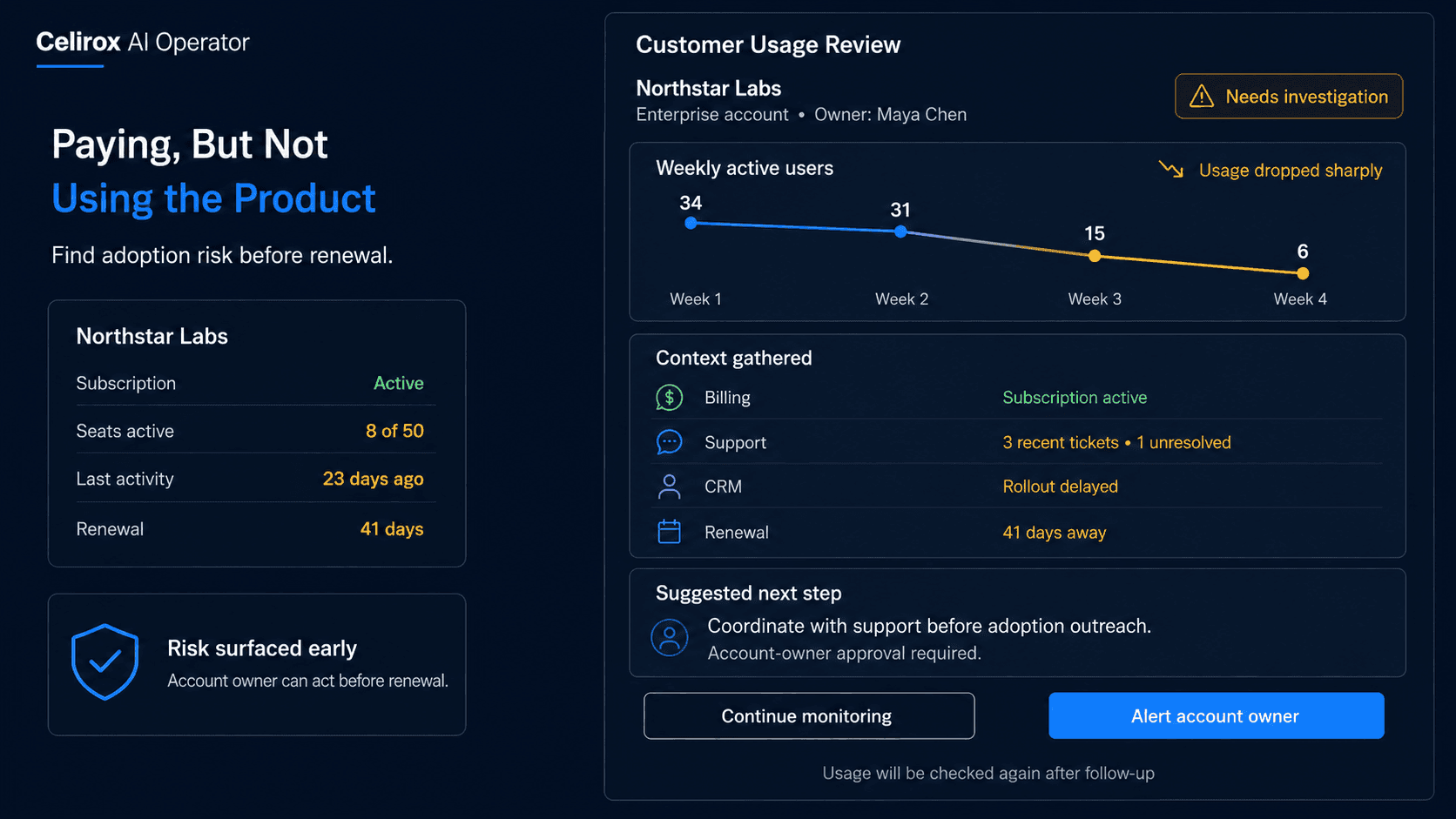
Imagine an enterprise customer purchased 50 seats.
Only eight are currently active.
That looks concerning.
But before escalating the account, more context is useful.
Perhaps the customer purchased seats for a phased rollout that starts next month.
Perhaps only one department has completed onboarding.
Perhaps the account has an open implementation project.
Or perhaps adoption genuinely stalled.
A useful investigation might show:
Plan: Enterprise
Seats purchased: 50
Seats activated: 8
Last significant product activity: 23 days ago
Renewal: 41 days away
Open onboarding project: Yes
Recent CRM note: Expansion to remaining teams delayed until internal training
Now the situation looks different.
The right action may be to monitor the rollout rather than send an urgent churn escalation.
AI Operator should help reduce false alarms by gathering the surrounding business context first.
Detect Sudden Usage Changes
Absolute usage is not always the strongest signal.
Change can matter more.
Imagine a customer normally has:
35 active users each week
Then usage changes:
Week 1: 34
Week 2: 31
Week 3: 15
Week 4: 6
That pattern deserves attention even if six active users would look reasonable for another account.
The Operator can compare current behavior with the customer's own previous baseline.
A sudden decline may indicate:
- Internal champion left
- Product issue
- Integration failure
- Organizational change
- Unresolved support problem
- Customer switching to another process
- Temporary seasonal slowdown
The decline tells the team where to investigate.
It does not automatically explain why it happened.
That distinction is important.
A useful system surfaces evidence before suggesting an intervention.
Match the Action to Context
Not every low-usage account needs the same email.
Suppose three customers have weak activity.
Customer A: Onboarding incomplete
Customer B: Previously active, then usage dropped suddenly
Customer C: Renewal in 20 days and most purchased seats unused
All three have an adoption problem.
But the next action should be different.
For Customer A:
Suggest completing onboarding or training
For Customer B:
Investigate whether something changed or broke
For Customer C:
Escalate to the account owner with renewal context
AI Operator can prepare the relevant next step instead of treating every account as one generic "at-risk customer."
The business can also define approval boundaries.
For example:
Prepare routine adoption follow-up → No approval required
Offer commercial incentive → Account-owner approval
Change contract terms → Human approval
High-value renewal risk → Escalate immediately
The Operator helps organize the situation.
Commercial judgment stays with the people responsible for the relationship.
Combine Support and Usage
Product activity becomes even more informative when combined with customer-support context.
Imagine usage has fallen sharply.
At the same time, the support system shows three recent tickets about the same feature.
One ticket is still unresolved.
That combination may deserve more attention than low usage alone.
A useful summary might say:
Account: Northstar Labs
Usage change: Down 62% over 30 days
Renewal: 36 days
Recent support: 3 tickets related to data import
Open ticket: Import failures still under investigation
Suggested action: Alert account owner and coordinate with support before sending an adoption message
Without the support context, the company might send:
"We noticed you haven't been using the product much. Would you like training?"
That could feel disconnected from the customer's actual problem.
Cross-system context helps the business respond to what is really happening.
Monitor Whether Usage Recovers
Finding a low-usage account is only the beginning.
Suppose customer success reaches out and schedules training.
What happens next?
The monitoring process can continue.
Did more seats activate?
Did the customer complete the missing setup?
Did key feature usage return?
Did product activity remain unchanged?
A useful loop becomes:
Detect → Investigate → Suggest → Follow up → Monitor → Reevaluate
Imagine an account was flagged because only 10% of its seats were active.
After training:
Week 1: 18%
Week 2: 31%
Week 3: 54%
That tells the team the intervention may be working.
Another account may remain inactive despite several attempts.
That is useful information too, especially when renewal planning begins.
The purpose of monitoring is not merely to create alerts.
It is to understand whether the customer situation actually changes.
Measure Adoption Risk
Do not judge this workflow by how many "at-risk" accounts it finds.
A system that flags half the customer base every week is not necessarily useful.
Useful measurements can include:
- Accounts with meaningful usage decline
- Accounts with low seat activation
- Customers missing key adoption milestones
- Time from risk detection to account-owner review
- Accounts whose usage recovers after intervention
- Renewal outcomes for previously flagged accounts
- False-positive alerts
- Repeated product or support issues across accounts
Patterns across customers can reveal broader problems too.
If many accounts struggle with the same feature, the issue may not be customer effort.
It could indicate onboarding complexity, product usability problems, weak documentation, or implementation friction.
Monitoring customer health can therefore become feedback for the business itself.
The goal is not to predict every cancellation.
It is to surface customer situations early enough for someone to understand and act on them.
Frequently Asked Questions
What is SaaS customer usage monitoring?
SaaS customer usage monitoring tracks whether active customers are meaningfully using the product and identifies changes or missing adoption signals that may deserve investigation.
Does low usage always mean a customer will churn?
No. Usage varies by product, customer type, season, workflow, and contract. Low activity should be treated as a signal requiring context rather than proof of future cancellation.
What usage signals should a SaaS company monitor?
Relevant signals may include logins, active seats, key-feature adoption, workflow completion, usage trends, onboarding milestones, and other actions connected to customer value.
Why combine usage with CRM and billing information?
A usage signal becomes more useful when the business understands the customer's plan, contract value, renewal date, account owner, implementation status, and commercial relationship.
Can support history be included?
Yes. Recent or unresolved support issues can provide important context when product usage declines.
Should AI Operator contact customers automatically?
That depends on the business rules. Routine follow-ups may be prepared or handled according to defined permissions, while high-value, commercial, sensitive, or uncertain situations may require account-owner approval.
Can AI Operator monitor usage on a schedule?
Yes. Recurring tasks can review account activity at defined intervals and surface customers that meet the business's monitoring conditions.
Is this the same as churn prediction?
No. This workflow does not need to produce a mysterious probability score. It can focus on concrete operational signals, investigate their context, and explain why a specific customer deserves attention.
Find Risk Before Renewal
A customer does not become disengaged on the day they cancel.
The signals may appear much earlier.
Seats stop being used.
Important workflows disappear.
A rollout stalls.
Support problems remain unresolved.
Product activity drops.
Billing can continue showing:
Active
through all of it.
That is why customer monitoring should look at the relationship across systems rather than relying on subscription status alone.
Monitor → Detect change → Investigate context → Suggest action → Follow up → Reevaluate
Celirox AI Operator helps businesses keep that process running across product usage, CRM, billing, support, and other connected systems so customer-success teams can focus on the accounts that actually need attention.
The goal is not to predict the future perfectly.
It is to notice meaningful changes before the renewal conversation becomes the first time anyone realizes the customer stopped getting value.