Shopify Checkout Upsells: How to Increase AOV Without More Traffic
Why Cart Upsells Create Friction
Increasing Average Order Value (AOV) does not always require bringing more traffic to your Shopify store. Another opportunity is helping customers discover a useful complementary product while they are already completing a purchase.
The problem is that many upsell experiences appear too early or interrupt the shopper's next action. A common approach is showing a popup immediately after someone clicks Add to Cart. That can work in some stores, but a generic popup can also force the shopper to make another decision before they reach checkout.
A better upsell should answer three simple questions:
- Is the recommended product relevant to the current cart?
- Is this the right moment to show it?
- Can the shopper accept or ignore it without disrupting checkout?
That is where a focused checkout upsell can create a cleaner experience.
What Is a Checkout Upsell?
A Shopify checkout upsell is an additional product or add-on offered while the customer is completing checkout. The recommendation can be connected to what is already in the cart, the value of the order, or other configured conditions.
For example, if someone is buying premium leather boots, offering leather conditioning wax makes immediate sense. A camera buyer may need a memory card. A coffee machine buyer may need replacement filters.
The important part is the relationship between the original purchase and the recommendation.
A good checkout upsell should feel like:
"You may need this too."
not:
"Here is another random product we want you to buy."
The goal is not to show more products. It is to show one relevant next purchase at the right moment.
Relevance Matters More Than Placement
Cart popups are not automatically bad, and checkout upsells are not automatically better.
The real question is whether the recommendation fits the customer's current decision.
Imagine someone clicks Checkout after adding a product.
Without interruption:
Add product → Checkout
With an unrelated popup:
Add product → Evaluate offer → Close popup → Continue
That extra decision may be harmless if the recommendation is highly relevant. If it is generic, it creates friction without adding much value.
Context matters too.
A customer buying running shoes may benefit from performance socks. Someone buying a backpack may be more interested in packing organizers. Showing the same "best seller" to both shoppers ignores what they are actually purchasing.
Mobile makes this even more important. Large overlays can consume most of the screen, while a compact checkout offer can keep the original purchase visible and easy to complete.
The upsell should support checkout, not take over checkout.
Build Targeted SmartFlow Upsells
With SmartFlow Checkout, merchants can choose which products to recommend and define the conditions that determine when an upsell appears.
Instead of:
Show Product B to everyone
a merchant can create:
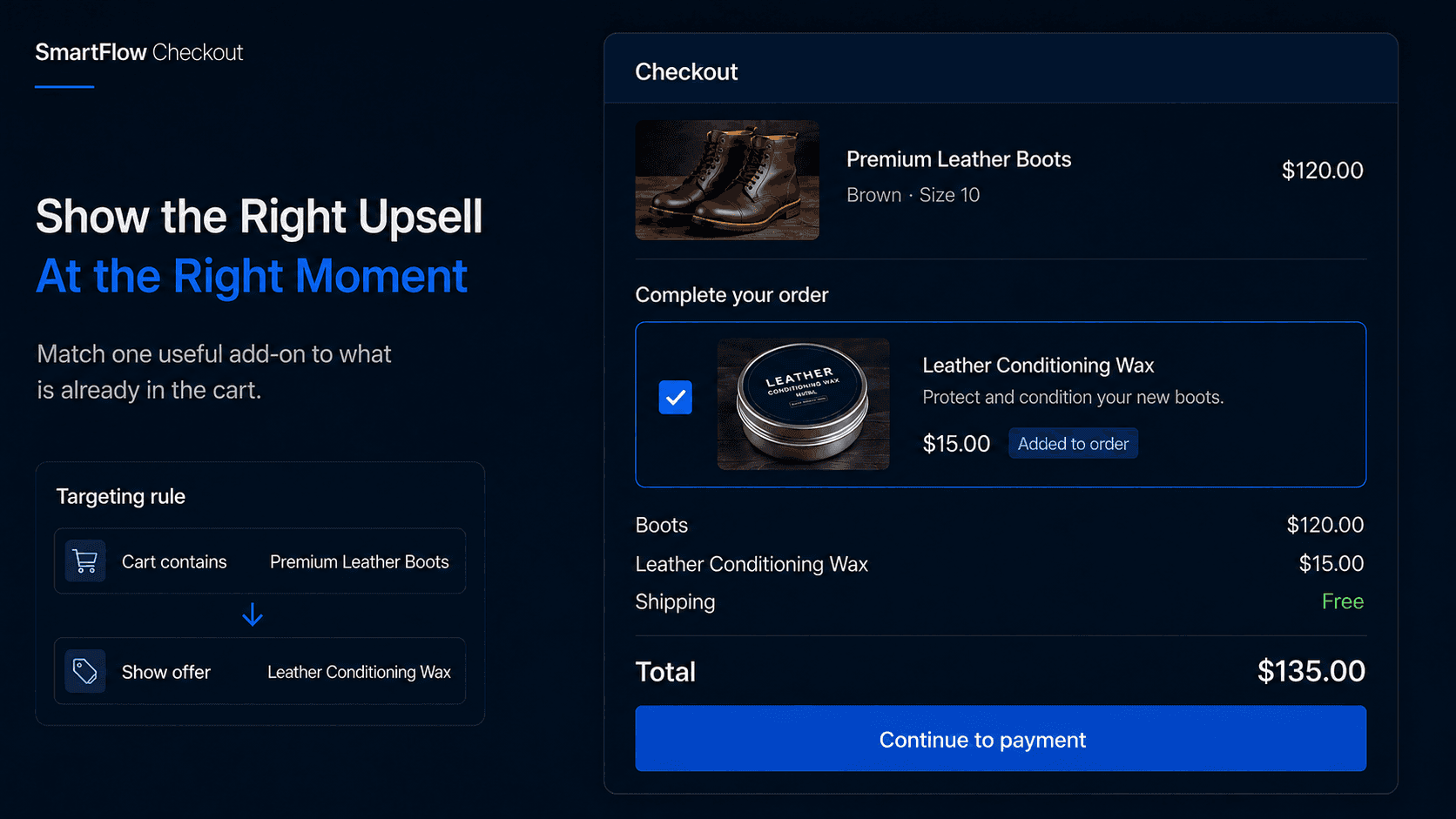
If cart contains Product A → Show Product B
For example:
Cart contains: Premium Leather Boots
Recommend: Leather Conditioning Wax
The recommendation now has a reason to appear.
Another store might connect:
- Cleanser → Moisturizer
- Foundation → Setting spray
- Hair dryer → Heat-protection spray
You do not need to create dozens of offers. A smaller number of strong product relationships is usually better than filling checkout with recommendations.
Shopify supports checkout customization through Checkout UI extensions on supported checkout surfaces. SmartFlow Checkout uses these supported extension capabilities rather than directly modifying Shopify's checkout DOM.
For information, shipping, and payment-step checkout extensions, Shopify Plus requirements should be considered when planning the experience.
Choose Products Customers Understand
The product being recommended usually matters more than the visual design of the upsell block.
A good checkout add-on should be easy to understand quickly.
A phone case alongside a phone makes sense.
A memory card alongside a camera makes sense.
A completely different expensive product may require too much additional consideration while the shopper is trying to finish their original purchase.
The strongest candidates usually share a few characteristics: they complement the main product, require little additional decision-making, have an obvious benefit, and do not distract from the customer's original order.
Imagine a shopper buying a $250 coffee machine.
Offering a $12 pack of compatible filters is easy to understand.
Offering another $180 kitchen appliance creates an entirely new buying decision.
That larger recommendation may work better later in the journey.
Checkout or Post-Purchase?
Not every upsell belongs in checkout.
A useful way to think about placement is based on how much consideration the additional purchase requires.
During checkout, smaller and clearly complementary products usually fit naturally. That might include gift packaging, accessories, consumables, or simple order enhancements.
After purchase, the merchant has more freedom because the original transaction is already complete. A larger or more optional offer can appear without putting the first purchase at risk.
For example:
During checkout: Add shoe-care spray
After purchase: Consider another pair of shoes
SmartFlow Checkout supports checkout and post-purchase experiences, allowing merchants to place different offers at different stages rather than forcing every recommendation into one part of the funnel.
The question should be:
Where can this offer appear without making the original purchase harder?
Know When to Show Nothing
A strong upsell strategy also needs rules for when not to show an offer.
Do not show a recommendation simply because a component exists.
The upsell may be unnecessary when the product is already in the cart, the recommended item is unavailable, no strong complementary product exists, or the checkout already contains enough promotional content.
This is especially important on stores that already use banners, free-shipping messages, discounts, checkout fields, and other components.
More elements do not automatically create more revenue.
Sometimes the best checkout upsell is no upsell at all.
A merchant should be willing to hide the offer when relevance is weak.
Measure the Whole Checkout
Upsell acceptance rate is useful, but it should not be the only metric.
Imagine 8% of shoppers accept a $15 add-on.
That sounds positive.
But if adding the component also causes more people to leave checkout, the overall result may be worse.
A more complete measurement approach looks at:
- Upsell acceptance
- Revenue from the offer
- Average Order Value
- Checkout completion
- Product margin
For example, imagine a store processes 5,000 orders and 8% of shoppers accept a $15 add-on.
5,000 × 8% × $15 = $6,000
That is $6,000 in additional gross sales before product cost, discounts, refunds, shipping, taxes, and other expenses.
It is only a hypothetical example, but it illustrates why merchants should measure the economics of the whole purchase.
AOV going up is useful only if the rest of the checkout remains healthy.
Set Up the Offer Carefully
A practical SmartFlow Checkout setup can begin with one clear product relationship.
For example:
If cart contains: Premium Leather Boots
Then show: Leather Conditioning Wax
The merchant chooses the upsell component, selects the product, defines the conditions, adds concise messaging, and places the component on the supported checkout surface.
Before publishing, test the complete experience rather than checking only whether the block appears.
Make sure the correct product shows when expected, stays hidden when conditions are not met, can be added correctly, updates the order total properly, and still works cleanly on mobile.
Also test obvious edge cases.
What happens when the recommended product sells out? What if the shopper already has it in the cart? What if a discount changes the order value? What if another checkout promotion is active?
A technically working upsell can still create a poor buying experience if those situations are ignored.
Frequently Asked Questions
What is a Shopify checkout upsell?
A Shopify checkout upsell is an additional product or add-on offered while a customer is completing checkout. It can be shown based on the current cart or other configured conditions.
Can Shopify merchants add checkout upsells?
Yes. Shopify supports checkout customization through Checkout UI extensions on supported surfaces. Availability depends on the checkout location and Shopify plan.
What products work best as upsells?
Products that naturally complement the current purchase, require little additional consideration, and have an obvious benefit are usually strong candidates.
Should I use checkout or post-purchase upsells?
Checkout works well for small, closely related add-ons. Post-purchase offers can be better for larger or more optional products because the original order is already complete.
Should every checkout show an upsell?
No. If there is no genuinely relevant recommendation, showing nothing may create a better experience.
Does SmartFlow Checkout support post-purchase offers?
Yes. SmartFlow Checkout supports checkout and post-purchase components so merchants can create different offers at different stages of the buying journey.
Make the Upsell Feel Useful
The best checkout upsells do not feel aggressive.
They feel relevant.
Someone buys leather boots and sees leather care.
Someone buys a camera and sees the memory card they may have forgotten.
Someone buys a gift and sees premium packaging.
That is the standard to aim for.
Right product → Right cart → Right moment
SmartFlow Checkout helps merchants build those targeted relationships and control when the recommendations appear without requiring custom checkout development from scratch.
Instead of asking every customer to buy more, show an additional product only when it genuinely makes the purchase more complete.