Your Store Has 20 Automations Running. Do You Still Know What They’re Doing?
It started with one simple automation.
The merchant needed a banner for a weekend sale.
So they created it, ran the campaign, and moved on.
A few weeks later, they added another rule for a product promotion.
Then one for inventory.
Then another storefront change for a seasonal campaign.
Six months later, someone on the team asks:
“Is that old sale automation still running?”
Nobody knows.
The store is working. Orders are coming in. Nothing looks obviously broken.
But there are now dozens of rules, and the team has lost track of which ones are active.
That is a different kind of Shopify problem.
The issue is no longer creating automations.
It is managing the automations you already have.
When Automation Becomes Hard To Track
Automation is supposed to reduce manual work.
But as a store grows, the number of rules can grow too.
A merchant might create something for a product launch, another for a promotion, another for a seasonal campaign, and another to solve a temporary operational problem.
Each rule made sense when it was created.
The problem comes later.
The campaign ends.
The person who created the rule forgets about it.
Someone else joins the team.
The store changes.
And an old automation may still be sitting there.
Without a clear place to review those rules, understanding the current state of the store becomes harder.
The Old Rule Nobody Remembers
Imagine a Shopify store preparing for its biggest sale of the year.
The team wants to launch new storefront changes.
Before doing that, the owner asks:
“What automations are already active?”
The answer should be easy.
Instead, the team starts checking different settings and trying to remember which features were created during previous campaigns.
One person remembers a promotion from last month.
Another remembers a banner from an earlier campaign.
Nobody is completely sure whether those rules are still active.
That creates unnecessary risk.
Before adding something new, the team needs to understand what is already running.
Store Rules Need A Home
This is where centralized automation management becomes useful.
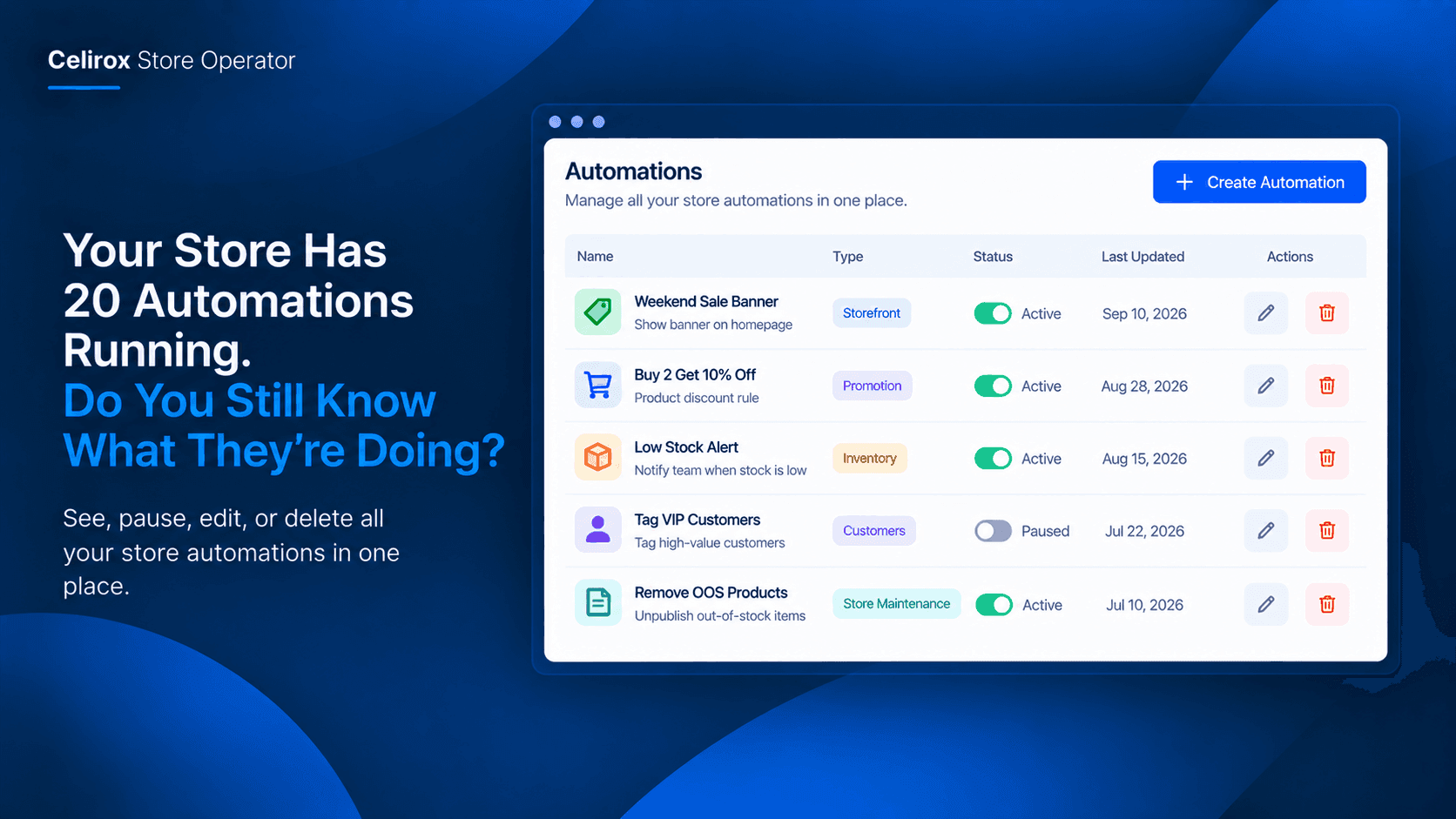
Celirox Store Operator provides an Automations area that acts as a control panel for active rules created through the platform.
Merchants can open the Automations tab and see the running store rules in one place. From there, they can toggle rules on or off and manually edit their settings. :contentReference[oaicite:0]{index=0}
That changes the workflow.
Instead of asking:
“What did we set up last month?”
The merchant can look at the active automation list.
The store's current rules become visible.
See What Is Actually Running
Visibility matters because an automation can be forgotten even when it is still doing exactly what it was designed to do.
A campaign rule may still be active.
A storefront message may still be enabled.
A temporary rule may no longer be needed.
The merchant needs a simple way to distinguish between what should remain active and what should be paused or removed.
Store Operator's centralized list is designed for that purpose. It lets merchants review active rules instead of relying entirely on memory. :contentReference[oaicite:1]{index=1}
That makes automation management part of normal store maintenance.
Pause Instead Of Rebuilding
Not every automation needs to be deleted.
Sometimes the merchant simply wants it to stop temporarily.
For example, a storefront rule may be useful during a particular campaign but unnecessary afterward.
Instead of rebuilding the rule later, the merchant can pause it.
Store Operator allows active automations to be toggled on or off from the Automations area. :contentReference[oaicite:2]{index=2}
That is useful when the underlying idea is still valuable but the timing is wrong.
The rule stays available.
The store simply stops using it until the merchant enables it again.
Edit Rules When The Store Changes
Business conditions change.
A rule created three months ago may still be useful, but its settings may no longer fit the store.
Maybe the original threshold is outdated.
Maybe the campaign timing changed.
Maybe the merchant wants to adjust the numbers rather than create another automation from scratch.
Store Operator provides a deeper editing option so merchants can manually tweak automation settings. :contentReference[oaicite:3]{index=3}
That gives the merchant another choice:
Keep it. Pause it. Change it. Delete it.
The decision stays with the store owner.
Clean Up Without Guesswork
Good automation management is not about having as many rules as possible.
It is about knowing which rules deserve to remain active.
Consider a merchant reviewing the automation list before a major campaign.
They might find:
Summer Sale Banner
No longer needed → Pause
Low Stock Alert
Still useful → Keep active
Weekend Promotion
Needs new settings → Edit
Old Product Campaign
No longer relevant → Delete
The process is simple because the merchant can see the rules together.
They are not trying to reconstruct the store's history from memory.
Why This Matters During Big Sales
Automation confusion becomes more important when traffic increases.
A major campaign may involve several storefront and operational changes.
The merchant wants to know exactly what is active before launching something new.
If old rules are forgotten, they can create confusion for the team.
The Store Operator documentation specifically describes centralized automation visibility as a way to maintain control during major sales events, with the ability to pause, edit, or delete rules from one place. :contentReference[oaicite:4]{index=4}
The benefit is not another automation.
It is control over the automations you already have.
Build A Habit Of Reviewing Rules
Automation management does not have to become another large administrative task.
A simple review before major campaigns can help.
Ask:
What is currently active?
Which rules are temporary?
Which rules still match the way the store operates?
Which ones should be paused?
Which ones need new settings?
Which ones are no longer needed?
This takes much less effort when the active rules are visible in one centralized place.
Keep Automation From Becoming Store Clutter
Automation is valuable when it removes work.
But forgotten automation can become another layer of store complexity.
The answer is not to stop automating.
It is to make automation easier to manage.
With Celirox Store Operator, merchants can review active rules from the Automations area, switch them on or off, and edit their settings when business requirements change. :contentReference[oaicite:5]{index=5}
That creates a simple operating cycle:
Create → Run → Review → Adjust → Retire
The store keeps the rules that are useful and removes the ones that are no longer needed.
Frequently Asked Questions
What is the Automations area in Store Operator?
It is a centralized control panel for the active store rules created through Celirox Store Operator. :contentReference[oaicite:6]{index=6}
Can I temporarily stop an automation?
Yes. Active automations can be toggled on or off from the Automations area. :contentReference[oaicite:7]{index=7}
Can I change an existing automation?
Yes. Store Operator provides a deeper editing option for manually adjusting automation settings. :contentReference[oaicite:8]{index=8}
Can I remove an automation I no longer need?
Yes. The Store Operator documentation describes the ability to delete rules from the centralized automation control area. :contentReference[oaicite:9]{index=9}
Why should merchants review their automations?
Because store campaigns, products, and operating processes change. A rule that made sense previously may no longer be appropriate, so reviewing active rules helps merchants maintain control over what is currently running.
Automation Should Not Become Another Mess
The whole point of automation is to make running a Shopify store easier.
That means merchants should not have to remember every rule they created months ago.
As the store grows, automation needs its own management process.
A centralized view makes that process much simpler.
You can see what is active.
You can pause something temporarily.
You can adjust a rule when the business changes.
And you can remove rules that have reached the end of their useful life.
That is not about adding more automation.
It is about staying in control of the automation already running your store.
Know What Your Store Is Doing
Celirox Store Operator brings store automation into one place so merchants can manage the rules they have created instead of losing track of them over time. The Automations area provides visibility and controls for active rules, including toggling, editing, and deleting them.
For a growing Shopify store, that can make an important difference.
Because automation should save you from repetitive work.
It should not leave you wondering:
“What is my store doing right now?”