The Sale Ended. Why Is Your Store Still Carrying It?
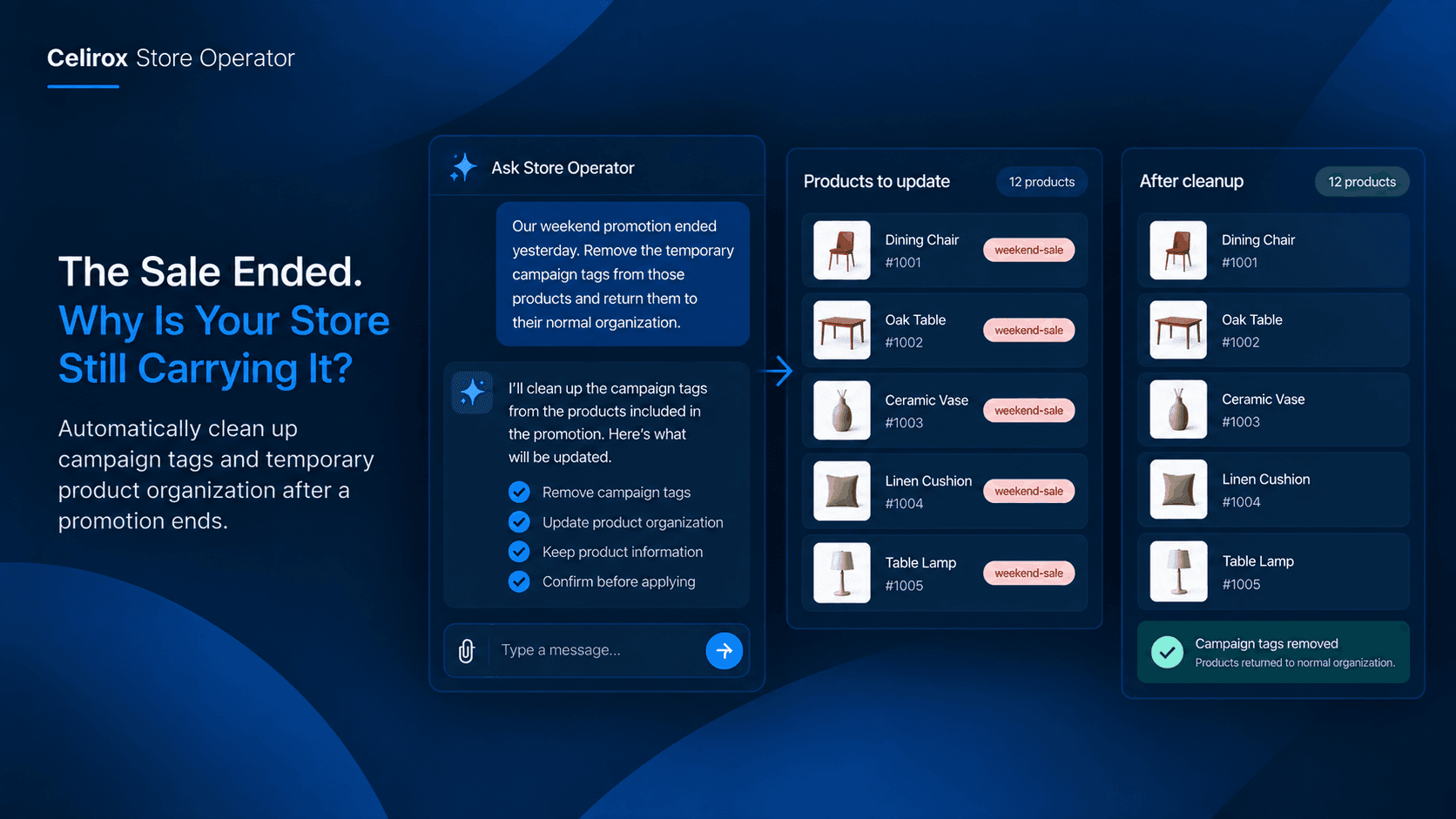
The sale ended Sunday night.
By Monday morning, the merchant has already moved on.
There is a new product launch to prepare.
The next campaign needs attention.
Customer messages are waiting.
Orders need to be checked.
But inside the Shopify admin, the previous promotion is still leaving traces.
Products still have the campaign tag.
Some products are still grouped for the promotion.
A temporary store organization rule is no longer needed.
Nothing is broken.
The sale simply left behind a little housekeeping.
And because there is always another task waiting, that housekeeping can easily be forgotten.
The Campaign Ends First
Running a promotion usually has a clear beginning and end.
The merchant decides which products are included, prepares the campaign, communicates the offer, and watches the orders come in.
When the promotion ends, everyone naturally thinks:
The campaign is over.
But operationally, there may still be work left.
Products that were temporarily tagged for the campaign may need to return to their normal organization.
A promotional collection may no longer be useful.
Internal labels created for the campaign may have served their purpose.
The storefront may be back to normal, but the backend still contains pieces of the old campaign.
That is where small cleanup tasks start accumulating.
Small Leftovers Become Store Clutter
One old campaign tag does not seem important.
Neither does another.
But imagine a store running promotions every month.
A summer campaign creates one set of tags.
A weekend sale creates another.
A holiday campaign adds more.
Then there is a clearance promotion, followed by a new-product launch.
Six months later, the product catalog contains tags that nobody remembers creating.
Someone sees:
summer-sale
weekend-offer
holiday-2025
clearance-final
special-promo
And eventually someone asks:
"Do we still use these?"
Nobody is completely sure.
That is how a clean catalog gradually becomes harder to manage.
Cleanup Is Easy To Forget
The merchant usually does not forget because the task is complicated.
They forget because it happens after the important event.
During the sale, everyone is paying attention.
After the sale, attention moves elsewhere.
The campaign generated orders.
The team needs to check fulfillment.
Customers are asking questions.
The next promotion is being prepared.
The cleanup feels like something that can wait until tomorrow.
Then tomorrow becomes next week.
By the time someone finally notices the old campaign tags, nobody remembers exactly which products were part of the promotion.
Now a five-minute cleanup can require investigation.
Give Temporary Work A Finish Line
Temporary store changes should have a clear ending.
If a campaign is only meant to last for a weekend, the work associated with that campaign should not become permanent simply because nobody remembered the cleanup.
This is where a repeatable workflow can help.
Instead of relying on someone's memory, a merchant can define what should happen when a promotion finishes.
For example:
"When our weekend promotion ends, clean up the temporary campaign tags from the products included in that promotion."
The important part is not the wording.
The merchant is defining a business rule:
This campaign is temporary. Its product organization should also be temporary.
Store Operator is built around plain-English instructions and workflows that can handle recurring store operations, allowing merchants to describe what they want rather than manually working through every administrative step. :contentReference[oaicite:0]{index=0}
Think About The Products
The cleanup should be based on the actual products involved in the campaign.
Imagine a home décor store runs a three-day promotion on dining furniture.
During the campaign, the relevant products are organized under a temporary campaign tag so the team can easily identify them.
The sale ends.
The products are still good products.
They are simply no longer part of that promotion.
The merchant should not have to search through the entire catalog trying to remember which products were included.
A properly defined workflow can use the campaign's product scope as part of the cleanup process.
That makes the task much more precise.
The goal is not:
"Clean up old tags."
The goal is:
"Clean up the temporary changes belonging to this completed campaign."
That difference matters as a store gets larger.
Keep Permanent And Temporary Rules Separate
One reason campaign cleanup can become confusing is that not every tag or product organization is temporary.
Some tags are part of the store's permanent catalog structure.
Others exist only because a specific campaign is running.
Those two things should not be treated the same way.
For example:
Permanent:
product-category
summer
menswear
premium
Temporary:
black-friday-2026
weekend-sale
launch-event
The merchant should know which is which before creating a cleanup workflow.
Otherwise, an overly broad cleanup can remove useful information along with the temporary campaign data.
A good workflow is specific about what it is allowed to change.
That makes automation safer and makes the process easier to understand later.
Make The Next Campaign Easier
There is another reason to clean up properly.
Every campaign starts with the lessons and structure left by the previous one.
If the backend is full of old campaign leftovers, the next campaign becomes harder to set up.
The merchant has to ask:
Which tags are still active?
Which collections are temporary?
Which products were part of the last campaign?
Can we reuse anything?
A cleaner store makes the next promotion easier to organize.
The team can start with the current campaign instead of first sorting through the remains of several old ones.
That is especially valuable for merchants who run frequent promotions.
The more campaigns a store runs, the more important it becomes to have a consistent beginning and ending process.
Keep The Merchant In Control
Automation should not mean deleting things simply because they look old.
A campaign may have finished, but some of its information could still be useful.
The merchant may want to keep historical tags for reporting.
Another campaign may intentionally reuse the same product grouping.
An internal team may still need certain labels.
That is why the merchant should define the scope of the cleanup.
Store Operator follows an approve-to-execute approach for critical backend automation and storefront changes. The system can propose actions while the merchant retains control over consequential changes. :contentReference[oaicite:1]{index=1}
The objective is not to let automation make assumptions about the store.
It is to let the merchant turn a known process into a repeatable one while keeping control over what happens.
Make Campaign Cleanup Repeatable
A promotion should have two sides.
There is the work required to launch it.
And there is the work required to close it.
The closing process might look like:
Promotion ends → Identify campaign products → Remove temporary organization → Check the catalog → Move on
That final step is important.
The team should not need to keep thinking about a promotion that has already finished.
Store Operator can be used for recurring store workflows through plain-English instructions, including operational tasks around product organization and store maintenance. :contentReference[oaicite:2]{index=2}
Once the process is defined clearly, the merchant can spend less time remembering the housekeeping and more time planning the next campaign.
Don't Let Old Campaigns Pile Up
A Shopify store changes constantly.
Products are added.
Products are removed.
Promotions start.
Promotions end.
Collections change.
The catalog that made sense three months ago may not make sense today.
That is normal.
The problem begins when every temporary change becomes permanent because nobody has time to clean it up.
One forgotten campaign tag is harmless.
A year of forgotten campaign leftovers is not.
The store becomes harder for the team to understand, and simple questions start requiring investigation.
A clean backend does not happen by accident.
It comes from giving recurring housekeeping a place in the operating process.
Frequently Asked Questions
Why should merchants clean up after a Shopify promotion?
Promotions often involve temporary product organization or campaign-related changes. Leaving those changes behind can make the catalog harder to understand and maintain over time.
What kind of campaign leftovers can become a problem?
Temporary product tags, promotional organization, and other campaign-specific store changes can become confusing when nobody remembers whether they are still being used.
Can Store Operator automate campaign cleanup?
Store Operator is designed to handle repetitive Shopify store operations through plain-English instructions and workflows. Merchants can define the cleanup process they want and use it as part of their store operations. :contentReference[oaicite:3]{index=3}
Should every old campaign tag be deleted?
No. Some historical information may still be useful. Cleanup rules should specifically identify temporary campaign information rather than broadly removing anything that looks old.
Why is campaign cleanup easy to forget?
The important work happens while the promotion is active. Once the sale ends, the team immediately moves to orders, customers, new products, or the next campaign, making cleanup easy to postpone.
Can a merchant define exactly what should be cleaned up?
Yes. The safest approach is to define the specific products, campaign information, or temporary organization that should be handled rather than creating a broad rule.
Does Store Operator make changes without merchant control?
For critical backend automation and storefront changes, Store Operator follows an approve-to-execute model so merchants can review and approve consequential actions. :contentReference[oaicite:4]{index=4}
Is this useful for stores that run frequent promotions?
Yes. The more frequently a store runs campaigns, the more repetitive post-campaign housekeeping can accumulate. A consistent cleanup process can help prevent those leftovers from building up.
Can campaign cleanup be part of a recurring workflow?
Store Operator supports recurring operational workflows, allowing merchants to turn repeated store tasks into a consistent process rather than relying on someone to remember them manually. :contentReference[oaicite:5]{index=5}
What is the best way to start?
Start with one temporary campaign process. Decide what changes are made when the campaign begins, what should happen when it ends, and which parts require merchant review.
Finish The Campaign Properly
A promotion is not completely finished just because the discount has stopped.
There is still a small operational job waiting behind it.
The products need to return to their normal organization. Temporary campaign information may need to be removed. The store should be ready for whatever comes next without carrying unnecessary leftovers from the previous promotion.
That work may take only a few minutes.
But when it happens after every campaign, those minutes add up.
More importantly, relying on memory means the cleanup will eventually be missed.
Start the campaign. Run the campaign. Close the campaign.
That final step deserves the same consistency as everything that came before it.
Celirox Store Operator helps merchants turn repetitive Shopify operations into workflows using plain-English instructions, so routine housekeeping does not always have to compete with the next urgent task. :contentReference[oaicite:6]{index=6}