How to Add Custom Input Fields to Shopify Checkout
The Need for Custom Order Data
If you run a standard D2C apparel brand, the default Shopify checkout is perfectly adequate. You need a name, a shipping address, and a credit card.
However, if your business model involves any level of customization, gifting, or B2B compliance, the default checkout becomes a massive operational bottleneck.
When a checkout flow lacks the necessary input fields, customers are forced into "hacky" workarounds.
- They might type a 300-word gift message into the tiny, generic "Order Notes" box on the cart page (which is easily missed by fulfillment staff).
- They might place the order and immediately send a frantic email to your support team saying, "Please deliver this cake on Friday, not Thursday!"
- They might abandon the cart entirely because they aren't sure how to provide their company's VAT number for wholesale purchasing.
The Operational Cost: Relying on post-purchase emails to gather critical fulfillment data creates massive administrative overhead. If your support team doesn't read the "Delivery Date Request" email before the warehouse prints the shipping label, you have ruined a birthday and lost a customer forever. This communication failure is completely avoidable with upfront data collection.
Configuring Custom Fields with SmartFlow
Traditionally, adding a single custom text box to the Shopify Checkout required a Shopify Plus subscription and thousands of dollars in custom Checkout Extensibility development.
SmartFlow Checkout democratizes this technology. It provides a visual interface that allows merchants to inject powerful data collection fields directly into the checkout flow in minutes, without touching a single line of code.
The Configuration Deep Dive
Using the SmartFlow visual editor, you can cleanly add elements to any step of the checkout (Information, Shipping, or Payment).
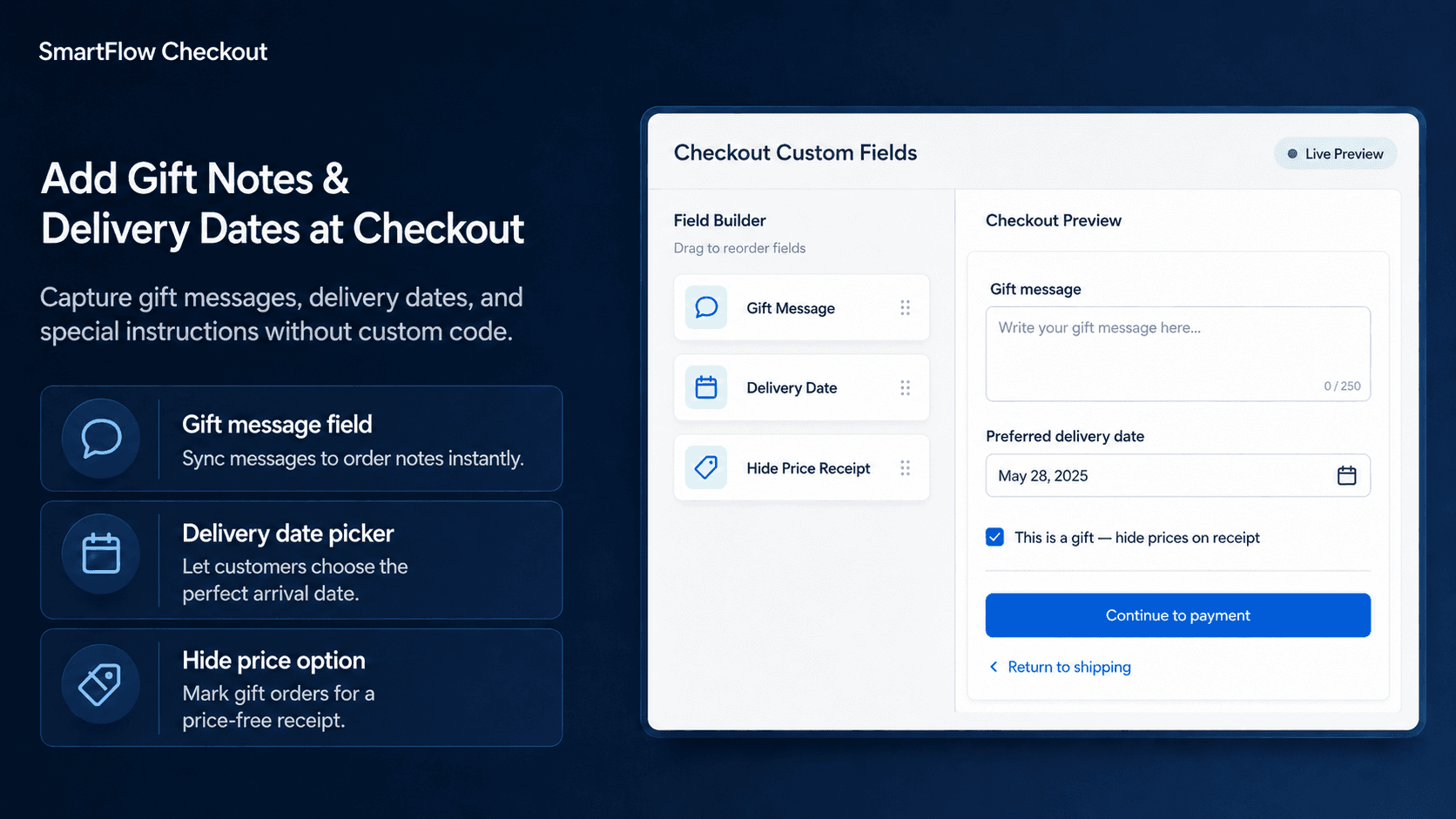
Example Scenario: A boutique florist needs to collect a Gift Message and a preferred Delivery Date.
Here is exactly how the system processes this customization:
- Component Placement: The merchant drags a Text Area component (labeled "Gift Message") and a Date Picker component (labeled "Delivery Date") into the Shipping step of the checkout layout.
- Data Mapping: The merchant configures the components to map to specific Shopify Order Attributes (sometimes called Cart Attributes or Note Attributes).
- Data Collection (Real-Time): When the customer fills out the fields during checkout, SmartFlow captures the input cleanly. Because the Date Picker is a calendar UI, the customer cannot accidentally type an invalid date format like "Next Tuesday." They must select a structured
YYYY-MM-DDvalue. - Data Syncing: Upon successful payment, the captured information is permanently appended to the Shopify Order Details page. It is immediately visible to your warehouse staff, your 3PL, and your shipping software (like ShipStation or ShipHero), ensuring the gift message is printed exactly as intended.
Strategic Uses for Custom Fields
Custom fields can solve a wide variety of e-commerce challenges beyond basic gifting.
- B2B / Wholesale Compliance: Add a required text field for "Company VAT Number" or "Purchase Order ID." This ensures your accounting team has the necessary documentation without having to chase down the buyer.
- Special Delivery Instructions: Add a dropdown menu for "Gate Code / Building Instructions." This noticeably reduces the rate of failed deliveries for apartment complexes.
- Marketing Attribution (Zero-Party Data): Add a simple "How did you hear about us?" dropdown right above the 'Pay Now' button. Because it's integrated into the checkout flow, the response rate will be significantly higher than a post-purchase survey.
- Age Verification Prompts: For stores selling regulated items, add a checkbox confirming the buyer is over 21, mapped directly to their order compliance file.
Technical Limitations & Human Oversight
It is critical to understand the difference between Data Collection and Operational Enforcement.
Custom checkout fields are tools for data collection; they do not inherently enforce operational constraints. For instance, adding a "Delivery Date" calendar picker does not magically force FedEx or UPS to deliver the package on that exact date. Furthermore, it does not automatically block customers from selecting a Sunday, or a date in the past, unless you specifically configure validation logic.
Merchants must clearly state their operational policies alongside these custom fields. Example: "Please select your preferred delivery date. Note that weekend deliveries are not available, and we require 48 hours notice for all custom cake orders."
Always test your custom fields by placing a live test order to ensure the data correctly flows from the checkout screen into your fulfillment software.
Frequently Asked Questions (FAQ)
Q: Can I make these custom fields mandatory? A: Yes, SmartFlow allows you to toggle a "Required" switch. If the customer tries to bypass the field, a red error message will block the checkout progression.
Q: Does the custom data print on packing slips? A: Absolutely. Because the data is mapped to Shopify Note Attributes, you can insert Liquid tags into your packing slip templates so warehouse workers can read the gift messages during fulfillment.
Q: Will adding custom fields slow down my checkout speed? A: No, SmartFlow relies on Shopify's native UI Extensions API. The fields are rendered server-side natively, so there is no layout shift or JavaScript lag.