Manage Shopify Store Changes Without Leaving Accessibility Behind
Stores Keep Changing
Imagine a Shopify merchant prepares a busy week.
A new collection launches Monday.
A bundle goes live Tuesday.
Several products need inventory updates Wednesday.
A promotion changes Thursday.
By Friday, the storefront looks different from the version customers saw at the beginning of the week.
That constant change is normal.
A Shopify store is not a static website that gets built once and left untouched.
Products change.
Inventory changes.
Merchandising changes.
Storefront content changes.
Customer journeys change.
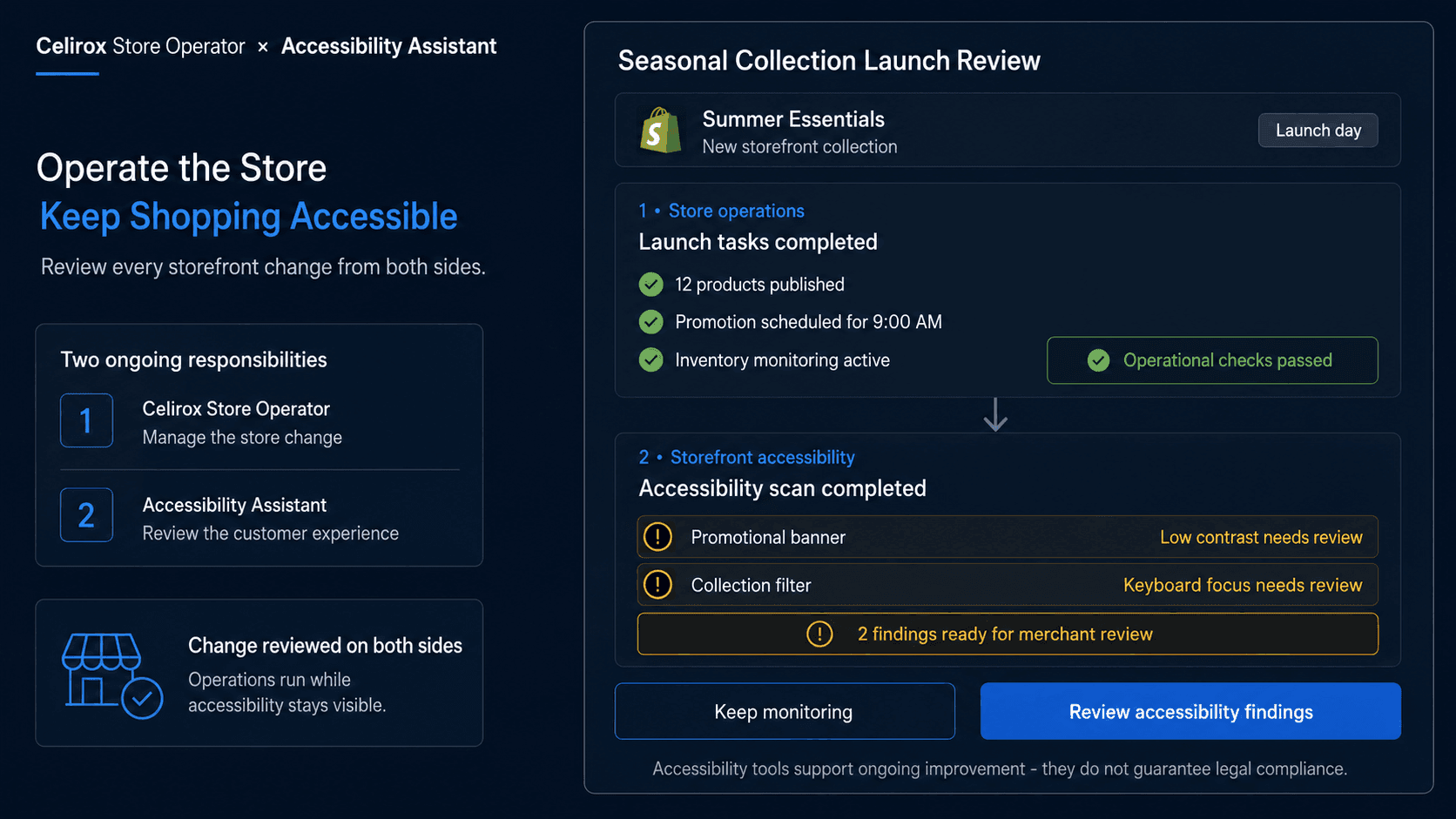
The merchant therefore has two ongoing responsibilities.
The first is keeping the business operating.
The second is making sure the storefront remains usable for the people trying to shop there.
A store can become easier to operate internally while still creating unnecessary barriers for customers if accessibility is treated as a one-time project.
That is where Celirox Store Operator and Accessibility Assistant support two different sides of the same Shopify business.
Accessibility Is Ongoing
Accessibility is easy to think about as something a merchant handles during the initial website build.
Real stores do not stay in their initial state.
A merchant may add a promotional banner, publish new products, change navigation, introduce new storefront components, or launch a seasonal campaign.
Those changes can affect how customers interact with the store.
Accessibility therefore needs ongoing attention rather than a single setup task.
Accessibility Assistant helps Shopify merchants improve the storefront experience with accessibility-focused capabilities such as:
- Keyboard navigation support
- Contrast adjustments
- Text controls
- Accessibility scans
- Other user-facing accessibility tools
These capabilities address the customer-facing side of the store.
The objective is not simply to add another widget.
It is to help merchants make the storefront easier for a wider range of shoppers to navigate and use.
Where Each App Fits
The two products solve different problems.
Celirox Store Operator focuses on operating the Shopify store.
A merchant can use plain-English instructions for one-time tasks, create ongoing rules, schedule recurring work, monitor store conditions through Store Pulse, and review or execute relevant Shopify actions.
For example:
"Every Monday, review products with low inventory and show me which ones need attention."
Or:
"When every relevant variant of a product sells out, add the tag sold-out. Remove it when inventory returns."
Accessibility Assistant has a different responsibility.
It focuses on the storefront experience shoppers interact with.
That makes the relationship complementary:
Store Operator → Manage what the store needs
Accessibility Assistant → Improve how customers can experience the storefront
Neither app needs to pretend to replace the other.
The value comes from handling two different responsibilities well.
Change Without Losing Context
Consider a fashion merchant launching a new seasonal collection.
There are several operational tasks behind that launch.
Products need to be published.
Inventory needs monitoring.
Collections may need updating.
Promotions may need to start and stop at specific times.
Slow-moving products may need merchandising attention afterward.
Store Operator can help with those operational tasks.
But the customer's experience of the resulting storefront still matters.
Can someone navigate important parts of the site using a keyboard?
Is text readable under different visual needs?
Are contrast and accessibility controls available where appropriate?
Has a new storefront change introduced something worth reviewing?
This creates a useful way to think about Shopify management:
Operational change and customer experience should move together.
The merchant should not have to choose between operating faster and paying attention to how the storefront is experienced.
Build an Accessible Routine
The strongest approach is not to wait until accessibility becomes a special project.
Make it part of the store's normal operating rhythm.
Imagine a merchant has a recurring weekly store review.
Store Operator handles operational checks such as:
Inventory issues → Product status → Merchandising opportunities → Store tasks
Accessibility Assistant supports another part of that routine:
Storefront accessibility → Scan → Review issues → Improve customer experience
The products do not need to be directly integrated for this approach to make sense.
They can be used independently as part of the merchant's broader operating process.
For example, after a major storefront campaign launches, the merchant can review both:
Did the business change happen correctly?
and:
Does the resulting storefront still provide an accessible experience?
That is more sustainable than treating accessibility as something to revisit only once a year.
Keep Customers in View
Store operations can easily become focused on backend efficiency.
How many products were updated?
How many workflows ran?
How much inventory was reviewed?
How many repetitive tasks disappeared?
Those are useful questions.
But Shopify ultimately has a customer on the other side.
Imagine Store Operator helps a merchant launch a new collection quickly.
Operationally, the task succeeds.
If the resulting experience creates unnecessary difficulty for some shoppers, there is still work to do.
Accessibility Assistant keeps another question visible:
Can customers actually use the storefront comfortably?
That includes different ways people may need to navigate, read, or interact with the site.
The two perspectives create a better operating mindset:
Make the store easier to manage without forgetting the people using it.
Avoid False Compliance Claims
Accessibility deserves careful language.
Installing an accessibility tool should not be presented as a guarantee that a store automatically complies with every accessibility law, standard, or requirement.
Accessibility can involve storefront design, theme code, content structure, third-party applications, media, navigation, forms, merchant practices, and jurisdiction-specific obligations.
Accessibility Assistant can provide tools that help merchants improve the experience and identify areas that deserve attention.
That is useful.
It should not become:
Install app → Accessibility solved forever
The same principle applies to Store Operator.
Operational tools can help merchants monitor and manage store activity, but the merchant still defines the business rules and reviews consequential decisions where appropriate.
Both products are most useful when they support an ongoing process rather than being treated as one-click substitutes for merchant responsibility.
Measure Both Sides
A partnership like this should not be evaluated using one generic metric.
Store operations and accessibility produce different kinds of value.
For Store Operator, merchants may look at:
- Repetitive tasks reduced
- Store issues surfaced
- Recurring tasks completed
- Time spent on catalog maintenance
- Actions requiring merchant attention
For storefront accessibility, merchants may review accessibility findings, recurring issues, usability feedback, and whether new storefront changes introduce areas requiring attention.
The important part is maintaining both perspectives.
A merchant can ask:
Is the store becoming easier to operate?
And:
Are we continuing to improve how people can use it?
Those are different questions.
A healthy Shopify operation should care about both.
Frequently Asked Questions
What is Celirox Store Operator?
Celirox Store Operator is a Shopify store-operations product that lets merchants use plain-English instructions for store tasks, create event-driven rules, schedule recurring work, monitor store conditions, and manage supported Shopify actions.
What is Accessibility Assistant?
Accessibility Assistant helps Shopify merchants improve storefront accessibility with tools including keyboard navigation, contrast adjustments, text controls, accessibility scans, and other customer-facing accessibility features.
Do the two apps perform the same job?
No. Store Operator focuses primarily on store operations and ongoing Shopify work, while Accessibility Assistant focuses on improving the accessibility of the customer-facing storefront.
Do the apps need to be directly integrated to be useful together?
No. They can complement each other independently by supporting different parts of the merchant's operating process.
Why should accessibility be reviewed continuously?
Shopify stores change over time. New themes, content, products, apps, campaigns, and storefront components can change the customer experience, so accessibility should not be treated only as an initial setup task.
Does installing an accessibility app guarantee legal compliance?
No. Accessibility and legal compliance can involve many technical, content, operational, and jurisdiction-specific factors. Accessibility tools can support improvement, but merchants should not treat installation alone as a universal compliance guarantee.
Can Store Operator monitor the storefront's business activity continuously?
Store Operator supports recurring tasks, event-driven rules, and Store Pulse monitoring that can help merchants keep track of relevant Shopify conditions and operational opportunities.
Operate and Include
A Shopify merchant has work happening on both sides of the storefront.
Behind the scenes:
Products → Inventory → Rules → Merchandising → Recurring tasks → Store operations
In front of the customer:
Navigation → Readability → Interaction → Product discovery → Shopping experience
Celirox Store Operator helps merchants manage the first side.
Accessibility Assistant helps merchants pay attention to the second.
Together, the message is simple:
Smarter Store Management. More Accessible Shopping Experiences.
The goal is not to combine two unrelated feature lists.
It is to recognize that running a Shopify store well includes both the work merchants perform behind the scenes and the experience customers receive when they arrive.