You Know the Promotion You Want. Why Does Setting It Up Take So Long?
The Promotion Is Already Decided
You know what you want to do.
"This weekend, give customers 20% off these products."
The decision is easy.
The promotion makes sense.
You already know which products should be included.
You know when the campaign should run.
But then comes the setup.
You open Shopify.
You find the discount settings.
You choose the discount type.
You select the products.
You check the conditions.
You review the configuration.
Then you save it.
The promotion itself took thirty seconds to decide.
Setting it up took much longer.
This Happens Every Time
One promotion is manageable.
But stores rarely run just one promotion.
There is the weekend sale.
Then the new-customer offer.
Then a seasonal campaign.
Then a collection-specific promotion.
Then a limited-time offer for a particular product group.
The work starts repeating.
The merchant is not really making a new decision each time.
They are repeating the same setup process.
That is where the unnecessary work appears.
You Shouldn't Need To Remember Every Setting
Imagine telling your store:
"Create a 15% discount for our summer collection and make it available this weekend."
That is how a merchant naturally thinks about the promotion.
They think about the business outcome.
They do not think:
"Open this setting, select this option, choose these products, enter this value, configure this condition..."
But traditional store administration often makes merchants translate their business decision into a series of settings.
The more often you run promotions, the more repetitive that becomes.
Tell Store Operator What You Want
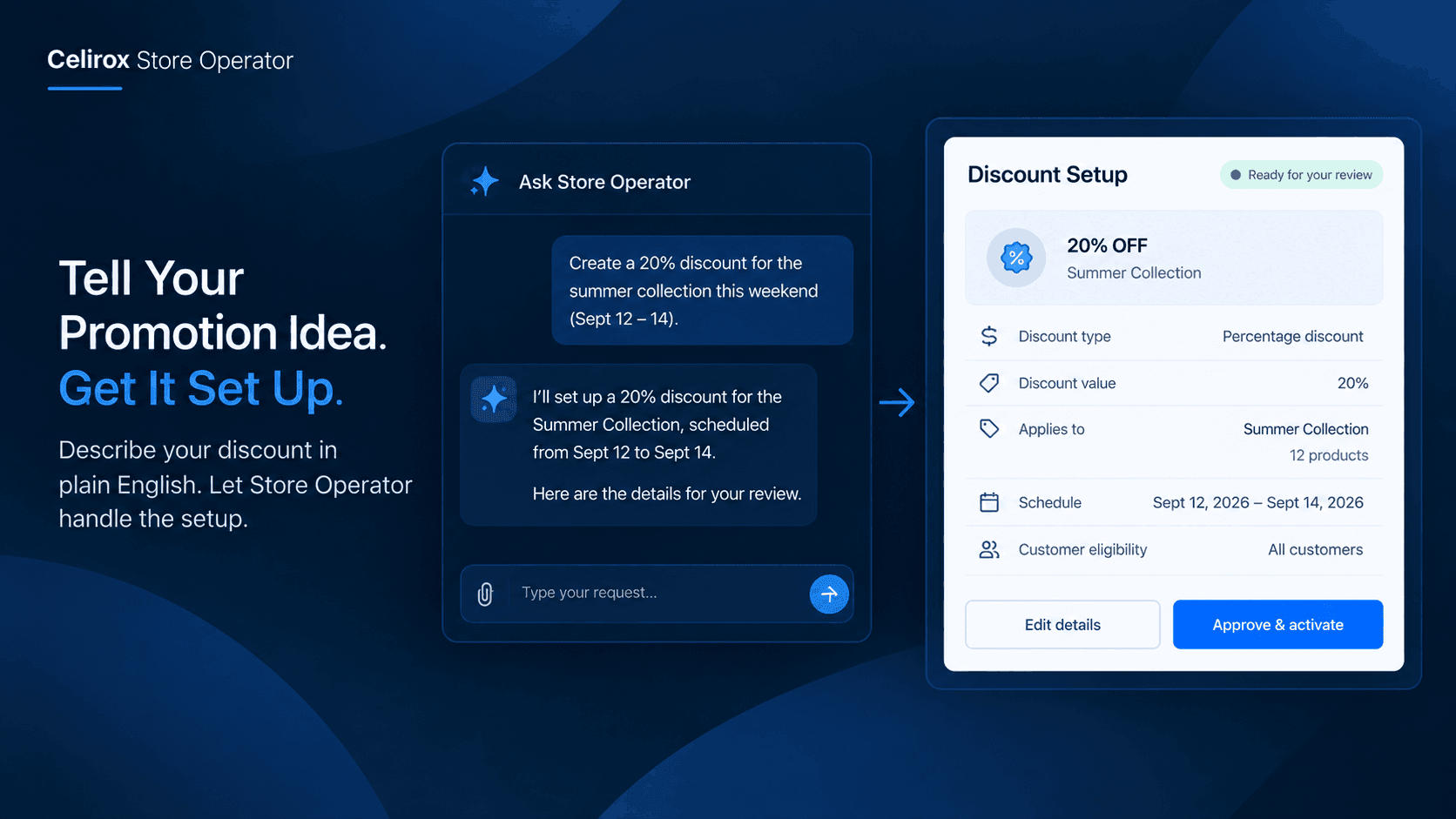
Celirox Store Operator includes a chat-based interface where merchants can describe store changes and requests in plain English. :contentReference[oaicite:0]{index=0}
Instead of starting with a settings page, the merchant can start with the outcome.
For example:
"Create a 20% discount for the products in our summer collection."
Or:
"Set up a weekend promotion for these products."
The important change is how the merchant communicates the request.
They describe the business requirement.
Store Operator helps translate that request into the corresponding store workflow.
From Idea To Configuration
Consider a merchant preparing for a weekend campaign.
They have already decided:
- Which products are included.
- How much the discount should be.
- When the promotion should run.
- Why they are running it.
The only remaining job is configuration.
Instead of manually walking through the setup, the merchant can explain the promotion through Store Operator's chat interface.
The workflow becomes:
Promotion idea → Chat request → Configuration → Review → Approval → Launch
The merchant spends more time deciding what the promotion should accomplish and less time navigating settings.
Keep The Merchant In Control
Automation does not mean blindly changing the store.
A discount affects real customers and real revenue.
The merchant should know what is being created before it goes live.
Store Operator is designed around an approval-based workflow for store changes, so merchants can review the proposed setup before approving it.
That creates a useful balance.
The repetitive configuration can be handled through the assistant.
The merchant still makes the final business decision.
A Small Promotion Can Still Take Time
Imagine a store owner wants to run this promotion:
"Buy from the new arrivals collection this weekend and get 15% off."
The promotion is simple.
But the merchant still has to make sure the right products are included and the discount is configured correctly.
Now imagine doing that several times every month.
The individual setup may not feel like a major task.
But repeated administrative work adds up.
Those are the minutes that disappear between more important parts of running the store.
The Merchant Should Think About The Offer
There is a difference between managing a promotion and configuring a promotion.
Managing means deciding:
Who is this for?
What products should be included?
What are we trying to achieve?
When should it run?
Configuration means translating those decisions into the store's settings.
Both are necessary.
But only one requires the merchant's actual business judgment.
Store Operator is useful when it can reduce the repetitive configuration layer without taking away that judgment.
Promotions Change Quickly
Store owners often change their minds about promotions.
A campaign may need to start earlier.
A product may need to be removed.
A new collection may be added.
A weekend campaign may become a weekday campaign.
When every change requires manually navigating through settings again, simple adjustments become another administrative task.
A conversational workflow makes it more natural to say what needs to change.
The merchant can focus on the new instruction rather than remembering where every setting lives.
Don't Build A Process Around Clicks
A merchant does not really care how many clicks it takes to create a discount.
They care that the promotion is correct.
They care that the right products are included.
They care that the campaign starts when intended.
They care that customers receive the offer they were promised.
That is why describing the desired outcome can be a better starting point than navigating through a configuration interface.
The store should understand the business request, not force the merchant to think like the settings page.
Make Repetitive Work Easier
The value of this workflow is not that merchants suddenly stop thinking about promotions.
They should think about them more.
They should spend their time deciding which offers make sense for customers and the business.
The repetitive part is everything around that decision.
Creating the configuration.
Checking the setup.
Repeating the same process for another campaign.
Making small changes.
Reviewing the final setup.
When those tasks become easier, the merchant gets more time back without losing control.
A Better Way To Run A Campaign
Think about the difference.
The old routine
Decide on promotion.
Open Shopify settings.
Navigate through the configuration.
Select products.
Enter discount details.
Review everything.
Save.
Repeat next week.
The simpler workflow
Decide on promotion.
Tell Store Operator what you want.
Review the proposed configuration.
Approve it.
Move on.
The promotion itself has not changed.
The amount of administrative work has.
It Works Best For Clear Requests
Conversational automation works best when the merchant knows what they want.
"Create a 20% discount for our summer collection."
That is a clear business instruction.
"Do something good for sales."
That is not.
The more clearly the merchant can describe the intended outcome, the easier it is to translate the request into a useful store action.
The assistant handles the configuration work.
The merchant provides the business context.
Give Your Time Back
Store owners already make hundreds of decisions every week.
Which products should be promoted?
What should be discounted?
When should the campaign start?
Which customers should receive the offer?
They should not have to spend the same amount of mental energy remembering how to configure each decision inside Shopify.
That is the real opportunity.
Not replacing the merchant.
Not letting AI decide the promotion.
Simply making the path from:
"Here's what I want to do."
to
"It's ready for me to review."
much shorter.
Frequently Asked Questions
Can I create a discount by describing it to Store Operator?
Store Operator provides a chat-based interface where merchants can describe store requests and changes in plain English, including discount-related workflows. :contentReference[oaicite:1]{index=1}
Do I still approve the change?
Yes. Store Operator's workflow is designed to let merchants review and approve important store changes rather than blindly applying them.
Is this only useful for large promotions?
No. The benefit can be especially noticeable for smaller, recurring promotions because repetitive setup work adds up over time.
Do I need to know Shopify's settings to use the chat interface?
The purpose of the chat-based interface is to let merchants describe what they want in normal language rather than having to start by navigating through configuration screens.
Can I use Store Operator for things besides discounts?
Yes. Store Operator's chat interface is designed for broader store operations, including requests such as discounts, preorder workflows, VIP experiences, and other store changes. :contentReference[oaicite:2]{index=2}
Stop Setting Up The Same Promotion
The hard part of running a promotion is deciding whether it is the right promotion.
Once that decision is made, the merchant should not have to repeatedly translate the same kind of business request into a long sequence of settings.
Celirox Store Operator gives merchants a conversational way to describe what they want, configure the workflow, and review the result before it goes live.
So next time you think:
"I know exactly what promotion I want. I just don't want to set it up again."
Tell Store Operator what you want.